


As AI continues to evolve rapidly, leveraging intelligent tools like Microsoft 365 Copilot brings new opportunities not only for developers but also for software testers looking to work faster, smarter, and with fewer repetitive tasks.
From drafting test plans and generating test cases to performing impact analysis and summarizing test results—Copilot and AI agents can become our virtual testing teammates.
☁️What is Microsoft 365 Copilot?
Copilot is an AI assistant built into Microsoft 365 apps like Word, Excel, Outlook, and Teams.
It uses large language models (LLMs) to help users:
- Automate document creation and editing
- Summarize content and extract insights
- Generate context-aware outputs for specific tasks
For QA professionals, Copilot is shaping up to be a powerful AI assistant for testing.
✅How Copilot Supports Testing Activities
Copilot can assist testers throughout the entire testing lifecycle:
- 1. Writing & Reviewing Documentation
- Draft test plans, strategies, and bug reports
- Improve communication via clearer follow-up emails and meeting notes
- Refine existing documents to ensure clarity and consistency
- 2. Test Case Design & Optimization
- Generate test cases from user stories or requirements
- Suggest edge cases and boundary conditions
- Refactor outdated or redundant test cases
- 3. Test Data Generation
- Create mock data for various scenarios
- Generate realistic but anonymized test data for safety
- 4. Test Execution & Reporting
- Recommend step-by-step execution plans
- Assist with bug reporting and root cause suggestions
- Summarize test execution results for stakeholders
- 5. Exploratory Testing & Communication
- Provide checklists and area suggestions for exploratory testing
- Draft easy-to-understand technical updates
- Help visualize test results for reports or presentations
🔎How can Copilot help in real context?
In Agile projects, requirements change frequently. As a tester, we’re often required to:
- Compare old vs. new requirements
- Analyze which areas are affected
- Update or write new test cases
- Ensure complete test coverage
Context:
An e-commerce application has an “Online Order” feature. Initially, users could select only one payment method. A new requirement now allows users to choose multiple payment methods (e.g., e-wallet + cash on delivery).
💁♂️How Copilot Can Help:
| Problem | Sample Prompt | Benefit |
|---|---|---|
| Changing Requirements | “Compare old vs. new requirements and list test case updates.” | Test cases stay aligned with the latest requirements |
| Impact Analysis | “Which modules are affected by this change?” | Focused testing, avoids redundancy |
| Test Case Creation | “Generate new test cases for the updated functionality.” | Faster and more accurate test coverage |
| Test Coverage Check | “Are there any missing scenarios in this test case set?” | Reduces missed defects |
🤖Building a Custom AI Agent to Assist with Test Case Generation
Beyond Copilot’s general capabilities, we can build our own AI Agent using tools like Copilot Studio. This agent can be customized to:
- Pull requirement data from multiple sources
- Perform impact analysis
- Generate structured test cases
- Organize outputs for review and reporting
Step 1 – Create a new agent
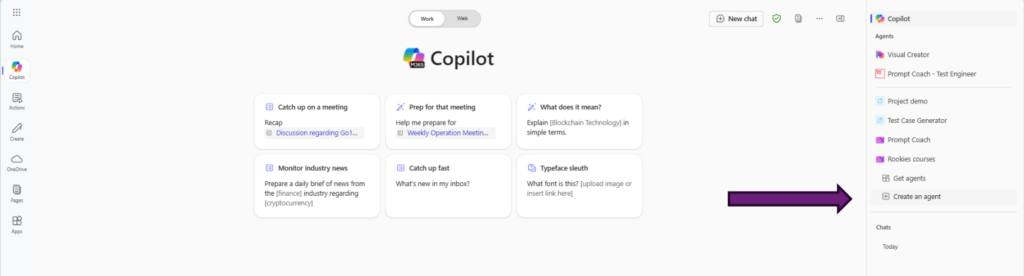
Step 2 – Define Agent Behavior
To make the agent be effective in analyzing requirements and creating test cases, define its behavior with clear and specific prompts. We should provide our agent with some prompts on where it can obtain requirements, sample test cases, and techniques it can use.
🧠 Prompt Examples: Requirement Analysis
🗨️ “You are a QA assistant. When given a functional requirement, break it down into key testable components and highlight any ambiguous or missing details.”
🗨️ “Analyze the provided requirement and identify: 1) functional flows, 2) edge cases, 3) validation points, and 4) potential test scenarios.”
🗨️ “Review the feature spec and generate a checklist of testing considerations including inputs, outputs, boundary conditions, and user roles.”
🧪 Prompt Examples: Test Case Generation
🗨️ “Based on the requirement provided, generate test cases using the following format: Test Case ID, Title, Preconditions, Steps, Test Data, Expected Result.”
🗨️ “Write at least 5 test cases for this requirement: [insert requirement]. Include positive, negative, and edge case scenarios.”
🗨️ “You are a test case writer. When a requirement is given, produce detailed test cases that cover happy path, exception flows, and edge conditions.”
Step 3 – Save our agent
Step 4 – Generate Test Cases
✅Lessons Learned
- AI is a Helper, Not a Replacement – AI boosts productivity but human validation is crucial.
- Good Prompts = Better Results – Clear, specific prompts lead to higher quality outputs.
- Protect Data Privacy – Always anonymize sensitive information when using AI tools.
- Human Review is Essential – AI-generated test cases must be checked for accuracy and coverage.
- Integrate AI into Workflow – Embedding AI into tools like Jira or TestRail ensures smooth adoption.
- Measure and Improve – Track productivity gains and refine AI usage continuously.
🎯Final Thoughts
AI won’t replace testers—but it can supercharge our productivity by removing repetitive tasks and allowing us to focus on what really matters: thoughtful, strategic testing.
🔗References
- Use the Copilot Studio Agent Builder to Build Agents | Microsoft Learn – https://learn.microsoft.com/en-us/microsoft-365-copilot/extensibility/copilot-studio-agent-builder-build
- Sử dụng AI trong Kiểm Thử Phần Mềm: Hướng Dẫn Chi Tiết và Lợi Ích – https://viblo.asia/p/su-dung-ai-trong-kiem-thu-phan-mem-huong-dan-chi-tiet-va-loi-ich-y3RL1AWPLao