


In today’s enterprise landscape, SOAP (Simple Object Access Protocol) remains a cornerstone for many mission-critical systems—especially in domains like finance, healthcare, and government. In my current project, which operates in the finance domain, we’re working with a legacy SOAP API that has been in production for quite a long time. While the API is stable and well-integrated into the system, ensuring its reliability and performance through thorough testing is essential, especially as new features and integrations are added.
One of the most effective tools for this purpose is Apache JMeter—a versatile, open-source platform that supports both functional and performance testing of SOAP services.
🧰 Why Use JMeter for SOAP API Testing?
JMeter is particularly well-suited for testing legacy SOAP services because it:
- Handles XML payloads efficiently
- Supports custom headers like
SOAPAction - Allows for load simulation and performance benchmarking
- Integrates easily into CI/CD pipelines for automated testing
In our finance project, where accuracy and uptime are non-negotiable, JMeter helps us catch issues early and maintain confidence in our API’s behavior under various conditions.
🛠️ Setting Up JMeter
- Download JMeter from jmeter.apache.org.
- Launch the GUI using
jmeter.bat(Windows) orjmeter.sh(Linux/Mac). - Create a new Test Plan to begin building your SOAP test.
📋 Creating a SOAP API Test Plan
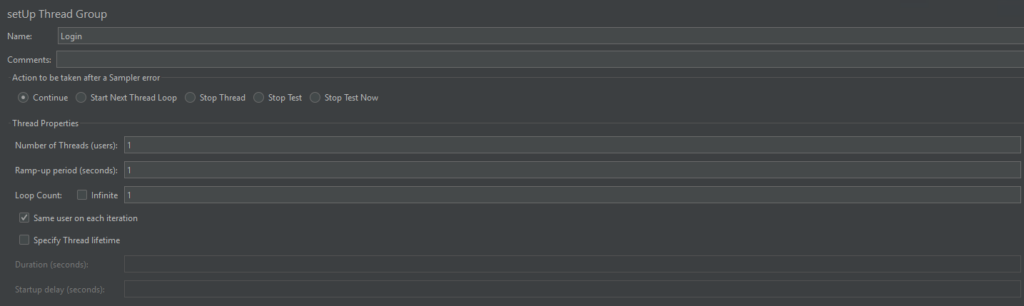
1. Add a Thread Group
This simulates virtual users. For our finance API, we typically test with realistic user loads based on transaction volumes.
- Right-click on Test Plan → Add → Threads → Thread Group.
- Configure:
- Number of Threads (users)
- Ramp-Up Period
- Loop Count
2. Add an HTTP Request Sampler
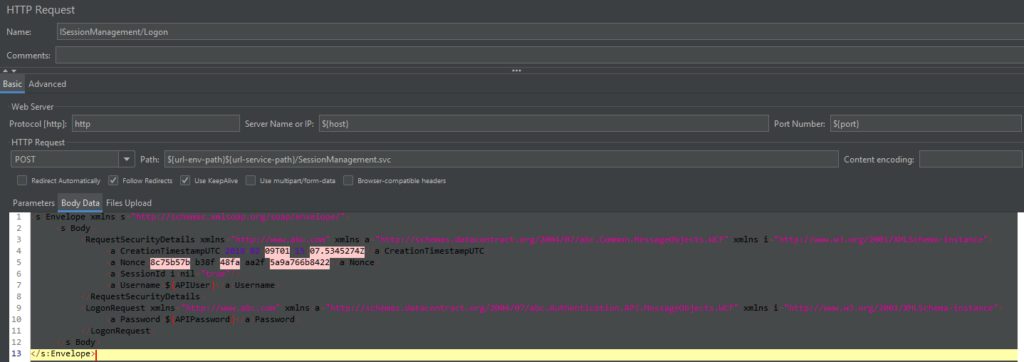
This is where you define the SOAP request.
- Right-click on Thread Group → Add → Sampler → HTTP Request.
- Configure:
- Server Name or IP: e.g.,
soap.financeapi.com - Method: POST
- Path: e.g.,
/services/TransactionService - Body Data: Paste your SOAP XML request here
- Server Name or IP: e.g.,
3. Add HTTP Header Manager
SOAP APIs require specific headers.
- Right-click on HTTP Request → Add → Config Element → HTTP Header Manager.
- Add headers:
Content-Type: text/xml;charset=UTF-8SOAPAction: "getTransactionDetails"

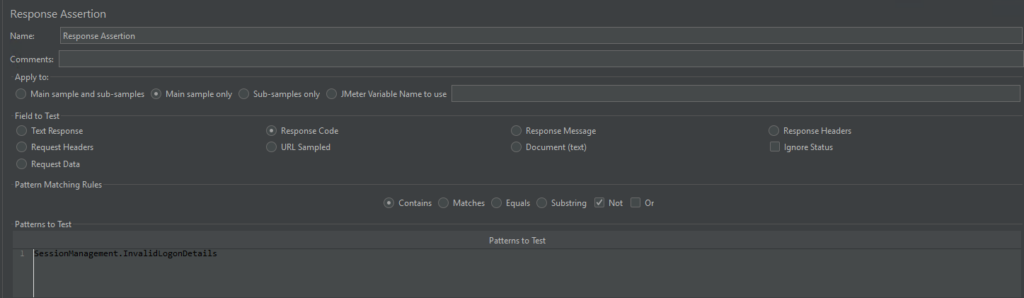
4. Add Assertions (Optional)
To validate the response:
- Right-click on the HTTP Request → Add → Assertions → Response Assertion.
- Check for expected text or XML elements in the response.
5. View results
To view results of the test.
- Right-click on Thread Group → Add → Listener → View Results Tree or Summary Report.

✅ Tips for Effective SOAP Testing
- Use parameterization with CSV Data Set Config for dynamic inputs.
- Use Regular Expression Extractor to parse response data.
- Combine with Timers and Assertions for realistic load testing.
📌 Conclusion
SOAP APIs may be legacy, but they’re still vital in industries like finance where reliability, security, and compliance are paramount. JMeter provides a robust platform for testing these services, helping teams like ours ensure that even long-standing APIs continue to perform flawlessly under pressure.