


🚀 Taming the Document Beast: Introducing Microsoft’s MarkItDown for LLMs
Tired of wrestling with PDFs, DOCX files, and spreadsheets just to feed clean, structured data to your Large Language Models (LLMs)? Microsoft has thrown us a digital lifeline! Meet MarkItDown, a lightweight, robust Python utility designed to shred complex document formats into the universally loved, clean-cut structure of Markdown.
It’s time to stop praying that your LLM will magically understand that cluttered presentation deck.
🛠️ Why MarkItDown is Your New Best Friend
MarkItDown isn’t just another file converter; it’s a document preprocessing powerhouse built with AI workflows in mind. Its core mission is to preserve the semantics and structure of your data—headings, tables, lists, links, and all—while dumping the messy, proprietary formatting.
Key Capabilities at a Glance:
- Universal Translator: Handles a massive array of file types: DOCX, PPTX, XLSX, PDF, HTML, JSON, CSV, ZIP, and even extracts metadata/transcripts from Images, Audio, and YouTube URLs.
- LLM-Ready Output: The resulting Markdown is clean, making it an ideal input format for prompt engineering and RAG (Retrieval-Augmented Generation) pipelines.
- Structure is King: It meticulously captures document hierarchy and crucial components like tables and lists, ensuring your data context isn’t lost in translation.
- AI-friendly: use Large Language Models for image/voice/video descriptions component in document file
💻 Get Started: Local Installation & Usage (The Python Way)
Prerequisites:
- The markitdown resource code
- Python 3.10 or higher
uvto manage virtual environment
Use standard Python, create and activate a virtual environment using the following commands
python -m venv .venv
source .venv/bin/activate
Using uv:
uv venv --python=3.12 .venv
source .venv/bin/activate
Installation:
To install MarkItDown (bash script)
git clone git@github.com:microsoft/markitdown.git
cd markitdown
pip install -e 'packages/markitdown[all]'
Running Locally via CLI:
| Action | Command | Result |
| Convert to Console | markitdown path/to/your/document.pdf | Prints Markdown to the terminal. |
| Convert to File | markitdown path/to/report.docx -o output.mdor markitdown path/to/report.docx > output.md | Saves the Markdown to output.md. |
Using the Python API:
from markitdown import MarkItDown

# 1. Initialize the converter
md = MarkItDown()

# 2. Convert a file
# The result object contains 'text_content' (the Markdown) and 'metadata'
result = md.convert("data/quarterly_results.xlsx")

# 3. Print the clean Markdown output
print(result.text_content)
🧩 Enter the Sidekick: MarkItDown-MCP
Now, here’s where things get real interesting.
Microsoft also built MarkItDown-MCP, a server implementation of the Model Context Protocol (MCP).
In simple terms:
It turns MarkItDown into a service your AI agents can call — just like an API.
🤖 What Can It Do?
With MarkItDown-MCP, your LLMs can:
- Send any file or URL to be converted to Markdown
- Get structured text back — perfect for RAG or summarization
- Work over STDIO, SSE, or HTTP
Basically, your AI agent can now say:
🧰 How to Run MarkItDown-MCP Locally:
1️⃣ Install: (bash script)
pip install markitdown-mcp2️⃣ Run as a Local MCP Server:
Default (STDIO mode): (bash script)
pip install markitdown-mcpOr with Streamable HTTP and SSE (Server-Sent Events): (bash)
markitdown-mcp --http --host localhost --port 30053️⃣ Setup MCP config in your IDE or tool
In your IDE, CLI or AI Agent, add MCP config below:
With HTTP type:
{
  "mcpServers": {
    "microsoft/markitdown-local": {
      "url": "http://localhost:3005/mcp",
      "type": "http"
    }
  }
}
With SSE:
{
  "mcpServers": {
    "microsoft/markitdown-local": {
      "url": "http://localhost:3005/sse",
      "type": "http"
    }
  }
}
4️⃣ Start using it now:
You can totally dive in and test out this MCP with your favorite AI Assistants, AI Chatbots, and AI Agents, right inside your IDE or current tools—just like any other awesome MCP utility!
Quick tip, though: If it decides to act up and fails to function, be a champ and double-check the MCP config to make sure the tool is completely and properly installed, okay? 😉
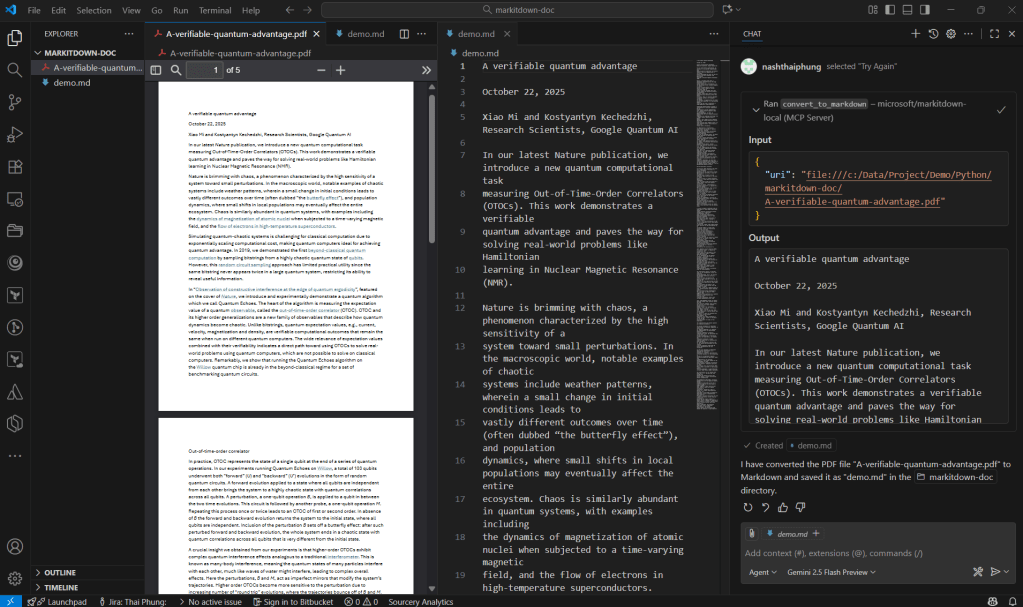
Try with the basic prompt as below:
The final result is we get a new markdown file as shown below:
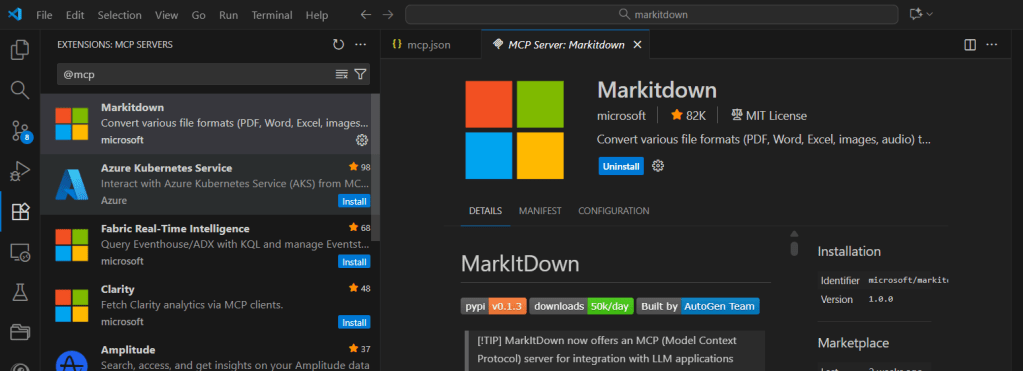
🎰 Automatic installation in IDE:
Check in the Extensions section in your IDE if it is available, if so use it. Now available on VS code, try using it.
🧪 You can incorporate and use MarkItDown in Agent Development Kits (ADKs) as an inline tool or MCP tool.
💬 Final Thoughts
MarkItDown is one of those deceptively simple tools that’ll quietly revolutionize your data workflows.
It’s open-source, lightweight, and built by a team that gets both AI pipelines and developer pain.
And with MarkItDown-MCP, the dream of connecting your AI agents directly to your document stash — and feeding them clean, structured, token-efficient Markdown — is finally real.
So go ahead.
Stop copying and pasting text out of PDFs.
Let MarkItDown do the dirty work — and let your AI agents focus on the smart stuff. 😎