


Introduction
What is Chai?
Chai is a flexible JavaScript assertion library designed for testing code with clear and expressive syntax. With its robust plugin support and compatibility with both synchronous and asynchronous operations, Chai is a preferrable for creating readable and maintainable test cases in Node.js and browser environments.
Why use Chai for JavaScript Testing?
Chai simplifies JavaScript testing by offering an intuitive, readable syntax with support for multiple assertion styles (TDD and BDD). Its flexibility, plugin ecosystem, and seamless handling of both synchronous and asynchronous code make it ideal for creating clear, maintainable tests across various environments.
Understanding Chai Assertion Styles
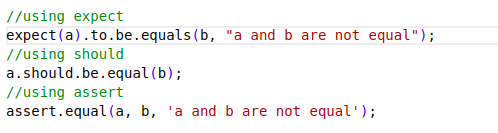
The Three Primary Assertion Styles
- Assert Style:
assertis something similar to Node JS default assert method and has a classic TDD style. - Expect Style: The expect style offers a clear and readable syntax, allowing you to chain keywords to write expressive and behaviour-driven (BDD) assertions.
- Should Style: The should and expect styles both follow the BDD approach, offering expressive and readable syntax. The key distinction is that should add a should property to all objects for chaining assertions.
Note: Unlike expect and should, the assert style does not support chaining expressions.
Getting Started with Chai
1. Prerequisites
Node.js and npm (Node Package Manager) are required to run Chai.
It can be downloaded and installed directly from its official website.
Verify the installation:

2. Install Chai
Install Chai as a development dependency:
npm install chai --save-dev3. Import Strategies
There are three primary ways to import Chai in your project:
I). CommonJS Import
const chai = require('chai');II). ES6 Module Import
import { expect, assert, should } from 'chai';III). Global Registration
import 'chai/register-expect';
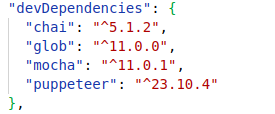
4. Configuration Steps
- Install testing framework alongside Chai. For Example: Mocha.
- Select preferred assertion style
- Configure test scripts in
package.json
Deep Dive into Assertion Techniques
Basic Assertion Technique
I). Equality Comparisons: Verify if two values are equal, not equal, deeply equal, or within a range.
II). Type checking: It refers to validating the type of an object or variable in your tests.

Advance Assertion Technique
I) Comparing Complex Data Structures: Chai provides deep comparison techniques for objects.
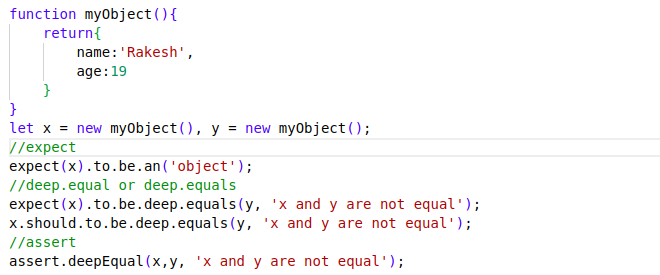
II). Object Property Assertions: Chai offers object property validations.
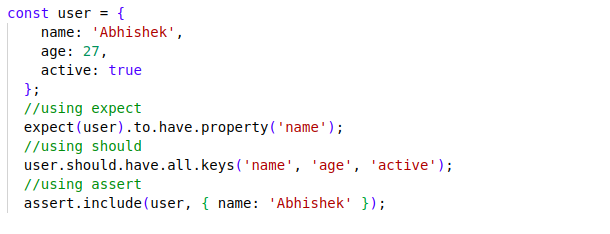
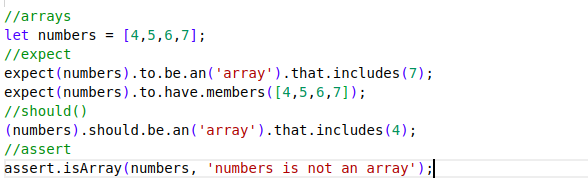
III) Array Assertions: Chai have a different advance validation technique.
Best Practices and Common pitfalls
1. Writing Maintainable tests
- Clear Test Naming Conventions
- Organize your tests logically
- Implement test data management
2. Performance Considerations
- Minimize Test Complexity
- Avoid Redundant Assertions
- Use Lightweight Assertions Chains
- Leverage Selective Test Executions
3. Key Error Handling Techniques
- Precise Error Type Checking
- Comprehensive Error Message Validations
- Validate Error Properties
- Descriptive Error Scenarios
- Handle async error scenarios
Conclusion
Chai makes testing simple and effective with its clear syntax and versatile assertions. Whether you’re validating types, checking values, or crafting custom tests, Chai helps ensure your code is reliable and easy to maintain, an essential tool for quality software development.