



Today’s digital environment drives websites and applications toward dependable, dynamic content capable of instant updates. Real-time content updates provide better user experiences yet create major challenges for users who have disabilities. The article investigates methods which secure dynamic content accessibility while keeping all users included during our digital world’s quick pace.
What is Dynamic Content
Interactive web elements function dynamically through computer algorithms triggered by user interactions, sourced data changes and time-dependent changes. The classification of dynamic content includes social media feeds together with live news updates and interactive maps. Real-time applications, including social chat services and live sports results, cause dynamic content to become a growing component of web pages and apps. Web pages featuring dynamic content alter rapidly between updates since they do not function like static content. Web accessibility becomes more challenging due to live content, which requires specialised methods for users with and without disabilities to navigate the site effectively.
Understanding the Challenge
Dynamic content includes elements like:
- Live social media feeds:
People who have cognitive disabilities experience difficulty maintaining alignment with social media update speed unless they have the option to regulate or suspend these notifications.
- Real-time notifications:
Users with cognitive disabilities along with sensory impairments, encounter issues understanding system notifications that arrive suddenly or lack integrated explanations.
- Auto-updating sports scores:
Users who are visually impaired encounter difficulty when they attempt to track a live sporting event. Users who cannot follow real-time updates will lose track of recent scores because the system does not provide proper notification signals.
- Stock market tickers:
Stock market updates at high speeds may trigger missed information while users lack visibility over speed management together with clear announcements therefore creating difficulties when tracking financial changes.
- Chat messages:
Online discussions become complicated when users cannot detect new messages automatically and do not have update control resulting in important message detection failures in fast-paced exchanges.
- Form validation messages:
User understanding of validation feedback suffers when messages lack direct field associations and instant visibility because they fail to guide users in correcting input mistakes thus causing failed submissions.
Screen readers and users with cognitive obstacles experience challenges from features that can cause them to overlook new content because changes happen without notice or clear indicators.
Key Implementation Strategies
1. ARIA Live Regions for Dynamic Content Accessibility
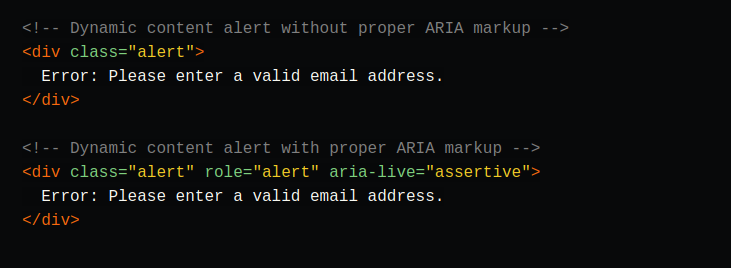
Making dynamic content accessible depends heavily on ARIA (Accessible Rich Internet Applications) live regions.
Screen readers automatically receive notifications about current content changes through real-time updates.
Choose appropriate ARIA live values:

- polite: For most updates that don’t require immediate attention will receive appropriate notification
- assertive: For time-sensitive or critical information
- off: Conditional notifications should go out for updates that remain silent after their introduction.
2. Web solutions provide dynamic accessibility through real-time notification systems
When content changes, provide clear context about:
- What changed
- Why it changed
- How users need to respond should be considered together with the changes made to the interface.
3. User Control in Dynamic Content Accessibility
Empower users with control over dynamic content by:
- Users should be able to activate features that allow them to pause and continue updates on automatically changing content. Allowing customisation of update frequency
- Allowing customization of update frequency
- The system displays obvious visual cues which inform users about transformations.
- Maintaining keyboard focus during updates
Best Practices for Common Scenarios
Real-Time Chat Applications
- When new messages appear, the system should use appropriate ARIA live regions for their announcement
- Focus position maintains unless users decide to navigate through new content selections
- Provide visual and audio cues for new messages
- Your system must present both audio and visual alerts when messages arrive
Form Validation
- ARIA-described by needs to connect error messages to their respective form fields for accessibility
- Announce validation results immediately
- Provide clear instructions for correction
- Error states benefit from the appropriate colour contrast application
Social Media Feeds
- Group-related updates logically
- Provide clear timestamps
- Users should have the option to set their own update frequency.
- Maintain scroll position during updates
Dynamic Content Accessibility Testing Requires Validation for Users of All Abilities
Ensure accessibility by:
- Testing with screen readers
- Conducting keyboard navigation tests
- Verifying colour contrast ratios
- Users with disabilities need to provide their feedback
- Using automated accessibility testing tools
Example
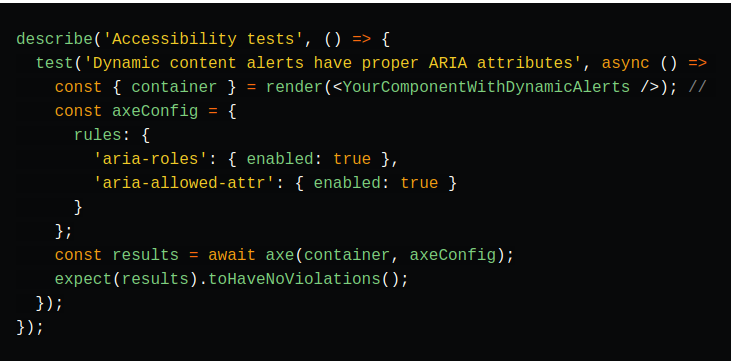
Consider writing an Axe test using aria rules to ensure the proper attributes exist.
Looking Ahead
Web application development should integrate accessibility elements throughout its entire lifecycle beginning at project initiation.
Future trends to watch include:
- AI-powered accessibility solutions
- Enhanced ARIA specifications
- Improved screen reader support for dynamic content
- New Web Accessibility Guidelines (WCAG) requirements
Conclusion
The creation of accessible dynamic content starts with purposeful design, followed by correct deployment combined with intensive testing processes. Professional standards, together with best practices, enable developers to create digital platforms that welcome every user type.
Reference:
- WAI-ARIA Authoring Practices 1.2: https://www.w3.org/TR/wai-aria-practices-1.2
- Web Content Accessibility Guidelines (WCAG) 2.1: https://www.w3.org/TR/WCAG21
- 61 Media: https://618media.com/en/blog/dynamic-content-in-web-accessibility/