


Last month, our production API started timing out under peak load. It felt like trying to make it across town in rush-hour traffic, utter chaos. That’s when we realised it was time to take a new direction. We needed something more tailored for load and concurrency. That’s how we discovered the power of Gatling API Performance Testing.
If you’ve ever abandoned a website because it was too slow to load, you already know how critical performance is. It doesn’t matter how smart your backend is, if it can’t keep up under pressure, people will simply leave. And the first place to start? Your API.
In this blog, I’ll walk you through our journey optimising performance using Gatling, the issues we faced, the fixes that worked, and what we learnt along the way. If you’re curious about making your API faster, more stable, and ready to handle real traffic, you’re in the right place.
Why We Chose Gatling API Performance Testing
Gatling is purpose-built for load testing. It’s written in Scala, but don’t let that worry you; you can write clean, readable simulations in minutes. And the HTML reports it generates are gold.
We switched to Gatling API Performance Testing for these reasons:
- It gives you real-time insights with graphs, metrics, and detailed breakdowns.
- It efficiently handles thousands of concurrent users.
- Gatling’s DSL lets you build test scenarios in a way that feels clear and natural to read, almost like describing your plan in plain English.
From Zero to Test: Our Setup
We kick-started our project with the Maven archetype for Gatling, then created a simulation file with feeder logic to simulate real user behaviour. We also built a mock API endpoint using Beeceptor, which helped us test in a safe, isolated environment.
Here’s what we configured:
- Assertions for response time and success rate.
- A CSV feeder with user credentials.
- Ramp-up of 50 users over 30 seconds.
- Status checks for response codes and timings.
Setup your project taking reference from our Readme file.
Early Failures (And What They Taught Us)
At first, everything failed. Literally. 100% of our login requests returned 401 Unauthorised errors. Turns out, the credentials in our feeder file weren’t valid, or the mock server didn’t recognise them.
So, we tweaked the CSV, adjusted endpoint paths, and even made our Beeceptor mock more forgiving by changing rules and setting response templates properly.
Once that was fixed, we got hit with 429 Too Many Requests errors. Classic rate-limiting. The Beeceptor server throttled our flood of simulated users. This was a valuable learning point, even mock servers have limits, so we adjusted the injection pace, added delays, and built smarter simulations.
Testing the Right Metrics
Performance testing isn’t about making things “feel fast”; it’s about measuring the right metrics. Here’s what we focused on:
Response Time
This shows how fast your API responds. In Gatling, we checked that 95% of responses were under 2 seconds. It’s a user-first number: anything slower, and users start noticing.
Throughput
We measured how many requests per second the API could handle without returning errors. This told us whether our backend could scale horizontally.
Error Rate
If more than 5% of users get errors under load, it’s a red flag. Our tests showed exactly where and when these failures cropped up.
Scalability
We gradually increased traffic to check how the API held up under pressure. And when it broke, we learnt why.
Solving the Bottlenecks
We saw some performance drops as we ramped up user load. Here’s what we did to solve them:
Problem 1: High Error Rate
Our API was fine under 10 users, but broke down at 30+. We found that our mock endpoint wasn’t caching responses. Once we enabled that, things improved immediately.
Problem 2: Slow Response Time
Long responses often trace back to non-optimised parameters or bad database queries. We mimicked queries using queryParams in Gatling and spotted where delays were creeping in.
Problem 3: Rate Limiting
429s taught us a lot. We adjusted pacing, split tests into batches, and learned to simulate realistic user load rather than brute force it.
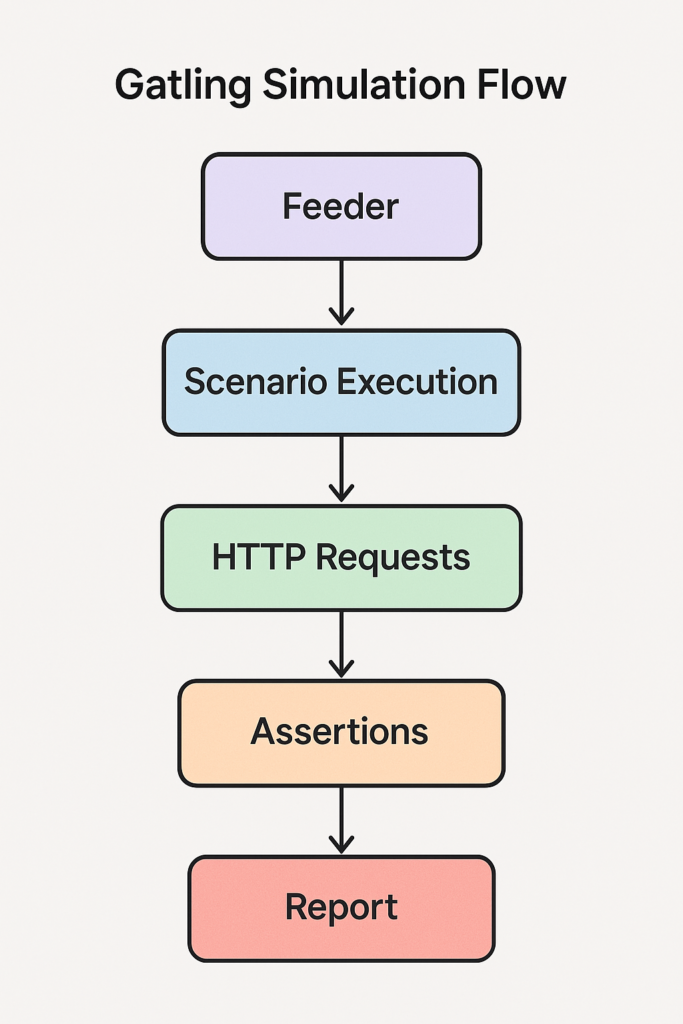
A flowchart showcasing the stages of API performance testing with Gatling helps you visualise what’s happening behind the scenes
Caching, Logs, and Real Insights
Once basic tests were passed, we moved deeper. We built simulations to:
- Test caching by comparing response times for repeated calls.
- Test variability using query parameters.
- Reviewing test logs helps spot odd behaviours or unexpected trends before they turn into real issues.
One brilliant tip? Logging API metrics during simulation, then comparing them with production logs. It revealed hidden slowdowns that standard metrics didn’t flag.
Real Results from Gatling API Performance Testing
After multiple test cycles, we managed to:
- Cut response time by 40%
- Handle twice as much traffic without crashing
- Reduce error rates to almost zero
The simulations didn’t just pass; they gave us the confidence to move forward with new releases without fearing breakdowns.
And the best part? Gatling gave us clear HTML reports for each test, making it super easy to see how performance changed by just opening a browser tab.
Key Tips from Our Experience
- Use real-world data: Feeding fake or repetitive data won’t help. Your tests should mimic real users.
- Always monitor rate limits: Even in staging or mock servers.
- Run tests regularly, and not just before release, by adding them to CI/CD.
- Use caching: Tests to squeeze out every millisecond
- Use query parameters to catch unexpected slowdowns.
Wrapping Up
Switching to Gatling API Performance Testing gave us the power to visualise, track, and improve our API performance in ways we hadn’t seen before. From fixing authentication errors to understanding rate-limiting and tuning response times, we’ve come a long way.
The best part? Our users noticed. Faster load times, fewer outages, and smoother rollouts mean happier users and more confidence from our team.
Performance testing doesn’t have to be painful. Once you have the right setup, it becomes a habit, a part of your development culture. With Gatling, that habit brings real, measurable gains.
Don’t forget to check out the complete working demo on GitHub:
Gatling API Performance Test – TechHub Project
References
https://testsigma.com/blog/api-performance-testing
https://dev.to/keploy/api-performance-testing-tools-a-comprehensive-guide-35hd