


We have been building microservices in Java using the Spring Boot framework, but microservices don’t work in isolation—they need to communicate. There are multiple ways to facilitate this interaction, and in this guide, we will focus on interservice communication using OpenFeign.
In many scenarios, microservices need to interact and exchange data. Take our example: we have two microservices—Player and Team.
- The Player entity has three fields: playerId, playerName and teamId.
- The Team entity has two fields: teamId and teamName.
Now, suppose we want the Team microservice to retrieve complete team details, including both the team name and all players in the team. Since the Team microservice does not store player data, this would be impossible without interservice communication.
Microservices can communicate in two primary ways:
- Synchronous communication – The calling service sends a request and remains blocked until a response is received.
- Asynchronous communication – The calling service does not wait for a response and can continue processing other tasks.
Synchronous communication uses the HTTP protocol for direct API calls between services, requiring the client to wait for a response before proceeding. The Spring Framework provides RestTemplate, a class that simplifies making HTTP requests and handling responses. It serves as a client for interacting with RESTful web services, reducing boilerplate code and making API communication more efficient.
OpenFeign (or simply Feign) is a declarative HTTP client similar to RestTemplate, simplifying interservice communication in microservices. Widely used in Spring Boot, it eliminates boilerplate HTTP request-handling code.
With Feign, we define an interface and annotate its methods to specify API calls. When invoked, Feign automatically generates an implementation, handles the HTTP request, and calls the API—removing the need for manual HTTP handling.
CODE
As discussed we have created two services: playerService and teamService and they are working fine independently. You can refer to the main branch of the public repository: MicroservicesDemo, to see their working before using Feign. and the branch OpenFeign ,to see how we have facilitated communication between them.
Since each player has a teamId, we can retrieve player information from playerService, which exposes an endpoint for fetching players by teamId. The playerService runs on port 8080, while teamService runs on port 8081. To access player data from teamService, we must send an HTTP request to playerService on port 8080.
With OpenFeign, we can achieve this by following these steps:
Step 1: Add Spring Cloud
OpenFeign is Part of Spring Cloud, so to add OpenFeign to our teamService, first we need to make sure that we have the cloud dependency included.
- Add the Spring Cloud BOM in the pom.xml of the teamService.
<dependencyManagement>
		<dependencies>
			<dependency>
				<groupId>org.springframework.cloud</groupId>
				<artifactId>spring-cloud-dependencies</artifactId>
				<version>${spring-cloud.version}</version>
				<type>pom</type>
				<scope>import</scope>
			</dependency>
		</dependencies>
</dependencyManagement>- Add the Spring Cloud version property in the properties section. You can find the latest version from the spring initializer site.
<spring-cloud.version>2024.0.0</spring-cloud.version>Step 2: Add OpenFeign Dependency
<dependency>
			<groupId>org.springframework.cloud</groupId>
			<artifactId>spring-cloud-starter-openfeign</artifactId>
</dependency>
Step 3: Enable Feign Clients
Annotate the team service main application with @EnableFeignClients.
Step 4: Add the Player entity
Add the Player entity class in the teamService entities package as well, as the teamService will need the Player object in further steps.
package com.nashtech.teamService.entities;

import jakarta.persistence.Entity;
import jakarta.persistence.GeneratedValue;
import jakarta.persistence.GenerationType;
import jakarta.persistence.Id;
import lombok.AllArgsConstructor;
import lombok.Getter;
import lombok.NoArgsConstructor;
import lombok.Setter;

@Entity
@Getter
@Setter
@NoArgsConstructor
@AllArgsConstructor
public class Player {

    @Id
    @GeneratedValue(strategy = GenerationType.IDENTITY)
    private Long playerId;
    private String playerName;
    private Long teamId;
}
Step 5: Add the players field
In a microservices architecture, data is often distributed across multiple services. In our case:
- teamService manages team-related data and stores it in the Team database.
- playerService manages player-related data and stores it in the Player database.
We want to associate players with a team, but players should not be stored in the teamService database. Instead, they should be fetched dynamically from playerService using OpenFeign. Hence, we will define the players field as transient. This means it is part of the object, but it does not persist in the database.
transient private List<Player> players;Step 6: Define the Feign Client Interface
Now, instead of storing players in teamService, we fetch them dynamically using Feign. We will create a FeignClient interface to call the GET /player/team/{teamId} endpoint in playerService.
package com.nashtech.teamService.service;
import com.nashtech.teamService.entities.Player;
import org.springframework.cloud.openfeign.FeignClient;
import org.springframework.web.bind.annotation.GetMapping;
import org.springframework.web.bind.annotation.PathVariable;
import java.util.List;

@FeignClient(url = "http://localhost:8080/", value = "playerClient")
public interface PlayerClient {

    @GetMapping("/player/team/{teamId}")
    List<Player> getPlayersOfTeam(@PathVariable Long teamId);
}
Step 7: Populate the players list in TeamService
Modify the teamServiceImpl class, by defining the playerClient and injecting the bean through the constructor. Also, we need to modify the two methods: getOne() and getAll() to retrieve players from playerService while fetching the team and set them dynamically.
package com.nashtech.teamService.service.implementation;

import com.nashtech.teamService.entities.Team;
import com.nashtech.teamService.repository.TeamRepository;
import com.nashtech.teamService.service.TeamService;
import org.springframework.stereotype.Service;
import com.nashtech.teamService.service.PlayerClient;

import java.util.List;
import java.util.stream.Collectors;

@Service
public class TeamServiceImpl implements TeamService {
    private TeamRepository teamRepository;
    private PlayerClient playerClient;

    public TeamServiceImpl(TeamRepository teamRepository, PlayerClient playerClient) {
        this.teamRepository = teamRepository;
        this.playerClient = playerClient;
    }

    @Override
    public Team create(Team team) {
        return teamRepository.save(team);
    }

    @Override
    public Team getOne(Long teamId) {
        Team team = teamRepository.findById(teamId).orElseThrow(()-> new RuntimeException("Team not found."));
        team.setPlayers(playerClient.getPlayersOfTeam(team.getTeamId()));
        return team;
    }

    @Override
    public List<Team> getAll() {
        List<Team> teams = teamRepository.findAll();
        List<Team> teamListWithPlayers = teams.stream().map(team -> {
            team.setPlayers(playerClient.getPlayersOfTeam(team.getTeamId()));
            return team;
        }).collect(Collectors.toList());
        return teamListWithPlayers;
    }
}
TEST
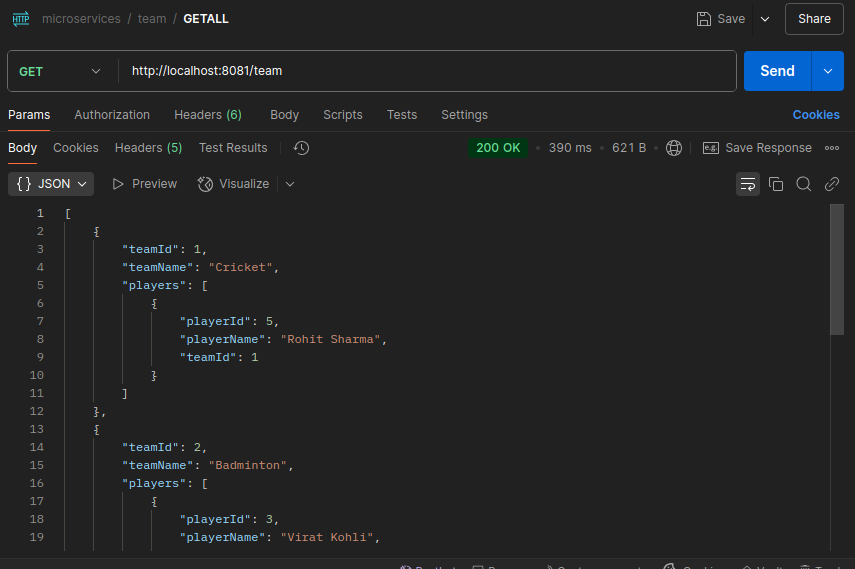
Now that we have set up Feign for communication between teamService and playerService, we will test the APIs using Postman. Before testing, ensure that:
teamServiceis running on port 8081playerServiceis running on port 8080- MySQL database is connected and running
- Create some players and corresponding teams.
CONCLUSION
In this blog, we explored how OpenFeign simplifies interservice communication in a microservices architecture. By integrating Feign in our teamService, we successfully fetched player data from playerService dynamically without writing boilerplate HTTP request-handling code.
To see the complete implementation, check out our GitHub repository: MicroservicesDemo
This hands-on example should give you a clear understanding of how OpenFeign works in a Spring Boot microservices setup. Happy coding!