



Introduction
In the world of CI/CD, the most important factor is how you can reduce the execution time of the pipeline. There are multiple ways to achieve this, and today I am going to cover one of the methods to reduce pipeline time while testing an Angular application. So, without any further delay, let’s dive into parallel testing in Angular using karma-parallel.
What is Parallel Testing?
Many of you may have doubts about what parallel testing really is and how we can implement it in our Angular project. Let me explain it to you in straightforward steps so that when you run
$ ng test
OR
$ npm run test
Test cases are executed sequentially, meaning one after another. So, if you have a large number of test cases, it will increase the testing time. However, in parallel testing, we divide the test cases into various parts and execute them simultaneously.
Benefits of parallel testing
There are various benefits of parallel testing. Let’s explore each of them in detail
1. Resource utilization
So, when you run tests in parallel, you utilize your CI/CD resources more effectively. For example, if you have 1GB of CPU available but are only utilizing 1/3 of it by running tests sequentially, running the tests in parallel allows you to make more efficient use of the CPU.
2. Reduce pipeline time
As I already explained, it’s crucial to run your pipeline faster. With the help of parallel testing, we can significantly reduce the pipeline time.
3. Faster deployment
Once we test our code faster, we can also deploy it to the server more quickly. Parallel testing not only reduces the pipeline execution time but also speeds up the deployment process.
Implementing parallel testing in Angluar App
To implement parallel testing in an Angular app, we need a module called karma-parallel. If you’re working with Angular, you might be familiar with Karma. The karma-parallel module provides a Karma JS plugin that supports sharding tests to run in parallel across multiple browsers.
Step 1: Install the karma-parallel module
Install the karma-parallel module in your angular project open your terminal and type the below command:
$ npm i karma-parallel --save-devStep 2: Create a karma.conf.js file
Create a karma.conf.js file if you don’t have one already, and paste the following content inside it.
module.exports = function(config) {
  config.set({
    // NOTE: 'parallel' must be the first framework in the list
    basePath: '',
    frameworks: ['parallel', 'jasmine', '@angular-devkit/build-angular'],
    plugins: [
      require('@angular-devkit/build-angular/plugins/karma'),
      require('karma-jasmine'),
      require('karma-jasmine-html-reporter'),
      require('karma-parallel'),
      require('karma-chrome-launcher')
    ],
    parallelOptions: {
      executors: 4, // Defaults to cpu-count - 1
      shardStrategy: 'round-robin',
      // shardStrategy: 'description-length'
      // shardStrategy: 'custom'
      // customShardStrategy: function(config) {
      //   config.executors // number, the executors set above
      //   config.shardIndex // number, the specific index for the shard currently running
      //   config.description // string, the name of the top-level describe string. Useful //     for determining how to shard the current specs
      //   return config.
      // }
    },
    // logLevel: config.LOG_DEBUG,
    browsers: ['ChromeHeadlessNoSandbox'],
    customLaunchers: {
      ChromeHeadlessNoSandbox: {
        base: 'ChromeHeadless',
        flags: ['--disable-gpu', '--no-sandbox']
      }
    },
    singleRun: true,
    restartOnFileChange: true
  });
};
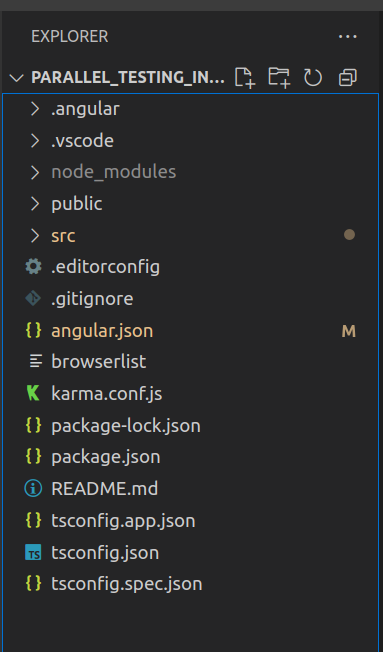
Make sure your karma.conf.js is in the same project directory
Step 3: Modify the angular.json file
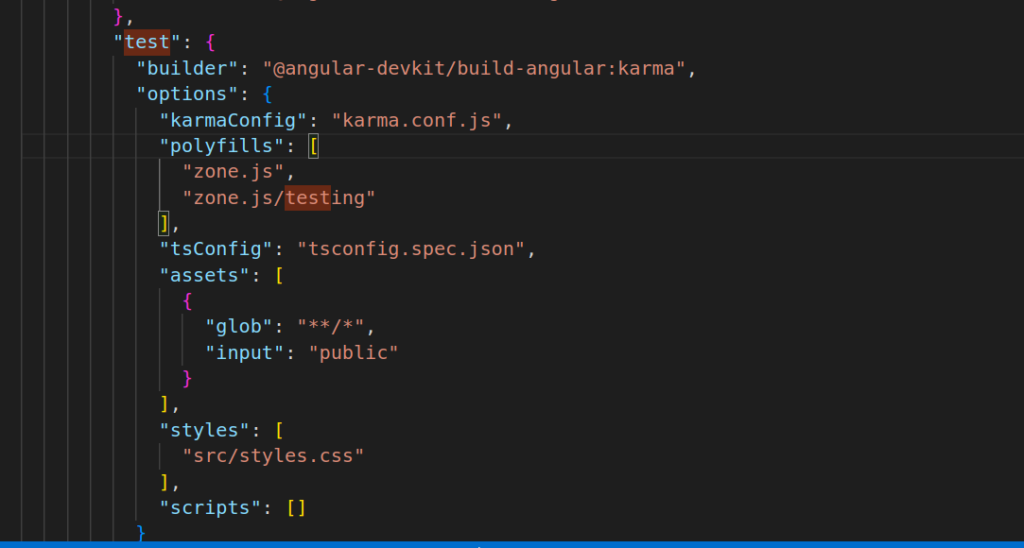
Now open the angular.json file and search for “test” Once you find the “test” text add the below line in the code.
"karmaConfig": "karma.conf.js"
Now open the terminal and type below command to run test parallaly
$ npm run test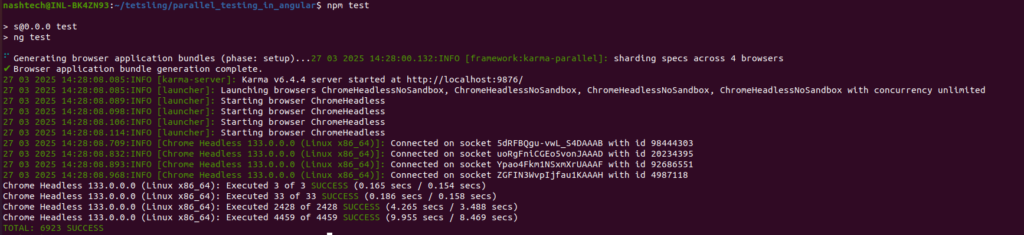
Test Exculation with karma-parallel
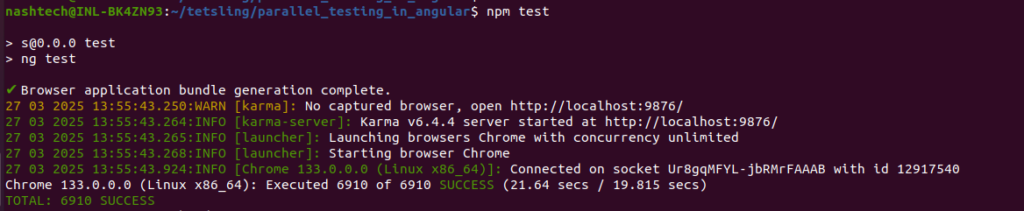
Test Executon without karma-parallel
Code Github Repo
I have a GitHub repo where I’ve placed all of my karma-parallel code. You can also use it; here is the link: https://github.com/NashTech-Labs/Parallel_Testing_in_Angular_using_karma.
Conclusion
Parallel testing not only saves you time but also helps save resources and costs. By running tests concurrently, you can make more efficient use of your infrastructure, leading to faster feedback cycles and reduced overhead. So, that’s it for this blog on parallel testing in Angular using karma-parallel. I hope you found it useful for optimizing your CI/CD pipeline!