


In today’s web development, Single-Page Applications (SPAs) are very popular. They’re built using frameworks like React, Vue.js, and Angular, and they provide a smooth user experience by loading content dynamically without refreshing the whole page.
But this modern design comes with its own set of security risks. Because SPAs rely on APIs, browser storage, and JavaScript-based routing, they can be harder to test using traditional tools.
That’s where Burp Suite helps. It’s a powerful tool that lets testers and ethical hackers see how a website works behind the scenes. With Burp Suite, you can inspect network requests, test APIs, and find hidden security issues in SPAs that might otherwise be missed.
💡 “If your app relies heavily on JavaScript and APIs, chances are — it’s a goldmine for attackers.”
This blog dives into the technical details of how to test and hack SPAs using Burp Suite — a go-to tool for web application security. You’ll learn how to:
- 🔍 Intercept and manipulate API requests hidden behind JavaScript logic.
- 💬 Explore and attack WebSocket connections for real-time communication flaws.
- 🧠 Tamper with client-side logic and override application behavior.
- 🧪 Test token-based authentication flows and insecure storage.
- 🧭 Detect weak or unprotected routing and unauthorized access.
Every section includes a real-world example that simulates how an attacker would actually exploit the system, along with the tools and techniques used to detect and defend against these threats.
Why SPAs Are Different
Unlike traditional multi-page applications (MPAs), where each user action triggers a new server-rendered page, Single-Page Applications (SPAs) rely heavily on client-side JavaScript to fetch and render content dynamically. This architectural shift drastically changes how we approach security testing.
Instead of full-page reloads, SPAs use XHR (XMLHttpRequest), Fetch APIs, or even WebSockets to communicate with the backend. These asynchronous interactions are often abstracted behind a JavaScript framework like React, Angular, or Vue, making it difficult to see what’s really happening under the hood without inspecting network traffic closely.
Key Characteristics of SPAs:
- 🔄 Heavily JavaScript-based: Most business logic, rendering, and state management happen on the client-side using frameworks like React, Angular, or Vue.
- ⚡ Minimal Page Reloads: Interactions load content dynamically through AJAX (
fetch/XHR) or GraphQL requests, making standard request-response testing less effective. - 📡 API-first Architecture: SPAs rely on RESTful or GraphQL APIs to communicate with the backend. The entire app is essentially an API client.
- 🔌 WebSockets Instead of REST: For real-time features (e.g., chats, dashboards), SPAs often use WebSockets, which are not visible in the standard HTTP request flow.
- 🔀 Client-Side Routing & Logic: Route handling and access control may happen in the browser itself, meaning hidden features can often be exposed through JavaScript tampering.
🎯 Why This Matters in Security Testing:
Traditional tools and techniques may miss vulnerabilities hidden behind asynchronous API calls or obfuscated JavaScript logic. As a tester, you need to go beyond form inputs and URLs—you must dive into intercepted API requests, decode WebSocket messages, and analyze the application’s JavaScript for hidden routes or logic flaws.
🔍 Takeaway: SPAs shift a lot of trust and logic to the client-side. This opens up new vectors for attacks like API tampering, broken access controls, and client-side logic abuse.
🛠️ Burp Suite Setup for SPAs
Before we attack, let’s configure Burp:
- Install Burp’s CA Certificate in your browser.
- Use Chrome Developer Tools alongside Burp for dynamic analysis.
- Enable Intercept > HTTP/2 and WebSockets in Burp settings.
- Set the Scope to the base URL of your SPA to filter API requests.
⚔️ 1. Attacking APIs Behind SPAs
In Single-Page Applications (SPAs), the frontend is decoupled from the backend, and most data exchange happens through RESTful APIs or GraphQL. This architecture exposes the underlying API surface to the browser, making it a prime target for attackers. Burp Suite allows us to intercept and manipulate these API calls, even if they’re hidden behind JavaScript logic.
Example: Unauthorized Data Access via API
Scenario:
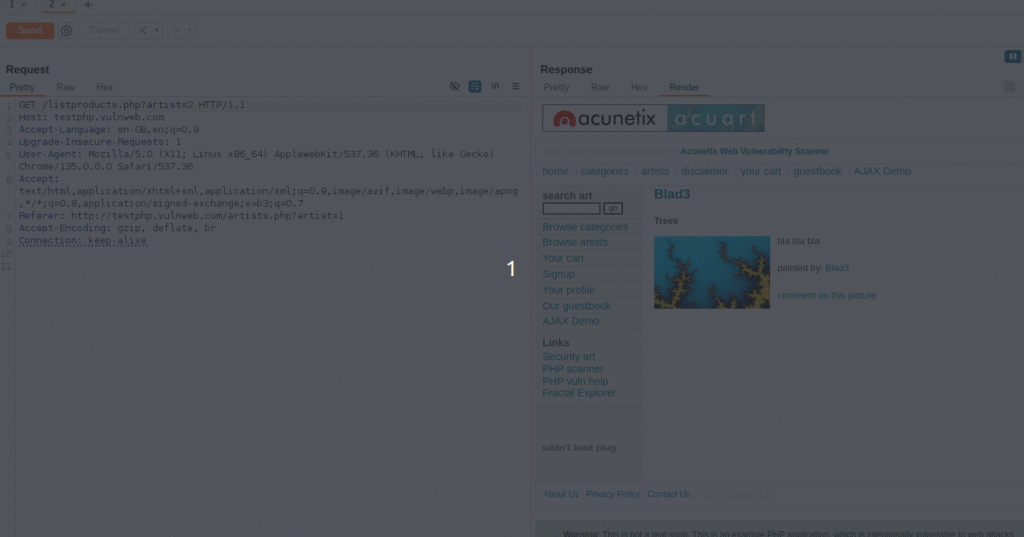
You’re testing a fintech SPA at http://testphp.vulnweb.com/. After logging in as a basic user, you notice the dashboard loads via background API calls, such as:
GET /listproducts.php?artist=3Steps Using Burp Suite:
- Use Burp Proxy to capture the network traffic from the SPA.
- Send the captured request to Burp Repeater.
- Modify the
artist IDin the URL to another value like1. - Observe the response. If it returns another user’s data, the API is missing proper access control.
Expected Result:
- The response should return
403 Forbiddenor401 Unauthorizedfor users accessing data they do not own. - The API should enforce authorization on the server side.
Why It’s Dangerous
Even if the UI doesn’t provide an option to switch users or access other data, attackers can directly tamper with API requests using tools like Burp Suite. SPAs often rely on client-side logic to determine visibility, which can be bypassed.
This is a textbook example of:
- Broken Object-Level Authorization (BOLA) — [OWASP API Security Top 10 – A1]
- Broken Access Control — [OWASP Top 10 – A01]
Mitigation Strategies
- Log and alert on abnormal behavior (e.g., one user accessing many IDs sequentially).
- Enforce authorization checks on the backend, not just on the frontend.
- Validate the authenticated user’s permissions against every object access request.
🔄 2. Manipulating Client-Side Logic
Single-Page Applications often rely heavily on JavaScript to control what users can see or do based on their role or permissions. However, if the frontend alone is used to hide or disable features, it can easily be bypassed by a malicious user. In security testing, this means you must never assume that “what’s hidden” is also “inaccessible.”
Example: Tampering with Hidden UI Controls
Scenario:
You’re testing a Single-Page App that hides the “Admin Settings” button if the user isn’t an admin. However, when inspecting the JavaScript code and the network traffic, you notice that the backend endpoint still exists:
PUT /api/admin/settingsSteps Using Burp Suite:
- Log in as a non-admin user in the browser while Burp Suite is running.
- Navigate through the SPA to ensure tokens/cookies are stored.
- In Burp Suite, go to Proxy → HTTP History and look for any API calls related to admin functions (e.g.,
PUT /api/admin/settings). - If you don’t see the call, you can manually construct it in Burp Repeater, using known API paths and payloads from JavaScript source or earlier admin sessions (if available).
- In Burp Repeater, send the request as a non-admin user.
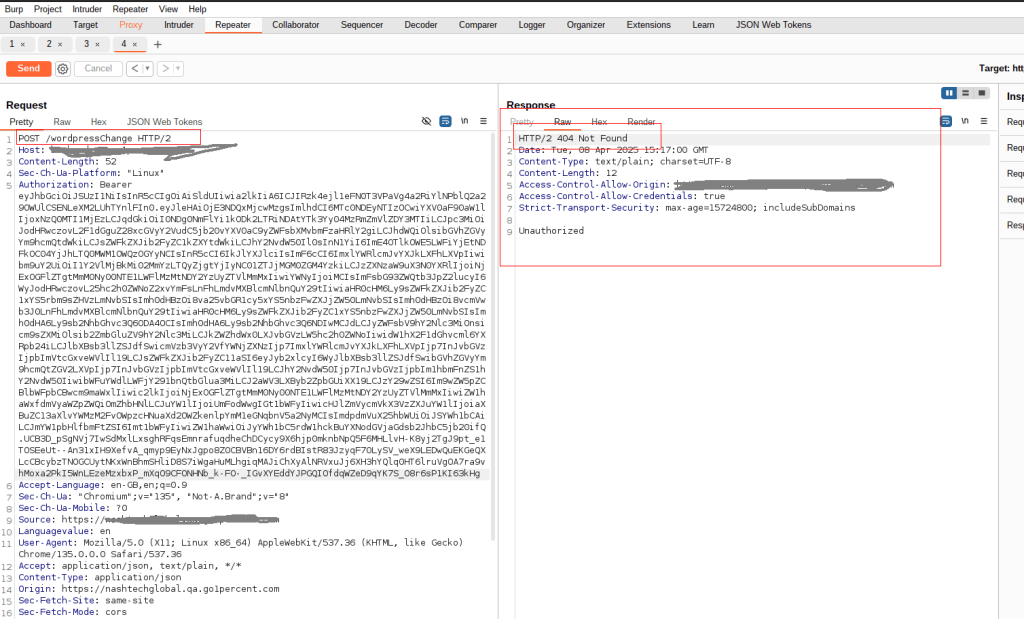
Expected Result: The server should deny the request with a 403 Forbidden similar response, based on the user’s role or permission, regardless of what the client tries to do.
Vulnerable Behavior: If the request succeeds and admin settings are updated, it confirms that the backend is relying solely on frontend logic for access control, which is a critical flaw.
🔌 3. Exploiting WebSockets in SPAs
Modern SPAs frequently use WebSockets for real-time features like live chat, stock updates, or collaborative editing. Unlike traditional HTTP requests, WebSocket messages don’t follow typical REST structures, making them a blind spot for many security scanners.
Burp Suite, however, offers powerful capabilities to intercept, analyze, and manipulate WebSocket traffic.
Example: Chat Application – WebSocket Message Tampering
Scenario:
A Single-Page Application at https://chatly.io provides real-time messaging using a WebSocket connection:wss://chatly.io/socket.
Upon authentication, the browser opens a persistent WebSocket connection for sending and receiving JSON messages:
{
  "action": "sendMessage",
  "message": "Hello World!",
  "to": "user_42"
}
Steps Using Burp Suite:
- Intercept the WebSocket:
- Navigate to
Proxy > WebSocketsin Burp Suite. - Visit the chat application in your browser while Burp Proxy is active.
- You’ll see the socket connection and live messages.
- Navigate to
- Manipulate Messages:
- Choose any message in the WebSocket history.
- Click “Send to Repeater” (WebSocket Repeater).
- Modify the payload to spoof actions or impersonate another user:
{ "action": "deleteMessage", "messageId": "12345", "userId": "admin_user" }
- Send and Observe:
- Send the modified message and observe if the server allows unauthorized actions.
Expected Result:
- The server should validate the session, role, and origin of each WebSocket message.
- Unauthorized actions (e.g., deleting another user’s messages) should result in:
{ "error": "403 Forbidden - Action Not Allowed" }
Risk:
- If authorization is missing, users can escalate privileges or disrupt other users’ sessions.
- This leads to Broken Access Control or Insecure Communication, mapped to:
- OWASP A01:2021 – Broken Access Control
- OWASP A02:2021 – Cryptographic Failures
🐛 4. Finding Hidden APIs via JavaScript Source Analysis
SPAs often load functionality dynamically using JavaScript, and in many cases, developers unintentionally expose internal or admin-only API endpoints directly in their frontend code. These endpoints may not be linked in the UI but can be discovered through JavaScript source analysis—a technique that pairs beautifully with Burp Suite during recon and exploitation phases.
Example: Discovering Hidden Admin Routes (In one engagement, a hidden admin export API was discovered via JavaScript analysis:)
fetch("/api/admin/export?type=csv")This endpoint was not exposed in the UI and was supposed to be for internal use only. However, it accepted requests from authenticated users without checking for admin privileges.
Steps Using Burp Suite:
- Send the endpoint to Repeater.
- Replay the request using a low-privileged user session.
- The server responded with admin-only data — a clear Broken Access Control issue (OWASP A01).
Expected Behavior
- All sensitive or admin-only APIs must enforce role-based access control server-side.
- JavaScript source should not expose internal logic or unused API routes.
- Minify and obfuscate JavaScript to make static analysis harder for attackers.
Risk:
- Sensitive Data Exposure (OWASP A02)
- Exposed Admin Interfaces
🔐 5. Token Tampering in SPAs (JWT / OAuth)
Single-Page Applications often use JWT (JSON Web Tokens) or OAuth tokens for user authentication. These tokens are typically stored in localStorage or sessionStorage and sent with every API request via headers like Authorization: Bearer <token>. Improper handling or insecure implementation of these tokens can lead to privilege escalation, impersonation, or broken authentication vulnerabilities.
Example: Modifying a JWT for Privilege Escalation
Scenario:
You’re testing an SPA that sends a JWT token with every API request. Upon decoding the token using Burp or jwt.io, you see the following:
{
  "alg": "HS256",
  "sub": "user123",
  "role": "user"
}
This indicates that the token includes user role data—potentially modifiable if not properly validated.
Steps Using Burp Suite:
- Capture the Token:
- Intercept any authenticated API request in Burp Proxy.
- Copy the JWT token from the
Authorizationheader.
- Analyze the Token:
- Use Burp’s Decoder or an online tool like jwt.io to decode the JWT.
- Check for fields like
role,permissions, oradmin.
- Attempt Token Tampering:
- Modify the token payload:
{ "sub": "user123", "role": "admin" } - Re-sign the token using a commonly misconfigured key like
secretor an empty key ifalg: noneis allowed (another misconfiguration).
- Modify the token payload:
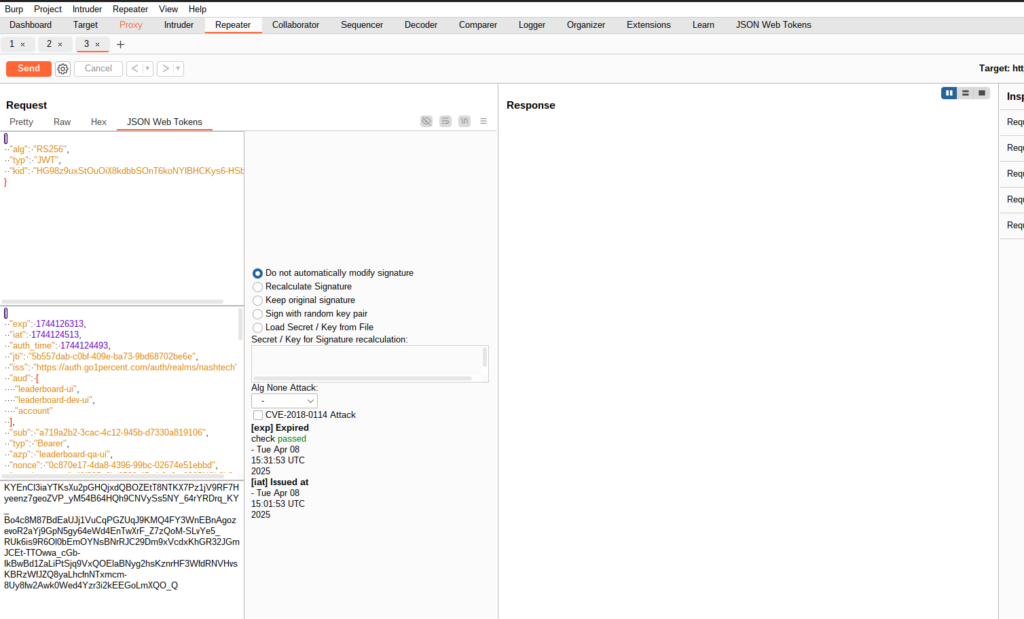
- Send Modified Request via Repeater:
- Open Burp Repeater.
- Replace the original token in the header with your tampered version.
- Send the request to see if the API accepts the modified token and grants elevated access.
Expected Secure Behavior:
- The server must validate the token signature using a strong, private key.
- The server should not rely on client-side data like
rolewithout backend verification. - The use of
alg: noneWeak HMAC secrets should be strictly prohibited.
Risks and OWASP Mapping:
- Broken Authentication (OWASP A07:2021)
- Cryptographic Failures (OWASP A02:2021)
- Broken Access Control (OWASP A01:2021)
Mitigation Best Practices:
- Always validate JWT signatures on the server.
- Use strong asymmetric signing algorithms (e.g., RS256).
- Store tokens securely in HttpOnly, Secure cookies (not localStorage).
- Never trust claims like
roleorisAdminwithout verifying them against a server-side user session or database.
✅ Best Practices for Testing SPAs with Burp Suite
When working with JavaScript-heavy Single-Page Applications (SPAs), security testing isn’t just about inspecting simple request/response cycles — it’s about understanding how APIs, tokens, and client logic interact in real time. Here are some best practices to follow when testing SPAs using Burp Suite:
🔌 Use Key Burp Extensions:
- Authorize – For detecting access control issues.
- JWT Editor – To decode and tamper with JWT tokens securely.
- InQL – Ideal for probing GraphQL APIs.
🔄 Test Both Layers:
- UI Flows – Interact like a real user to see how the frontend behaves.
- Direct API Calls – Use Repeater to test backend APIs independently.
⚠️ Don’t Trust the Frontend:
Client-side logic can be bypassed. Always validate access, roles, and input on the server side — never rely on hidden buttons or disabled fields for security.
🧩 Conclusion
As SPAs continue to dominate modern web development, their unique architecture demands a shift in how we approach security testing. Burp Suite remains a critical tool—not just for traditional applications, but also for dissecting the complex, asynchronous behaviors of SPAs. By combining strategic inspection of APIs, WebSockets, and client-side logic, testers can uncover vulnerabilities often overlooked in dynamic JavaScript environments. A thoughtful, hands-on approach backed by solid tooling is key to securing these increasingly sophisticated applications.
By leveraging advanced security testing techniques, we’re just getting started! Stay tuned for more valuable insights in upcoming posts. For deeper dives into related topics, be sure to visit our blog regularly, Test Automation NashTech Blog.