


In today’s world of Agile + AI, testers aren’t just finding bugs — we’re writing smarter test cases, understanding edge cases faster, and even drafting reports with the help of AI tools like Microsoft Copilot, ChatGPT, Gemini, or Claude. But to get value from AI, you need to give clear instructions — and that starts with writing effective prompts.
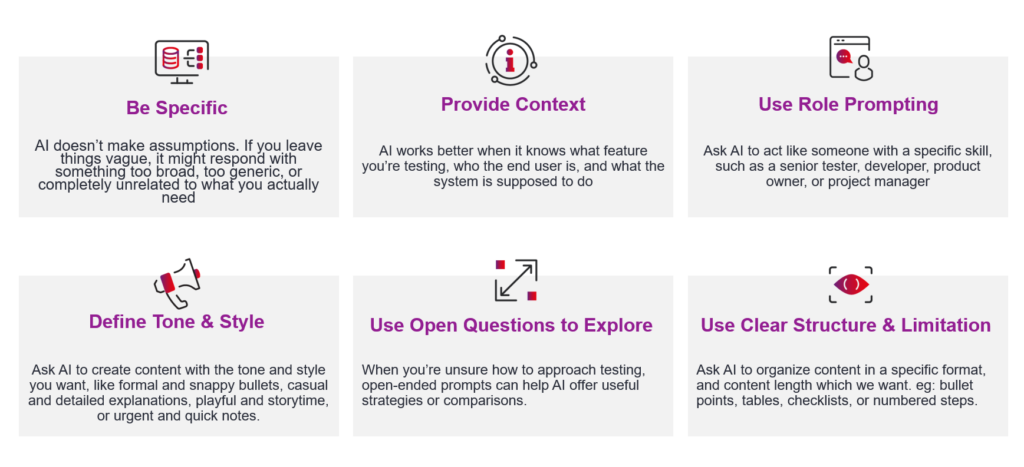
Let’s break down 6 practical rules for writing powerful prompts for testers:
1. Be Specific — AI Can’t Read Between the Lines
AI doesn’t make assumptions. If you leave things vague, it might respond with something too broad, too generic, or completely unrelated to what you actually need. We often work with detailed user stories and acceptance criteria. AI can help generate test cases, but only if we’re very clear about what we want and how we want it.
Use case: Use this to speed up test design for new features during sprint planning or refinement.
Bad prompt:
“Write test cases for login page.”
Better Prompt Example:
“Generate 5 test cases for this user story:
As a logged-in user, I want to reset my password via email, so I can recover access when I forget it.
Include: ID, Title, Preconditions, Steps, Expected Result. Cover both happy and edge cases.”
2. Use Role Prompting — Assign AI a Role
Ask AI to act like someone with a specific skill, such as a senior tester, developer, product owner, or project manager. This helps AI provide more focused and expert responses. You can ask AI to “review your test cases,” “suggest risks,” or “analyze a story”.
Use case: You are reviewing a test strategy for a new software application.
Prompt Example:
“You are a senior tester reviewing a test strategy.
Please assess this approach for web application testing. Highlight strengths, risks, and missing areas.”
3. Provide Context — What’s the Feature, Who’s the User?
AI works better when it knows what feature you’re testing, who the end user is, and what the system is supposed to do. We provide a good context helps AI suggest better test ideas or write more useful summaries. It copies how we ask in the testing, ‘Why?’ and ‘Who is this for?’
We can treat AI like a new tester joining your project — give it the same background info you’d give a teammate.
Prompt Example:
“Write end to end test scenarios for this acceptance criteria:
- Given I’m on the login page on our learning platform,
- When I enter a valid email and password,
- Then I should be redirected to the dashboard.”
The app is a web-based project management tool used by remote teams.”
4. Define Tone & Style — How Should the Output Sound?
When writing bug reports, internal blogs, or Slack messages, the tone and style matter. Ask AI to create content with the tone and style you want, like formal and snappy bullets, casual and detailed explanations, playful and storytime, or urgent and quick notes.
Prompt Example:
“Summarize this bug for Jira. Use a professional tone, include steps to reproduce, actual vs. expected result, and note browser & device info.”
5. Use Clear Structure & Limitation — Make Info Easy to Read
AI might give too much detail if you don’t tell it how long the response should be. Therefore, we should ask AI to organize content in a specific format which we want with the limitation. eg: bullet points, tables, checklists, or numbered steps.
Prompt Example:
“Summarize the risk of releasing the password reset feature without full regression on the login flow. Limit to 3 bullet points and 100 words.”
Prompt Example:
Generate all possible test cases using Boundary Value Analysis (BVA) for the following user story of an ecommerce system & highlight the unclear requirements to clarify. The test cases are presented in a table format with the following columns: ID, Summary , Steps , Expected Result.
User Story: As a customer, I want to create an account so that I can save my personal details and track my orders.
Acceptance Criteria:
The system should allow users to register using email, phone number, or social login.
The system should send a verification email or OTP for account activation.
The system should display appropriate error messages for invalid input (e.g., incorrect email format).
The system should allow users to reset their password via email or phone OTP.
6. Use Open Questions to Explore
When you’re unsure how to approach testing, open-ended prompts can help AI offer useful strategies or comparisons.
Prompt Example:
Suggest a JMeter load test strategy for testing the CMS system. The system should handle 500 concurrent users, and response times should stay under 2 seconds. What test scenarios and configurations should I use?
Final Thought
Sometimes, we just have one prompting rule is enough, like when we summarize a bug or asking AI to reword a short sentence or doing a simple tweak, such as setting a tone or length, can instantly improve the result. But for more complex tasks, like generating test cases, reviewing strategies, or analyzing requirements, it’s best for us to combine all the prompting rules. It is to give AI clear context, assigning it a role, specifying the tone, structure, and expected length, and refining the results through iteration leads to more accurate and useful outputs.
Prompt Example:
“You are a Test lead. Write 4 negative test cases for the email validation rule in the sign-up form of our web app. The form uses live validation with JavaScript.
Acceptance Criteria:
- Show an error when the email field is empty
- Show an error if the email format is invalid (e.g. missing ‘@’)
- Don’t allow duplicate emails already in use
- The ‘Sign Up’ button is disabled until valid input is entered
Present the output as a table: ID, Summary , Steps , Expected Result.”
A prompt’s answer might up to 70% accurate, depending on the AI model you’re using. Instead of rewriting the response from scratch, treat it like reviewing a bug report or refining a test case—give feedback to improve it step by step. Think of it as a conversation with the AI.
Prompt Example:
“Rewrite these test steps to be more concise and consistent. Start each step with a verb, avoid passive voice, and ensure clarity for new testers.”
However, if the response still doesn’t meet your expectations after some revisions, it’s best to move on—try a different model or return to traditional methods.
AI isn’t here to replace testers — but testers who know how to use AI effectively will have a strong advantage. Mastering the skill of prompting allows you to work smarter by saving time on test design, improving the clarity and consistency of your documentation, and accelerating your growth as a Tester professional. When used well, AI becomes more than a tool — it becomes a valuable assistant that helps you deliver better quality work, faster. Start by applying just one prompt technique in your next sprint, and you’ll quickly see the impact it can have on your workflow.