


JSON Web Tokens (JWT) are a common method of handling user login and authentication in modern web applications. They help keep your app fast and scalable. They do not need keeping session data on the server; instead, whatever the server needs to know about the user is saved within the token itself.
But, for JWTs to work securely, we need to handle a few things properly. This post covers how to handle JWT expiration, implement refresh tokens, and follow security best practices using Spring Boot.
What is JWT?
A JWT (JSON Web Token) is similar to a digital passport, allowing a user to prove their identity. It is a short, protected piece of data that a server provides to a user after they log in. The user then includes this token with every request to access protected parts of the app like their profile or dashboard. It’s a popular way to handle login and access control in modern web applications.
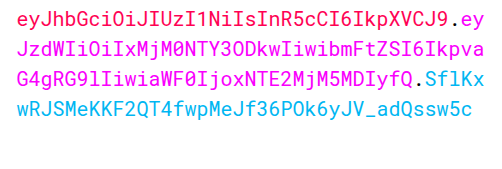
A JWT has three parts
Header.Payload.SignatureHeader – It specifies the token type and signing algorithm
Payload – It contains the claims (like userid, roles)
Signature – It ensures the integrity and authenticity of the token.
When we put all together the header, payload, and signature JWT looks like this: –
JWT Expiration
You should set tokens to expire after a specific duration to prevent misuse if someone ever compromises them. This approach adds a layer of security, if an attacker steals a token, they won’t use it for long. In JWTs, you set an expiration time, Once the token reaches that time, it becomes invalid, and the user must either log in again or use a refresh token to get a new one.
Configuring JWT Expiration in Spring Boot
In your Spring Boot app, define token expiration and secret key in your application properties:
jwt.secret=your_secret_key_here
jwt.expiration=36000000
Then, set expiration when generating the token:
public class JwtHelper {

    @Value("${jwt.expiration}")
    private long JWT_TOKEN_VALIDITY;

    @Value("${jwt.secret}")
    private String secret;

    public String generateToken(UserDetails userDetails) {
        Map claims = new HashMap();
        return doGenerateToken(claims, userDetails.getUsername());
    }

    private String doGenerateToken(Map claims, String subject) {
        return Jwts.builder()
                .setClaims(claims)
                .setSubject(subject)
                .setIssuedAt(new Date(System.currentTimeMillis()))
                .setExpiration(new Date(System.currentTimeMillis() + JWT_TOKEN_VALIDITY ))
                .signWith(SignatureAlgorithm.HS512, secret)
                .compact();
    }
}
Refresh Tokens
To avoid having users log in constantly, refresh tokens are utilised. When your access token expires, you use the refresh token to get a new json web token. It helps users stay logged in without having to repeatedly input their login and password.
Why are Refresh Tokens useful?
Configuring Refresh Tokens
In your Spring Boot app, define refresh token expiration in your application properties:
jwt.expiration.refresh=604800000You can include just this method to generate the refresh token:
public String generateRefreshToken(String username) {
    return Jwts.builder()
            .setSubject(username)
            .setIssuedAt(new Date())
            .setExpiration(new Date(System.currentTimeMillis() + refreshTokenExpiration))
            .signWith(SignatureAlgorithm.HS256, secretKey)
            .compact();
}
Add this variable at the top of your class to read the refresh token expiry:
@Value("${jwt.expiration.refresh}")
private long refreshTokenExpiration;
Spring Security Best Practices
Short Expiry for Access Tokens
To authenticate and authorise user activity, web applications and APIs employ access tokens. Attackers can, however, use these tokens to gain unauthorised access if they obtain them through a network leak, browser flaw, or other ways. Developers advise utilising short-lived access tokens to lower this danger. Usually, these tokens expire five to fifteen minutes after they are released.
Rotate Refresh Tokens
Refresh token rotation is a security technique that helps protect your application from token theft and misuse. When a user’s access token expires, they send their refresh token to get a new access token. Instead of giving them just a new access token, the server also sends a brand-new refresh token and invalidates the old one. So, every time a refresh token is used, it gets replaced with a new one.
Revoke Compromised Tokens
Sometimes, tokens can get into the wrong hands maybe through a stolen device or suspicious activity. To prevent token theft in these kinds of situations, you need a method to block or cancel the tokens.
In the event that a token is ever stolen, revoking compromised tokens helps prevent unwanted access, making it a crucial security measure. You can better govern user sessions and handle active logins with added safety by monitoring issued refresh tokens. This also gives users the ability to log out from all devices or force a fresh login if there’s any suspicious activity, adding an extra layer of protection to your application.
Always use HTTPS
It is critical to utilise HTTPS while working with tokens. While Using Https it prevents hackers from intercepting private data, like access or refresh tokens, by encrypting the data that is sent back and forth between the client and the server. Without HTTPS, tokens can easily steal by man-in-the-middle attacks or token theft. To ensure protected communication, always apply HTTPS in your application.
Protect your API Endpoints
It is critical in a Spring Boot application to restrict who has access to specific API endpoints. Spring Security includes annotations like as @PreAuthorize and @Secured that allow you to manage access depending on user roles or permissions. These annotations ensure that only authorised users may carry out specified tasks, such as accessing admin-only features or sensitive data. This provides a solid layer of security to your backend by enforcing proper role-based access control.
Conclusion
To summarise, integrating JWT-based authentication with appropriate expiration and refresh token procedures is critical for developing secure and scalable Spring Boot apps. While JWTs are a stateless and efficient approach to authenticate users, they must be properly managed to avoid vulnerabilities. Adopting JWT expiration, refresh tokens, Spring Security best practices guarantees that your authentication flow is robust, user-friendly, and resistant to typical security attacks.
References
For more Information about JWT, Refer these links:
https://medium.com/geekculture/implementing-json-web-token-jwt-authentication-using-spring-security-detailed-walkthrough-1ac480a8d970
https://blog.nashtechglobal.com/jwt/