


Hello Readers!! We are again back with an exciting topic today i.e. Getting started with WebAssembly. In this blog we are going to explore all about webAssembly. What is Web Assembly? How can we use it? How to install it? And many more. So, stay tuned with me till end.
Let’s get started!!
What is WebAssembly(WASM)?
Have you ever wondered, what goes behind the scenes when you browse the web? Well, it’s not just HTML, CSS and Javascript. WebAssembly is a new technology that’s changing the way we build websites and apps. It’s a new type of code that can run into our web browser. It is designed to be fast, secure and portable, which means code is written in WebAssembly can run on any device, regardless of its operating system or browser.
One of the biggest benefits of using WebAssembly is that it lets developers to use any programming languages to write code for the web. This means that programmers can use their any favourite languages like C++, C, Rust, Python and so on tio build web apps instead of being limited to use javascript. As webassembly is so fast, it can be used for more demanding applications like games, graphics and more.
It is not only just for developers but it’s also good for users because webassembly code can run faster than javascript code. It makes apps and websites load faster, which is really great for users who just want to get things done quickly.
It’s another benefit is that it is more secure than javascript because it run in a sandboxed environment. It makes harder for hackers to exploit security vulnerabilities. This means that webassembly apps can be more secure which is important when we are dealing with sensitive data like personal information. It’s changing the way we build the web.
Benefits of WebAssembly:
WebAssembly (WASM) offers several significant benefits, especially for web and performance-critical applications:
- High Performance – WebAssembly is a low-level, binary instruction format that runs at near-native speed. It enables performance comparable to languages like C, C++, and Rust in the browser.
2. Language Agnostic – As mentioned developers can write code in multiple languages (C, C++, Rust, Go, etc.) and compile it to WebAssembly. This opens the web to a wider range of developers and existing codebases.
3. Fast Load and Execution – The binary format is compact and faster to download, parse, and execute than JavaScript.
4. Safe and Secure – It runs in a sandboxed execution environment, making it safe to run untrusted code. It integrates well with browser security models.
5. Portability – It works consistently across different operating systems and browsers that support WebAssembly. It can also run outside browsers in environments like Node.js and serverless platforms.
6. Interoperability with JavaScript – It can be called from JavaScript and can call JavaScript code. Allows incremental adoption performance critical parts of an app can be rewritten in WebAssembly without rewriting the whole app.
7. Smaller Code Footprint – It is efficient binary format often results in smaller payloads compared to equivalent JavaScript code.
8. Use Cases Beyond the Web – It can be used for server-side computing, edge computing, IoT, and even blockchain based applications (e.g., smart contracts).
Installation of WebAssembly:
Let’s install it in linux. To install it on Linux, we typically want to set up a toolchain that allows you to compile code (like C/C++ or Rust) to WebAssembly (Wasm). The exact steps depend on the language we want to use.
Here are the most common setups:
Install Emscripten (for C/C++ to WebAssembly):
Emscripten is the main toolchain for compiling C/C++ to WebAssembly.
# Install required dependencies
$ sudo apt update
After updating, clone the Emscripten SDK repository in our system:
$ git clone https://github.com/emscripten-core/emsdk.git
$ cd emsdk
# Install and activate the latest SDK
./emsdk install latest
./emsdk activate latest

# Activate Emscripten in your shell
source ./emsdk_env.sh
It’s successfully installed on our linux system.
After this, you can use emcc (Emscripten compiler) to compile C/C++ to .wasm files.
How to use it:
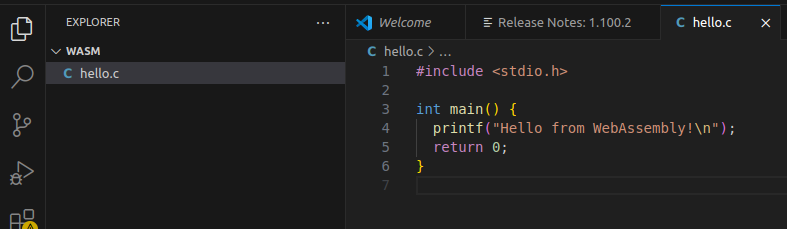
- Create a hello.c file for simple hello programming.
2. Compile to webassemebly. It may can say you to install emscripten, if it’s not.
$ emcc hello.c -o hello.html
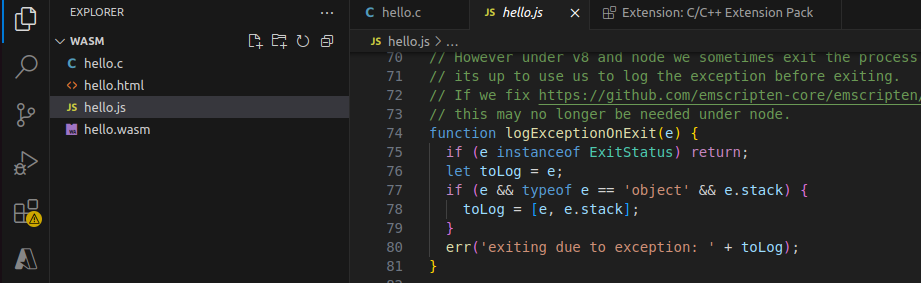
This command will generate:
hello.html– HTML page to run the Wasmhello.js– JS loaderhello.wasm– compiled WebAssembly binary
Now, Start a local server and open the HTML page:
$ python3 -m http.server
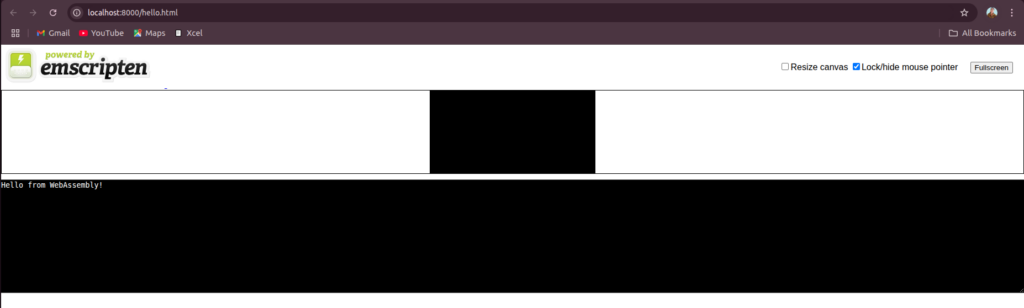
3. Then open http://localhost:8000/hello.html to access your application.
We are all done now!! Hope you enjoyed learning this.
Conclusion
Thanks for being with me till end. So, in this blog we have learnt all about WebAssembly. How we can install it and utiilize it. Therefore, it’s quite really interesting and easy to explore. If this blog helped you somewhere do like and share this blog with the needful.
HAPPY READING!!!