


Hi folks,
In this blog, we will explore OpenAPI, k6, and how to auto-generate K6 tests using OpenAPI specs.
What is OpenAPI?
OpenAPI (previously Swagger) is a commonly used specification format for REST APIs. It describes your API endpoint, the format of requests/responses, and parameters in a consistent, machine-readable JSON or YAML structure.
A formal OpenAPI specification enables tools to do the below:
- Create server/client code.
- Create API documentation.
- Automatically produce tests and mocks.
What is K6?
K6 is a load-testing tool for APIs that is open-source, free, and focused on developers. By testing your systems’ dependability and performance using K6, you may identify performance regressions and issues early. JavaScript is used to prepare test scripts, offering flexibility and familiarity for developers.
What is openapi-generator-cli?
The openapi-generator project, maintained by the community, enables the creation of client libraries, servers, documentation, and tests across a wide range of programming languages and frameworks using OpenAPI specs. Among its numerous generators, it can generate k6 test scripts. Also, you can integrate it with a CI/CD pipeline for automation purposes.
Benefits of Auto-Generating k6 Tests from OpenAPI
- Speed: Create load tests quickly without the need for manual efforts.
- Coverage: Automatically includes all endpoints outlined in your OpenAPI specification.
- Maintainability: Modify your OpenAPI specification and easily regenerate tests.
How to auto-generate k6 tests from OpenAPI specs?
Below are the steps to auto-generate K6 tests from OpenAPI specs:
Step 1: Prerequisite
Before auto-generating k6 tests, you should have the following prerequisites installed:
- Node.js installed (to run k6 scripts & version > 16)
- k6 installed (Installation Guide)
- Java installed (required for openapi-generator-cli)
Step 2: Install openapi-generator-cli
You can install the openapi-generator-cli via npm. Below is the command for installation:
npm install @openapitools/openapi-generator-cli -gStep 3: Prepare Your OpenAPI Spec
Make sure your OpenAPI spec is properly structured. It supports both a YAML or JSON format for this. You can use Tools like Postman or Swagger Editor to build OpenAPI spec files. Below is an example:
openapi: 3.0.3
info:
  title: JsonPlaceHolder API
  version: 1.0.0
  description: Login API

servers:
  - url: https://jsonplaceholder.typicode.com

paths:
  /posts:
    post:
      summary: User Login
      operationId: LoginUser
      tags:
        - Authorization
      requestBody:
        required: true
        content:
          application/json:
            schema:
              $ref: '#/components/schemas/LoginRequest'
      responses:
        '201':
          description: Successful Login
          content:
            application/json:
              schema:
                $ref: '#/components/schemas/LoginResponse'
        '401':
          description: Unauthorized - Invalid Credentials
        '400':
          description: Bad request - Missing or malformed fields

components:
  schemas:
    LoginRequest:
      type: object
      required:
        - email
        - password
      properties:
        email:
          type: string
          example: jk@yahoo.com
        password:
          type: string
          example: 745345

    LoginResponse:
      type: object
      properties:
        email:
          type: string
        password:
          type: string
        id:
          type: integer
In the above code, we are simulating a login API using a mock endpoint (/posts) provided by jsonplaceholder.typicode.com. It defines what data the client should send (email, password) and how the API might respond (email, password, and id).
Step 4: Generate the k6 Script
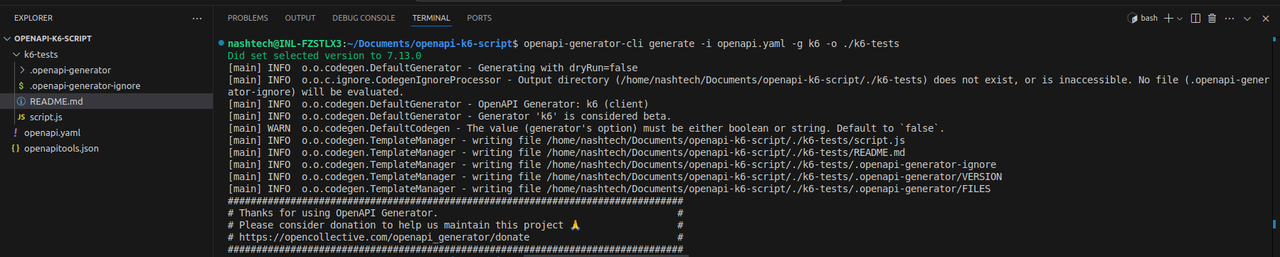
Use the CLI to convert your OpenAPI spec to a k6 test script:
openapi-generator-cli generate -i openapi.yaml -g k6 -o ./k6-testsThis command will generate a fundamental k6-tests directory featuring openapi-generator files and a script.js file (your k6 test file).
Step 4: Run the k6 Load Test
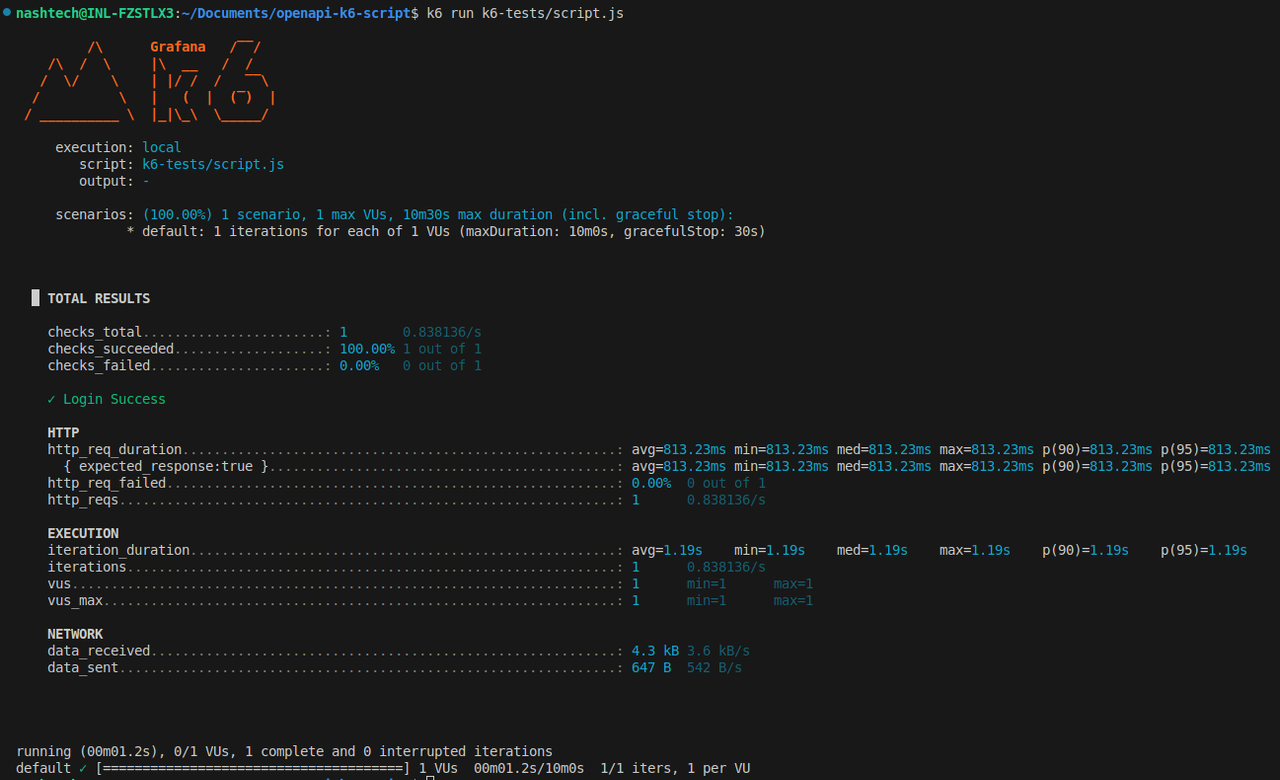
Run the generated script with the k6 CLI:
k6 run k6-tests/script.jsYou will encounter comprehensive results that include request times, data transfer rates, and HTTP error counts.
Limitations & Considerations
The produced tests are basic foundational scenarios; you may need to modify them to model realistic load or business logic.
- Requests involving authentication or complex bodies may necessitate manual adjustments.
- Not every feature of OpenAPI may be completely represented in the generated tests.
- A good approach is to utilize the generated scripts as a foundation and then improve them with personalized logic.
Conclusion
Auto-generating k6 tests from OpenAPI specs revolutionizes the automation of performance testing. Whether you are scaling a microservices architecture or introducing a new API, this method guarantees speed, dependability, and assurance in your backend performance. Utilizing openapi-generator-cli to automatically create k6 tests from OpenAPI specifications enhances your performance testing process.
If you possess a comprehensive OpenAPI specification, consider generating your k6 scripts automatically today — you may be astonished by the amount of time it conserves!