


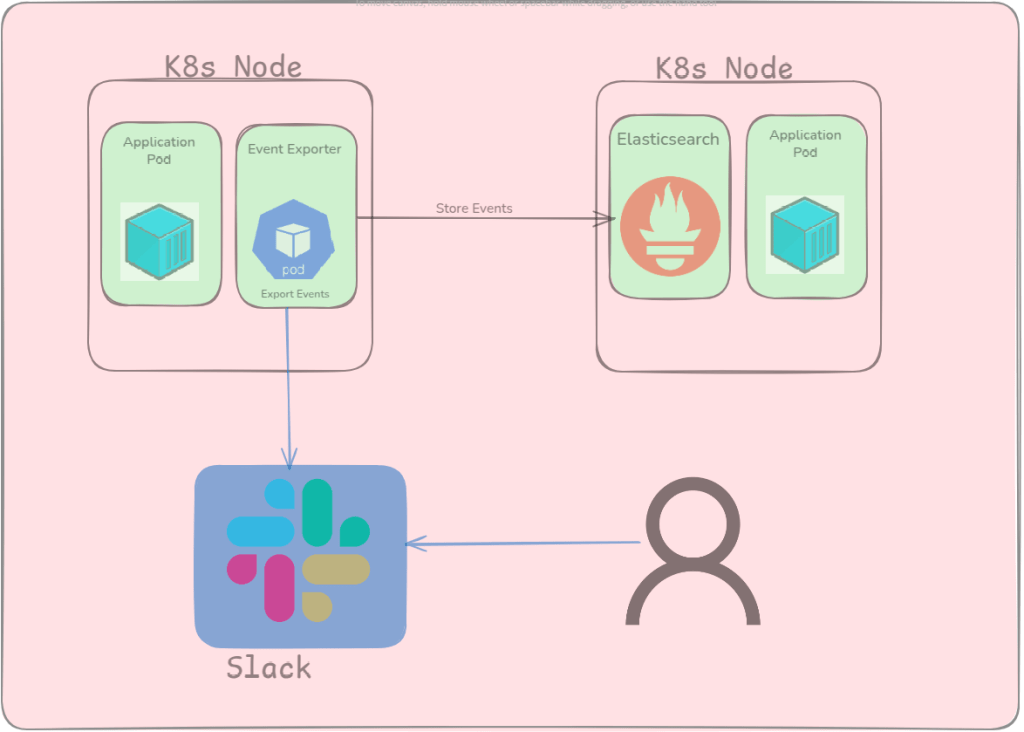
Introduction
Many of you might already be familiar with Kubernetes events and their importance. For those who are not, by the end of this blog series, you will have a clear understanding of everything related to Kubernetes events and the event exporter.
What are Kubernetes events?
In general programming, an event is a notification that something has occurred, such as a user action (like clicking a button) or a system operation (like opening a file). These events allow applications to respond dynamically to changes. Similarly, in Kubernetes, an event is a record of a significant change or action related to the state of a Kubernetes object, such as a Pod transitioning from Pending to Running or a container crash.
Why are Kubernetes events important?
Kubernetes events play a crucial role in understanding what is currently happening inside a Kubernetes cluster. They are especially useful for debugging issues and identifying problems in real time. Storing these events can help track the root cause of issues that might not be immediately visible. For example, imagine you have a Pod that runs fine under normal conditions, but during a sudden spike in traffic, it becomes unhealthy or transitions to an unready state. By examining the events generated during that time, you can pinpoint what went wrong, whether it was resource exhaustion, a failed readiness probe, or something else allowing for quicker and more accurate troubleshooting
What is Event Exporter?
Event Exporter is a tool used to export Kubernetes events to specific outputs such as Elasticsearch, Slack, Microsoft Teams, and others. It runs as a pod within the Kubernetes cluster and continuously monitors for new events. When a new event occurs, it captures and forwards it to the configured output. Event Exporter also provides functionality to filter events based on their properties, allowing users to export only the events that are relevant to them.
Importance of Event Exporter
Event Exporter helps you manage Kubernetes events more effectively. As we know, Kubernetes retains events only for a limited period, and once they’re gone, there’s no built-in way to recover them. With Event Exporter, you can persist these events by exporting them to external databases like Elasticsearch. It sends real-time notifications for critical events by integrating with various alerting tools, ensuring you don’t miss important issues.
Conclusion
Kubernetes events play a crucial role in understanding what’s happening inside your cluster, from normal operations to critical issues. However, due to their short retention period, relying solely on the default event mechanism can lead to missed insights. So that’s it for this blog, in the upcoming blog, we will see how we can deploy the event exporter and how to integrate it with different tools. For more information you can visit https://github.com/resmoio/kubernetes-event-exporter