


1. Introduction
In today’s modern web applications, the role-based access control system is commonly implemented to grant users varying levels of access depending on their role in the system. While this system offers great flexibility, it also introduces complexities, particularly when it comes to authentication. Let’s explore how authentication works, how you can test it, and the importance of security during the testing phase using tools like Postman.
This blog will guide you through API Testing for login authentication using JWT and Postman, including how to extract tokens from Local Storage in a web browser.
2. Why JWT Authentication Matters
One of the most popular authentication methods for APIs is JSON Web Token (JWT). JWTs are used for securely transmitting information between parties as JSON objects. They are particularly useful in modern web applications for authentication, as they allow stateless communication.
However, without proper testing, security vulnerabilities may arise. Issues like token hijacking, brute-force attacks, and SQL injection can compromise the system’s security. Let’s walk through the steps you need to follow to test your login authentication APIs and some best practices to ensure your system’s security.
3. Approach to API Authentication Testing Using Postman
- Compile the API List:
Begin by listing all authentication-dependent APIs that need verification. This includes endpoints visible to various user roles
- Identify Role Mappings for Each API:
Understand which roles are supposed to access each API. Are they read-only? Do they include write/delete permissions?
- Determine API URLs via UI Investigation:
If documentation is sparse, investigate by logging in with each role on the system UI. Note down all reachable endpoints and their purposes.
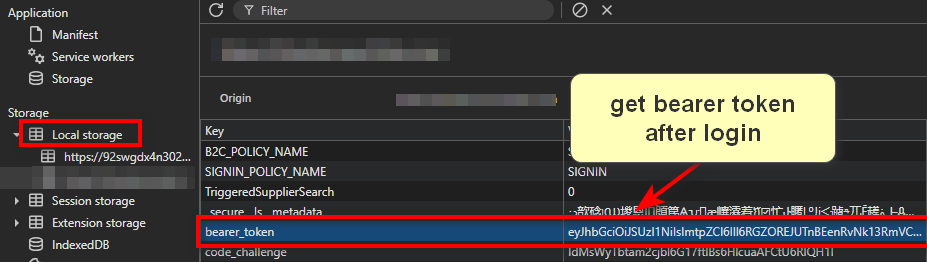
- Collect Bearer Tokens for Roles:
Open Developer Tools (F12).
Navigate to Application > Storage > Local Storage.
Copy the Bearer token and use it for API requests in Postman.
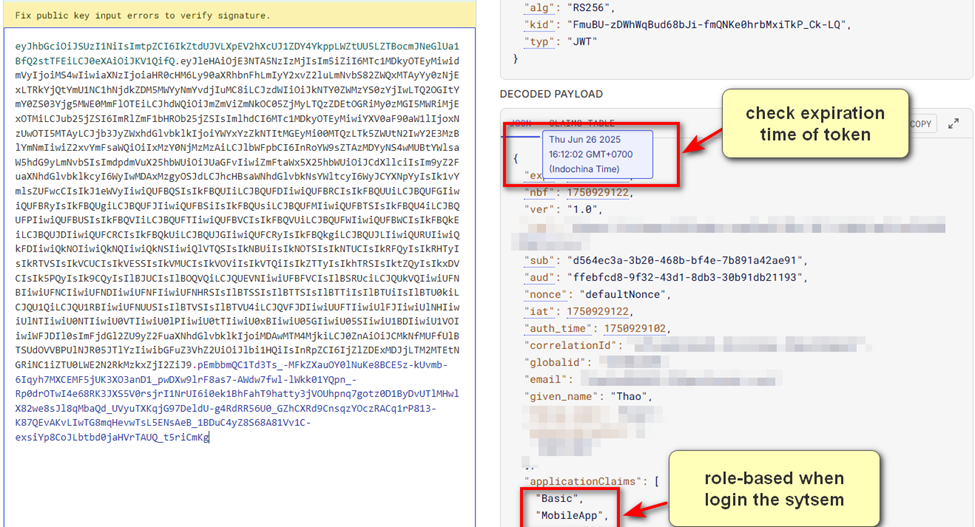
- Validate Tokens via jwt.io:
This tool decodes JWTs and displays claims like expiration date, email, organization ID, and the assigned role. Confirm that tokens match the intended role before testing APIs.
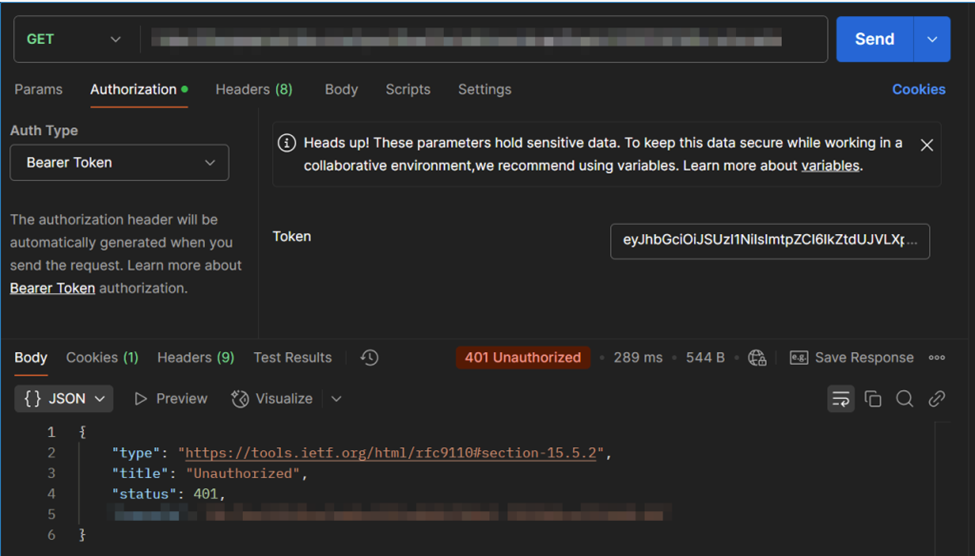
- Use JWT for Authenticated API Calls
For each API, test with the correct role’s token and evaluate the response:
Request:
GET /api/user/profile
Headers: {
  "Authorization": "Bearer <your_JWT_token>"
}
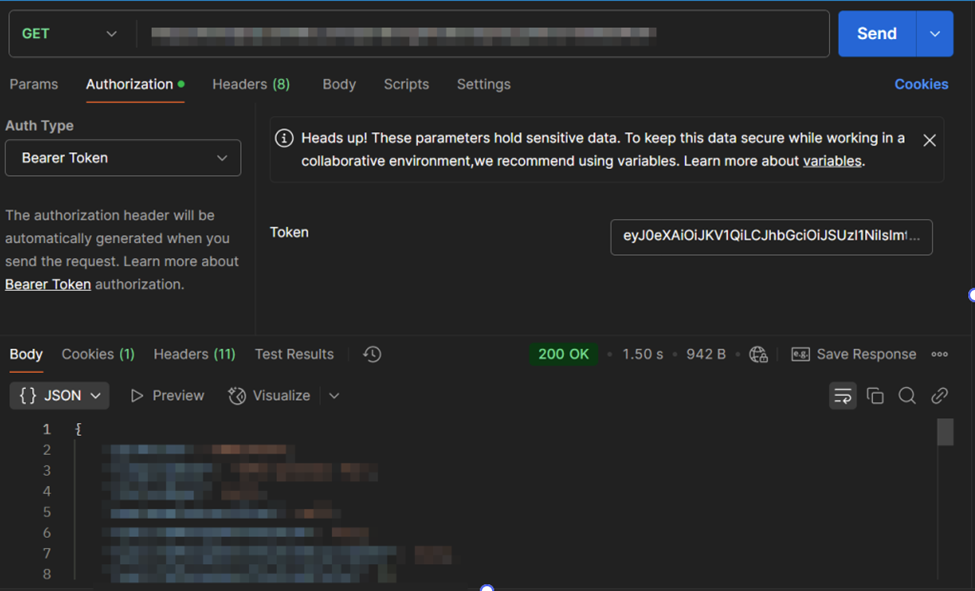
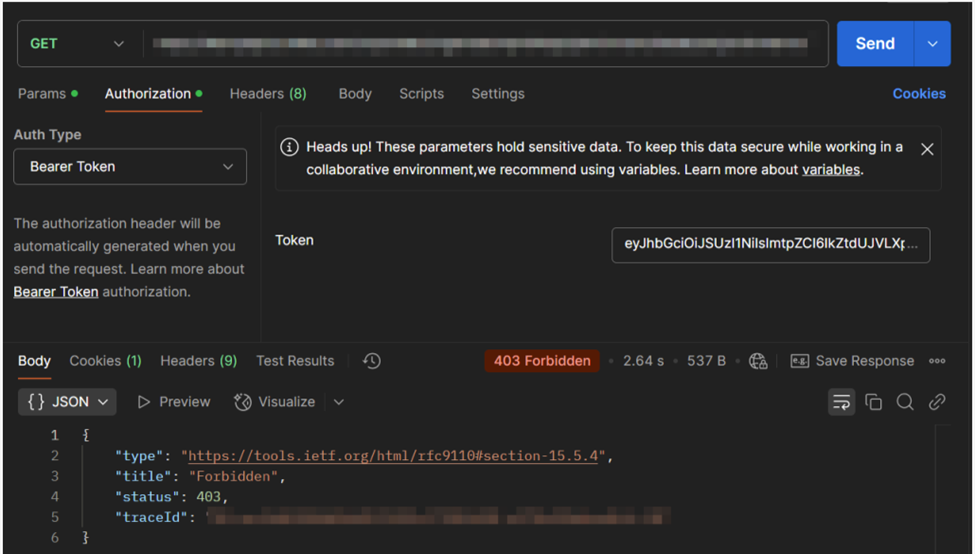
Response: returns the following 3 results:
Valid token:
Invalid token:
Expired token:
4. Best Practices for Security When Testing Authentication APIs
While testing authentication APIs using tools like Postman, it’s important to focus on the following key security concerns:
- Token Hijacking
Token hijacking occurs when an attacker intercepts or steals a JWT and reuses it to gain unauthorized access. To prevent token hijacking, ensure that JWT tokens are stored securely and are not exposed in URLs or console logs.
Testing Tip: Check whether JWTs are stored in localStorage or sessionStorage and ensure that HTTP-only cookies are used instead.
- Brute Force Attacks
Hackers can attempt to guess login credentials by trying multiple combinations of usernames and passwords. This is called a brute force attack.
Testing Tip: Use Postman’s Runner feature to simulate multiple login attempts with common passwords. Also, check if the API limits failed attempts (e.g., locking the account after 5 failed attempts).
- SQL Injection
SQL Injection attacks occur when an attacker inputs malicious SQL queries into a form field, potentially gaining unauthorized access to the system's database.
Testing Tip: Enter payloads like ' OR 1=1 -- in login fields and verify that the system properly sanitizes inputs. Sending SQL commands through Postman requests can help identify vulnerabilities in API security.
5. Conclusion
API testing plays a crucial role in ensuring the security and functionality of modern web applications. When testing authentication mechanisms, especially those using JWT tokens, there are several areas to focus on:
1. Secure Token Storage: Avoid storing JWTs in localStorage. Use secure, HTTP-only cookies whenever possible.
2. Limit Failed Login Attempts: Prevent brute-force attacks by locking accounts after a certain number of failed login attempts.
3. Proper Token Expiry Handling: Ensure that expired tokens are rejected and users are forced to re-authenticate.
4. Prevent SQL Injection: Always validate and sanitize user inputs to avoid malicious attacks.
By following these best practices and using tools like Postman for API testing, you can ensure your authentication system remains secure, preventing unauthorized access and protecting your users’ data.
6. Reference
Image from internet.