


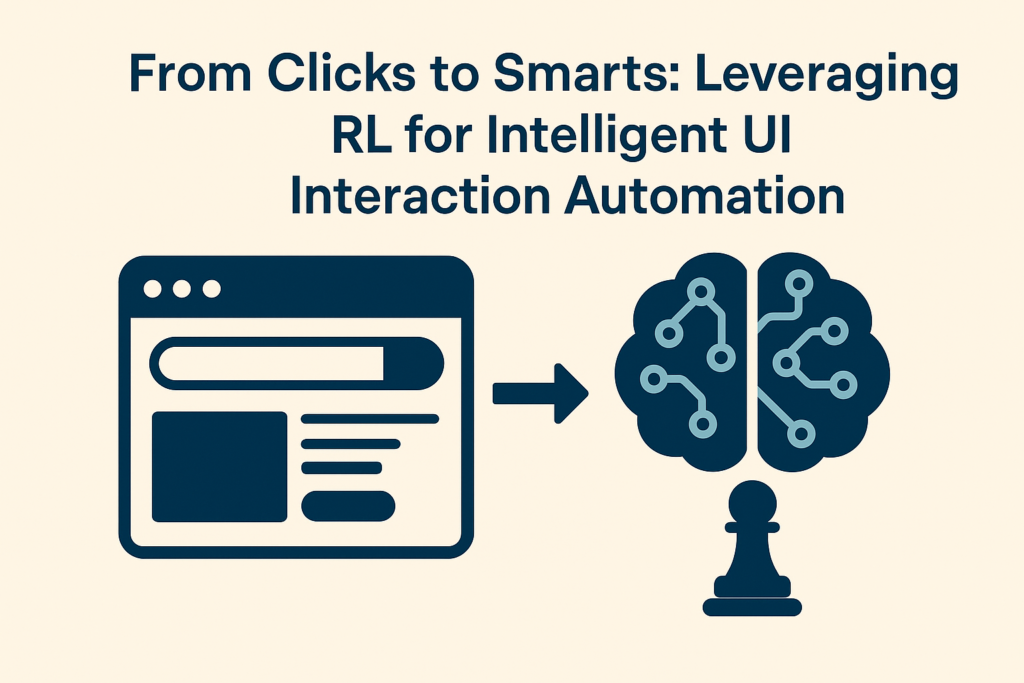
User behaviour on websites today is far from predictable. User interface testing grows more difficult since interfaces change and browsing habits move. Selenium-like tools have for a long time automated UIs, yet they often tie automations to set steps and to user flows. Because the layout shifts or a user picks another path, these inflexible scripts may not adapt, making automation fragile plus less dependable.
Now, you can imagine upon your automation. It is no longer limited by scripts. For every time that it runs, imagine then that it could observe how users behave, learn also from outcomes, and then make smarter choices. Learning via Reinforcement presents a real outlook. This is its promise.
Understanding Reinforcement Learning in Simple Terms
In RL, the agent is simply creating a program to learn by doing. It interacts with all of its surroundings while trying different actions. Then, it watches what occurs. A reward can be given if something has worked well now. A penalty exists in cases when it does not. Over time, these experiences shape their understanding, and they can also choose better actions the next time around.
Let us explore that in a deeper way.
- The agent: The learner or automation bot.
- Environment: It interacts within the application or website environment.
- State: The context, as well as the current screen, such as search results or homepage.
- Actions: The agent can perform things like clicking, scrolling, or typing.
- Reward: A reward is simply a score that reflects how useful an action was. The score shows whether the action was helpful or not.
At first, the agent is in ignorance. It gets better and better at reaching for its goals as it receives some feedback and takes the required actions.
Why Use Reinforcement Learning in UI Automation?
Here’s why RL makes sense for automated testing:
- UI changes break traditional scripts often.
- Mapping out every possible flow is nearly impossible.
- RL learns what works based on goals instead of hardcoded steps.
You don’t need to write each and every single test path. The agent figures out what works best by trying and learning.
A Practical Example: An RL Agent Navigating a Website
Let’s look at a Java-based simulation that shows how RL works in a testing context.
Picture a bot starting its session on Google. It can perform a search, scroll down, click on a result, or go back. The aim is to arrive at a relevant external site in as few steps as possible.
Here’s how it’s built:
The Test Environment
This simulation uses different states like:
- HOME
- SEARCH_RESULTS
- EXTERNAL
And the possible actions include:
- SEARCH
- CLICK_RESULT
- SCROLL
- GO_BACK
Each action updates the state. The system also gives a reward based on whether the action helped or not.
The Learning Agent
The agent uses something called Q-learning. It builds a table of all the states and actions and stores a value for each one. That value shows how useful the action was in that situation.
So, if clicking a result usually helps the agent reach its goal, that value becomes higher. Over time, the agent begins to choose actions that have brought good results before.
How It All Works Together
Here’s a simple way to understand how the agent moves and learns:
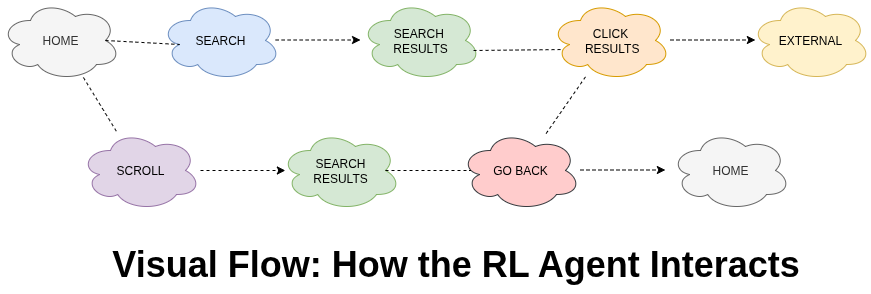
In the beginning, the agent tries different actions to see what happens. This is called exploration. After many runs, it starts making better choices based on what it has learned.
Learning from Feedback
The feedback system plays a big role. Each action gets scored. Here are a few examples:
- A successful search gives a small reward.
- Clicking a relevant result gives a bigger reward.
- Reaching an external site quickly gives a bonus.
- Taking too many steps or repeating actions leads to penalties.
This helps the agent avoid wasting time and encourages it to take efficient paths.
Tools and Tech Behind the Scenes
While this example uses Java, the concept can work with many popular tools:
- Selenium or Puppeteer to handle browser automation.
- Custom environments or OpenAI Gym for training agents.
- Machine learning libraries like TensorFlow or PyTorch are used for building the learning logic.
- CI/CD tools like Jenkins are used to integrate with testing pipelines.
Real-World Advantages
Here’s why this approach is useful in real projects:
- RL-based automation adapts to UI changes.
- It reduces the time spent updating flaky scripts.
- It helps uncover user flows that you may not think to test.
- It’s ideal for exploratory testing where the goal is not fixed paths but meaningful coverage.
This isn’t just an experiment. It’s a smarter way to build resilient, adaptable automation.
How the Agent Improves Over Time
At first, the agent tries many different actions. This is necessary to gather information. Later, it becomes more confident and starts relying on what it has learned.
This behavior is controlled by something called the epsilon value. A high epsilon means more exploring. A low epsilon means the agent trusts its experience.
You may notice log outputs such as:
Q-Table size: 68, Epsilon: 0.045Conclusion
It enables automation to learn from interaction, adapt to change, and continuously improve its decision-making, resulting in more resilient and intelligent testing workflows.
This article, From Clicks to Smarts: Leveraging Reinforcement Learning for Intelligent UI Interaction Automation, highlights how shifting from static rules to learning-based automation can make testing more powerful and flexible.
This article, From Clicks to Smarts: Leveraging Reinforcement Learning for Intelligent UI Interaction Automation, highlights how shifting from static rules to learning-based automation can make testing more powerful and flexible.
For QA teams aiming to stay ahead, now is the perfect moment to try this approach. Start with something small. Let the agent interact, learn from its outcomes, and grow better with each run.
References
https://www.geeksforgeeks.org/machine-learning/what-is-reinforcement-learning