


Unit testing is a vital part of building robust and reliable applications. In the world of React, where components are modular and reusable, unit tests ensure that each piece of your UI behaves as expected in isolation. Whether you’re a junior developer looking to get started or a seasoned engineer aiming to refine your testing practices, this guide will walk you through mastering unit testing in React.
Why Unit Testing Matters
Unit tests give you confidence that your code works — not just today, but tomorrow, after every refactor or dependency upgrade. With a good suite of tests, you’ll:
1. Catches Bugs Early
Unit tests verify small pieces of logic in isolation. This means:
- Bugs are caught before they reach production.
- Developers can confidently push changes without breaking existing features.
“Test early, fix cheap.”
2. Enables Safe Refactoring
Without tests, refactoring feels like walking in the dark. With tests:
- You can safely restructure code without fear.
- If something breaks, the test will tell you exactly where and why.
Think of tests as a safety net for your code.
3. Improves Code Quality
Well-tested components tend to be:
- Smaller and more focused
- More predictable
- Easier to reuse and maintain
If something is hard to test, it’s probably too complex.
3. Serves as Living Documentation
Unit tests:
- Describe how your components or functions are supposed to behave
- Help new developers understand expected inputs, outputs, and edge cases
4. Makes You Faster in the Long Run
Yes, writing tests takes time up front.
But skipping tests leads to:
- More bugs
- Harder debugging
- Slower development over time
Tools of the Trade
To get started with unit testing in React, you’ll typically use the following stack:
- Jest – JavaScript testing framework (test runner + assertion library)
- React Testing Library (RTL) – For testing UI components the way users interact with them
- Vitest or Testing Library DOM – Lightweight alternatives, especially with Vite projects
How to Write a Good Unit Test
Whether you’re testing a utility function or a React component, writing a good unit test involves clear purpose, realistic usage, and reliable results. Here’s how to do it:
1. Understand What You’re Testing
Before writing the test, ask:
- What is the responsibility of this function or component?
- What are the expected inputs and outputs?
- How does a user interact with it (if it’s a UI component)?
2. Test Like a User
React Testing Library promotes user-centric testing. You should simulate how users interact with your components, not how components are built.
Example:
DO
screen.getByRole('button', { name: /submit/i });
userEvent.type(screen.getByLabelText(/email/i), 'user@example.com');
DON’T
container.querySelector('.button-class'); // brittle
component.state; // implementation detail
3. Structure Tests Clearly
Use AAA pattern (Arrange – Act – Assert):
test('increments the count when button is clicked', async () => {
  // Arrange
  render(<Counter />);

  // Act
  await userEvent.click(screen.getByRole('button', { name: /increment/i }));

  // Assert
  expect(screen.getByText(/count: 1/i)).toBeInTheDocument();
});
Always separate setup, action, and assertion visually.
4. Create Reusable Setup Helpers
Instead of repeating the same render/setup logic in every test, extract it:
const setup = () => {
  render(<MyForm />);
  const email = screen.getByLabelText(/email/i);
  const submit = screen.getByRole('button', { name: /submit/i });
  return { email, submit };
};
Use it in your tests:
test('submits when email is valid', async () => {
  const { email, submit } = setup();
  await userEvent.type(email, 'test@example.com');
  await userEvent.click(submit);

  expect(screen.getByText(/submitted/i)).toBeInTheDocument();
});
Improves readability and makes refactoring easier when UI structure changes.
4. Focus on Scenarios, Not Lines
Don’t just test a component renders — test use cases and scenarios:
Instead of this:
test('renders input', () => {
  render(<LoginForm />);
  expect(screen.getByLabelText(/email/i)).toBeInTheDocument();
});
Do this:
test('shows error if email is invalid on submit', async () => {
setup();await userEvent.type(screen.getByLabelText(/email/i), 'invalid');
await userEvent.click(screen.getByRole('button', { name: /submit/i }));expect(screen.getByText(/invalid email/i)).toBeInTheDocument();
});
5. Mock Dependencies, Not the Unit
A unit test isolates the unit (component or function), not its internals. Mock:
- API calls
- Context values
- External components/services
Example: Mock API
vi.mock('../api/login', () => ({
  login: vi.fn(() => Promise.resolve({ success: true })),
}));
this keeps your tests fast, focused, and deterministic.
6. Keep Tests Clean and Independent
Each test should:
- Not depend on the result of another test
- Reset mocks, timers, etc.
afterEach(() => {
  vi.clearAllMocks(); // or jest.clearAllMocks()
});
Use describe blocks for grouping related tests:
describe('LoginForm', () => {
  test('submits with valid data', () => {});
  test('shows error with invalid email', () => {});
});
7. Repeating Tests with it.each
Imagine you’re testing an email validation logic inside a form. You want to test multiple invalid inputs without copying the same test logic multiple times.
Using it.each for Validation Cases
Component (simplified for test):
// EmailValidator.tsx
type Props = { email: string };
export const EmailValidator = ({ email }: Props) => {
  const isValid = /^[^\s@]+@[^\s@]+\.[^\s@]+$/.test(email);
  return <p>{isValid ? 'Valid email' : 'Invalid email'}</p>;
};
Test:
import { render, screen } from '@testing-library/react';
import { EmailValidator } from './EmailValidator';
setup = () =>inputrender(<EmailValidator email={input} />);describe('EmailValidator - invalid cases', () => {(
it.each([
['missing @', 'invalid.com'],
['missing domain', 'user@'],
['missing username', '@domain.com'],
['empty string', ''],
])('shows "Invalid email" for %s', (_, input) => {
setup)inputexpect(screen.getByText(/invalid email/i)).toBeInTheDocument();
});
});
describe('EmailValidator - valid cases', () => {
it.each([
['normal email', 'user@example.com'],
['email with subdomain', 'user@mail.example.com'],
['email with numbers', '123user@domain.co'],
])('shows "Valid email" for %s', (_, input) => {
(setup)input
expect(screen.getByText(/valid email/i)).toBeInTheDocument();
});
});
Example How to Test a LoginForm Component
A robust login form should be tested thoroughly at different layers. Here’s how to do that using:
- UI Testing (React Testing Library)
- Hook Testing (React hooks logic like
useLogin) - Business Logic Testing (e.g. input validation)
- API Testing (mocking backend interaction)
- CI/CD Integration (running tests in a pipeline)
1. UI Test
Goal: Ensure the form renders and user interaction works.
// LoginForm.test.tsx
import { render, screen, fireEvent } from '@testing-library/react';
import LoginForm from './LoginForm';const setup = () =>render(<LoginForm />);
const handleSubmitLogin = () => {
const emailInput = screen.getByLabelText(/email/i);
const passwordInput = screen.getByLabelText(/password/i);
const submitButton = screen.getByRole('button', { name: /log in/i });
fireEvent.change(emailInput, { target: { value: 'user@example.com' } });
fireEvent.change(passwordInput, { target: { value: '123456' } });
fireEvent.click(submitButton);
}handleSubmitLogin()
test('renders and submits login form', () => {
setup();
expect(screen.getByText(/logging in/i)).toBeInTheDocument();
});
Description: We test that the UI renders inputs and handles a full form submission.
2. Hook Test
Goal: Test useLogin hook separately.
// useLogin.test.ts
import { renderHook, act } from '@testing-library/react-hooks';
import { useLogin } from '../hooks/useLogin';
import { login } from '../api/auth';
jest.mock('../api/auth', () => ({
login: jest.fn(),
}));const setup = (token) => {(login as jest.Mock).mockResolvedValue({ token: token });
return renderHook(() => useLogin());}
test('calls login API with correct data', async () => {setup('123')await act(async () => {
await result.current.login('user@example.com', '123456');
});
expect(login).toHaveBeenCalledWith('user@example.com', '123456');
});
Description: Tests the logic inside the custom hook and ensures it calls the API correctly.
3. Business Logic Test
Goal: Validate input logic like “required fields”, “email format”, etc.
tsCopyEdit// validation.test.ts
import { validateLogin } from '../utils/validation';

test.each([
  ['', '123456', 'Email is required'],
  ['user@example.com', '', 'Password is required'],
  ['wrong-email', '123456', 'Email is invalid'],
])('validateLogin(%s, %s)', (email, password, expectedError) => {
  const result = validateLogin(email, password);
  expect(result.error).toBe(expectedError);
});
Description: Using test.each, this test checks multiple validation cases.
4. API Integration Test
Goal: Mock and assert API behavior.
// auth.test.ts
import { login } from './auth';
import axios from 'axios';

jest.mock('axios');
const mockedAxios = axios as jest.Mocked<typeof axios>;

test('calls backend login API', async () => {
  mockedAxios.post.mockResolvedValue({ data: { token: 'abc123' } });

  const response = await login('test@example.com', 'password');
  expect(mockedAxios.post).toHaveBeenCalledWith('/api/login', {
    email: 'test@example.com',
    password: 'password',
  });
  expect(response.token).toBe('abc123');
});Description: Mocking Axios ensures you’re testing the client logic, not the real API.
5. CI/CD Integration
Goal: Automatically run all tests before merge or deploy.
GitHub Action (e.g. .github/workflows/test.yml):
name: Run Unit Tests

on: [push, pull_request]

jobs:
  test:
    runs-on: ubuntu-latest
    steps:
      - uses: actions/checkout@v3
      - name: Use Node.js
        uses: actions/setup-node@v3
        with:
          node-version: '18'
      - run: npm ci
      - run: npm run test:ci
Description: This GitHub Action workflow installs dependencies and runs tests in CI.
6. Setting Up Coverage Thresholds
Test coverage thresholds help enforce a minimum level of test completeness across your codebase. They ensure that important logic isn’t skipped by accident and that every team member maintains a consistent level of quality.
By setting a coverage threshold, you’re telling your test runner (like Jest or Vitest) to fail the build if coverage drops below a specified percentage. This acts as a guardrail in your development process—especially useful in CI/CD pipelines.
Example Configuration (jest.config.js)
module.exports = {
  collectCoverage: true,
  coverageThreshold: {
    global: {
      branches: 80,
      functions: 85,
      lines: 90,
      statements: 90,
    },
  },
};
- Prevents untested code from being merged
- Encourages writing more robust and reliable tests
- Promotes long-term maintainability and quality
- Helps catch edge cases early in development
In your GitHub Actions workflow or CI script:
- name: Run tests with coverage
  run: npm test -- --coverage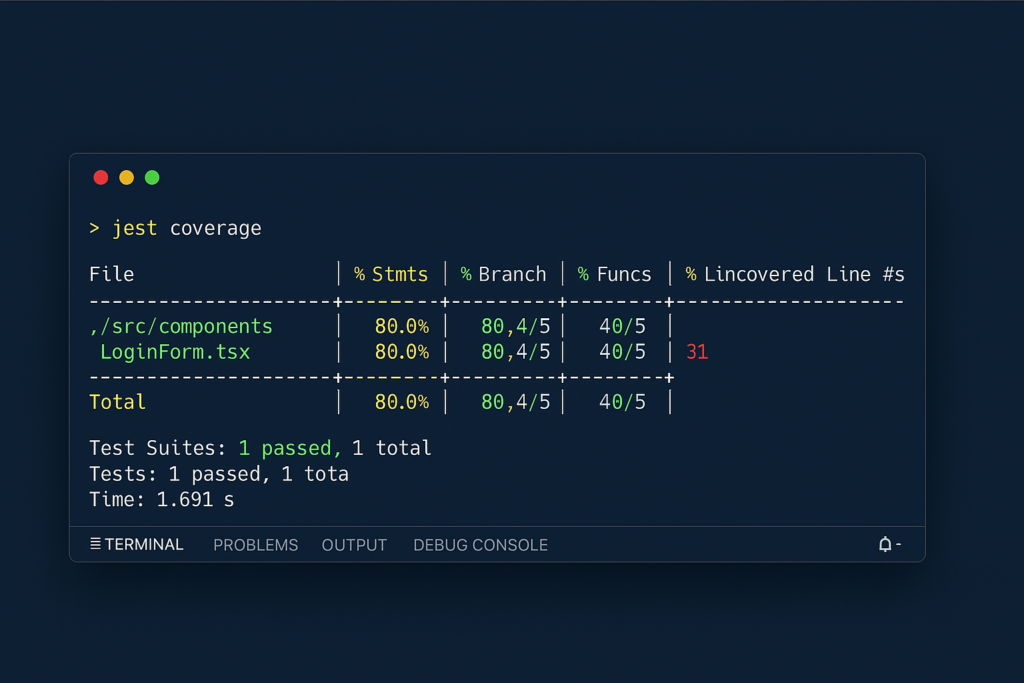
Summary
“Mastering Unit Testing in React” is a comprehensive guide designed to help developers build robust, maintainable React applications with confidence. It covers the fundamentals of what unit testing is, why it matters, and what makes a unit test effective. You’ll learn how to write clean, meaningful tests using tools like Jest and React Testing Library, along with tips for testing React components, hooks, and edge cases. The guide emphasizes writing tests that are isolated, fast, readable, and easy to maintain. It also explores best practices like using it.each for repetitive scenarios, testing user interactions, and structuring your test files for scalability. Whether you’re a beginner or improving an existing test suite, this article provides the strategies, mindset, and examples you need to level up your testing skills and ship React code with confidence.