ElasticSearch: The Engine Powering Search, Analytics, and AI
ElasticSearch is a powerful, distributed search and analytics engine optimized for speed, scalability, and versatility. Built on top of Apache Lucene, it underpins modern data platforms with its lightning-fast full-text search, real-time analytics, and seamless scaling across massive datasets. Here’s a concise overview and guide for your blog.
What is Elastic Stack ?
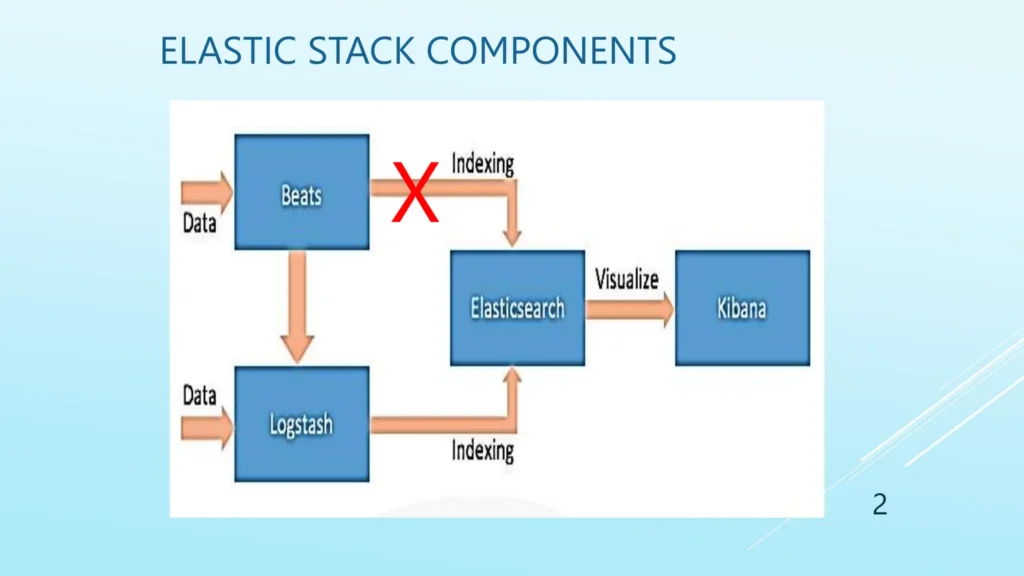
The Elastic Stack is group of open source product build by Elastic. Elastic Stack (known as the ELK Stack) is a collection of powerful open-source tools designed for searching, analyzing, and visualizing data from any source, in any format, in real-time. It is widely used for log management, data analytics, security, observability, and more by organizations needing scalable and flexible data handling capabilities.
Core Components for Elastic Stack :
Elasticsearch : It is the backbone that indexes and stores massive volumes of structured and unstructured data, enabling ultra-fast search and analytics.
Logstash : It is used to collects, parses, transforms, and forwards data from various sources, providing a flexible data processing pipeline.
Kibana : It is used for the data visualization and dashboarding.
Beats : These are lightweight agents that collect and ship data (logs, metrics, events, etc.) from servers and endpoints to Logstash or Elasticsearch.
How ELK core components are working ?
Data is ingested from any source using Beats or Logstash.
Data will be parsed and structured by the Logstash and sent to ElasticSearch where its indexed and stored.
User can access and and analyze their data visually in Kibana. With the using of building queries, charts, dashboards, and performing deep analytics.
What is ElasticSearch ?
Distributed, Open Source: ElasticSearch operates as a distributed system, meaning data is split across multiple nodes for speed and resilience. It’s open source, making it easily accessible for developers and enterprises alike.
JSON Documents: Data is indexed as JSON documents grouped into indices, making it flexible for handling structured, semi-structured, or unstructured data.
Inverted Index: Uses an inverted index for fast, Google-like full-text search, mapping words to document locations for efficient queries.
Node in Elastic Search
Node is a single instance of a ElasticSearch running on a machine inside a cluster.
There are many roles a Node can play :
Master Node Role : Its manages the cluster-wide operations (index creation, node tracking).
Data Node : It will stores the data and handles index search requests.
Coordinating Node: Its working as a load balancer and routes client requests, manages query execution by forwarding requests to appropriate nodes.
Ingest Node: Processes data before indexing (transforms or enriches documents)
Indexes, Documents, and Fields
Index: Index in Elastic Search is equivalent to table of data base
Fields : Fields in Elastic Search is equivalent to the table’s column of the data base.
Documents : Document in Elastic Search is equivalent to the table’s row of the data base.
Below image having the sample data how the data is stored in Elastic Search within a particular index.
“_index” : index fields is tell about the index name where the data is stored.
“_id” : The _id called as document id which is unique and auto generated if its not defined.
“_source” : The document (Data) is stored inside the source, here “name” and “age” are the fields of the document. In ES the data is stored in the form of document.
Sharding and Replication
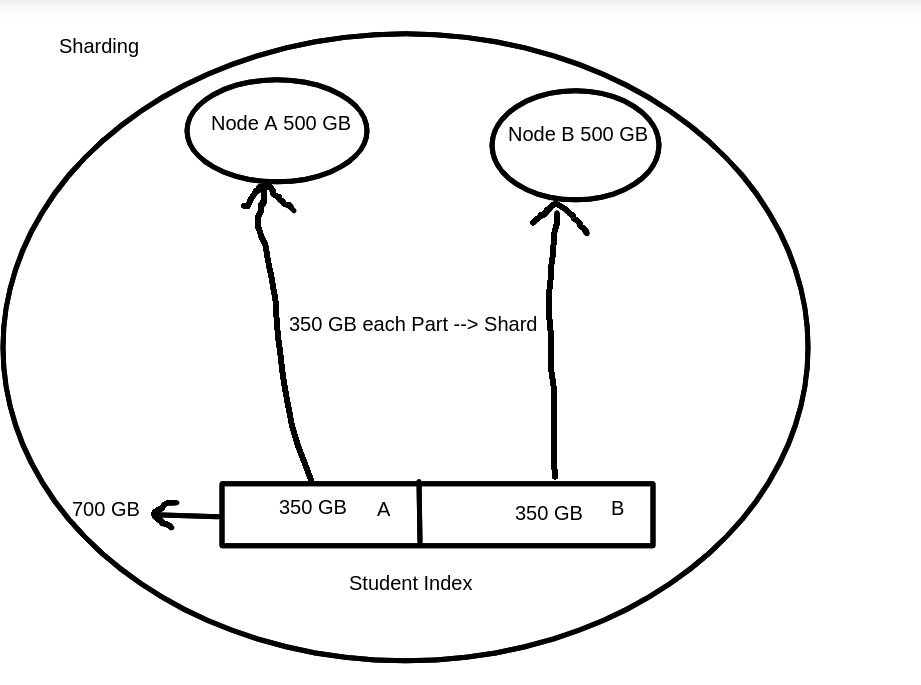
Shard : Sharding is a way to divide indices into smaller pieces. Each piece is called as Shard. Sharding is done on index levels.
Example :
You have a Student index with 700GB of data. You want to store this across two new nodes, each with 500GB storage.
1. Create/Plan Your Nodes
You set up 2 nodes in your Elasticsearch cluster (Node A and Node B).
Each node has enough space (500GB each).
2. Split Data into Shards
Instead of storing all 700GB on one node, you break the index into shards.
In this scenario, you could split the Student index into 2 shards:
Shard 1: ~350GB
Shard 2: ~350GB
3. Allocate Shards to Nodes
Store Shard 1 on Node A, Shard 2 on Node B.
Elasticsearch will automatically balance the shards, making sure the data and queries are spread across available nodes.
There is two types of Shards :
Primary Shard : It will contains the original data Segements.
Replica Shard : A copy of a primary shard, providing redundancy and improving query performance.
Note : Replica shards must be located on a different node than their corresponding primary shards. The reason is: if both the primary and its replica are stored on the same node and that node goes down (due to hardware failure, maintenance, network issues, etc.), you would lose both copies of the data for that shard. This results in data loss and defeats the entire purpose of replication for fault tolerance and high availability.
Operations of ElasticSearch
PUT Operation
In Elasticsearch, the HTTP PUT method is used to create a new index. When creating the index, you can also specify index settings, such as: 1.1. Number of Primary Shards : how many pieces the index data should be split into. 1.2. Number of Replica Shards : how many copies of each primary shard should be maintained for fault tolerance and high availability.
Example :
In this example:
number_of_shards: 3-> The index will be split into 3 primary shards.
number_of_replicas: 1 -> Each primary shard will have 1 replica stored on a different node for redundancy.
If you try to create an index with the same name that already exists, Elasticsearch will return an error unless you use the PUT request with the correct update operation through index templates or settings adjustments.
The number of shards cannot be changed after index creation, but the number of replicas can be increased or decreased dynamically.
2.Post Create Operation
In Elasticsearch, the HTTP POST method is commonly used for indexing a new document into an existing index. Following are the key points which POST do :
Adds a new JSON document to a specified index.
If the document ID is not provided, Elasticsearch generates a unique ID automatically.
POST can also be used for operations such as bulk indexing, searching, or other commands.
Useful for creating documents when you don’t need to control the document ID explicitly.
Example :
Adding a document using POST
The below request sends a document to the index.
Elasticsearch stores the document and automatically generates a unique _id for it.
The endpoint _doc is the default document type since Elasticsearch 7.x.
The GET method is used to retrieve documents or information from Elasticsearch.
Fetch a document by its ID from a specific index.
Retrieve cluster, index, or shard-level information.
Perform search queries (though POST is also often used for complex queries).
Example :
Get a document or ES data by ID
This fetches the document with ID 1 from the index my-index.
The response includes the document source if found, or a 404 if not.
GET /my-index/_doc/1
5. Delete Operation
The DELETE method is used to remove documents or entire indices.
Delete a specific document by ID.
Delete an entire index and all its data.
Example : Delete a Document by ID
This deletes the document with ID 1 in the specified index.
A successful deletion returns a confirmation with a result like “deleted”.
DELETE /my-index/_doc/1
Example : Delete an entire Index
This deletes the entire index named my-index and all its data.
Use with caution, as this action cannot be undone.
DELETE /my-index
6. Search Query Operations
Elasticsearch provides powerful and flexible search capabilities, allowing you to find documents using various query types and parameters. Here’s a formal overview of how search operations work, along with key examples:
Basic Search Syntax :
You can search an index using the _search endpoint with JSON-based queries. The most common HTTP operation is:
Supports typo-tolerant searching: Useful for user queries with misspellings.
					{
  "query": {
    "fuzzy": {
      "field_name": {
        "value": "search_term",
        "fuzziness": 2  // allow up to 2 edits : searh, serch : these are having 1 word missing for search
      }
    }
  }
}
7. Pagination and Sorting :
Limit results and control order:
					{
  "from": 0, // starting point
  "size": 10, // number of results
  "sort": [
    { "date": { "order": "desc" } } // by field or relevant score
  ]
}
Conclusion
In this blog, we explored the key aspects of Elasticsearch, starting with its powerful architecture and the reasons why it is the preferred choice for modern search and analytics solutions. We discussed what makes Elasticsearch fast, including its distributed design and efficient indexing mechanisms.
We also covered the core query operations that allow users to search, filter, and analyze data effectively, enabling deeper insights and better decision-making. Along the way, we examined essential architectural elements such as nodes, indices, documents, fields, as well as sharding and replicas, which ensure scalability, fault tolerance, and high availability.
By understanding these concepts, one can fully leverage Elasticsearch’s capabilities to store, manage, and query vast amounts of data efficiently—making it a go-to solution for real-time search and analytics needs.
This project provides a practical example of integrating Elasticsearch with Spring Boot. Using Spring Data Elasticsearch simplifies the management of complex queries and CRUD operations, allowing developers to build powerful search-driven applications efficiently.
For full source code and detailed instructions, check the GitHub repository at: [https://github.com.mcas.ms/arvind16116-nashtech/elasticsearch_integration/tree/main].