


Parallelism in programming is the ability to execute multiple tasks simultaneously by utilizing multiple processors or CPU cores.
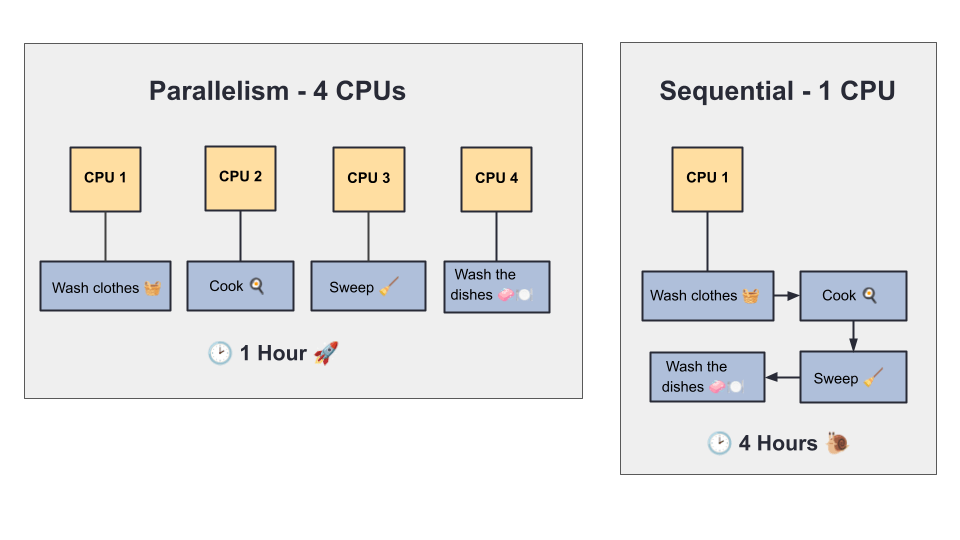
Think of it like this: you need to wash clothes and cook. If you wash the clothes first, then cook, that’s sequential execution. But if you start the washing machine and cook at the same time, that’s parallelism—two tasks running together.
Here’s how it looks in terms of CPU usage:
🔴 Sequential Execution (No Parallelism)
With a single CPU, tasks run one after the other:
- Wash clothes (1 hour)
- Then cook (1 hour)
- Total time: 2 hours
🟢 Parallel Execution (With Parallelism— 2 CPUs)
With two CPUs, each can handle a different task at the same time:
- CPU 1 washes clothes (1 hour)
- CPU 2 cooks (1 hour)
- Total time: 1 hour
In short, sequential processing makes the CPU handle one job at a time, increasing total execution time. Parallel processing splits the work across multiple CPUs, finishing tasks faster.
And with 4 CPUs? You could wash clothes, cook, sweep, and wash dishes—all at once!
When Should You Use Parallel Programming?
Parallel programming can greatly improve efficiency in many scenarios, but it’s not always the right choice. Here are the main situations where it shines—and where it’s better to avoid.
✅ When Parallelism Works Best
- You have multiple independent, time-consuming tasks.
- Example: Calculating statistics for several large files.
- Applications that serve many users at once, like web servers, cloud platforms, or REST APIs.
- CPU-intensive algorithms that can be split into smaller, parallelizable chunks.
Examples: Data analysis, scientific simulations, AI training, Big Data processing (MapReduce). - Systems with multiple CPU cores, where you can fully utilize available hardware resources.
🚫 When to Avoid Parallelism?
- Tasks are tightly dependent, where one must wait for the other to finish.
Example: Sequential processing where outputs are chained. - Small workloads that don’t justify the overhead of parallel processing.
- Risk of complex concurrency or synchronization issues that are hard to debug.
Example: Financial transactions requiring strict ordering. - Running on single-core or resource-limited environments.
Compare Parallelism and Asynchrony
| Aspect | Parallelism | Asynchrony |
| Definition | Executing multiple tasks at the same time — truly concurrent execution. | Handling tasks that may take time without blocking the main thread, but not necessarily running at the same time. |
| Goal | Speed up processing by leveraging multiple CPU cores or processors. | Keep a program responsive while waiting for something (I/O, network, file read, etc.). |
| Analogy | You have 4 chefs cooking 4 different dishes at once. | You have 1 chef who starts boiling water, then instead of waiting, starts chopping vegetables while the water boils. |
| Execution Model | – Uses multiple threads or processes. – Tasks run simultaneously (e.g., two CPU-bound – calculations running on different cores). – Usually CPU-bound work. | – Often single-threaded (e.g., JavaScript event loop). – Tasks are interleaved — start one task, switch to another while waiting. – Often I/O-bound work. |
Can They Be Combined?
Yes — for example:
- Use asynchrony to start multiple long-running tasks without blocking.
- Inside those tasks, use parallelism to speed up CPU-intensive parts.
Example: A web server handling many HTTP requests (async) where each request may perform data crunching (parallel).
Implementing Parallelism in ASP.NET Core
1. Parallel.ForEach
using System.Diagnostics;

void Process()
{
    var customers = new int[10];
    for (int i = 0; i < customers.Length; i++)
        customers[i] = i + 1;

    Console.WriteLine("*== Sequential Execution ==*");
    var sequentialTime = MeasureTime(() =>
    {
        foreach (var customer in customers)
        {
            ProcessPurchase(customer);
        }
    });
    Console.WriteLine($"Total time (sequential): {sequentialTime.TotalSeconds:F2} seconds\n");

    Console.WriteLine("*== Parallel Execution ==*");
    var parallelTime = MeasureTime(() =>
    {
        Parallel.ForEach(
            customers,
            customer =>
            {
                ProcessPurchase(customer);
            }
        );
    });
    Console.WriteLine($"Total time (parallel): {parallelTime.TotalSeconds:F2} seconds");
}

void ProcessPurchase(int customerId)
{
    Console.WriteLine($"[Customer {customerId}] Purchase started...");
    Thread.Sleep(1000);
    Console.WriteLine($"[Customer {customerId}] Purchase completed");
}

TimeSpan MeasureTime(Action action)
{
    var stopwatch = Stopwatch.StartNew();
    action();
    stopwatch.Stop();
    return stopwatch.Elapsed;
}

Process();
The code creates an array of 10 customers and simulates purchases in two ways: sequentially and in parallel.
Sequential: A foreach loop calls ProcessPurchase for each customer, which prints a start message, waits 1 second, and then prints a completion message. The total time is measured with MeasureTime.
Parallel: Uses Parallel.ForEach to run ProcessPurchase for multiple customers at the same time, reducing total execution time.
Run dotnet run to compare performance between the two approaches.
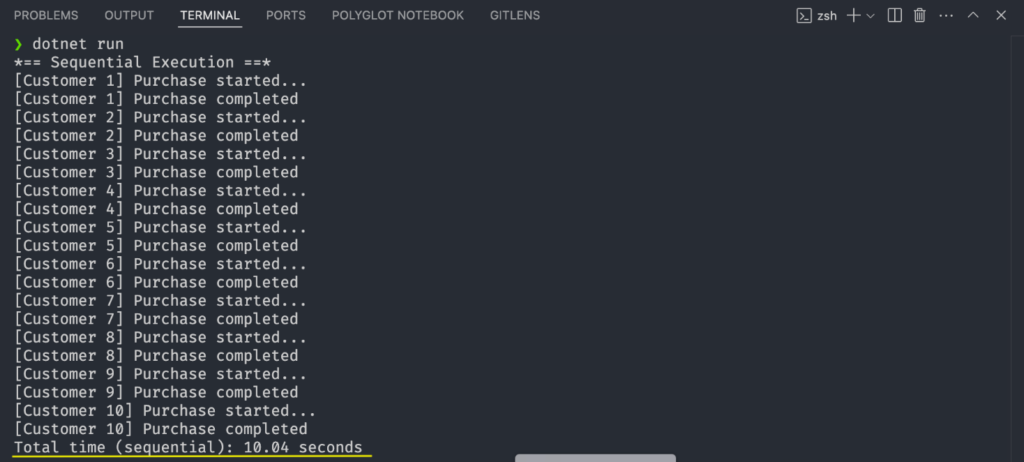
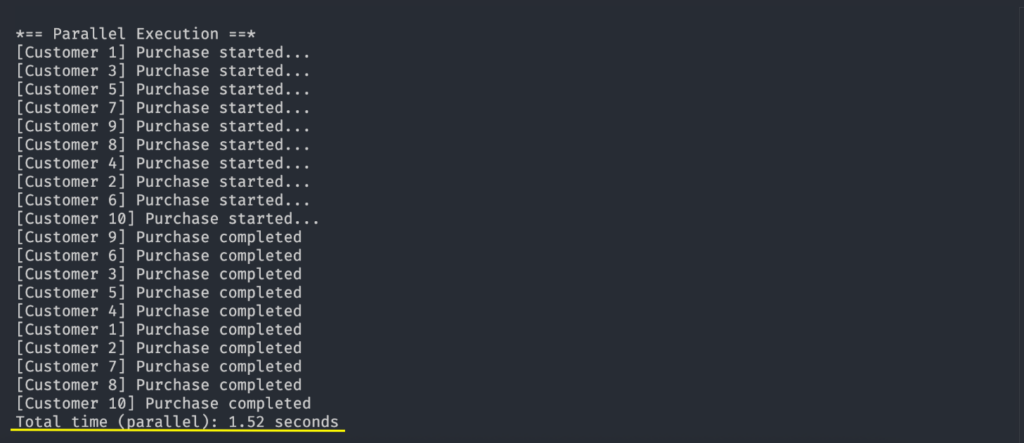
Note that the sequential execution took 10.4 seconds, while the parallel execution took only 1.52 seconds. This demonstrates that parallelism is superior in performance compared to sequential approaches.
2. Parallel.Invoke
Parallel.Invoke offers an easy way to run multiple actions simultaneously, without returning values, and waits for all to complete before proceeding.
The example below demonstrates how to use Parallel.Invoke:
void RunInvoke()
{
    Parallel.Invoke(
        () => PerformingAnAction("SendDataToA", 1000),
        () => PerformingAnAction("SendDataToB", 500),
        () => PerformingAnAction("SendDataToC", 2000)
    );

    Console.WriteLine("All tasks are finished.");
}

void PerformingAnAction(string name, int delay)
{
    Console.WriteLine($"Starting {name} on thread {Thread.CurrentThread.ManagedThreadId}");
    Thread.Sleep(delay);
    Console.WriteLine($"Ending {name}");
}
Note that the SendDataToA, SendDataToB and SendDataToC tasks are started at the same time, each in a different thread, and execution only continues after they are all finished.
3. Task.WhenAll and Task.WhenAny
These methods help run multiple tasks at once, letting you either wait for all to finish (WhenAll) or just the first (WhenAny).
Below, let’s see an example of how to use each of them.
Task.WhenAll: Runs all tasks in parallel and continues only when every task is done—ideal for cases like fetching data from several sources and processing once all results are ready.
async Task UsingWhenAll()
{
    var task1 = Task.Delay(2000).ContinueWith(_ => "Task 1 done");
    var task2 = Task.Delay(3000).ContinueWith(_ => "Task 2 done");
    var task3 = Task.Delay(1000).ContinueWith(_ => "Task 3 done");

    var allResults = await Task.WhenAll(task1, task2, task3);

    foreach (var result in allResults)
    {
        Console.WriteLine(result);
    }

    Console.WriteLine("All tasks completed.");
}
Note that Task.WhenAll executes everything before moving on. This method is useful for situations where you need to wait for everything and process the results together—for example, retrieving data from multiple sources and processing only after getting all of them.
Task.WhenAny: Starts multiple tasks and proceeds as soon as the first finishes—useful for timeouts, fallbacks, or racing tasks.
async Task UsingWhenAny()
{
    var task1 = Task.Delay(2000).ContinueWith(_ => "Task 1 done");
    var task2 = Task.Delay(3000).ContinueWith(_ => "Task 2 done");
    var task3 = Task.Delay(1000).ContinueWith(_ => "Task 3 done");

    var firstFinished = await Task.WhenAny(task1, task2, task3);

    Console.WriteLine($"First completed: {firstFinished.Result}");

    Console.WriteLine("Other tasks may still be running...");
}
Note that with Task.WhenAny you can be very efficient because you don’t have to wait until all other tasks are finished—you can move on as soon as the first one finishes. Some common examples for using Task.WhenAny are timeouts, fallbacks and task racing.
4. Task.Run
Task.Run is useful in situations where you want to execute a task asynchronously without blocking the main thread.
Use Task.Run for CPU-heavy tasks, such as complex calculations. Avoid using it for I/O operations, as ASP.NET Core already handles this.
async Task<string> ProcessDataAsync()
{
    return await Task.Run(() =>
    {
        // // Simulates heavy work
        Thread.Sleep(20);
        return "Processing completed!";
    });
}
5. Combining Parallelism with Asynchrony with Parallel.ForEachAsync
Combining parallelism with asynchrony can be beneficial, as it lets you process many items at once (Parallel.ForEachAsync) without blocking threads unnecessarily. This approach frees the thread while awaiting results.
The example will show how to use Parallel.ForEachAsync with async/await, along with ConcurrentBag<T> for thread-safe result handling.
async Task ExecuteAsync()
    {
        var userIds = Enumerable.Range(1, 100).ToList();
        var processedUsers = new ConcurrentBag<string>();

        var parallelOptions = new ParallelOptions
        {
            MaxDegreeOfParallelism = Environment.ProcessorCount
        };

        await Parallel.ForEachAsync(userIds, parallelOptions, async (userId, cancellationToken) =>
        {
            var userData = await FetchUserDataAsync(userId);
            var result = await ProcessUserDataAsync(userData);
            processedUsers.Add(result);
        });

        // At this point, 'processedUsers' contains all the results
        Console.WriteLine($"Total processed users: {processedUsers.Count}");
    }

    private async Task<string> FetchUserDataAsync(int userId)
    {
        await Task.Delay(100); // Simulate I/O-bound async work
        return $"UserData-{userId}";
    }

    private async Task<string> ProcessUserDataAsync(string userData)
    {
        await Task.Delay(50); // Simulate processing work
        return $"Processed-{userData}";
    }
The ExecuteAsync method processes user data in parallel.
It creates a list of user IDs (1–100) and a thread-safe ConcurrentBag to store results.MaxDegreeOfParallelism is set to match the number of CPU cores for balanced performance.
Using Parallel.ForEachAsync, each ID is processed by fetching and then handling user data asynchronously, with results added to the collection.
In the end, all users are processed in parallel, combining Parallel.ForEachAsync for concurrent execution with async/await to free threads during I/O waits.
Reference GitHub repository: ParallelFlow Source Code.
Conclusion
Parallelism offers a way to boost performance by running multiple tasks at the same time.
When combined with asynchrony, it can deliver even greater benefits.
This post explored five ASP.NET Core features for implementing parallelism, each suited to different scenarios with their own pros and cons.
Hopefully, it has clarified what parallelism is, why it matters, and how to apply it in real-world applications.