


We often don’t read the full content to find information, we scan and skim the content for what we want to read. After finding things we want, we start reading. So to help readers find things easily, we have to provide clear heading structures.
Therefore, using headings in content is important for well structure, as well as accessibility, usability and SEO. Headings not only organize content into logical order, make the content easy to read, to follow, to skim, scan and navigate but also help assistive technology to communicate with impairments such as screen readers to announce content structures… Search engines likes Google use headings to understand topic hierarchy and ranking pages on semantic meanings.
So, in this blog post, we will focus on how to use headings so that it is inclusive to your readers.
Don’t use headings for styling only
Headings define the hierarchy and outline of a page, it helps to provide high level information to those who use assistive technology, to understand and find the content effectively. Heading hierarchy is something arranged in order from most important to least one, from h1 to h6.
Screen readers users using shortcut key to navigate through heading as this is the fast way when you can’t see anything. So proper heading using is a must to support your users.
In practice, using h1 for page title, h2 for the most important sections and h3, h4 … for sub topics of h2, dividing h2 content into smaller ones.
Common mistakes might be:
- Using h2 heading for quote because it looks nice with big font size
- Using h2 heading for all headings because all headings have the same size in design
- Using a lot of h1 headings on a page
- Using <bold> and bigger font size instead of heading
- ….
Example of a good heading structure:
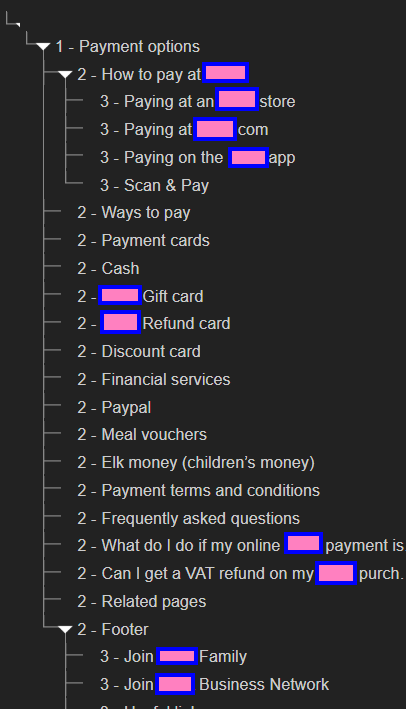
Example below is using css to styling so that it looks like a heading instead of heading:

Don’t skipped heading level
An example of skipped heading is from h2 to h4 without h3. While this might cause confuse to screen readers users, however, there is no blocking in access the content, so in some cases, this is acceptable.
Text in headings
A good headings text represents the content below, heading text but be clear and concise. Although there is no requirement about heading text length, however, a lengthy heading like a paragraph might be a nightmare with the screen reader users as well as difficult for normal users to scan.
An example of lengthy heading:

Semantic headings
There are scenarios that you can’t make changes to the existing hierarchy, then using an alternative method such as ARIA role=”heading”, aria-level to defined heading levels.
For example, in the previous example, we can update it as below:
Non-sematic heading version

Semantic heading

Conclusion
When creating an inclusive website, there are a lot of things to care, one of them is webpage structure. By following structuring your heading properly, you make your website more accessible with everyone, especially who depends on assistive technologies.