



Introduction
In Part 1 of this series, we created a simple backend for our booking agent using static, or “stub,” data. This was a great way to test the agent’s logic and the OpenAPI schema. Now, it’s time to build a robust, real-world solution.
This article, Part 2, focuses on replacing that temporary data with a powerful and persistent database: Amazon DynamoDB. We will modify our AWS Lambda function to connect directly to the DynamoDB table, allowing it to handle live, real-time data for booking appointments and checking availability.
Github repo: https://github.com/toan-lea1/Practical-AI-Lab/tree/main/agentic-ai/dental-appointment
Main steps
Step 1: DynamoDB Table Setup 🗃️
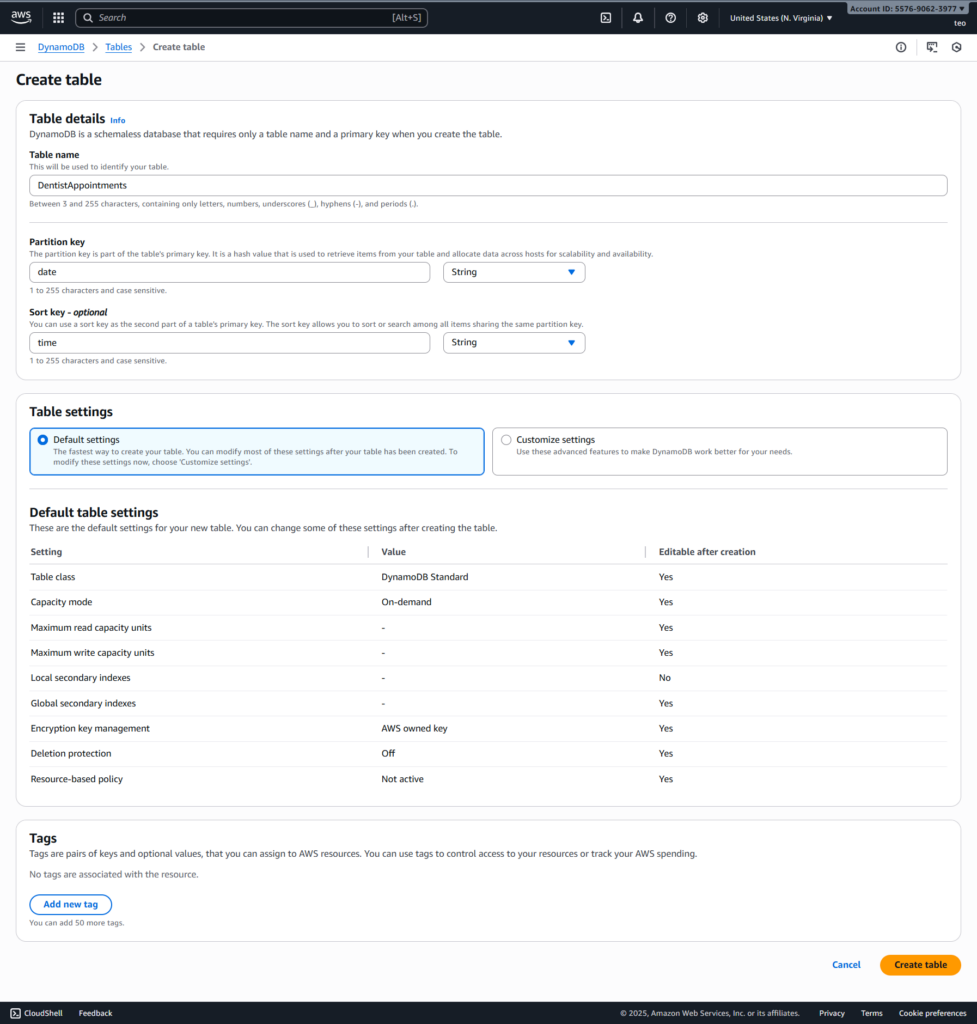
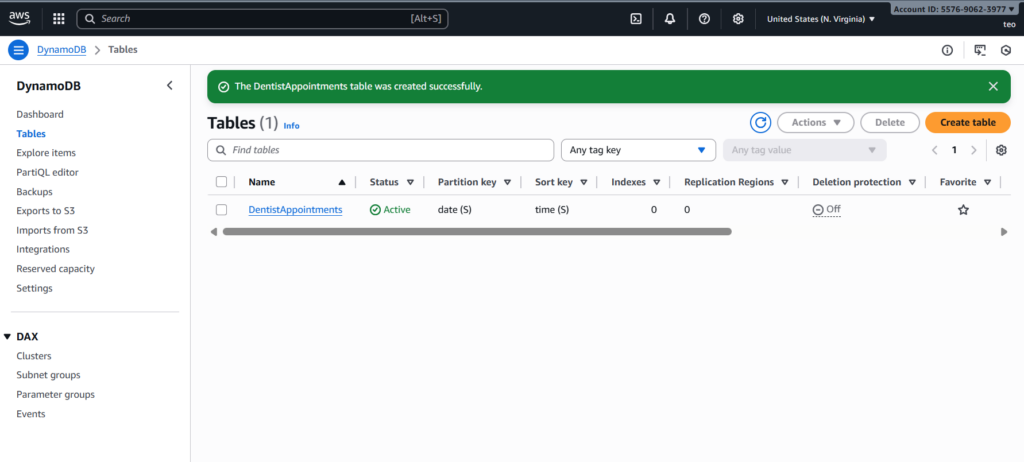
First, you need to create the database table that will store your appointment data.
- Create a DynamoDB Table:
- Go to the AWS DynamoDB console.
- Click “Create table”.
- Name the table
DentistAppointments. - For the Partition key, enter date and select String.
- For the Sort key, enter time and select String.
- This combination creates a composite primary key, allowing you to uniquely identify a single 30-minute time slot (
2025-09-12+10:30). This design is highly efficient for querying all appointments on a specific day.
Step 2: Sample Data Import 📥
To simulate a real-world scenario with existing appointments, you can import sample data into your new DynamoDB table.
Create a JSON file:
- Create a file named
appointments.jsonwith a list of booked appointments. The format is a little different from the previous example to match DynamoDB’s format, usingPutRequestfor each item. Sample JSON is as below:
{
    "DentistAppointments": [
        {
            "PutRequest": {
                "Item": {
                    "date": {
                        "S": "2024-11-20"
                    },
                    "time": {
                        "S": "10:00 AM"
                    },
                    "patientName": {
                        "S": "Jane Doe"
                    },
                    "dentistName": {
                        "S": "Smith"
                    }
                }
            }
        },
        {
            "PutRequest": {
                "Item": {
                    "date": {
                        "S": "2024-11-20"
                    },
                    "time": {
                        "S": "02:00 PM"
                    },
                    "patientName": {
                        "S": "John Smith"
                    },
                    "dentistName": {
                        "S": "Jones"
                    }
                }
            }
        },
        {
            "PutRequest": {
                "Item": {
                    "date": {
                        "S": "2024-11-21"
                    },
                    "time": {
                        "S": "09:00 AM"
                    },
                    "patientName": {
                        "S": "Alice Johnson"
                    },
                    "dentistName": {
                        "S": "Doe"
                    }
                }
            }
        }
    ]
}
Import the data using the AWS CLI:
- Open your terminal or command prompt.
- Ensure you have the AWS CLI installed and configured.
- Run the following command, replacing
your-regionwith your AWS region (e.g.,us-east-1). This command usesBatchWriteItemto efficiently upload the data.
Bash
aws dynamodb batch-write-item --request-items file://appointments.json --region your-region --profile <your_aws_profile>For example:
aws dynamodb batch-write-item --request-items file://appointments.json --region us-east-1 --profile teo
Return from above command as below: indicating that the process is finished successfully.
{
"UnprocessedItems": {}
}
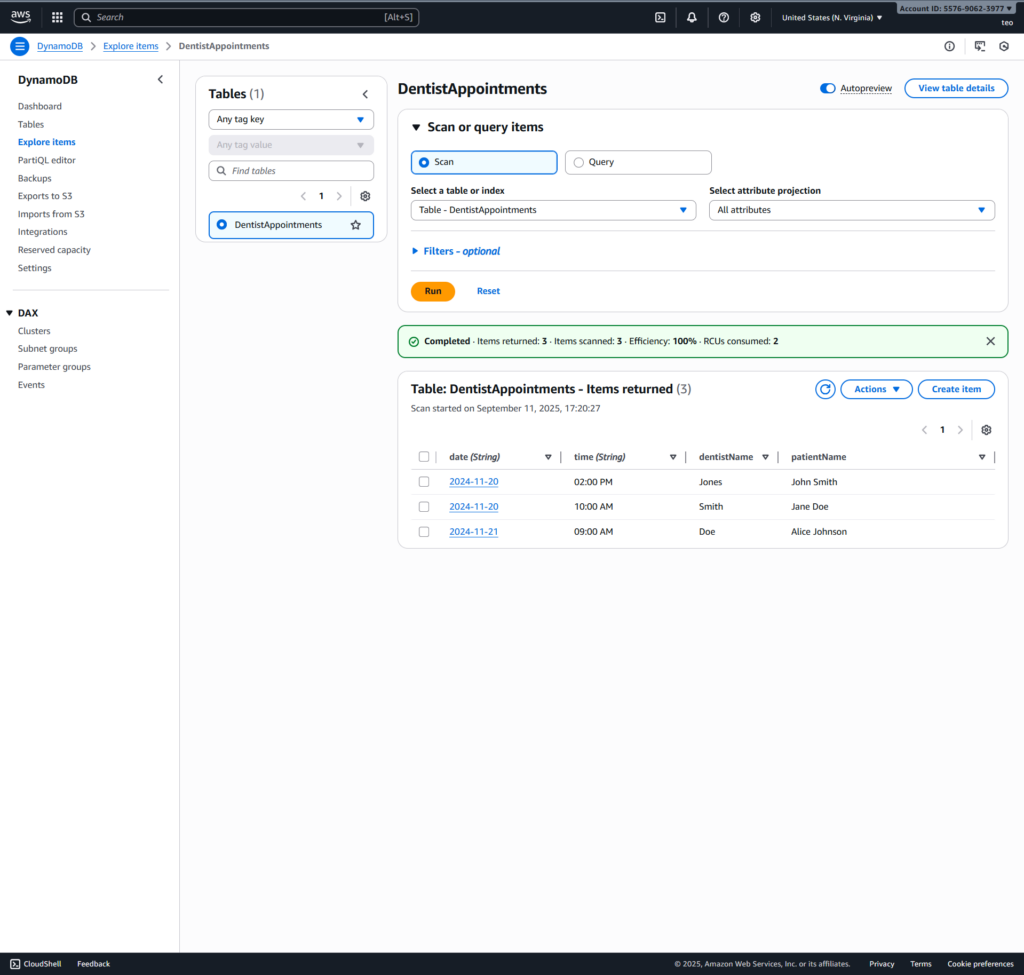
You can now check your DentistAppointments table in the DynamoDB console; the sample data should be there.
Step 3 – Update the lambda function
Go to the lambda function for our Bedrock agent
- Lambda > Functions > DentistBookingTools-9ni3a then update with the updated code (refer to https://github.com/toan-lea1/Practical-AI-Lab/blob/main/agentic-ai/dental-appointment/part2/lambda_function/lambda_handler.py) as below:
import logging
from typing import Dict, Any
from http import HTTPStatus
import json
import boto3
from botocore.exceptions import ClientError
from boto3.dynamodb.conditions import Key # Import Key for cleaner queries

logger = logging.getLogger()
logger.setLevel(logging.INFO)

# Initialize DynamoDB client
dynamodb = boto3.resource('dynamodb')
# Make sure this table name exists in your AWS account and has 'date' as a partition key
appointments_table = dynamodb.Table('DentistAppointments')

def lambda_handler(event: Dict[str, Any], context: Any) -> Dict[str, Any]:
    # Log the incoming event for debugging purposes
    logger.info(f"Received event: {json.dumps(event, indent=2)}")

    action_group = "Unknown" # Default for error handling
    api_path = "Unknown"     # Default for error handling
    http_method = "Unknown"  # Default for error handling

    try:
        action_group = event.get('actionGroup', action_group)
        api_path = event.get('apiPath', api_path)
        http_method = event.get('httpMethod', http_method)

        # Initialize action_response with defaults, will be updated based on logic
        action_response_content = {
            'actionGroup': action_group,
            'apiPath': api_path,
            'httpMethod': http_method,
            'httpStatusCode': HTTPStatus.OK.value,
            'responseBody': {}
        }

        result_body = {} # Dictionary to hold the actual response data

        # --- Logic for checking availability (GET /checkAvailability) ---
        if api_path == '/checkAvailability' and http_method == 'GET':
            parameters = {param['name']: param['value'] for param in event.get('parameters', [])}
            date_to_check = parameters.get('date')

            if not date_to_check:
                result_body = {"message": "Please provide a date to check availability."}
                action_response_content['httpStatusCode'] = HTTPStatus.BAD_REQUEST.value
            else:
                try:
                    # Define all possible slots for the day
                    all_slots = ["09:00 AM", "10:00 AM", "11:00 AM", "02:00 PM", "03:00 PM", "04:00 PM"]

                    # Query DynamoDB for booked appointments on the specified date
                    response = appointments_table.query(
                        KeyConditionExpression=Key('date').eq(date_to_check)
                    )

                    booked_slots = [item['time'] for item in response.get('Items', [])]

                    # Find available slots by subtracting booked slots from all slots
                    available_slots = [slot for slot in all_slots if slot not in booked_slots]

                    result_body = {"available_slots": available_slots}

                except ClientError as e:
                    logger.error(f"DynamoDB query failed for /checkAvailability: {e.response['Error']['Message']}")
                    result_body = {"message": "An error occurred while checking availability."}
                    action_response_content['httpStatusCode'] = HTTPStatus.INTERNAL_SERVER_ERROR.value
                except Exception as e:
                    logger.error(f"Unexpected error in /checkAvailability: {str(e)}")
                    result_body = {"message": "An unexpected error occurred while checking availability."}
                    action_response_content['httpStatusCode'] = HTTPStatus.INTERNAL_SERVER_ERROR.value

            action_response_content['responseBody']['application/json'] = {'body': json.dumps(result_body)}

        # --- Logic for booking an appointment (POST /bookAppointment) ---
        elif api_path == '/bookAppointment' and http_method == 'POST':
            # Safely get requestBody properties
            post_properties_list = event.get('requestBody', {}).get('content', {}).get('application/json', {}).get('properties', [])
            post_properties = {prop['name']: prop['value'] for prop in post_properties_list}

            dentist_name = post_properties.get('dentistName')
            patient_name = post_properties.get('patientName')
            date = post_properties.get('date')
            time = post_properties.get('time')

            if not all([dentist_name, patient_name, date, time]):
                result_body = {"message": "Missing one or more required parameters for booking."}
                action_response_content['httpStatusCode'] = HTTPStatus.BAD_REQUEST.value
            else:
                try:
                    # Check if the slot is already booked for the given date and time
                    # This is a basic check; a real-world system would need more robust concurrency control
                    check_response = appointments_table.get_item(
                        Key={'date': date, 'time': time}
                    )
                    if 'Item' in check_response:
                        result_body = {"message": f"The appointment slot on {date} at {time} is already booked."}
                        action_response_content['httpStatusCode'] = HTTPStatus.CONFLICT.value # 409 Conflict
                    else:
                        # Create a new item in the DynamoDB table
                        appointments_table.put_item(
                            Item={
                                'date': date,
                                'time': time,
                                'patientName': patient_name,
                                'dentistName': dentist_name
                            }
                        )

                        confirmation_message = f"Your appointment with Dr. {dentist_name} for {patient_name} has been confirmed on {date} at {time}."
                        result_body = {"message": confirmation_message}

                except ClientError as e:
                    logger.error(f"DynamoDB operation failed for /bookAppointment: {e.response['Error']['Message']}")
                    result_body = {"message": "An error occurred while booking the appointment."}
                    action_response_content['httpStatusCode'] = HTTPStatus.INTERNAL_SERVER_ERROR.value
                except Exception as e:
                    logger.error(f"Unexpected error in /bookAppointment: {str(e)}")
                    result_body = {"message": "An unexpected error occurred while booking the appointment."}
                    action_response_content['httpStatusCode'] = HTTPStatus.INTERNAL_SERVER_ERROR.value

            action_response_content['responseBody']['application/json'] = {'body': json.dumps(result_body)}

        # --- Fallback for invalid paths ---
        else:
            result_body = {"message": f"Invalid API Path or Method: {api_path} {http_method}"}
            action_response_content['httpStatusCode'] = HTTPStatus.NOT_FOUND.value # 404 Not Found
            action_response_content['responseBody']['application/json'] = {'body': json.dumps(result_body)}

        # Log the final response being sent back to Bedrock
        logger.info(f"Returning response: {json.dumps({'response': action_response_content}, indent=2)}")
        return {'response': action_response_content}

    except Exception as e:
        # Catch any unexpected errors that occur outside the main API path logic
        logger.critical(f"Critical unhandled error in lambda_handler: {str(e)}", exc_info=True)
        result_body = {"message": f"An unexpected error occurred: {str(e)}"}
        return {
            'response': {
                'actionGroup': action_group, # Use the captured actionGroup if available
                'apiPath': api_path,         # Use the captured apiPath if available
                'httpMethod': http_method,   # Use the captured httpMethod if available
                'httpStatusCode': HTTPStatus.INTERNAL_SERVER_ERROR.value, # 500 Internal Server Error
                'responseBody': {
                    'application/json': {'body': json.dumps(result_body)}
                }
            }
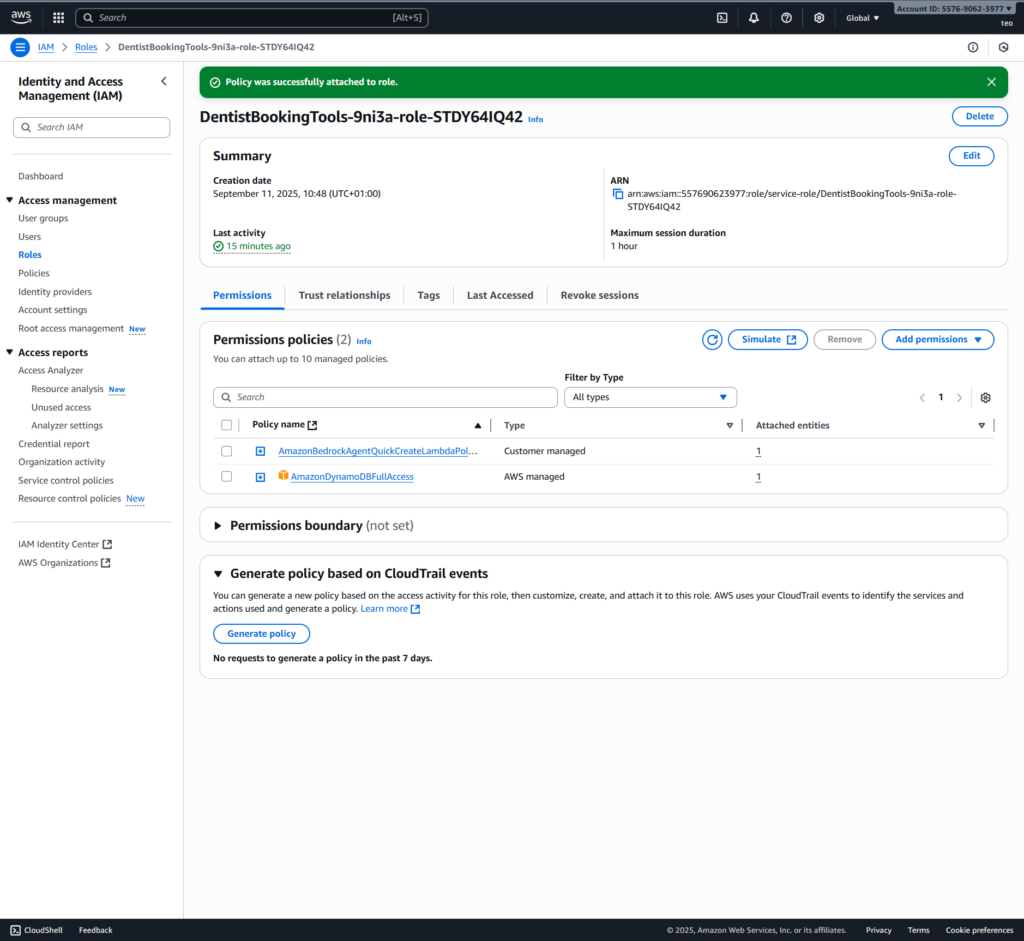
}- Update the role attached to the lamba function (called DentistBookingTools-9ni3a-role-STDY64IQ42): to have the permissions that querying/updating our Dynamo tables.
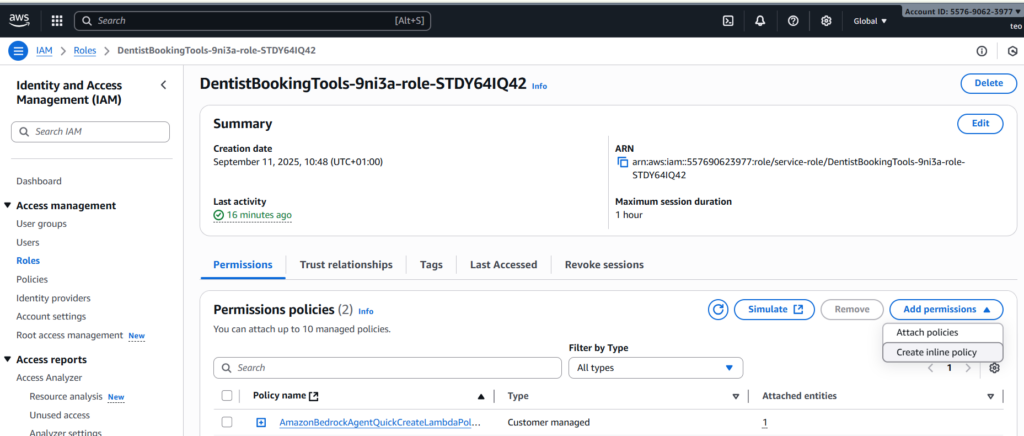
- Click [Add permission] > Attach policies then searching AmazonDynamoDBFullAccess
- For demo purpose, we will use grant AmazonDynamoDBFullAccess.
Please note in real scenarios, you should follow the principle of least privilege to grant only the necessary permissions
Step 4 – Test the agent
Given that we have the initial data for the DentistAppointment table as below:
Date,Time,Patient Name,Dentist Name
2024-11-20,10:00 AM,Jane Doe,Smith
2024-11-20,02:00 PM,John Smith,Jones
2024-11-21,09:00 AM,Alice Johnson,Doe
Slot available for a day:
all_slots = [“09:00 AM”, “10:00 AM”, “11:00 AM”, “02:00 PM”, “03:00 PM”, “04:00 PM”]
Here are two distinct real-world scenarios with corresponding questions to test the agent’s logic, including both successful and failure cases.
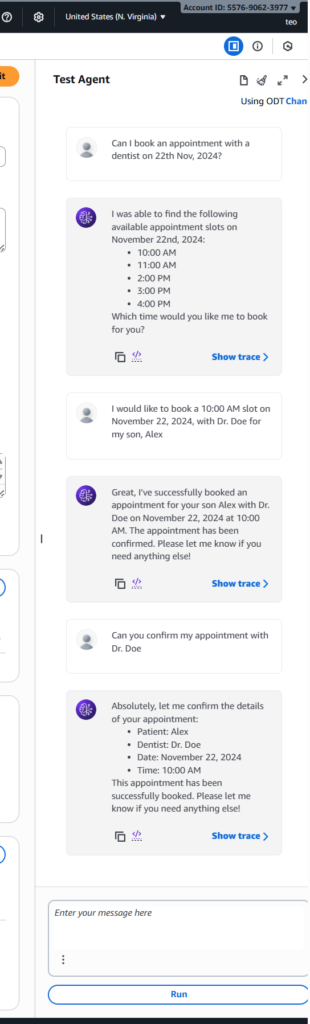
Scenario 1: Successful Booking and Follow-up
This scenario tests the agent’s ability to check for availability and successfully book a slot that is open. It also includes a follow-up question that the agent should be able to answer based on the stored data.
User Interaction:
- Question: “Can I book an appointment with a dentist on 22th Nov, 2024?”
- Goal: The agent should call the
/checkAvailabilityendpoint for tomorrow’s date. Since the sample calledappointments.json
- Goal: The agent should call the
- Question: “I would like to book a 10:00 AM slot on November 22, 2024, with Dr. Doe for my son, Alex.”
- Goal: The agent should call the
/bookAppointmentendpoint with the specified details. The request should succeed, and the agent should respond with a confirmation message.
- Goal: The agent should call the
- Question: “Can you confirm my appointment with Dr. Doe?”
- Goal: The agent should check the table for the new appointment with Dr. Doe and confirm the details with the user.
Scenario 2: Handling a Conflict and Rebooking
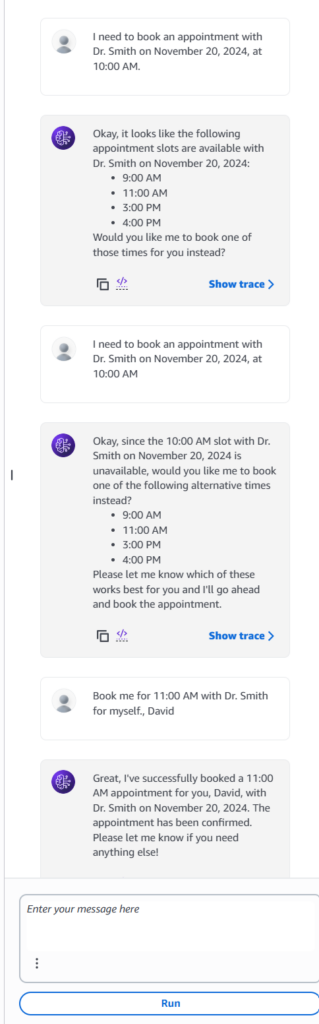
This scenario tests the agent’s ability to handle a conflict, a critical part of the new logic. The agent should guide the user to an alternative and then successfully complete the booking.
User Interaction:
- Question: “I need to book an appointment with Dr. Smith on November 20, 2024, at 10:00 AM.”
- Goal: The agent should attempt to call the
/bookAppointmentendpoint. However, since theappointments.jsonfile already has an appointment for this time, the conditional write in the Lambda function should fail. The agent should report back that the slot is no longer available.
The agent should now call the/checkAvailabilityendpoint for November 20th. This time, it should correctly identify that the 10:00 AM slot is taken and offer the remaining available slots, such as 9:00 AM, 11:00 AM, etc.
- Goal: The agent should attempt to call the
- Question: “Book me for 11:00 AM with Dr. Smith for myself.”
- Goal: The agent should successfully call the
/bookAppointmentendpoint for the 11:00 AM slot. The conditional write will succeed this time, and the agent should provide a confirmation message to the user.
- Goal: The agent should successfully call the
Clean up
Here is the list of steps that we need to do the clean-up to saving costs.
- Delete the DynamoDB tables
- Delete the Amazon Bedrock agents
- Delete the S3 buckets
- Delete the Lambda functions
- Delete generated IAM roles
Conclusion
With this updated Lambda function, your agent is now connected to a real, persistent database. This is a critical step in building a robust, production-ready system. Your appointment data is no longer temporary; it is securely stored and can be updated in real-time by multiple users.