



In today’s fast-paced digital world, businesses are constantly seeking innovative ways to streamline operations and enhance customer experiences. One of the most significant challenges for service-based industries, like dental practices, is efficient scheduling and appointment management. Traditional methods often lead to wasted time, missed calls, and human errors. The rise of artificial intelligence offers a powerful solution: Agentic AI. By leveraging this technology, we can create intelligent assistants capable of handling complex tasks autonomously, revolutionizing how businesses interact with their customers.
This series serve as a comprehensive guide to building a practical, real-world AI agent designed specifically to manage and book appointments for a dental practice using Amazon Bedrock.
Github repo: https://github.com/toan-lea1/Practical-AI-Lab/tree/main/agentic-ai/dental-appointment
Main steps
Step 1: Define the API Schema (OpenAPI)
The OpenAPI schema is the blueprint for your agent’s capabilities. It tells the agent what actions it can take, what information it needs, and what kind of response it should expect. You will create this file first and upload it to an S3 bucket.
Create an S3 Bucket: Go to the AWS S3 console and create a new bucket to store your schema file (e.g., bedrock-agent-schemas-34).

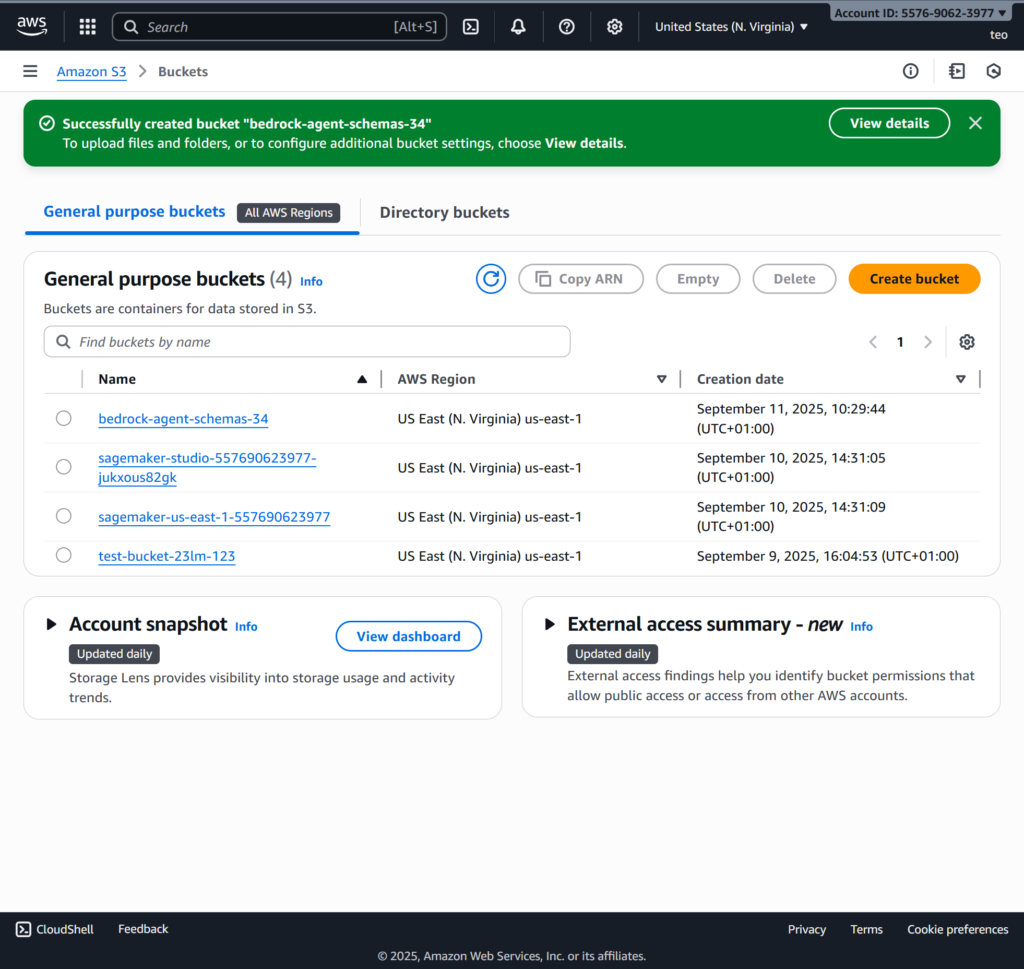
Write the OpenAPI Schema: Create a file named dentist_api_schema.yaml with the following content. This schema defines two key actions: checkAvailability (a GET request) and bookAppointment (a POST request).
Summary as below:
1. /checkAvailability
- Purpose: To retrieve available appointment times for a specific date.
- Method: This is a GET request, meaning it’s used to get information without creating or changing anything.
- Input: It requires a
dateas input, which is passed in the URL. - Output: It returns a list of available time slots in a JSON format.
2. /bookAppointment
- Purpose: To create a new appointment booking.
- Method: This is a POST request, meaning it’s used to send data to the server to create a new record.
- Input: It requires a JSON object with the
dentistName,patientName,date, andtimein the request body. - Output: It returns a confirmation message in JSON format once the booking is successful.
openapi: "3.0.0"
info:
  title: Dentist Appointment API
  version: "1.0.0"
  description: API for managing dentist appointments.
paths:
  /checkAvailability:
    get:
      description: Checks for available appointment slots on a given date.
      operationId: checkAvailability
      parameters:
        - name: date
          in: query
          required: true
          # The description for the parameter must be a top-level field
          description: The date to check availability for.
          schema:
            type: string
            format: date
      responses:
        '200':
          description: A list of available time slots.
          content:
            application/json:
              schema:
                type: object
                properties:
                  available_slots:
                    type: array
                    items:
                      type: string
                      format: time
                    description: A list of available time slots.
  /bookAppointment:
    post:
      description: Books a new appointment with a dentist.
      operationId: bookAppointment
      requestBody:
        required: true
        content:
          application/json:
            schema:
              type: object
              properties:
                dentistName:
                  type: string
                  description: The name of the dentist.
                patientName:
                  type: string
                  description: The name of the patient.
                date:
                  type: string
                  format: date
                  description: The desired date for the appointment.
                time:
                  type: string
                  description: The desired time for the appointment.
              required:
                - dentistName
                - patientName
                - date
                - time
      responses:
        '200':
          description: Appointment successfully booked.
          content:
            application/json:
              schema:
                type: object
                properties:
                  message:
                    type: string
                    description: A confirmation message for the user.
Then upload the file into the created bucket
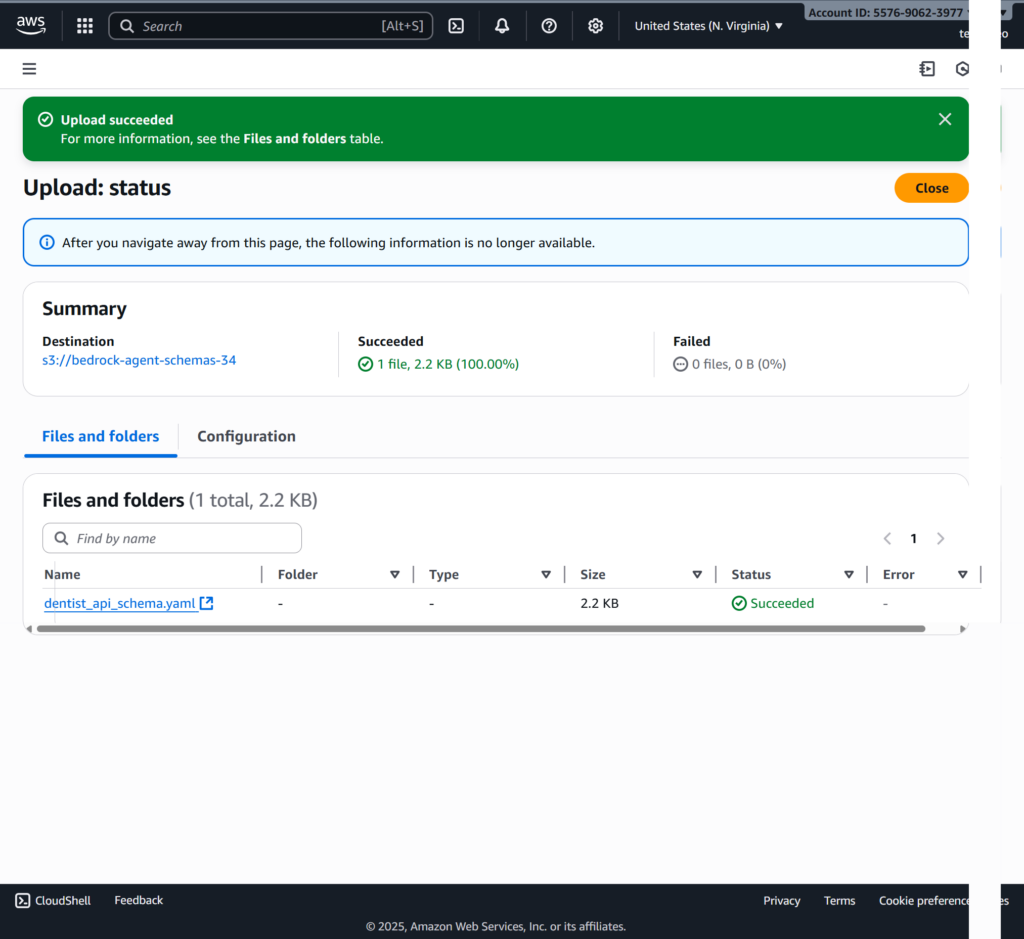
Step 2: Create and Configure the Bedrock Agent
Now, you will create the agent itself, defining its behavior and linking it to your API schema. The Lambda function will be added in a later step.
- Navigate to Bedrock: In the AWS Management Console, go to the Amazon Bedrock service.
- Create Agent: Select Agents from the left navigation pane and click Create agent.
- Provide Agent Details:
- Agent name: Choose a descriptive name, like
DentistBookingAgent. - Agent instructions: This is crucial for guiding the agent’s behavior. Use a detailed prompt like this:
“You are a friendly and helpful assistant for booking dentist appointments. Your core responsibilities are to find available appointment slots and book them. When a user asks for available times, use thecheckAvailabilitytool first. The user must provide a specific date. Only after the user has confirmed a specific time and you have all the necessary information, use thebookAppointmenttool to finalize the booking. Always confirm the booking by stating the details clearly.“ - Select a model: Choose a suitable model, such as Anthropic Claude 3 Haiku.
- Agent name: Choose a descriptive name, like
- Create an Agent Service Role: Click Create and use a new service role. Bedrock will automatically create a generated role automatically. For example: AmazonBedrockExecutionRoleForAgents_G4MUBY2R1X
- Configure Action Groups: On the next screen, click Add to create an action group.
- Action group name:
DentistBookingTools - Description: “API for managing dentist appointments.”
- API schema: Select Select from Amazon S3 and provide the full S3 URI for the schema file you uploaded in Step 1 (e.g.,
s3://bedrock-agent-schemas-34/dentist_api_schema.yaml). - Leave the Lambda function field empty for now. Click Add.
- Action group name:
- Review and Create: Review your configuration and click Create agent.
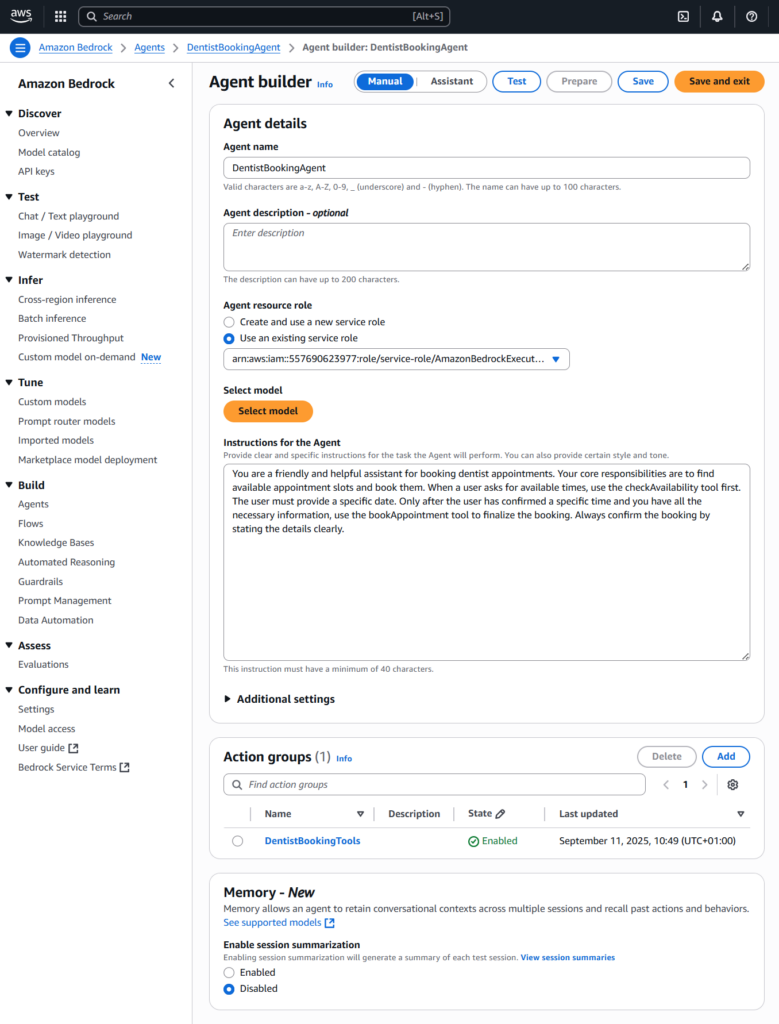

Next, click [Create] to finish creating the action group

Step 3: Develop the Lambda Function
This is where you write the code that executes the logic defined by the above action groups’ OpenAPI schema. To simplify things, this single Lambda function will handle all the API paths in our schema.
Go to the action group called [DentistBookingTools], then click [View] at the generated Lambda function called [DentistBookingToolks-<generated_id>]. For example: DentistBookingTools-9ni3a
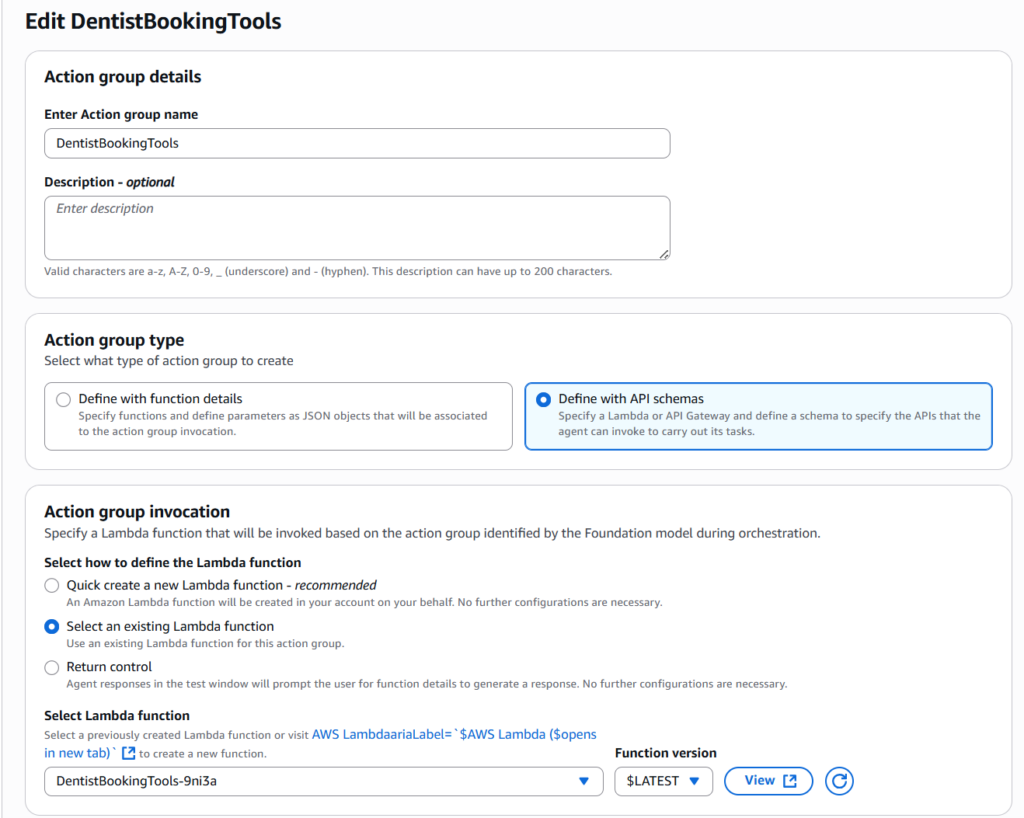
Default code in this lambda function:
import logging
from typing import Dict, Any
from http import HTTPStatus

logger = logging.getLogger()
logger.setLevel(logging.INFO)

def lambda_handler(event: Dict[str, Any], context: Any) -> Dict[str, Any]:
    """
    AWS Lambda handler for processing Bedrock agent requests.

    Args:
        event (Dict[str, Any]): The Lambda event containing action details
        context (Any): The Lambda context object

    Returns:
        Dict[str, Any]: Response containing the action execution results

    Raises:
        KeyError: If required fields are missing from the event
    """
    try:
        action_group = event['actionGroup']
        apiPath = event['apiPath']
        httpMethod =  event['httpMethod']
        parameters = event.get('parameters', [])
        message_version = event.get('messageVersion',1)

        # Execute your business logic here. For more information,
        # refer to: https://docs.aws.amazon.com/bedrock/latest/userguide/agents-lambda.html
        response_body = {
            'application/json': {
                'body': f'The API {apiPath} was called successfully with parameters: {parameters}!'
            }
        }
        action_response = {
            'actionGroup': action_group,
            'apiPath': apiPath,
            'httpMethod': httpMethod,
            'httpStatusCode': 200,
            'responseBody': responseBody
        }
        response = {
            'response': action_response,
            'messageVersion': message_version
        }

        logger.info('Response: %s', response)
        return response

    except KeyError as e:
        logger.error('Missing required field: %s', str(e))
        return {
            'statusCode': HTTPStatus.BAD_REQUEST,
            'body': f'Error: {str(e)}'
        }
    except Exception as e:
        logger.error('Unexpected error: %s', str(e))
        return {
            'statusCode': HTTPStatus.INTERNAL_SERVER_ERROR,
            'body': 'Internal server error'
        }
Update the Python Code: In the function’s code editor, paste the following Python code (refer to https://github.com/toan-lea1/Practical-AI-Lab/tree/main/agentic-ai/dental-appointment/part1/lambda_function) This code handles both GET and POST requests and processes the specific event payload from the Bedrock Agent.
import logging
from typing import Dict, Any
from http import HTTPStatus
import json


logger = logging.getLogger()
logger.setLevel(logging.INFO)

def lambda_handler(event: Dict[str, Any], context: Any) -> Dict[str, Any]:
    """
    AWS Lambda handler for processing Bedrock agent requests.

    Args:
        event (Dict[str, Any]): The Lambda event containing action details
        context (Any): The Lambda context object

    Returns:
        Dict[str, Any]: Response containing the action execution results

    Raises:
        KeyError: If required fields are missing from the event
    """
    try:
        # Extract key information from the Bedrock Agent event payload
        action_group = event['actionGroup']
        api_path = event['apiPath']
        http_method = event['httpMethod']

        # This is the wrapper for the final response
        action_response = {
            'actionGroup': action_group,
            'apiPath': api_path,
            'httpMethod': http_method,
            'httpStatusCode': 200,
            'responseBody': {}
        }

        # --- Logic for checking availability (GET /checkAvailability) ---
        if api_path == '/checkAvailability' and http_method == 'GET':
            parameters = {param['name']: param['value'] for param in event.get('parameters', [])}
            date_to_check = parameters.get('date')

            if not date_to_check:
                result = {"message": "Please provide a date to check availability."}
                action_response['httpStatusCode'] = 400
            else:
                # Simulate a database lookup for available slots
                available_slots = ["09:00 AM", "11:00 AM", "02:30 PM", "04:00 PM"]
                result = {"available_slots": available_slots}

            action_response['responseBody']['application/json'] = {'body': json.dumps(result)}

        # --- Logic for booking an appointment (POST /bookAppointment) ---
        elif api_path == '/bookAppointment' and http_method == 'POST':
            post_properties_list = event['requestBody']['content']['application/json']['properties']
            post_properties = {prop['name']: prop['value'] for prop in post_properties_list}

            dentist_name = post_properties.get('dentistName')
            patient_name = post_properties.get('patientName')
            date = post_properties.get('date')
            time = post_properties.get('time')

            if not all([dentist_name, patient_name, date, time]):
                result = {"message": "Missing one or more required parameters."}
                action_response['httpStatusCode'] = 400
            else:
                # Simulate booking the appointment
                confirmation_message = f"Your appointment with Dr. {dentist_name} for {patient_name} has been confirmed on {date} at {time}."
                result = {"message": confirmation_message}

            action_response['responseBody']['application/json'] = {'body': json.dumps(result)}

        # --- Fallback for invalid paths ---
        else:
            result = {"message": f"Invalid API Path or Method: {api_path} {http_method}"}
            action_response['httpStatusCode'] = 404
            action_response['responseBody']['application/json'] = {'body': json.dumps(result)}

        return {'response': action_response}

    except Exception as e:
        # This is the catch-all for any unexpected errors
        result = {"message": f"An unexpected error occurred: {str(e)}"}
        return {
            'response': {
                'actionGroup': 'Error',
                'apiPath': 'None',
                'httpMethod': 'None',
                'httpStatusCode': 500,
                'responseBody': {
                    'application/json': {'body': json.dumps(result)}
                }
            }
        }

Summary as below:
This Lambda function serves as a generic template for a Bedrock Agent’s backend. Its sole purpose is to receive and correctly respond to a Bedrock event payload, acting as a mock API handler with no real business logic.
How It Works
Placeholder Logic: Instead of performing a real task (like booking an appointment), the code simply generates a hardcoded success message. This part is a placeholder for where you’d add your custom code.
- checkAvailability Logic:
The code checks if theapi_pathis/checkAvailabilityand thehttp_methodisGET. If these conditions are met, the function:- Does not perform a real-time check against a database or external system.
- Returns a hardcoded, static list of available time slots (e.g., “09:00 AM”, “11:00 AM”).
- bookAppointment Logic:
The code checks if theapi_pathis/bookAppointmentand thehttp_methodisPOST. If these conditions are true, the function: - Correct Formatting: The function’s main job is to ensure the response payload is formatted exactly as the Bedrock Agent expects. It builds a JSON object with the required
actionResponseandresponseBodykeys and a200HTTP status code. - Error Handling: It includes robust
try-exceptblocks to handle potential issues. AKeyErroris caught if the agent’s payload is missing a required field, and a generalExceptioncatches any other unexpected errors, returning appropriate HTTP status codes.
After that, Click Deploy to deploy your changes.
Step 4: Link and Test the Agent
The final step is to prepare the agent and test the entire flow.
- Go back to your Bedrock Agent’s details page then click [Save] to update the agent.
- Click Prepare & Test: to update the agent’s DRAFT version. Once it’s ready, use the chat interface to test your multi-step conversation.

Given that, we have available slots with below time for all days
available_slots = ["09:00 AM", "11:00 AM", "02:30 PM", "04:00 PM"]Successful Invocation
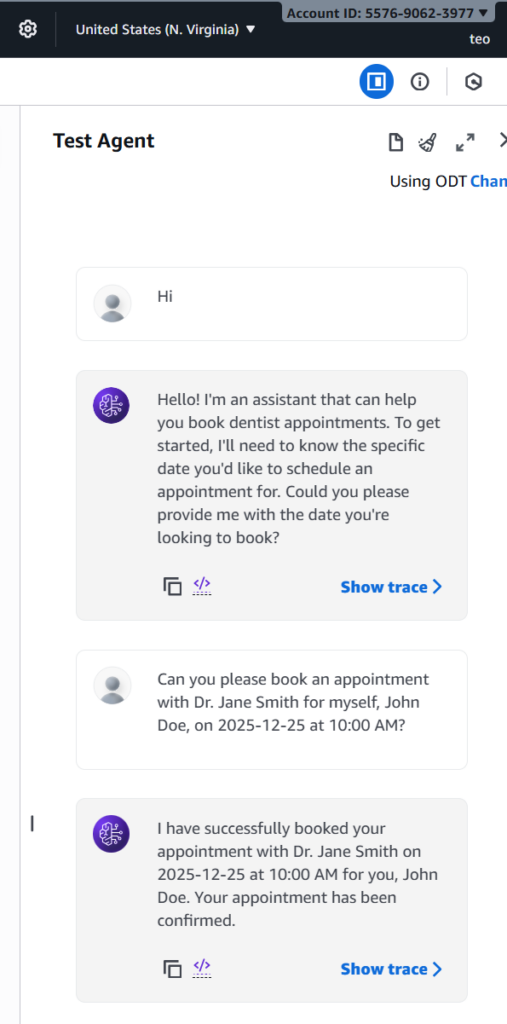
Question1 : “Can you please book an appointment with Dr. Jane Smith for myself, John Doe, on 2025-12-25 at 10:00 AM?”
What to look for in the trace:
- The agent’s reasoning should show it identified the intent to “book an appointment.”
- It should correctly extract all four parameters:
dentistName,patientName,date, andtime. - The trace will show a successful
POSTcall to the/bookAppointmentAPI path. - The final response from the agent should be the confirmation message returned by your Lambda function (e.g., “Your appointment with Dr. Jane Smith…”).
Partial Information and Contextual Chaining
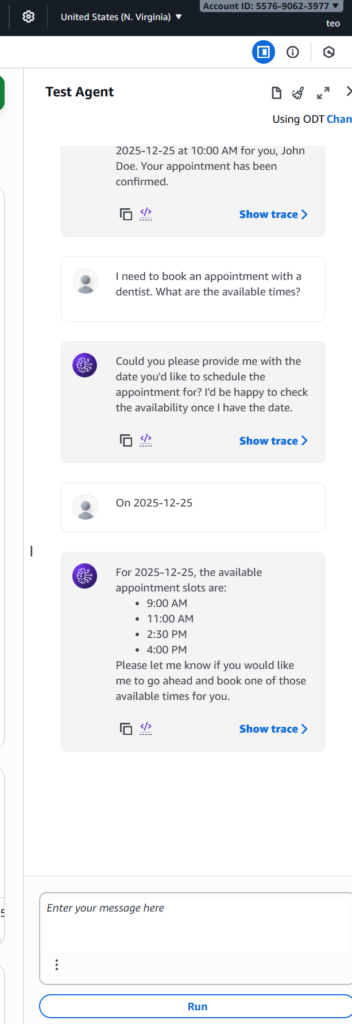
Question:1 “I need to book an appointment with a dentist. What are the available times?”
What to look for in the trace:
- The agent’s reasoning should recognize that the user wants to check availability, not book an appointment.
- It should identify that a date is missing to perform the
checkAvailabilityaction. - The agent’s response should be a clarifying question, such as “What date would you like to check for availability?”
- Follow-up question: If you then respond with “On 2025-12-25,” the agent should call the
checkAvailabilityaction group with the new information. The trace will show a successfulGETrequest to the/checkAvailabilityAPI path, and the agent’s final response should list the available times returned by your Lambda.
Scenario: Booking a Dentist appointment
This scenario tests the agent’s conversational skills and its ability to remember context across multiple turns.
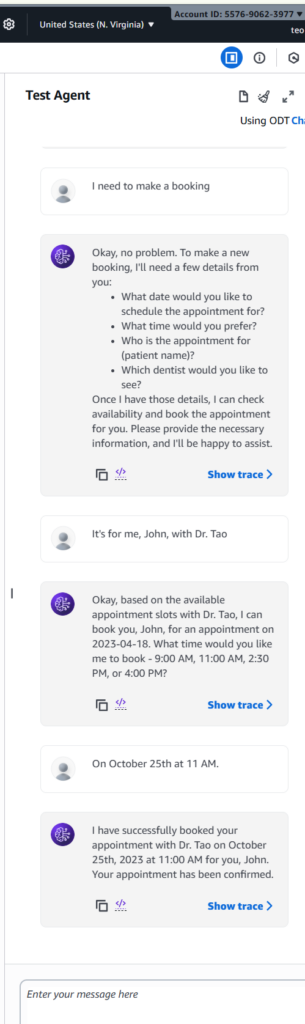
- Initial Prompt: The user’s first query (“I need to make a booking”) is an open-ended request that doesn’t contain enough information to call any action group. The agent, based on its instructions, should identify the need to gather more information and politely ask for all the required parameters at once.
- Contextual Understanding: When the user provides the patient’s and dentist’s names, the agent demonstrates its ability to retain this information. It then asks for the missing details (date and time) and remembers the previously provided information.
- Final Action: Once the user provides the date and time, the agent has all the necessary information to perform the
bookAppointmentaction. It should then invoke the Lambda function with the full set of parameters, leading to a successful booking.
Clean up
Here is the list of steps that we need to do the clean-up to saving costs.
- Delete the Amazon Bedrock agents
- Delete the S3 buckets
- Delete the Lambda functions
- Delete generated IAM roles
Conclusion
The development of this AI agent for a dental practice demonstrates the immense potential of agentic AI in transforming routine business operations. By combining the conversational prowess of the Claude 3 Haiku model with a well-defined set of tools and business rules, we have created an autonomous system that can not only understand user requests but also execute complex, real-world tasks like checking availability and booking appointments.
In the next part of this series, we’ll enhance the agent’s capabilities by leveraging a scalable database like DynamoDB for persistent data, providing a more robust and reliable solution.