


1. What is BDD
Behavior-Driven Development (BDD) is a software development methodology that focuses on collaboration between developers, quality assurance professionals and business stakeholders. It bridges the gap between technical and non-technical teams by defining application behavior in a clear, human-readable format. This is typically done using the Given-When-Then structure which describes a feature in a way that’s easy for anyone to understand.
2. Why Playwright Test Runner?
Playwright is a modern, open-source automation library developed by Microsoft. It provides a single API to automate web browsers like Chromium, Firefox and WebKit, making it a powerful tool for end-to-end testing. When combined with BDD it becomes even more effective.
However, when you integrate Playwright with CucumberJS, your tests are executed by the Cucumber runner by default. This means you use the Cucumber configuration file instead of playwright.config.ts, making that Playwright config file essentially redundant. As a result, you won’t be able to take advantage of features that are native to the Playwright test runner, such as parallel execution or timeout management.
This is where playwright-bdd comes in. Instead of relying on the Cucumber runner and treating Playwright as just a library, playwright-bdd converts BDD scenarios directly into test files and runs them using the Playwright test runner. This gives you all the advantages of the Playwright runner, including:
- Parallelism: Playwright runs tests in parallel by default, which can dramatically speed up your test suite.
- Auto-waiting: Playwright assertions automatically retry until they pass or time out, which is extremely useful when dealing with dynamic web content.
- Powerful Debugging: Tools like the Playwright Inspector and Visual Studio Code Extension make debugging easy and intuitive.
3. How it works

playwright-bdd works by mapping human-readable Gherkin steps to the underlying JavaScript or TypeScript code that performs the automation. Here is a quick demo of how it works
Step 1: Install playwright-bdd
Option 1: If you are going to work with a new project
Install Playwright and Playwright-BDD:
npm i -D @playwright/test playwright-bdd
Install Playwright browsers:
npx playwright install
Option 2: if you are working on existing project with Playwright, you only need to install playwright-bdd
npm i -D playwright-bdd
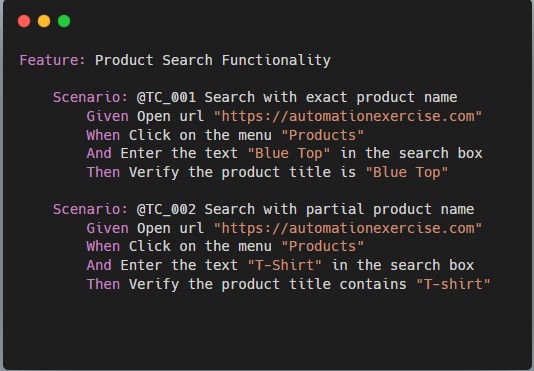
Step 2: Create a feature file
This is where you describe your BDD scenarios in plain language
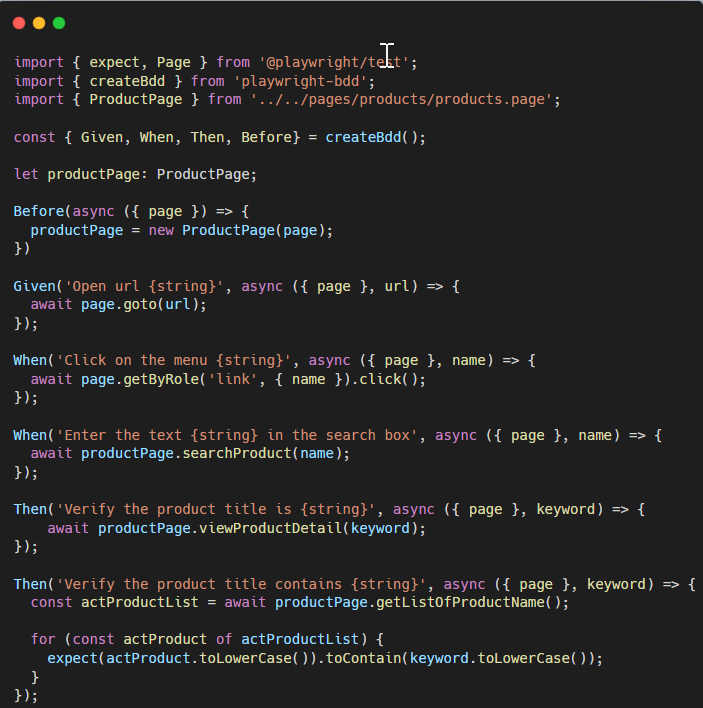
Step 3: Create a step definitions file
You write the code that maps the Gherkin steps above to specific actions
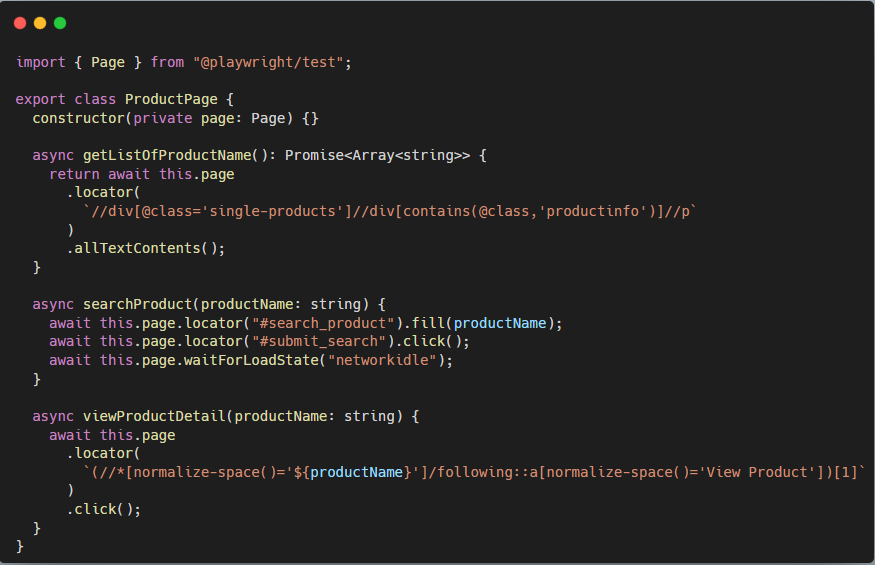
We can apply the Page Object Model (POM) pattern in this project by creating a corresponding page file
Step 4: Configure Playwright
Configure Playwright to recognize your feature and step definition files
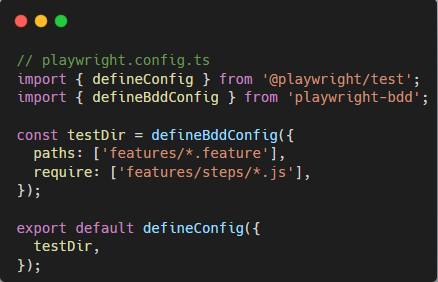
When you run the npx playwright test command, playwright-bdd will automatically convert the products.feature file into a Playwright test file and execute it
4. The BDD Approach to the next level with AI
In the age of AI, the BDD approach can be supercharged, directly supporting a shift-left testing strategy. By integrating AI into the BDD workflow, we can perform testing activities much earlier in the development cycle, finding and fixing issues at the requirements and design phases rather than waiting until the end.
Generate
You can provide a high-level user story or business requirement to an AI chat model. The AI can then generate multiple, well-structured, and human-readable BDD scenarios in the Given-When-Then format. This dramatically speeds up the initial test design phase.
Validate
Once the AI generates the scenarios, you can easily refine them with your colleagues or even the AI itself. Because the scenarios are in plain text, stakeholders can collaborate without needing to understand any code.
Automate
With the scenarios finalized, you can link them to your existing step definitions. By reusing steps, you can prevent the test codebase from growing exponentially. playwright-bdd makes this easy by allowing you to write reusable, modular step definitions.
Exporting Steps for AI
To supercharge your workflow, you can export your existing step definitions to use as a reference for AI. The playwright-bdd library has a dedicated tool built just for this.
- Build your step dictionary: run the
bddgen exportcommand in your terminal. This command scans your project for all defined step definitions and prints them in a clean, parseable list. - Use the list as an AI prompt: simply copy the list of steps and provide them to an AI model like ChatGPT. The list acts as a dictionary, telling the AI exactly what actions your automation framework can already perform.
- An example prompt: combine your user story with the exported steps to get a new scenario
Example:
Step 1: Imagine you have a E-commerce website and want to cover it with BDD tests written by ChatGPT and executed by Playwright. You have step definitions already

Step 2: Run the bddgen export command in your terminal. This command scans your project for all defined step definitions and prints them in a clean
- Given Open url {string}
- When Click on the menu {string}
- When Enter the text {string} in the search box
- Then Verify the product title is {string}
- Then Verify the product title contains {string}
Step 3: Combine your user story with the exported steps to get new scenarios
Prompt template
{user story description}
Format output as a single gherkin file.
Include user story text in the file.
Use Background for common steps.
Use “And” keyword for repeated “Given” / “When” / “Then”.
Strictly use only the following step definitions:
{steps list from bddgen export}
Provide the corresponding project information
As a user I want to write testcase for search product function in the E-commerce website
Format output as a single gherkin file.
Include user story text in the file.
Use Background for common steps.
Use “And” keyword for repeated “Given” / “When” / “Then”.
Strictly use only the following step definitions:
- Given Open url {string}
- When Click on the menu {string}
- When Enter the text {string} in the search box
- Then Verify the product title is {string}
- Then Verify the product title contains {string}
Here is list of test scenarios generated by ChatGPT
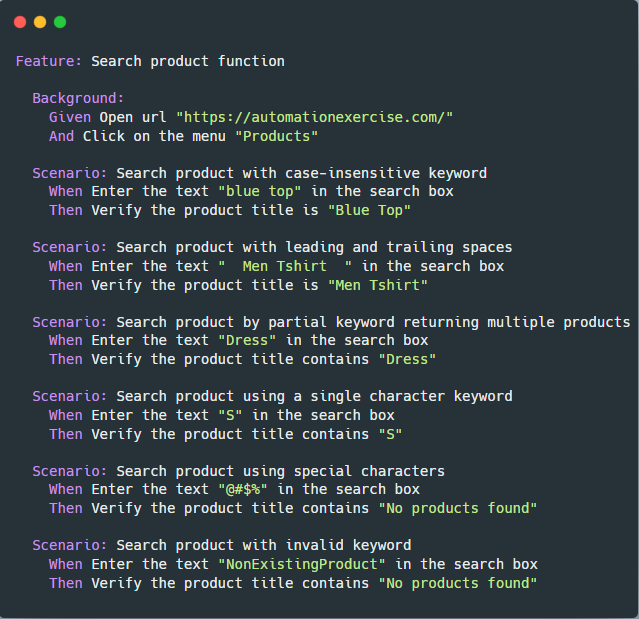
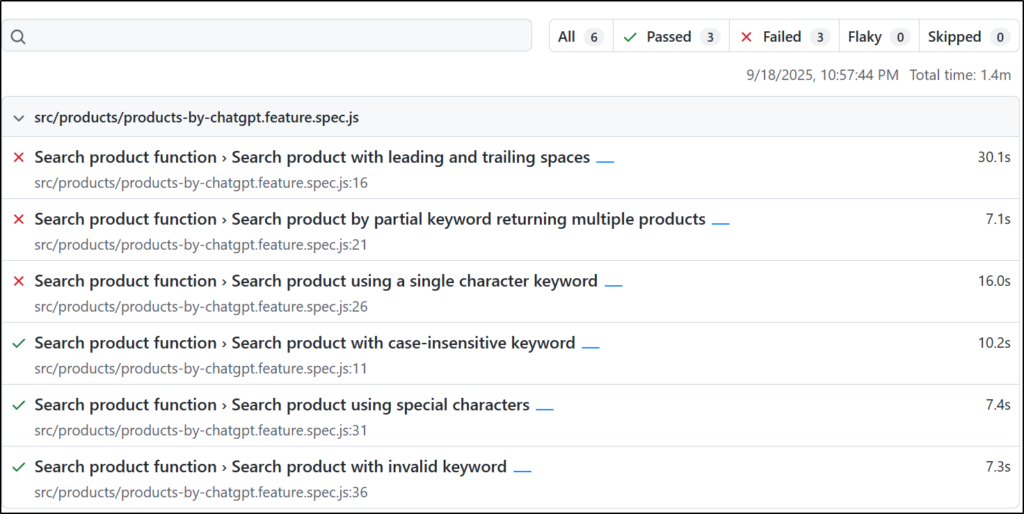
Step 4: You can save that .feature file and run tests with the command npx bddgen && npx playwright test. Here is final test result
5. Conclusion
In the world of automated testing, the combination of Playwright and BDD offers a powerful solution. By leveraging playwright-bdd, you can move beyond the limitations of traditional integrations and unlock the full potential of Playwright’s test runner, including its speed, reliability and built-in parallelism.
This approach isn’t just about technical efficiency it is about a strategic shift. By integrating BDD with AI tools, you can move testing to the beginning of your development cycle, allowing business and technical teams to collaborate seamlessly. This shift-left strategy helps you find and prevent issues at the earliest possible stage, saving valuable time and resources.
Like any tool, playwright-bdd has a few challenges. As a community project, it depends on its maintainers to stay updated with Playwright’s quick releases. But these small issues are easily overcome by the huge advantages. The library helps you write strong, readable tests that are easy to maintain and aligned with your business goals. Ultimately, playwright-bdd is a powerful tool for building higher-quality software and improving teamwork.