



How we built a serverless system that lets my team trigger tests by simply typing “test” in Slack – without spending a penny.
The Problem: Manual Test Triggers Are Annoying
Imagine this: You’re in the middle of a Slack conversation about a new feature, someone asks, “Can we run the tests to make sure this works?” and suddenly everyone has to:
- Switch to GitLab
- Navigate to the CI/CD section
- Manually trigger a pipeline
- Switch back to Slack to share the results
There had to be a better way. What if we could just type test In Slack and have it automatically trigger our GitLab pipelines?
That’s exactly what we built, and the best part? It costs absolutely nothing to run.
Slack as a CI/CD Command Centre
We wanted to create something where anyone on the team could trigger different types of tests directly from Slack:
test                    → Run all tests
test unit              → Run only unit tests
test e2e production    → Run E2E tests on production
test integration branch develop → Run integration tests on develop branch
And get instant feedback:
Tests triggered by @john!
- Suite: unit
- Environment: staging
- Branch: develop
- Pipeline: https://gitlab.com/project/pipelines/12345
The Architecture: Simple but Powerful
Here’s the flow we designed:
Slack Message → Slack Event → Vercel Function → GitLab API → Pipeline Runs → Slack NotificationWhy this stack?
- Slack: Where our team already communicates
- Vercel: Free serverless functions with great developer experience
- GitLab: Our existing CI/CD platform
- GitHub: Free hosting for the function code
Total monthly cost: $0
Part 1: Setting Up the GitLab Foundation
Creating Pipeline Triggers
First, we needed a way for external services to trigger GitLab pipelines. GitLab has a great feature called “Pipeline Triggers” for exactly this.
Steps to be followed:
- Went to the GitLab project → Settings → CI/CD
- Expanded “Pipeline triggers”
- Created a new trigger with description “Slack integration”
- Copied the generated token (starts with
glptt-)
Note down your Project ID too – it’s the number shown under your project name.
Designing the CI/CD Pipeline
We wanted our pipeline to only run when triggered from Slack, not on every commit. Here’s the YAML we created:
# .gitlab-ci.yml
image: alpine:latest

stages:
  - test

slack_test:
  stage: test
  rules:
    # Only run when triggered via Slack
    - if: $CI_PIPELINE_SOURCE == "trigger" && $TRIGGERED_BY_SLACK == "true"
  before_script:
    - apk add --no-cache curl
  script:
    - echo "Pipeline triggered by Slack user: $SLACK_USER"
    - echo "Test suite: $TEST_SUITE"
    - echo "Environment: $TEST_ENVIRONMENT"
    - sleep 5  # Simulate test execution
    - echo "Test completed successfully"
  after_script:
    # Post results back to Slack
    - 'curl -X POST -H "Authorization: Bearer $SLACK_BOT_TOKEN"
        -H "Content-Type: application/json"
        --data "{\"channel\": \"$SLACK_CHANNEL\", \"text\": \"Pipeline completed! Triggered by <@$SLACK_USER>\"}"'
Key learnings:
- The
rulessection ensures this only runs on API triggers, not commits - Environment variables like
$SLACK_USERget passed from the Slack function - The
after_scriptposts results back to Slack, creating a complete feedback loop
Part 2: Building the Slack App
Creating the App
Building a Slack app was straightforward:
- Went to https://api.slack.com/apps
- Created a new app “from scratch”
- Named it “GitLab Test Trigger”
Configuring Permissions
The app needs specific permissions to read messages and post responses:
Bot Token Scopes we added:
channels:history– Read messages in channelschat:write– Post messages back to channelsusers:read– Get user information for @mentions
After adding scopes, you must reinstall the app in your workspace for changes to take effect.
Getting the Tokens
Two critical pieces of information:
- Bot User OAuth Token (starts with
xoxb-) – For posting messages - Signing Secret – For verifying requests actually come from Slack
We stored these safely for the next step.
Part 3: The Serverless Function
This is where it gets interesting. We needed a webhook that could:
- Receive Slack events
- Parse test commands
- Trigger GitLab pipelines
- Handle errors gracefully
Choosing Vercel
Why Vercel over AWS Lambda or other options?
- Free tier is generous (100GB bandwidth/month)
- Zero configuration deployment from GitHub
- Excellent developer experience
- Built-in environment variable management
The Function Structure
We organised the code into clear responsibilities:
// Command parsing - turns "test unit staging" into structured data
function parseTestCommand(message) {
  const text = message.toLowerCase().trim();

  // Check if it's a test command
  const testTriggers = ['test', 'run test', 'run tests'];
  const isTestCommand = testTriggers.some(trigger => text.includes(trigger));

  if (!isTestCommand) return null;

  // Parse test suite, environment, branch
  // Returns: { testSuite: 'unit', environment: 'staging', branch: 'main' }
}

// GitLab integration - triggers the actual pipeline
async function triggerGitLabTests(testConfig, slackUser, slackChannel) {
  const variables = {
    TRIGGERED_BY_SLACK: 'true',
    SLACK_USER: slackUser,
    SLACK_CHANNEL: slackChannel,
    TEST_SUITE: testConfig.testSuite,
    TEST_ENVIRONMENT: testConfig.environment
  };

  // Call GitLab's trigger API
  const response = await fetch(
    `${GITLAB_URL}/api/v4/projects/${GITLAB_PROJECT_ID}/trigger/pipeline`,
    {
      method: 'POST',
      headers: { 'Content-Type': 'application/json' },
      body: JSON.stringify({
        token: GITLAB_TRIGGER_TOKEN,
        ref: testConfig.branch,
        variables
      })
    }
  );

  return await response.json();
}
Security: Verifying Slack Requests
One crucial security measure, verifying that requests actually come from Slack:
function verifySlackRequest(req) {
  const signature = req.headers['x-slack-signature'];
  const timestamp = req.headers['x-slack-request-timestamp'];
  const body = JSON.stringify(req.body);

  const hmac = crypto.createHmac('sha256', SLACK_SIGNING_SECRET);
  const [version, hash] = signature.split('=');
  hmac.update(`${version}:${timestamp}:${body}`);

  return hmac.digest('hex') === hash;
}
This prevents malicious actors from triggering your pipelines.
Part 4: Deployment and Configuration
GitHub to Vercel Pipeline
We set up automatic deployment:
- Created a public GitHub repository (required for free Vercel tier)
- Connected Vercel to the repository
- Every push to main automatically deploys
File structure:
slack-gitlab-bridge/
├── api/
│   └── slack-event.js    # The serverless function
├── package.json          # Node.js configuration
├── vercel.json          # Vercel settings
└── README.md
Environment Variables
All the secrets go into Vercel’s environment variables:
SLACK_SIGNING_SECRET=abc123...
SLACK_BOT_TOKEN=xoxb-123-456...
GITLAB_PROJECT_ID=74168798
GITLAB_TRIGGER_TOKEN=glptt-def456...
GITLAB_URL=https://gitlab.com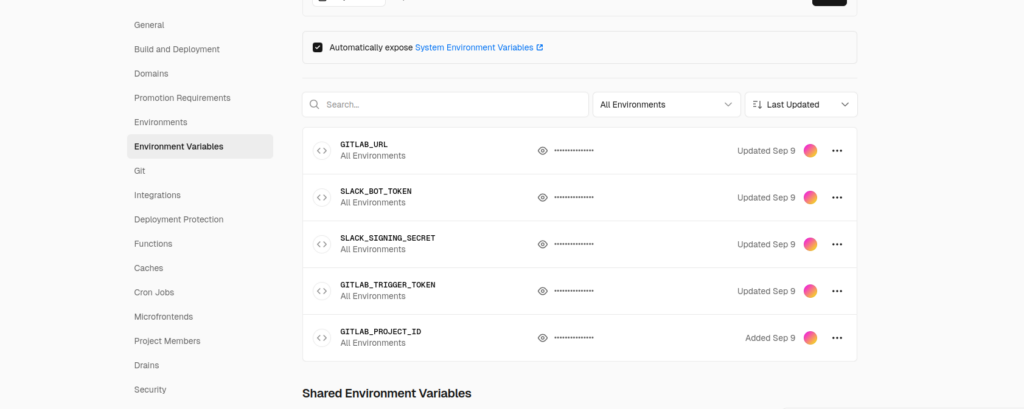
No secrets in the code repository!
Connecting Slack to Vercel
The final piece, telling Slack where to send events:
- In Slack app settings → Event Subscriptions
- Request URL:
https://my-app.vercel.app/api/slack-event - Subscribe to
message.channelsevents
Slack sends a verification challenge, and our function handles it:
if (req.body?.type === 'url_verification') {
  return res.json({ challenge: req.body.challenge });
}
That’s it, just type “test” in your specified Slack channel, and you are good to go.
Conslusion
The best part: Watching team members naturally start running tests more often because it became so easy. Sometimes the best productivity improvements are the ones that remove friction from workflows people already want to follow.
The complete code and step-by-step guide are available on GitHub. Feel free to reach out if you have questions or build something cool with this approach!
Tech Stack: Slack API, Vercel Serverless Functions, GitLab CI/CD, JavaScript/Node.js
Cost: $0/month
Setup Time: ~2 hours
Maintenance: Minimal