


The Blueprint: The Art of Graph Data Modeling
Designing an effective graph data model is less about rigid schemas and more about thinking in terms of paths and questions. Unlike relational databases, which focus on rows and joins, graphs excel when your data and queries revolve around relationships.
We’ll explore the key principles of graph modeling and then walk through a practical example you can execute yourself.
Principles of Effective Graph Modeling
In relational models, you infer connections through keys. In graphs, you make them explicit. This enables fast traversal and intuitive queries.
Think in paths, not tables
- Instead of asking “what table does this belong to?”, ask “how does this entity connect to others?”
- Relationships are first-class citizens. For example, in a social graph, User → FRIEND_OF → User is just as important as the users themselves.
Model around questions, not data
- Your design should reflect the queries you need to run most often.
- For instance, if your main goal is to recommend products, the model should make it easy to traverse from Customer → PURCHASED → Product → PURCHASED_BY → Other Customers → Other Products.
Favor explicit relationships over implicit joins
- In relational models, you infer connections through keys. In graphs, you make them explicit. This enables fast traversal and intuitive queries.
Walkthrough: A Social Network Example
Let’s model a simple social network. Our dataset has:
- Nodes:
User(with properties:name,email)Post(with properties:content,timestamp)Group(with properties:name)
- Relationships:
(:User)-[:FRIEND_OF]->(:User)(:User)-[:POSTED]->(:Post)(:User)-[:MEMBER_OF]->(:Group)
This structure lets us ask questions like:
- Who are a user’s friends-of-friends?
- What posts are trending in a given group?
- Which groups have the most active members?
Executable Example with Cypher
Here’s how you can try this model using Neo4j.
1. Create sample data
CREATE (alice:User {name: "Alice", email: "alice@example.com"})
CREATE (bob:User {name: "Bob", email: "bob@example.com"})
CREATE (carol:User {name: "Carol", email: "carol@example.com"})

CREATE (g1:Group {name: "Graph Enthusiasts"})
CREATE (g2:Group {name: "Book Club"})

CREATE (p1:Post {content: "Graphs are awesome!", timestamp: datetime()})
CREATE (p2:Post {content: "Reading Kafka on the Shore", timestamp: datetime()})

MERGE (alice)-[:FRIEND_OF]->(bob)
MERGE (bob)-[:FRIEND_OF]->(carol)

MERGE (alice)-[:MEMBER_OF]->(g1)
MERGE (bob)-[:MEMBER_OF]->(g1)
MERGE (carol)-[:MEMBER_OF]->(g2)

MERGE (alice)-[:POSTED]->(p1)
MERGE (carol)-[:POSTED]->(p2);

// Created 7 nodes, created 7 relationships, set 12 properties, added 7 labels
2. Query: Friends-of-friends for Alice
MATCH (alice:User {name: "Alice"})-[:FRIEND_OF]->(:User)-[:FRIEND_OF]->(fof)
WHERE fof <> alice
RETURN fof.name AS friendOfFriend;

// # Expect Carol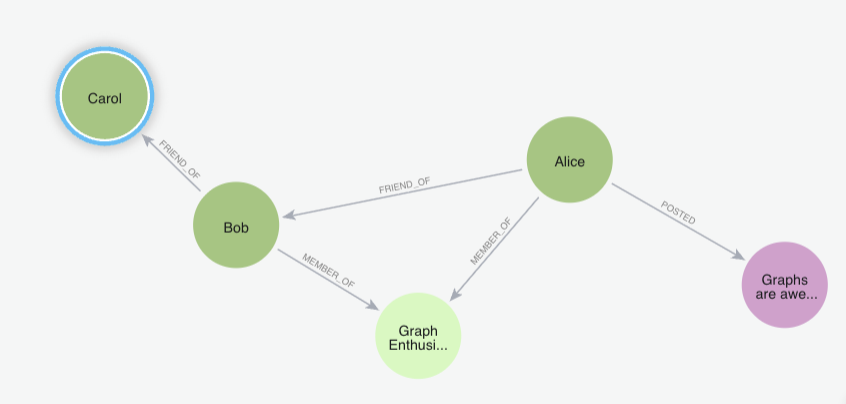
3. Query: Most active groups
MATCH (u:User)-[:MEMBER_OF]->(g:Group)
RETURN g.name AS group, count(u) AS members
ORDER BY members DESC;

// # Returns "Graph Enthusiasts" → 2, "Book Club" → 1
4. Query: Posts in Bob’s groups
MATCH (alice:User {name: "Bob"})-[:MEMBER_OF]->(g:Group)<-[:MEMBER_OF]-(u:User)-[:POSTED]->(p:Post)
RETURN g.name AS group, u.name AS author, p.content AS post;

// "Graph Enthusiasts" - "Alice" - "Graphs are awesome!"
Key Takeaways
- Model for queries, not just for storage. The graph should answer your main questions efficiently.
- Paths matter. Relationships aren’t an afterthought—they’re the backbone.
- Start simple, refine later. Even a small dataset modeled correctly can answer complex queries with ease.
By thinking in terms of paths and questions, you create graph models that are both intuitive and powerful.
Populating Your Graph with LOAD CSV
You can use these files to load the sample data or modify and run the Python script below to generate your own.
Sample File
<Upload Sample FIle Here>
Generate Script
import csv
import random
import faker

fake = faker.Faker()

NUM_USERS = 10000
NUM_PRODUCTS = 2000
NUM_PURCHASES = 50000

# 1. Generate users.csv
with open("users.csv", "w", newline="", encoding="utf-8") as f:
    writer = csv.writer(f)
    writer.writerow(["userId", "name", "email", "country"])
    for user_id in range(1, NUM_USERS + 1):
        writer.writerow([
            user_id,
            fake.name(),
            fake.email(),
            fake.country()
        ])

# 2. Generate products.csv
categories = ["Electronics", "Books", "Clothing", "Sports", "Home", "Toys"]
with open("products.csv", "w", newline="", encoding="utf-8") as f:
    writer = csv.writer(f)
    writer.writerow(["productId", "name", "price", "category"])
    for product_id in range(1, NUM_PRODUCTS + 1):
        writer.writerow([
            product_id,
            fake.word().title(),
            round(random.uniform(5, 500), 2),
            random.choice(categories)
        ])

# 3. Generate purchases.csv (relationships)
with open("purchases.csv", "w", newline="", encoding="utf-8") as f:
    writer = csv.writer(f)
    writer.writerow(["userId", "productId", "timestamp"])
    for _ in range(NUM_PURCHASES):
        writer.writerow([
            random.randint(1, NUM_USERS),
            random.randint(1, NUM_PRODUCTS),
            fake.date_time_this_year().isoformat()
        ])

print("CSV files generated: users.csv, products.csv, purchases.csv")
Since the browser cannot directly access your file, you need to upload those CSV files into <neo4j-installation-directory>/imports
Import User
LOAD CSV WITH HEADERS FROM 'file:///users.csv' AS row
CREATE (:User {
  userId: toInteger(row.userId),
  name: row.name,
  email: row.email,
  country: row.country
});
Import Products
LOAD CSV WITH HEADERS FROM 'file:///products.csv' AS row
CREATE (:Product {
  productId: toInteger(row.productId),
  name: row.name,
  price: toFloat(row.price),
  category: row.category
});
Import Purchases (Relationship)
CALL {
  LOAD CSV WITH HEADERS FROM 'file:///purchases.csv' AS row
  MATCH (u:User {userId: toInteger(row.userId)})
  MATCH (p:Product {productId: toInteger(row.productId)})
  CREATE (u)-[:PURCHASED {timestamp: datetime(row.timestamp)}]->(p)
} IN TRANSACTIONS OF 1000 ROWS;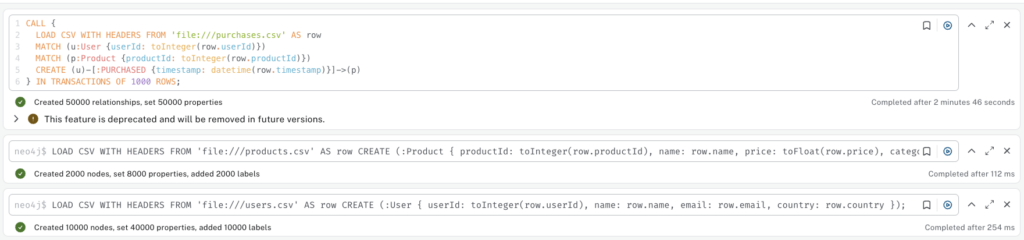
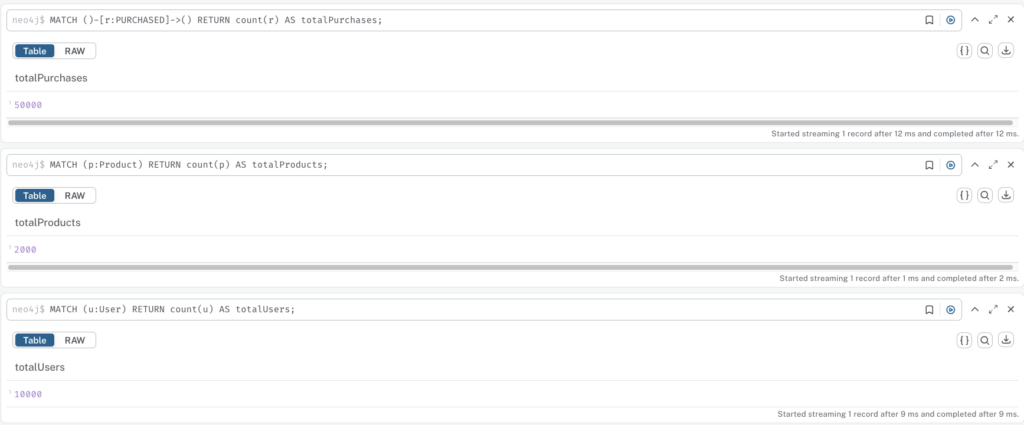
Verification
MATCH (u:User) RETURN count(u) AS totalUsers;
MATCH (p:Product) RETURN count(p) AS totalProducts;
MATCH ()-[r:PURCHASED]->() RETURN count(r) AS totalPurchases;
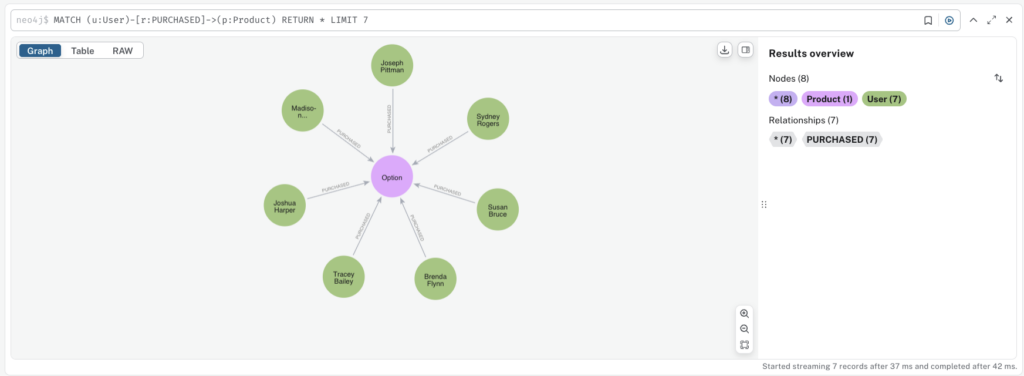
MATCH (u:User)-[r:PURCHASED]->(p:Product) RETURN * LIMIT 7
Advanced Querying: Finding Deeper Insights with Cypher
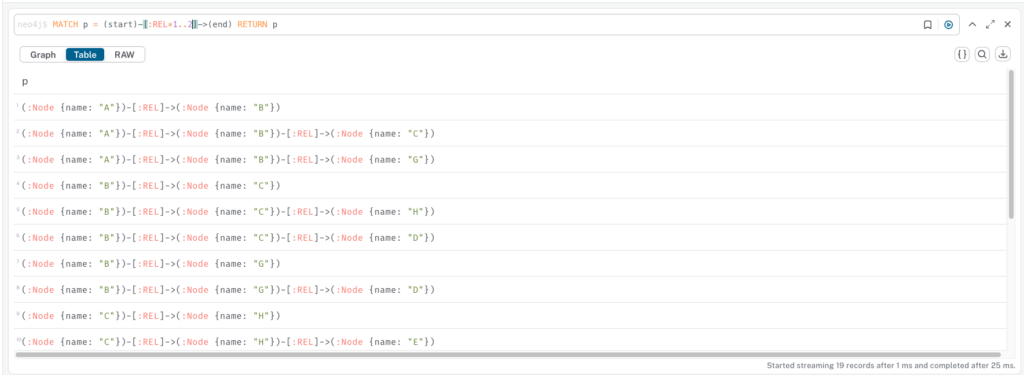
Working with paths (-[:REL*]->)
- The query finds and returns all paths where a node
startis connected to a nodeendby one or two relationships of any type. - For example, the query below will exclude any paths with zero relationships, as well as any paths with three or more relationships. It specifically looks for and returns only paths with a length of exactly one or two.
// Create main chain
CREATE (a:Node {name: 'A'})
CREATE (b:Node {name: 'B'})
CREATE (c:Node {name: 'C'})
CREATE (d:Node {name: 'D'})
CREATE (e:Node {name: 'E'})
CREATE (f:Node {name: 'F'})

CREATE (a)-[:REL]->(b)
CREATE (b)-[:REL]->(c)
CREATE (c)-[:REL]->(d)
CREATE (d)-[:REL]->(e)
CREATE (e)-[:REL]->(f)

// Add branching paths
CREATE (b)-[:REL]->(g:Node {name: 'G'})
CREATE (g)-[:REL]->(d)

CREATE (c)-[:REL]->(h:Node {name: 'H'})
CREATE (h)-[:REL]->(e)

// Query
MATCH p = (start)-[:REL*1..2]->(end) RETURN p
Aggregations (COUNT, COLLECT)
You can group and summarize purchases to reveal trends:
- Count how many users bought each product:
MATCH (:User)-[:PURCHASED]->(p:Product)
RETURN p.name AS product, COUNT(*) AS purchases
ORDER BY purchases DESC;- Collect all products purchased by a user:
MATCH (u:User)-[:PURCHASED]->(p:Product)
RETURN u.name AS user, COLLECT(p.name) AS products;


Chaining with WITH
WITH lets you break queries into logical steps, carry forward variables, and apply filters in between:
- Find the top 3 products in each category:
MATCH (:User)-[:PURCHASED]->(p:Product)
WITH p.category AS category, p, COUNT(*) AS purchases
ORDER BY category, purchases DESC
WITH category, COLLECT({name: p.name, total: purchases})[0..3] AS topProducts
RETURN category, topProducts;
These techniques—paths, aggregation, and WITH—unlock the ability to move from raw graph data to actionable insights like purchase trends, popular categories, and hidden connections.
Connecting Neo4j to Your Application
Graph databases unlock powerful ways to model and query relationships, and Neo4j makes integration straightforward with its official drivers. In this post, we’ll cover the essentials: official driver support, a Python example, and best practices for safe and efficient queries.
Neo4j provides well-maintained drivers for popular languages:
- Python
- Java
- JavaScript/TypeScript
- .NET
These drivers use the Bolt/Neo4J protocol, ensuring fast, secure communication between your app and Neo4j.
In the example below, we will
- Creates a connection to Neo4j with advanced connection pool settings (max connections, timeouts, connection lifetime)
- Sets up database constraints to ensure email uniqueness for TestUser nodes
- Creates users with email, name, and age properties (includes automatic timestamp)
- Retrieves users by email address
- Uses transactions for data integrity during user creation
from neo4j import GraphDatabase
import logging
from typing import Optional, Dict, Any

# Configure logging
logging.basicConfig(level=logging.INFO)
logger = logging.getLogger(__name__)

class Neo4jManager:
    def __init__(self, uri: str, user: str, password: str):
        """Initialize Neo4j connection with advanced pool settings"""
        self.driver = GraphDatabase.driver(
            uri,
            auth=(user, password),
            # Advanced connection pool configuration
            max_connection_lifetime=3600,  # 1 hour
            max_connection_pool_size=50,
            connection_acquisition_timeout=60,
            encrypted=False  # Set True for production
        )

    def close(self):
        """Close the driver connection"""
        self.driver.close()

    def create_constraints(self):
        """Create database constraints"""
        with self.driver.session() as session:
            session.run("CREATE CONSTRAINT user_email IF NOT EXISTS FOR (u:TestUser) REQUIRE u.email IS UNIQUE")

    def create_user(self, email: str, name: str, age: int) -> bool:
        """Create a new user using transaction"""
        def create_user_tx(tx):
            result = tx.run("""
                MERGE (u:TestUser {email: $email})
                SET u.name = $name, u.age = $age, u.created_at = datetime()
                RETURN u
                """, email=email, name=name, age=age)
            return result.single()

        try:
            with self.driver.session() as session:
                result = session.execute_write(create_user_tx)
                logger.info(f"User created/updated: {email}")
                return True
        except Exception as e:
            logger.error(f"Error creating user: {e}")
            return False

    def get_user_by_email(self, email: str) -> Optional[Dict[str, Any]]:
        """Get user by email"""
        with self.driver.session() as session:
            result = session.run("""
                MATCH (u:TestUser {email: $email})
                RETURN u.email as email, u.name as name, u.age as age, u.created_at as created_at
                """, email=email)

            record = result.single()
            if record:
                return dict(record)
            return None

def main():
    """Main execution function"""
    # Connection parameters (adjust for your setup)
    URI = "bolt://localhost:7687"
    USER = "neo4j"
    PASSWORD = "password"  # Change this!

    # Initialize Neo4j manager
    neo4j_manager = Neo4jManager(URI, USER, PASSWORD)

    try:
        logger.info("Creating constraints...")
        neo4j_manager.create_constraints()

        # Create users
        logger.info("Creating users...")
        neo4j_manager.create_user("alice@example.com", "Alice Johnson", 28)
        neo4j_manager.create_user("bob@example.com", "Bob Smith", 35)

        # Get users
        logger.info("Retrieving users...")
        alice = neo4j_manager.get_user_by_email("alice@example.com")
        bob = neo4j_manager.get_user_by_email("bob@example.com")
        nonexistent = neo4j_manager.get_user_by_email("nonexistent@example.com")

        logger.info(f"Alice: {alice}")
        logger.info(f"Bob: {bob}")
        logger.info(f"Nonexistent user: {nonexistent}")

    except Exception as e:
        logger.error(f"Error: {e}")
    finally:
        neo4j_manager.close()
        logger.info("Connection closed")

if __name__ == "__main__":
    main()
Output
INFO:__main__:Creating constraints...
INFO:__main__:Creating users...
INFO:__main__:User created/updated: alice@example.com
INFO:__main__:User created/updated: bob@example.com
INFO:__main__:Retrieving users...
INFO:__main__:Alice: {'email': 'alice@example.com', 'name': 'Alice Johnson', 'age': 28, 'created_at': neo4j.time.DateTime(2025, 9, 23, 11, 38, 36, 514000000, tzinfo=<UTC>)}
INFO:__main__:Bob: {'email': 'bob@example.com', 'name': 'Bob Smith', 'age': 35, 'created_at': neo4j.time.DateTime(2025, 9, 23, 11, 38, 36, 585000000, tzinfo=<UTC>)}
INFO:__main__:Nonexistent user: None
INFO:__main__:Connection closed
What’s next?
In the next section, we’ll take a quick overview of Neo4j Enterprise and its key features.