


Running backend services inside an Azure Kubernetes Service (AKS) cluster gives us a lot of scalability and flexibility. But with great scale comes great responsibility — especially when those services call external APIs.
Suddenly, we hit an unexpected roadblock: a sudden spike of failed requests to third-party APIs. What we discovered turned out to be a classic cloud networking challenge: SNAT port exhaustion. In this post, I’ll walk through what happened, what SNAT actually is, why exhaustion happens, and how we solved it.
The Incident: When Outbound Calls Started Failing
Our system runs multiple backend services in AKS. These services not only talk to each other but also to several third-party providers via REST APIs (for payments, loyalty, and other integrations).
One day, we received alerts and reports that calls to one of the third-party APIs were failing intermittently. The logs showed connection errors like:
Connection reset by peerTimeout while establishing connection503 Service Unavailable
At first, we suspected the third-party was down. But their status page looked fine. Digging deeper into AKS networking metrics, we found the real cause: our cluster had run out of SNAT ports.
Understanding SNAT and SNAT Ports
Before jumping to the fix, let’s clarify what SNAT means.
- SNAT (Source Network Address Translation): When a pod inside AKS makes an outbound connection (say, to an external API), the source IP of the pod is translated to the node’s IP or another public IP. This is required so the request can traverse the internet and the external service knows where to respond.
- SNAT Port: Each outbound TCP/UDP connection needs a unique combination of:
- Source IP
- Source port
- Destination IP
- Destination port
The challenge: SNAT ports are a finite resource. By default, Azure allows 64K ports per IP, but only a portion is actually usable for SNAT in AKS. Once you hit the limit, new outbound connections can’t be established — hence, failures.
Default SNAT Port Allocation
When using default (automatic) allocation, SNAT ports are distributed among backend VMs based on the pool size. The following table shows the SNAT port preallocations for a single frontend IP:
| Backend Pool Size (VMs) | SNAT Ports per VM |
|---|---|
| 1–50 | 1,024 |
| 51–100 | 512 |
| 101–200 | 256 |
| 201–400 | 128 |
| 401–800 | 64 |
| 801–1,000 | 32 |
For example, with 100 VMs in a backend pool and only one frontend IP, each VM is assigned 512 ports.
- Add another frontend IP → Each VM now gets an additional 512 ports, totaling 1,024 per VM.
- Adding a third frontend IP does not increase the ports per VM beyond 1,024 (maximum limit per VM).
Why We Hit Exhaustion
In our case, the root causes were:
- High concurrency: Our services opened thousands of concurrent outbound requests to the same third-party endpoints.
- Short connection lifetimes: The apps didn’t use proper connection pooling, so many short-lived connections were created instead of reusing existing ones.
- Single outbound IP: Our nodes were sharing one public IP for egress, reducing the total number of available SNAT ports.
This combination meant we quickly burned through the available port range.
Detecting SNAT Port Exhaustion
Use Azure Load Balancer metrics to monitor SNAT port usage and availability. For Standard Load Balancers, navigate to the resource in the Azure portal and select Monitoring > Metrics.
- Set Time Aggregation: 1 minute.
- Select Metrics:
- Used SNAT Ports
- Allocated SNAT Ports
- Use Average for per-VM insights.
- Use Sum for total load balancer-level insights.
- Apply Filters:
- Protocol Type, Backend IPs, Frontend IPs
- Use Splitting to monitor per instance (only one metric at a time).
- Example: To monitor TCP SNAT usage per backend VM:
- Aggregate: Average
- Split: Backend IPs
- Filter: Protocol = TCP
| Metric | Resource Type | Description | Recommended Aggregation |
|---|---|---|---|
| SNAT Connection Count | Public Load Balancer | Number of outbound flows using SNAT | Sum |
| Allocated SNAT Ports | Public Load Balancer | Number of SNAT ports allocated per backend | Average |
| Used SNAT Ports | Public Load Balancer | Number of SNAT ports in use per backend | Average |
Solutions: How We Prevented SNAT Exhaustion
Azure provides several ways to mitigate SNAT exhaustion in AKS. We applied a mix of these:
1. Connection Pooling (Application-Level Fix)
We updated our services to reuse connections instead of creating new ones per request. In .NET, this meant properly configuring HttpClientFactory and ensuring sockets weren’t disposed after every call.
This alone significantly reduced the port churn.
2. Azure NAT Gateway (Infrastructure Fix)
By default, AKS nodes use their node IPs for outbound traffic. To scale SNAT capacity, we attached an Azure NAT Gateway to the cluster subnet.
- Each NAT Gateway can support 64K SNAT ports per public IP.
- You can attach multiple public IPs to increase the available SNAT pool.
- Provides consistent outbound IPs (good for whitelisting with third parties).
3. Modify Outbound Rules
If you’re using a public standard load balancer and experience SNAT exhaustion or connection failures, ensure you’re using outbound rules with manual port allocation. Otherwise, you’re likely relying on the load balancer’s default port allocation, which isn’t a recommended method for enabling outbound connections. You can configure outbound rules to:
- Increase (decrease) idle timeouts so that ports are held longer or released faster depending on your traffic pattern.
- Fine-tune port allocation per frontend IP by increasing the number of available SNAT ports per VM, ensuring workloads don’t starve each other.
This is a useful knob if you don’t want to immediately introduce NAT Gateway but need to optimize existing port usage.
4. Add More Frontend IPs
To add more IP addresses for outbound connections, create a frontend IP configuration for each new IP. When outbound rules are configured, you’re able to select multiple frontend IP configurations for a backend pool.
Each public IP provides its own pool of SNAT ports. By attaching multiple frontend IPs (via Load Balancer or NAT Gateway), you can:
- Multiply the number of available ports.
- Spread outbound traffic across IPs for better scaling.
- Maintain resiliency if one IP gets throttled by a third-party provider.
We eventually used this approach in combination with NAT Gateway to guarantee plenty of outbound capacity.
Illustration of the Problem & Solution
Without enough SNAT capacity (risk of exhaustion):
[Pod] -> [Node IP + Limited SNAT Ports] -> [3rd API]
With NAT Gateway and multiple frontend IPs (scalable outbound):
[Pod] -> [Node IP] -> [NAT Gateway + Multiple IPs + Tuned Outbound Rules] -> [3rd API]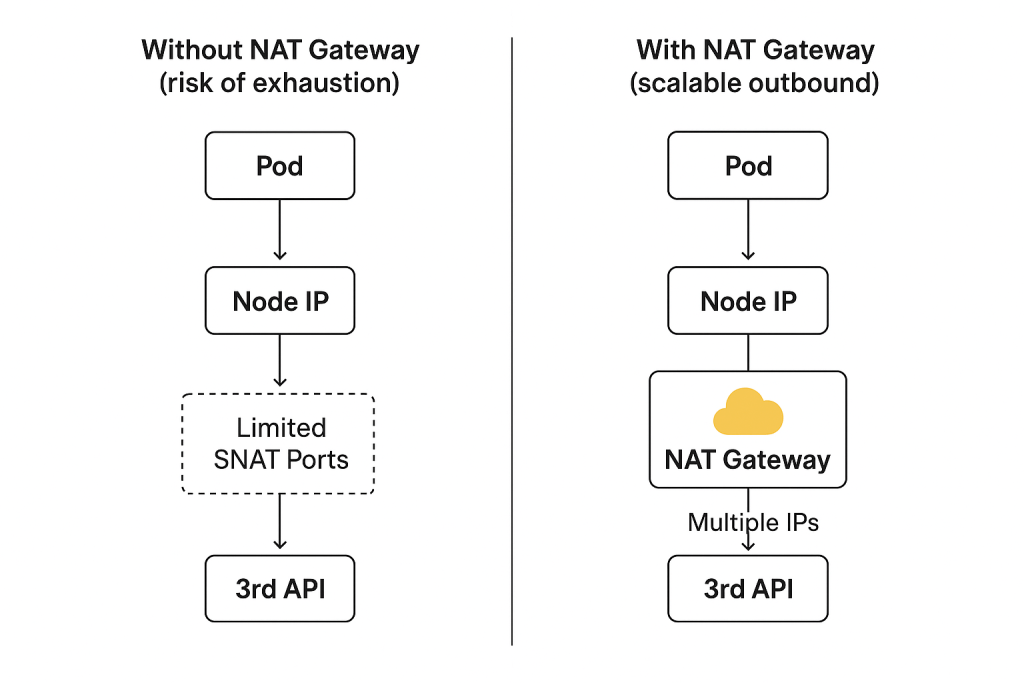
Lessons Learned
- SNAT ports are a hidden but critical resource when your AKS workloads make outbound calls.
- Lack of connection pooling at the app level can waste ports quickly.
- For production AKS clusters with heavy egress, always plan for a NAT Gateway.
- If you need more control, tune outbound rules and add frontend IPs to expand port capacity.
- Scaling nodes can help, but it’s usually better to handle this with networking design.
By combining application best practices (connection pooling) with infrastructure scaling (NAT Gateway, outbound rules, and extra IPs), we solved our port exhaustion issue and ensured our third-party integrations stayed reliable.
References
Troubleshoot SNAT port exhaustion on AKS nodes – Azure | Microsoft Learn
Troubleshoot Azure Load Balancer outbound connectivity issues | Microsoft Learn