


APIs are the backbone of modern applications. If an API fails, it can break the entire system. As testers, our responsibility is to make sure APIs are reliable, secure, and performant before they reach production.
In this article, we will share best practices for API testing with Postman, explain why Postman is a strong choice compared to other tools, and walk through practical examples that we can apply in our daily testing.
Why Postman for API Testing?
There are many tools available for APIs testing, such as REST Assured, Karate, or JMeter. Each has its strengths. But Postman stands out because:
- Easy to start: We don’t need coding knowledge to begin testing.
- Team collaboration: Collections and environments can be shared with the team.
- Powerful scripting: JavaScript-based tests cover functional, security, and performance checks.
- Automation ready: Newman allows us to run tests in CI/CD pipelines.
- Great documentation: Postman can automatically generate API docs from collections.
This makes Postman not just beginner-friendly, but also powerful enough for advanced teams.
Best Practices for API Testing with Postman
We have grouped the practices into four areas: Organization, Validation, Automation, and Collaboration.
1. Organized
- Keep requests in collections.
- Use folders to group related endpoints (Login, Users, Orders).
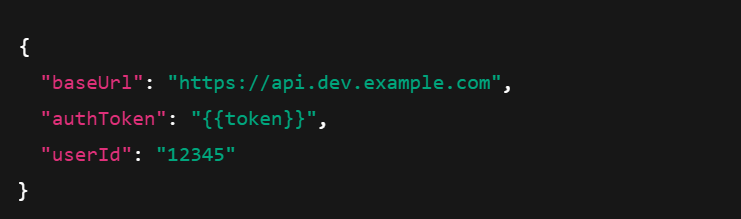
- Store dynamic values in environment variables so we can easily switch between dev, test, and prod.
Example environment variables:
We should also cover negative cases:

2. Validate
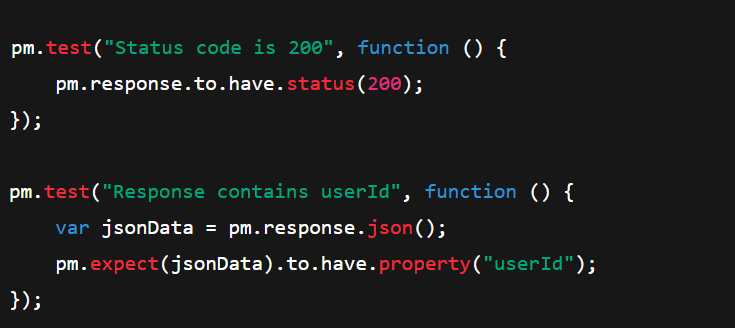
A strong APIs test do more than check if the API responds. We must validate the status codes, response body, and headers.
Example variables:
We should also cover negative cases:

3. Automate
Running tests manually is time-consuming. With Postman + Newman, we can automate tests and run them in our CI/CD pipelines.
Example Newman command:

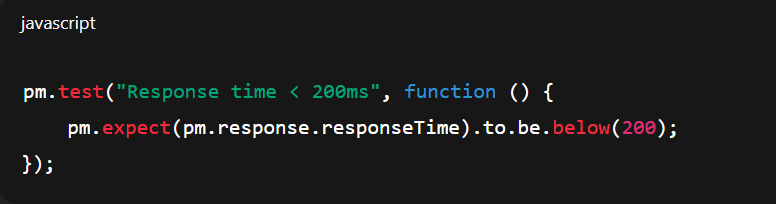
We can also test performance:
And use data-driven testing with CSV or JSON inputs:
CSV file (users.csv):
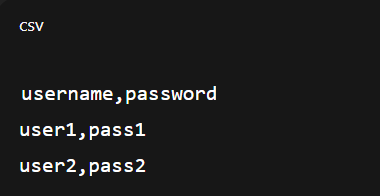
Run with:

4. Collaborate
APIs testing is not a one-person job. With Postman, we can:
- Share collections and environments with the team
- Use version control (Postman integrates with GitHub/GitLab)
- Generate API documentation automatically so developers and testers stay in sync
Collaboration ensures that everyone works with the same tests and the same understanding of the API.
Conclusion
By using Postman and following these best practices, we can:
- Ensure our APIs behave correctly in both normal and error scenarios
- Detect problems early with automation and CI/CD integration
- Improve API reliability, security, and performance
- Collaborate effectively across the team
Postman gives us the balance of ease of use and advanced capabilities. It helps us deliver higher-quality APIs faster and with more confidence.
References
Postman Learning Center – Writing Tests
https://learning.postman.com/docs/writing-scripts/test-scripts/
Postman Learning Center – Variables and Environments
https://learning.postman.com/docs/sending-requests/variables/
Newman (CLI for Postman)
https://github.com/postmanlabs/newman
Postman Blog – Best Practices for API Testing
https://blog.postman.com/api-testing-best-practices/
OWASP API Security Top 10 (for security testing reference)
https://owasp.org/API-Security/