Introduction
While Neo4j’s free Community Edition offers a fantastic gateway into the world of graph databases for developers, students, and smaller projects, the Enterprise Edition is specifically engineered for mission-critical, production workloads where performance, uptime, and security are paramount. It builds upon the core graph capabilities by introducing a suite of advanced features designed for scale and resilience. Unlike the single-node architecture of the Community version, Neo4j Enterprise delivers robust horizontal scaling through clustering, enhanced security with fine-grained access controls, and crucial operational tools like online backups, ensuring your application remains available and secure as it grows.
Clustering
Introduction
This setup defines a three-node Neo4j causal cluster using the Enterprise Edition (v5.23). Each core node acts as a primary member participating in the RAFT consensus protocol to maintain data consistency across the cluster. The configuration specifies discovery endpoints, advertised addresses, and cluster communication ports, ensuring that all nodes can find each other and synchronize properly. This structure provides high availability, fault tolerance, and scalability for graph data operations.
Example – Demo
Start the local cluster using the Docker Compose file below. This will create a Neo4j cluster with 3 nodes.
services:
  neo4j-core-1:
    image: neo4j:5.23-enterprise
    container_name: neo4j-core-1
    hostname: neo4j-core-1
    ports:
      - "7475:7474"
      - "7688:7687"
    environment:
      - NEO4J_AUTH=neo4j/password
      - NEO4J_ACCEPT_LICENSE_AGREEMENT=yes
      - NEO4J_initial_dbms_default__database=neo4j
      - NEO4J_server_cluster_system__database__mode=PRIMARY
      - NEO4J_initial_server_mode__constraint=PRIMARY
      - NEO4J_dbms_cluster_minimum__initial__system__primaries__count=3
      - NEO4J_initial_dbms_default__primaries__count=3
      - NEO4J_dbms_cluster_discovery_endpoints=neo4j-core-1:5000,neo4j-core-2:5000,neo4j-core-3:5000
      - NEO4J_server_bolt_advertised__address=neo4j-core-1:7687
      - NEO4J_server_discovery_advertised__address=neo4j-core-1:5000
      - NEO4J_initial_dbms_default__primaries__count=3
      - NEO4J_server_cluster_advertised__address=neo4j-core-1:6000
      - NEO4J_server_cluster_raft_advertised__address=neo4j-core-1:7000
      - NEO4J_server_default__advertised__address=neo4j-core-1
      - NEO4J_server_default__listen__address=0.0.0.0
      - NEO4J_dbms_cluster_discovery_resolver__type=LIST
    networks:
      - neo4j_cluster

  neo4j-core-2:
    image: neo4j:5.23-enterprise
    container_name: neo4j-core-2
    hostname: neo4j-core-2
    ports:
      - "7476:7474"
      - "7689:7687"
    environment:
      - NEO4J_AUTH=neo4j/password
      - NEO4J_ACCEPT_LICENSE_AGREEMENT=yes
      - NEO4J_initial_dbms_default__database=neo4j
      - NEO4J_server_cluster_system__database__mode=PRIMARY
      - NEO4J_initial_server_mode__constraint=PRIMARY
      - NEO4J_dbms_cluster_minimum__initial__system__primaries__count=3
      - NEO4J_dbms_cluster_discovery_endpoints=neo4j-core-1:5000,neo4j-core-2:5000,neo4j-core-3:5000
      - NEO4J_server_bolt_advertised__address=neo4j-core-2:7687
      - NEO4J_server_discovery_advertised__address=neo4j-core-2:5000
      - NEO4J_initial_dbms_default__primaries__count=3
      - NEO4J_server_cluster_advertised__address=neo4j-core-2:6000
      - NEO4J_server_cluster_raft_advertised__address=neo4j-core-2:7000
      - NEO4J_server_default__advertised__address=neo4j-core-2
      - NEO4J_server_default__listen__address=0.0.0.0
      - NEO4J_dbms_cluster_discovery_resolver__type=LIST
    networks:
      - neo4j_cluster

  neo4j-core-3:
    image: neo4j:5.23-enterprise
    container_name: neo4j-core-3
    hostname: neo4j-core-3
    ports:
      - "7477:7474"
      - "7690:7687"
    environment:
      - NEO4J_AUTH=neo4j/password
      - NEO4J_ACCEPT_LICENSE_AGREEMENT=yes
      - NEO4J_initial_dbms_default__database=neo4j
      - NEO4J_server_cluster_system__database__mode=PRIMARY
      - NEO4J_initial_server_mode__constraint=PRIMARY
      - NEO4J_dbms_cluster_minimum__initial__system__primaries__count=3
      - NEO4J_dbms_cluster_discovery_endpoints=neo4j-core-1:5000,neo4j-core-2:5000,neo4j-core-3:5000
      - NEO4J_server_bolt_advertised__address=neo4j-core-3:7687
      - NEO4J_server_discovery_advertised__address=neo4j-core-3:5000
      - NEO4J_initial_dbms_default__primaries__count=3
      - NEO4J_server_cluster_advertised__address=neo4j-core-3:6000
      - NEO4J_server_cluster_raft_advertised__address=neo4j-core-3:7000
      - NEO4J_server_default__advertised__address=neo4j-core-3
      - NEO4J_server_default__listen__address=0.0.0.0
      - NEO4J_dbms_cluster_discovery_resolver__type=LIST
    networks:
      - neo4j_cluster

networks:
  neo4j_cluster:
    driver: bridge
Verification
After executing the Docker Compose file, a Neo4j causal cluster with three core nodes is created. Each node runs as part of the same cluster and participates in maintaining data consistency.
You can access the Neo4j Browser from ports 7475, 7476, and 7477. When you create a node or run a write query, you’ll see that only one node acts as the leader (write node), while the others operate as followers (read-only). The written data, however, is automatically replicated across all nodes to keep them in sync.


If you stop or remove the leader node, the cluster will automatically elect a new leader from the remaining followers, promoting it to handle write operations and ensuring continuous availability.


Authentication & Authorization
In Neo4j, authentication and authorization differ significantly between the Community and Enterprise editions. The Community Edition provides only basic authentication, meaning it supports a single default user with limited security controls. It’s suitable for local or small-scale development but lacks proper user management. In contrast, the Enterprise Edition offers full role-based access control (RBAC), allowing administrators to create multiple users, define custom roles, and assign fine-grained permissions. This enables secure, multi-user environments and integration with enterprise systems like LDAP or Active Directory. Overall, Enterprise ensures robust security, while Community focuses on simplicity and accessibility.
Example – Demo
Demo show authentication and authorization features available in Neo4j Enterprise Edition:
// Create Users
CREATE USER bob SET PASSWORD ‘bob123567’ CHANGE NOT REQUIRED;
CREATE USER alice SET PASSWORD ‘alice123’ CHANGE NOT REQUIRED;
CREATE USER carol SET PASSWORD ‘carol123’ CHANGE NOT REQUIRED;
// Create custom role
CREATE ROLE analyst;
CREATE ROLE developer;
CREATE ROLE admin_assistant;
// Analyst: read-only access
GRANT TRAVERSE ON GRAPH neo4j TO analyst;
GRANT READ {*} ON GRAPH neo4j TO analyst;
// Developer: full write access
GRANT TRAVERSE ON GRAPH neo4j TO developer;
GRANT READ {*} ON GRAPH neo4j TO developer;
GRANT WRITE ON GRAPH neo4j TO developer;
// Admin Assistant: manage users but no data access
GRANT USER MANAGEMENT ON DBMS TO admin_assistant;
// Assign role to user
GRANT ROLE analyst TO alice;
GRANT ROLE developer TO bob;
GRANT ROLE admin_assistant TO carol;
// Review permission
SHOW USERS;
SHOW ROLES;
SHOW PRIVILEGES AS COMMANDS;

Verification
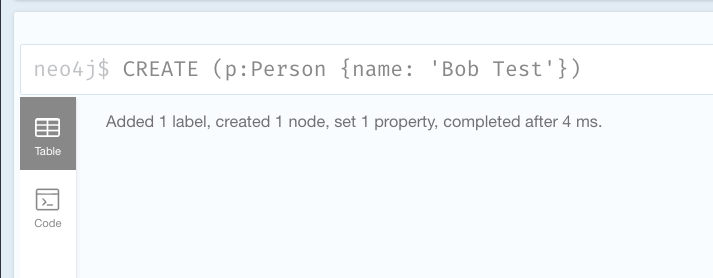
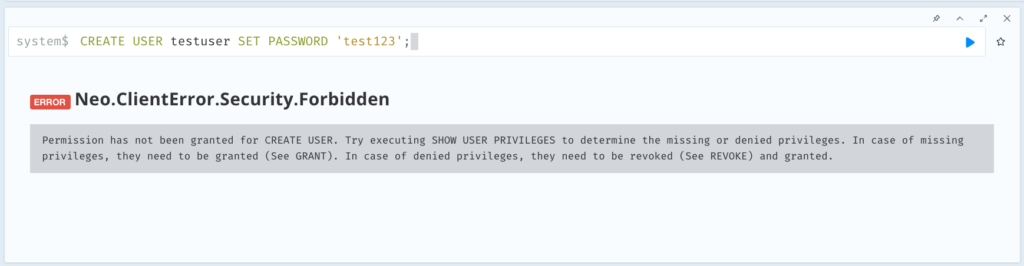
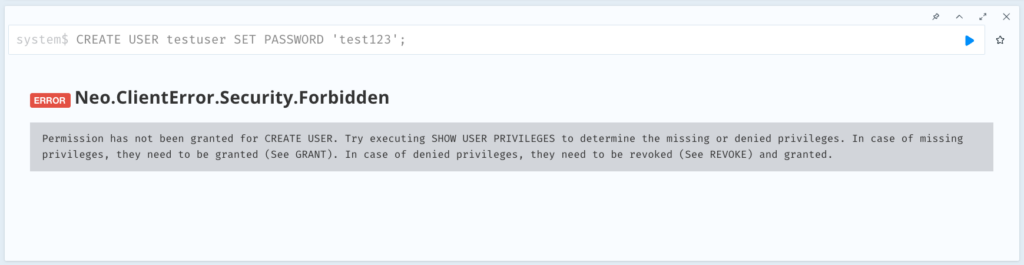
Test 1: Developer (Bob) – Can Read/Write Access But Can’t Create New Users
// Login as bob first, then run these queries

// Should SUCCEED - Read data
MATCH (n) RETURN count(n) AS nodeCount;

// Should SUCCEED - Write data
CREATE (p:Person {name: 'Bob Test', role: 'developer'})
RETURN p;

//  Should FAIL - Cannot create users
CREATE USER testuser SET PASSWORD 'test123';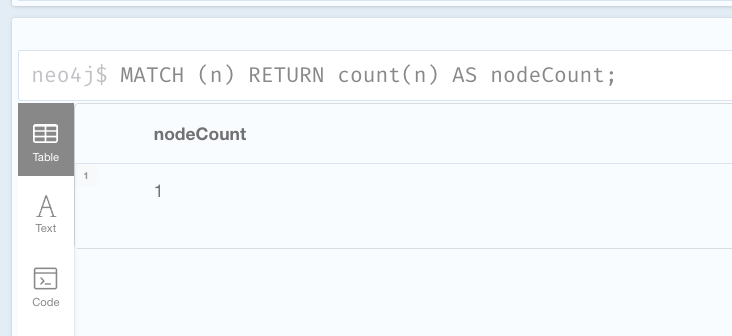
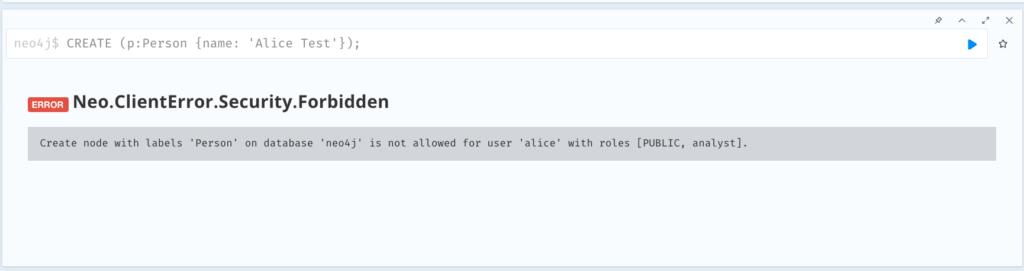
Test 2: Analyst (Alice) – Read-Only Access
// Login as alice, then run these queries

// Should SUCCEED - Read data
MATCH (n) RETURN count(n) AS nodeCount;

// Should FAIL - Cannot write data
CREATE (p:Person {name: 'Alice Test'});
// Expected error: Permission denied

// Should FAIL - Cannot create users
CREATE USER testuser SET PASSWORD 'test123';
// Expected error: Permission denied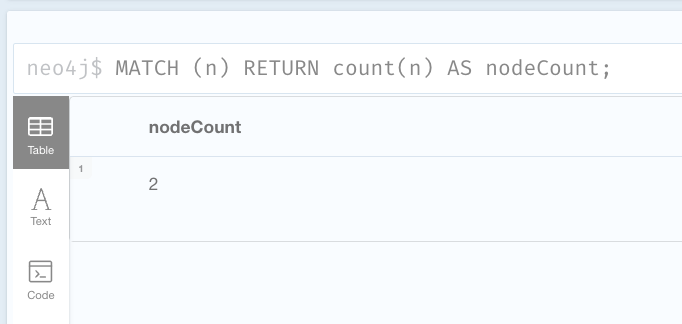
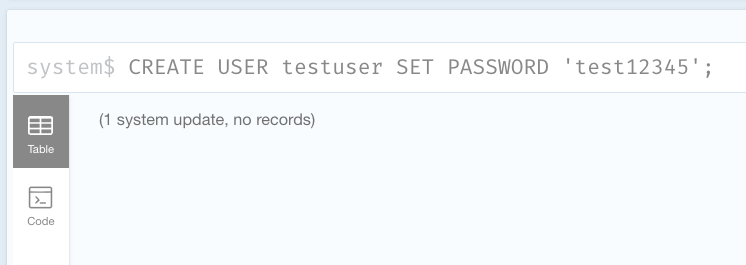
Test 3: Admin Assistant (Carol) – User Management Only
// Login as carol, then run these queries

// Should SUCCEED - Create user
CREATE USER testuser SET PASSWORD 'test123' CHANGE NOT REQUIRED;

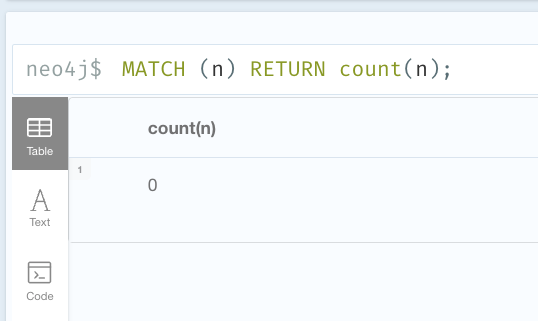
// Should FAIL - Cannot read data
MATCH (n) RETURN count(n);
Backup / Restore
One of the most critical aspects of managing any database is ensuring your data is safe and recoverable. Neo4j Enterprise makes this straightforward with built-in backup and restore capabilities. Whether you’re running a single instance or a distributed cluster, Neo4j provides command-line tools that let you create full or incremental backups of your graph database with just a simple command. These backups can be scheduled to run automatically, stored locally or pushed to cloud storage like S3, and restored whenever needed—whether you’re recovering from an incident, migrating to new hardware, or testing in a development environment. With Neo4j’s backup features, you can focus on building powerful graph applications knowing your valuable data is protected and can be recovered quickly when it matters most.
Example – Demo
Neo4j Enterprise Edition supports online backup through the neo4j-admin database backup command, allowing you to create consistent backups without stopping the database server. This eliminates downtime during backup operations while ensuring data integrity through Neo4j’s transaction log system.
Run the docker compose file below to run simple Neo4J server with only volume sharing for backup and data: ./backups:/backups | neo4j_data:/data
services:
  neo4j:
    image: neo4j:5.23-enterprise
    container_name: neo4j
    ports:
      - "7474:7474"
      - "7687:7687"
    volumes:
      - neo4j_data:/data
      - ./backups:/backups
    environment:
      - NEO4J_AUTH=neo4j/password
      - NEO4J_ACCEPT_LICENSE_AGREEMENT=yes
      - NEO4J_dbms_backup_enabled=true

volumes:
  neo4j_data:
Run the following command to perform backup:
docker compose exec neo4j \
neo4j-admin database backup neo4j \
–from=localhost:6362 \
–to-path=/backups
2025-10-12 06:53:33.932+0000 INFO  [c.n.b.b.BackupOutputMonitor] Starting backup of database 'neo4j' from servers: [localhost:6362]
2025-10-12 06:53:34.337+0000 INFO  [c.n.b.b.BackupOutputMonitor] Start backup of database 'neo4j'.
2025-10-12 06:53:34.338+0000 INFO  [c.n.b.b.BackupOutputMonitor] Using remote server localhost:6362 for backup of database 'neo4j'.
2025-10-12 06:53:34.393+0000 INFO  [c.n.b.b.BackupOutputMonitor] Start differential backup of database 'neo4j'.
2025-10-12 06:53:34.429+0000 INFO  [c.n.b.b.BackupOutputMonitor] Differential backup of database 'neo4j' failed. Reason: Differential backups require that a full backup of the same database exists in the folder defined in --to-path. No existing backup found here: /backups.
2025-10-12 06:53:34.430+0000 INFO  [c.n.b.b.BackupOutputMonitor] Falling back to full backup of database 'neo4j'.
2025-10-12 06:53:34.430+0000 INFO  [c.n.b.b.BackupOutputMonitor] Start full backup of database 'neo4j'.
2025-10-12 06:53:34.954+0000 INFO  [c.n.b.b.BackupOutputMonitor] Start receiving store files for database 'neo4j'.
2025-10-12 06:53:35.060+0000 INFO  [c.n.b.b.BackupOutputMonitor] Finished receiving store files for database 'neo4j', took 105ms.
2025-10-12 06:53:35.076+0000 INFO  [c.n.b.b.BackupOutputMonitor] Start receiving database 'neo4j' transactions from [30, 31].
2025-10-12 06:53:35.188+0000 INFO  [c.n.b.b.BackupOutputMonitor] Finished receiving transactions for database 'neo4j' at 30, took 112ms.
2025-10-12 06:53:35.249+0000 INFO  [c.n.b.b.BackupOutputMonitor] Finished full backup of database 'neo4j'. Downloaded from tx -1 to tx 30.
2025-10-12 06:53:35.270+0000 INFO  [c.n.b.b.BackupOutputMonitor] Start recovering database 'neo4j'.
2025-10-12 06:53:35.612+0000 INFO  [c.n.b.b.BackupOutputMonitor] Finished recovering database 'neo4j', took 342ms.
2025-10-12 06:53:35.613+0000 INFO  [c.n.b.b.BackupOutputMonitor] Start creating artifact 'incomplete_backup0.tmp' for database 'neo4j'.
2025-10-12 06:53:35.678+0000 INFO  [c.n.b.b.BackupOutputMonitor] Finished artifact creation 'neo4j-2025-10-12T06-53-35.backup' for database 'neo4j', took 64ms.
2025-10-12 06:53:35.701+0000 INFO  [c.n.b.b.BackupOutputMonitor] Backup of database 'neo4j' completed, took 1s 363ms.
Backup command completed.
Try to change, and remove your data then execute this command to restore from the previous snapshot:
docker compose stop neo4j
docker compose run --rm \
  -v ./backups:/backups \
  -v neo4j_data:/data \
  neo4j \
  neo4j-admin database restore neo4j \
    --from-path=/backups/neo4j-2025-10-12T06-48-47.backup \
    --overwrite-destination=true
LOG:
2025-10-12 06:55:17.956+0000 INFO [c.n.b.r.RestoreDatabaseExecutor] Starting to restore RestoreSource{sourceDirectory=/backups, databaseName='neo4j', type=Artifact, artifact chain=neo4j [1-30] from artifacts: [file:///backups/neo4j-2025-10-12T06-48-47.backup]}
2025-10-12 06:55:17.968+0000 INFO [c.n.b.r.RestoreDatabaseExecutor] Created temporary directory for extracting artifacts
2025-10-12 06:55:17.972+0000 INFO [c.n.b.r.RestoreDatabaseExecutor] Unpacking database from RestoreSource{sourceDirectory=/backups, databaseName='neo4j', type=Artifact, artifact chain=neo4j [1-30] from artifacts: [file:///backups/neo4j-2025-10-12T06-48-47.backup]}
2025-10-12 06:55:17.978+0000 INFO [c.n.b.c.BackupArtifactService] Unpacking full backup artifact: file:///backups/neo4j-2025-10-12T06-48-47.backup into directory: PlainDatabaseLayout{databaseDirectory=/backups/neo4j-temp-extracted-artifacts-0, transactionLogsDirectory=/backups/neo4j-temp-extracted-artifacts-0}
2025-10-12 06:55:18.151+0000 INFO [c.n.b.r.RestoreDatabaseExecutor] Start recovering database 'neo4j'.
2025-10-12 06:55:18.454+0000 INFO [c.n.b.r.RestoreDatabaseExecutor] Finish recovering database 'neo4j', took 300ms.
2025-10-12 06:55:18.465+0000 INFO [c.n.b.r.RestoreDatabaseExecutor] Start recovering database 'neo4j'.
2025-10-12 06:55:18.476+0000 INFO [c.n.b.r.RestoreDatabaseExecutor] Finish recovering database 'neo4j', took 10ms.
2025-10-12 06:55:18.487+0000 INFO [c.n.b.r.RestoreDatabaseExecutor] Finished unpacking database from RestoreSource{sourceDirectory=/backups, databaseName='neo4j', type=Artifact, artifact chain=neo4j [1-30] from artifacts: [file:///backups/neo4j-2025-10-12T06-48-47.backup]}
2025-10-12 06:55:18.488+0000 INFO [c.n.b.r.RestoreDatabaseExecutor] Cleaning target directories [directories: [/data/databases/neo4j, /data/transactions/neo4j]]
2025-10-12 06:55:18.491+0000 INFO [c.n.b.r.RestoreDatabaseExecutor] Restoring files [from:/backups/neo4j-temp-extracted-artifacts-0 , to:PlainDatabaseLayout{databaseDirectory=/data/databases/neo4j, transactionLogsDirectory=/data/transactions/neo4j}]
2025-10-12 06:55:18.624+0000 INFO [c.n.b.r.RestoreDatabaseExecutor] You need to execute /data/scripts/neo4j/restore_metadata.cypher. To execute the file use cypher-shell command with parameter neo4j
2025-10-12 06:55:18.625+0000 INFO [c.n.b.r.RestoreDatabaseExecutor] Restoring of files completed
Restore of database 'neo4j' from path=RestoreSource{sourceDirectory=/backups, databaseName='neo4j', type=Artifact, artifact chain=neo4j [1-30] from artifacts: [file:///backups/neo4j-2025-10-12T06-48-47.backup]} completed successfully.
You need to execute /data/scripts/neo4j/restore_metadata.cypher. To execute the file use cypher-shell command with parameter neo4j%Monitoring Metrics
Neo4j provides a built-in metrics endpoint that allows you to monitor database performance and health in real time. These metrics can be easily integrated with Prometheus for collection and Grafana for visualization, giving you deep insights into query performance, cache usage, transaction rates, and overall system behavior. With this setup, you can build interactive dashboards to track Neo4j’s performance and detect issues before they impact your applications.
Example – Demo
Run the Docker Compose file with the following configuration to start Neo4j, Prometheus, and Grafana for monitoring your database performance.
docker-compose-yml
services:
  neo4j:
    image: neo4j:5.23-enterprise
    container_name: neo4j
    ports:
      - "7474:7474"
      - "7687:7687"
      - "2004:2004"  # Prometheus metrics endpoint
    volumes:
      - neo4j_data:/data
      - ./backups:/backups
    environment:
      - NEO4J_AUTH=neo4j/password
      - NEO4J_ACCEPT_LICENSE_AGREEMENT=yes
      - NEO4J_dbms_backup_enabled=true
      - NEO4J_metrics_prometheus_enabled=true
      - NEO4J_metrics_prometheus_endpoint=0.0.0.0:2004
      - NEO4J_metrics_csv_enabled=true
      - NEO4J_metrics_csv_interval=5s
    networks:
      - monitoring

  prometheus:
    image: prom/prometheus:latest
    container_name: prometheus
    ports:
      - "9090:9090"
    volumes:
      - ./prometheus.yml:/etc/prometheus/prometheus.yml
      - prometheus_data:/prometheus
    command:
      - '--config.file=/etc/prometheus/prometheus.yml'
      - '--storage.tsdb.path=/prometheus'
    networks:
      - monitoring
    depends_on:
      - neo4j

  grafana:
    image: grafana/grafana:latest
    container_name: grafana
    ports:
      - "3000:3000"
    volumes:
      - grafana_data:/var/lib/grafana
      - ./grafana/dashboards:/etc/grafana/provisioning/dashboards
      - ./grafana/datasources:/etc/grafana/provisioning/datasources
    environment:
      - GF_SECURITY_ADMIN_PASSWORD=admin
      - GF_SECURITY_ADMIN_USER=admin
    networks:
      - monitoring
    depends_on:
      - prometheus

volumes:
  neo4j_data:
  prometheus_data:
  grafana_data:

networks:
  monitoring:
    driver: bridge
prometheus.yml
global:
  scrape_interval: 15s

scrape_configs:
  - job_name: 'neo4j'
    static_configs:
      - targets: ['neo4j:2004']
grafana/dashboards/dashboard.yml
apiVersion: 1
providers:
  - name: 'Neo4j'
    folder: ''
    type: file
    options:
      path: /etc/grafana/provisioning/dashboards
grafana/datasources/datasource.yml
apiVersion: 1
datasources:
  - name: Prometheus
    type: prometheus
    access: proxy
    url: http://prometheus:9090
    isDefault: true
Verification
- Connect to
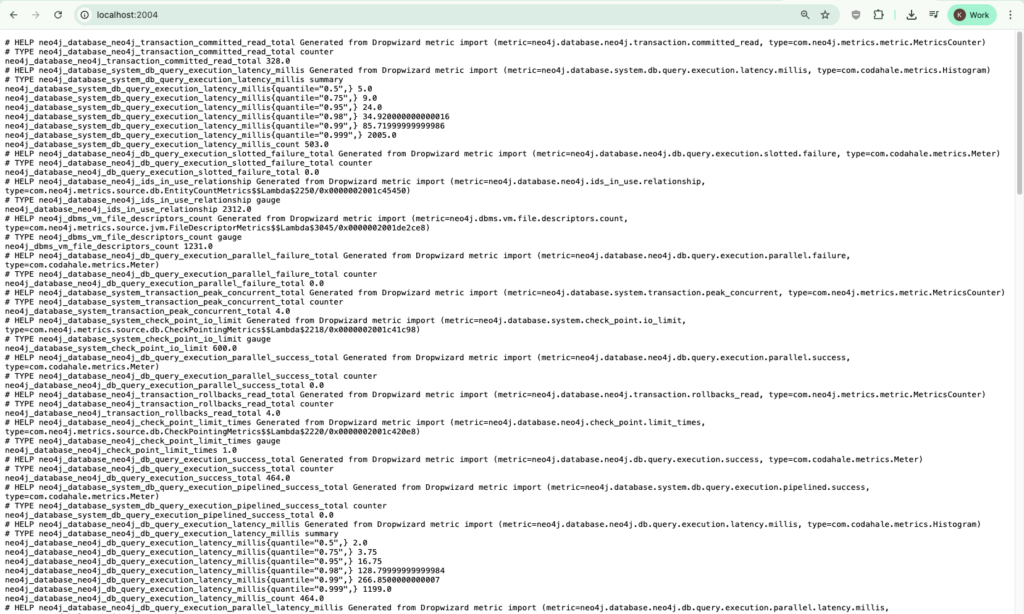
localhost:2004, and you’ll see the metrics exposed by Neo4j in Prometheus format. - Go to
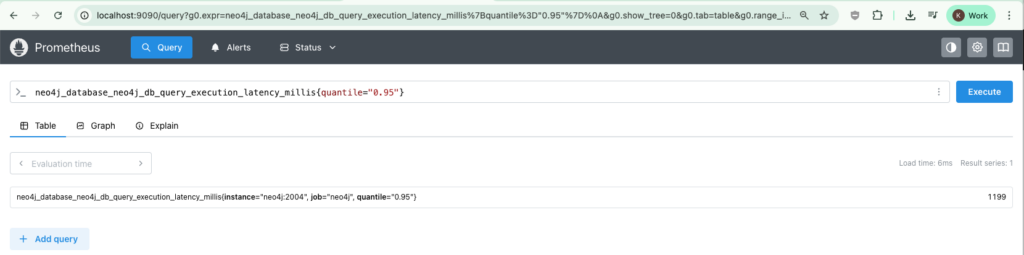
http://localhost:9090/and run the queryneo4j_database_neo4j_db_query_execution_latency_millis{quantile="0.95"}to confirm Prometheus is connected correctly and receiving metrics from Neo4j. - Navigate to
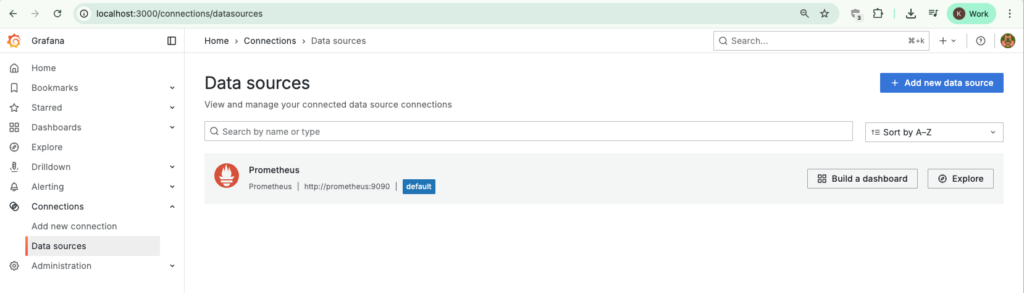
http://localhost:3000/connections/datasourcesand verify thatPrometheuswith port 9000 is listed as a data source. - Go to Dashboard → New → Import, then enter 12046 to load a predefined Neo4j monitoring dashboard.
- Run a few queries in Neo4j, and you’ll see the charts in Grafana start updating in real time as the metrics change.