


Working with any FE framework. It’s just not delivering UI, but also responsible for ensuring that your app’s architecture, data flows, and rendering strategies don’t open up vulnerabilities. In this post, we’ll walk through the key security domains you need to consider and how to proactively secure your app.
1. Data Access & Layering
- Restrict/filter which data fields are returned to the client rather than full backend entities.
- Avoid mixing server logic and client logic in ways that permit accidental exposure of server-only modules.
- Never expose server-only environment variables to client: only use
NEXT_PUBLIC_*for truly public values. - Use packages like
server-onlyto prevent server-only modules from leaking into client bundles.
// lib/db.ts
'use server'

type UserEntity = { id: string; email: string; passwordHash: string; role: string }
export async function getUserPublicProfile(id: string) {
  // Return only safe fields (DTO) without redundant or sensitive data
  // Also fetch data via server function. It prevents leaking sensitive information (i.e. DB connection, secret keys,...)
  const user: UserEntity = { id: 1, email: 'test@example.com', passwordHash: '#@$^&**55', role: 'user' }
  return { id: user.id, email: user.email, role: user.role } // no passwordHash
}

// app/api/user/route.ts
import { NextResponse } from 'next/server'
import { getUserPublicProfile } from '@/lib/db'

export async function GET() {
  const user = await getUserPublicProfile('user_123')
  return NextResponse.json(user) // only safe fields returned
}
2. Authentication & Authorization
- Use secure cookies (HttpOnly, Secure, SameSite) rather than localStorage for session tokens.
- Avoid placing sensitive tokens in cookies accessible via JS.
- Renew/rotate tokens/sessions regularly.
- Validate the user’s session in every entry point (pages, api route handlers, server actions) or through middleware file.
- Permission-based access for protected operations.
// app/api/login/route.ts
import { cookies } from 'next/headers'
import { NextResponse } from 'next/server'

export async function POST() {
  // Imagine you've verified user credentials already
  cookies().set({
    name: 'session',
    value: 'user_token_123',
    httpOnly: true,                   // not accessible via JS
    secure: process.env.NODE_ENV === 'production', // HTTPS only in prod
    sameSite: 'lax', // prevent CSRF
    path: '/', // available to entire app
  })

  return NextResponse.json({ ok: true })
}

// middleware.ts
import { NextResponse } from 'next/server'
import type { NextRequest } from 'next/server'

export function middleware(req: NextRequest) {
  // Validate secure cookie session
  const session = req.cookies.get('session')?.value
  if (!session) {
    const loginUrl = new URL('/login', req.url)
    return NextResponse.redirect(loginUrl)
  }

  return NextResponse.next()
}
3. Input Validation & Sanitization
- Never trust user input or query parameters from
searchParams,params, form data. Always validate and sanitize on the server. - Avoid using
dangerouslySetInnerHTMLunless you absolutely sanitize content (e.g., via DOMPurify)
// app/api/search/route.ts  (validate searchParams)
import { NextResponse } from 'next/server'
import { z } from 'zod'

const IdParam = z.string().min(1).regex(/^[a-zA-Z0-9_-]+$/)

export async function GET(req: Request) {
  const url = new URL(req.url)
  const paramId = url.searchParams.get('id') ?? ''
  const id = IdParam.safeParse(paramId)
  if (!id.success) return NextResponse.json({ error: 'Invalid id' }, { status: 400 })

  return NextResponse.json({ results: [`You searched: ${paramId}`] })
}

// app/content/page.tsx (Server Component – render sanitized content only)
import sanitizeHtml from 'sanitize-html'

export default async function ContentPage() {
  // fetch sanitized content from your DB; here we sanitize again defensively
  const contentFromDb = '<p>Hello <script>alert(1)</script>world</p>'
  const safe = sanitizeHtml(contentFromDb)

  return <div dangerouslySetInnerHTML={{ __html: safe }} />
}
4. Preventing XSS / CSP / Security Headers
- Use a strong Content Security Policy (CSP) header to restrict script, style, and resource sources.
- Prevent leaking production secret keys by using environment variables.
- Limit exposure of client-side js and move heavy logic to server components.
// next.config.js
/** @type {import('next').NextConfig} */
const nextConfig = {
  async headers() {
    const csp = [ "default-src 'self'", "script-src 'self'", "style-src 'self'", "img-src 'self' data:", "font-src 'self' data:", "connect-src 'self'", "frame-ancestors 'none'", "base-uri 'self'", "form-action 'self'" ].join('; ')

    return [
      {
        source: '/:path*',
        headers: [
          { key: 'Content-Security-Policy', value: csp },
          { key: 'Referrer-Policy', value: 'no-referrer' },
          { key: 'X-Content-Type-Options', value: 'nosniff' },
          { key: 'X-Frame-Options', value: 'DENY' },
          { key: 'Permissions-Policy', value: 'geolocation=(), microphone=()" },
          // HSTS only in prod:
          ...(process.env.NODE_ENV === 'production'
            ? [{ key: 'Strict-Transport-Security', value: 'max-age=31536000; includeSubDomains' }]
            : []),
        ],
      },
    ]
  },
}
module.exports = nextConfig
5. CSRF & State-Changing Operations
- Protect against CSRF by validating origin/headers or using CSRF tokens.
- Use POST for mutations, not GET
// middleware.ts
import { NextResponse } from 'next/server'
import type { NextRequest } from 'next/server'

export function middleware(req: NextRequest) {
  const res = NextResponse.next()
  const hasToken = req.cookies.get('csrfToken')

  if (!hasToken) {
    const token = randomUUID()
    res.cookies.set({
      name: 'csrfToken',
      value: token,
      httpOnly: false,
      sameSite: 'lax',
      secure: true,
      path: '/',
    })
  }
  return res
}

// app/api/account/update/route.ts
import { NextResponse } from 'next/server'

export async function POST(req: Request) {
  // CSRF token check from submitted body vs cookie or via header if use (req.headers.get('x-csrf-token'))
  const form = await req.formData().catch(() => null)
  const token = form?.get('csrf')?.toString() ?? ''

  const cookieHeader = req.headers.get('cookie') || ''
  const cookieToken = /(?:^|;\s*)csrfToken=([^;]+)/.exec(cookieHeader)?.[1] ?? ''

  if (!token || token !== cookieToken) {
    return NextResponse.json({ error: 'CSRF' }, { status: 403 })
  }

  // perform the mutation safely
  return NextResponse.json({ ok: true })
}

// app/account/page.tsx
import { cookies } from 'next/headers'

export default function AccountPage() {
  const csrf = cookies().get('csrfToken')?.value ?? ''
  return (
    <form action="/api/account/update" method="POST">
      <input name="displayName" placeholder="Display name" />
      <input type="hidden" name="csrf" value={csrf} />
      <button>Save</button>
    </form>
  )
}
6. Audit Dependency
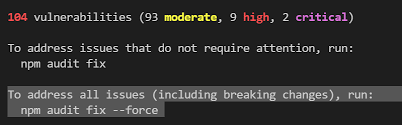
- Keep dependencies up-to-date and run audit checking frequently (for example:
npm audit, yarn audit or automated tooling)

7. Secure API Routes, Server Actions,…
- Audit your route handlers, server actions to ensure that they verify authentication.
- Rate-limit sensitive endpoints to avoid DDoS or brute force. This can configure via hosted server (i.e. Nextlify,…)
// lib/with-auth.ts
import { NextResponse } from 'next/server'

type Handler = (req: Request) => Promise<Response>
async function requireAuth() {
  const s = await getSession()
  if (!s) throw new Error('UNAUTHENTICATED')
  return s
}
export function withAuth(handler: Handler) {
  return async function (req: Request) {
    try {
      // validate session
      const session = await requireAuth()
      if (!session) {
         NextResponse.json({ status: 403 })
      }
      return NextResponse.json({ ok: true })
    } catch () {
      return NextResponse.json({ status: 500 })
    }
  }
}

// app/api/admin/users/route.ts
import { NextResponse } from 'next/server'
import { withAuth } from '@/lib/with-auth'

// Every request must have a valid session with role=admin
export const GET = withAuth(async () => {
  // fetch sensitive data
  return NextResponse.json([{ id: 'u1', email: 'a@example.com' }])
})
8. Error Handling & Monitoring
- Avoid leaking stack traces or internal error details to client instead of showing generic error pages.
- Monitor logs, use error tracking.
// app/error.tsx
'use client'

export default function GlobalError({ error, reset }: { error: Error & { digest?: string }, reset: () => void }) {
  useEffect(() => {
        // Log the error to an external service or
        // send this error to a logging service like Sentry, LogRocket, etc.
        console.error('Global Error:', error)
      }, [error])

  // Don't render error.message or stack here.
  return (
      <body>
      <html>
        <div>
          <p>Please try again or contact support.</p>
          <button onClick={reset}>Try again</button>
        </div>
       </html>
      </body>
  )
}
Reference links
- https://nextjs.org/docs/app/guides/data-security
- https://nextjs.org/blog/security-nextjs-server-components-actions
- https://blog.arcjet.com/next-js-security-checklist
- https://blog.openreplay.com/best-practices-for-security-in-nextjs/