


What Is Aikido?
Aikido is a modern security scanning solution that automatically analyzes your code repositories to detect potential risks — from hardcoded secrets to vulnerable dependencies.
It integrates directly with platforms like GitHub, GitLab, and Azure DevOps, scanning your code automatically every time you push new commits or open a pull request.
Key Features of Aikido
1. Strong Security Scanning
Aikido continuously scans your repositories for common vulnerabilities, including:
- Hardcoded secrets: Exposed API keys, passwords, and tokens
- Vulnerable dependencies: Libraries with known CVEs
- Insecure configurations: Unsafe setup patterns or misconfigurations
- Typical security flaws: XSS, SQL injection, SSRF, and more
Results are presented clearly, showing severity, file location, and actionable remediation suggestions — so you know exactly what to fix first.
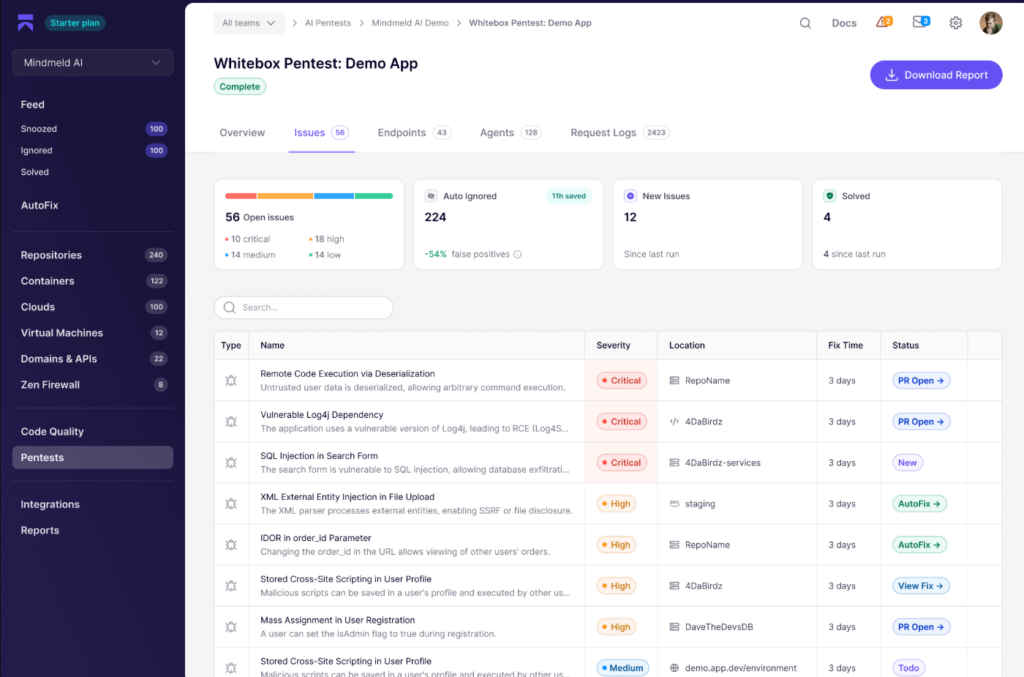
2. Clean and Intuitive Web Dashboard
Aikido’s web dashboard is simple yet powerful. You can:
- View all detected issues per repository
- Filter by severity level (Low, Medium, High)
- Jump directly to affected files and lines
- Read detailed remediation guidance
3. CI/CD Integration for Seamless Security
Aikido integrates smoothly into your CI/CD pipeline (especially Azure DevOps), allowing you to:
- Run automatic scans on each commit or pull request
- Detect and block vulnerabilities before merging
- Enforce secure coding standards team-wide
This helps teams maintain strong security hygiene without slowing down delivery.
4. Autofix for Common Issues
For certain vulnerabilities, Aikido goes beyond detection — it helps you fix them.
It can:
- Preview fixes directly in VSCode
- Or even generate a Pull Request with suggested changes
While Autofix support is still limited, it’s a valuable time-saver for recurring or easily patchable issues.
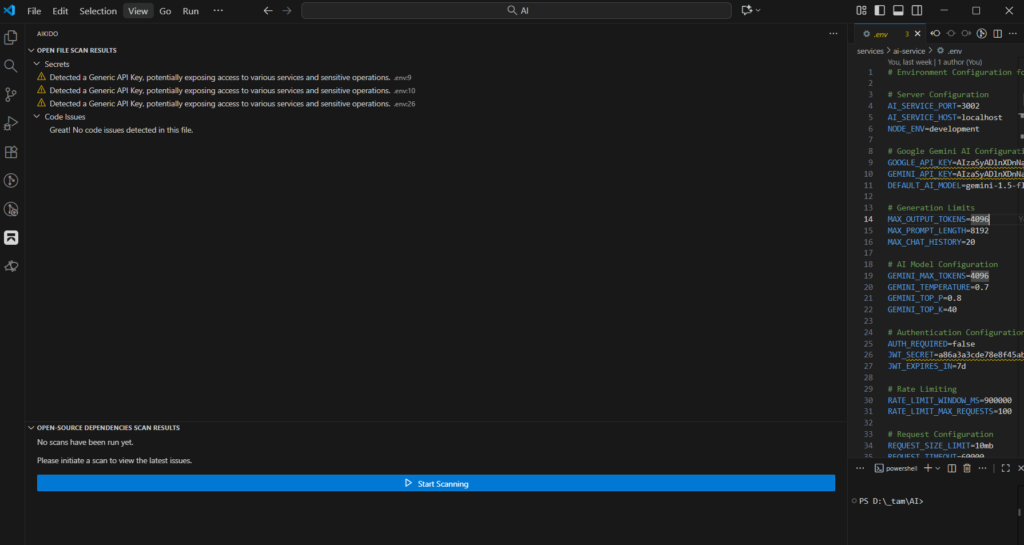
5. VSCode Extension – Fix Issues Without Leaving Your Editor
Aikido offers an official VSCode extension:
🔗 Get it here
With it, developers can:
- See detected vulnerabilities in the currently opened file
- Get inline highlights and remediation hints
- Verify fixes instantly
⚠️ Note: The extension currently scans only the open file. It doesn’t provide a full project overview within VSCode.
Limitations of Aikido
Like any evolving tool, Aikido still has room to grow. Current limitations include:
- ❌ No CLI tool for local (pre-commit) scanning
- ⚙️ Limited workflow automation compared to tools like Snyk or Checkmarx
- 🔧 No advanced rule customization yet
How to Use Aikido in Your Workflow
Here’s a typical flow for fixing a security issue with Aikido:
- Open the Aikido web dashboard
→ View all detected issues, file names, line numbers, and severity levels. - Switch to VSCode
→ Open the specific file that contains the issue. - Use the Aikido extension
→ The issue is highlighted directly in your editor. - Fix the issue
→ Once resolved, it disappears locally. - Push your changes
→ Aikido automatically re-scans and updates the issue status (Resolved/Reopened).
💡 Pro Tip: Integrate Aikido into your CI/CD pipeline to catch issues before they reach production.
Quick Comparison with Competitors
| Feature | Aikido | Snyk | SonarQube | Checkmarx |
|---|---|---|---|---|
| CI/CD Integration | ✅ | ✅ | ✅ | ✅ |
| Local CLI | ❌ | ✅ | ✅ | ✅ |
| VSCode Plugin | ✅ | ✅ | ⚙️ | ⚙️ |
| Autofix | ⚙️ Partial | ✅ | ❌ | ⚙️ |
| Ease of Use | ⭐⭐⭐⭐ | ⭐⭐⭐ | ⭐⭐ | ⭐⭐ |
Conclusion: Aikido – Security Made Simple for Developers
If you’re a software engineer looking to improve code security without adding friction, Aikido is absolutely worth exploring.
With quick setup and automated scanning, Aikido empowers you to:
- Catch vulnerabilities early
- Understand risk severity clearly
- Fix issues fast — right inside VSCode