



Welcome back to our journey to AgenticRAG! The last article, Meet AgenticRAG: A Smart Interface to Akka Agentic AI – Part-1, provides a step-by-step guide to build a Retrieval-Augmented Generation (RAG) application using a very simple agent that streams responses from a LLM.
However, for a RAG application to work efficiently, indexing of documents is important. Since, the indexed documents will become the basis for AI Agent(s) to respond to User queries. Akka Workflows simplifies the process of indexing documents in a responsive and a scalable manner. This article will guide us through indexing documents in MongoDB Atlas DB using Akka Workflows.
Knowledge Indexing is a 3-step process:
- Adding Indexing Workflow: RagIndexingWorkflow
- Injecting a MongoDB Client
- Exposing the Workflow via Endpoint(s)
Step 1: Adding RagIndexingWorkflow
Core logic of RagIndexingWorkflow encapsulates 3 major components:
1. State
The workflow needs to maintain a state, i.e., a list of files the needs to be processed (toProcess) and a list of files which are processed (processed).
@Component(id = "rag-indexing-workflow")
public class RagIndexingWorkflow extends Workflow<RagIndexingWorkflow.State> {

  private final Logger logger = LoggerFactory.getLogger(getClass());
  private final OpenAiEmbeddingModel embeddingModel;
  private final MongoDbEmbeddingStore embeddingStore;
  private final DocumentSplitter splitter;

  // metadata key used to store file name
  private final String srcKey = "src";

  public record State(List<Path> toProcess, List<Path> processed) {
    public static State of(List<Path> toProcess) {
      return new State(toProcess, new ArrayList<>());
    }

    public Optional<Path> head() {
      if (toProcess.isEmpty()) return Optional.empty();
      else return Optional.of(toProcess.getFirst());
    }

    public State headProcessed() {
      if (!toProcess.isEmpty()) {
        processed.add(toProcess.removeFirst());
      }
      return new State(toProcess, processed);
    }

    public boolean hasFilesToProcess() {
      return !toProcess.isEmpty();
    }

    public int totalFiles() {
      return processed.size() + toProcess.size();
    }

    public int totalProcessed() {
      return processed.size();
    }
  }

  @Override
  public State emptyState() {
    return State.of(new ArrayList<>());
  }
2. Processing Files
Since, we are treating the list of files as queue. Hence, a processingFileStep (StepEffect) is required which reads documents one by one, indexes them, and adds them in MongoDB Atlas as a segment.
@Override
public WorkflowSettings settings() {
  // prettier-ignore
  return WorkflowSettings.builder()
    .defaultStepTimeout(ofMinutes(1))
    .build();
}

@StepName("processing-file")
private StepEffect processingFileStep() {
  if (currentState().hasFilesToProcess()) {
    indexFile(currentState().head().get());
  }

  if (currentState().hasFilesToProcess()) {
    var newState = currentState().headProcessed();
    logger.debug("Processed {}/{}", newState.totalProcessed(), newState.totalFiles());
    return stepEffects()
      .updateState(newState)
      .thenTransitionTo(RagIndexingWorkflow::processingFileStep);
  } else {
    return stepEffects().thenPause();
  }
}

private void indexFile(Path path) {
  try (InputStream input = Files.newInputStream(path)) {
    // read file as input stream
    Document doc = new TextDocumentParser().parse(input);
    var docWithMetadata = new DefaultDocument(
      doc.text(),
      Metadata.metadata(srcKey, path.getFileName().toString())
    );

    var segments = splitter.split(docWithMetadata);
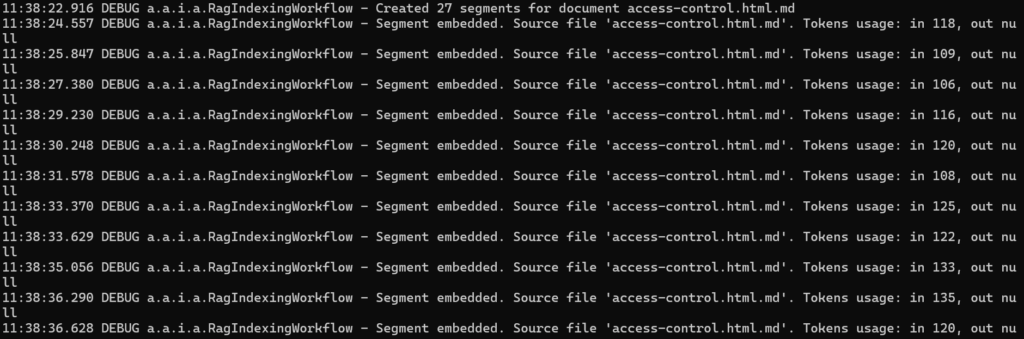
    logger.debug(
      "Created {} segments for document {}",
      segments.size(),
      path.getFileName()
    );

    segments.forEach(this::addSegment);
  } catch (BlankDocumentException e) {
    // some documents are blank, we need to skip them
  } catch (Exception e) {
    logger.error("Error reading file: {} - {}", path, e.getMessage());
  }
}

private void addSegment(TextSegment seg) {
  var fileName = seg.metadata().getString(srcKey);
  var res = embeddingModel.embed(seg);

  logger.debug(
    "Segment embedded. Source file '{}'. Tokens usage: in {}, out {}",
    fileName,
    res.tokenUsage().inputTokenCount(),
    res.tokenUsage().outputTokenCount()
  );

  embeddingStore.add(res.content(), seg);
}
3. Termination
At last, the workflow needs to be paused and resume later for new documents. An interesting aspect of this workflow is that it never ends. If it runs out of files to process, then it simply pauses itself.
public Effect<Done> start() {
  if (currentState().hasFilesToProcess()) {
    return effects().error("Workflow is currently processing documents");
  } else {
    List<Path> documents;
    var documentsDirectoryPath = getClass()
      .getClassLoader()
      .getResource("md-docs")
      .getPath();

    try (Stream<Path> paths = Files.walk(Paths.get(documentsDirectoryPath))) {
      documents = paths
        .filter(Files::isRegularFile)
        .filter(path -> path.toString().endsWith(".md"))
        .toList();
    } catch (IOException e) {
      throw new RuntimeException(e);
    }

    return effects()
      .updateState(State.of(documents))
      .transitionTo(RagIndexingWorkflow::processingFileStep)
      .thenReply(done());
  }
}
Step 2: Injecting a MongoDB Client
Next step is to inject an embeddingStore field into the workflow. This field is of type MongoDbEmbeddingStore, and to create an instance of that we need to inject a MongoClient (MongoDB) to the workflow’s constructor.
public RagIndexingWorkflow(MongoClient mongoClient) {
  this.embeddingModel = OpenAiUtils.embeddingModel();
  this.embeddingStore = MongoDbEmbeddingStore.builder()
    .fromClient(mongoClient)
    .databaseName("akka-docs")
    .collectionName("embeddings")
    .indexName("default")
    .createIndex(true)
    .build();

  this.splitter = new DocumentByCharacterSplitter(500, 50);
}
To make the MongoClient instance available, we can use a bootstrap class that uses Akka’s @Setup annotation.
@Setup
public class Bootstrap implements ServiceSetup {

  private Config config;


  public Bootstrap(Config config) {
    this.config = config;
    KeyUtils.checkKeys(config);
  }


  @Override
  public DependencyProvider createDependencyProvider() {
    MongoClient mongoClient = MongoClients.create(config.getString("mongodb.uri"));
    Knowledge knowledge = new Knowledge(mongoClient);

    return new DependencyProvider() {
      @Override
      public <T> T getDependency(Class<T> cls) {
        if (cls.equals(MongoClient.class)) {
          return (T) mongoClient;
        }

        return null;
      }
    };
  }
}
Step 3: Exposing the Workflow via Endpoint(s)
Akka offers HTTP endpoint(s) to control indexing, i.e., start/abort indexing.
@Acl(allow = @Acl.Matcher(principal = Acl.Principal.INTERNET))
@HttpEndpoint("/api/index")
public class IndexerEndpoint {

  private final Logger logger = LoggerFactory.getLogger(getClass());
  private final ComponentClient componentClient;

  public IndexerEndpoint(ComponentClient componentClient) {
    this.componentClient = componentClient;
  }

  @Post("/start")
  public HttpResponse startIndexation() {
    componentClient.forWorkflow("indexing").method(RagIndexingWorkflow::start).invoke();
    return HttpResponses.accepted();
  }

  @Post("/abort")
  public HttpResponse abortIndexation() {
    componentClient.forWorkflow("indexing").method(RagIndexingWorkflow::abort).invoke();
    return HttpResponses.accepted();
  }
}
Since, both the endpoint(s) return HTTP 202 (Accepted) status code, hence, external orchestration becomes easy.
Time to Index Documents!
1. Start the service locally
mvn clean compile exec:java2. Trigger Indexing
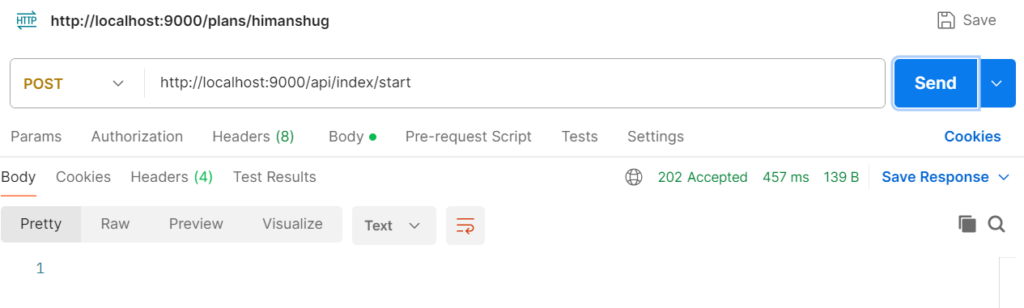
Indexing process of all *.md documents can be observed in the application logs. Once indexed, MongoDB will contain the embeddings ready for semantic search.
Next Steps
Now we know how to index documents in a vector DB (MongoDB Atlas). With the indexing in place, the next step is to build an actual Akka AI Agent that will wire the embeddings into a RAG search query. And at last create Endpoint(s)/UI for interactive User querying. To know more about it, stay tuned 🙂