


Welcome back to our journey to AgenticRAG! The last article, Meet AgenticRAG: Indexing Knowledge using Akka Workflows, provides a step-by-step guide to indexing documents in MongoDB Atlas DB using Akka Workflows.
With the indexing in place, the next step is to wire the embeddings (indexed documents) into a RAG search query. For that we need a class that will provide an abstraction to be used by AskAkkaAgenticAiAgent to make RAG queries.
Add Knowledge Class
public class Knowledge {

  private final RetrievalAugmentor retrievalAugmentor;
  private final ContentInjector contentInjector = new DefaultContentInjector();

  public Knowledge(MongoClient mongoClient) {
    var contentRetriever = EmbeddingStoreContentRetriever.builder()
      .embeddingStore(MongoDbUtils.embeddingStore(mongoClient))
      .embeddingModel(OpenAiUtils.embeddingModel())
      .maxResults(10)
      .minScore(0.1)
      .build();

    this.retrievalAugmentor = DefaultRetrievalAugmentor.builder()
      .contentRetriever(contentRetriever)
      .build();
  }

  public String addKnowledge(String question) {
    var chatMessage = new UserMessage(question);
    var metadata = Metadata.from(chatMessage, null, null);
    var augmentationRequest = new AugmentationRequest(chatMessage, metadata);

    var result = retrievalAugmentor.augment(augmentationRequest);
    UserMessage augmented = (UserMessage) contentInjector.inject(
      result.contents(),
      chatMessage
    );
    return augmented.singleText();
  }
}
This utility will retrieve the relevant content (indexed documents) from MongoDB Atlas and augment the user request (question) with the retrieved content.
Update AskAkkaAgenticAiAgent with Knowledge
@Component(
        id = "ask-akka-agentic-ai-agent",
        name = "Ask Akka Agentic AI",
        description = "Expert in Akka Agentic AI"
)
public class AskAkkaAgenticAiAgent extends Agent {

  private final Knowledge knowledge;

  private static final String SYSTEM_MESSAGE =
    """
    You are a very enthusiastic Akka Agentic AI representative who loves to help people!
    Given the following sections from the Akka Agentic AI documentation, answer the question
    using only that information, output in markdown format.
    If you are unsure and the text is not explicitly written in the documentation, say:
    Sorry, I don't know how to help with that.
    """.stripIndent();

  public AskAkkaAgenticAiAgent(Knowledge knowledge) {
    this.knowledge = knowledge;
  }

  public StreamEffect ask(String question) {
    var enrichedQuestion = knowledge.addKnowledge(question);

    return streamEffects()
      .systemMessage(SYSTEM_MESSAGE)
      .userMessage(enrichedQuestion)
      .thenReply();
  }
}
The changes done to the AI Agent are:
- Inject Knowledge utility
- Add knowledge to the question, i.e., retrieve the content and augment the question
- Pass the knowledge to the LLM. This will allow the LLM to answer the question meaningfully
Inject Knowledge via Bootstrap
At last, to inject the Knowledge class into AskAkkaAgenticAiAgent, we need to add it via Bootstrap
@Setup
public class Bootstrap implements ServiceSetup {

  private Config config;

  public Bootstrap(Config config) {
    this.config = config;
    KeyUtils.checkKeys(config);
  }

  @Override
  public DependencyProvider createDependencyProvider() {
    MongoClient mongoClient = MongoClients.create(config.getString("mongodb.uri"));
    Knowledge knowledge = new Knowledge(mongoClient);

    return new DependencyProvider() {
      @Override
      public <T> T getDependency(Class<T> cls) {
        if (cls.equals(MongoClient.class)) {
          return (T) mongoClient;
        }
        if (cls.equals(Knowledge.class)) {
          return (T) knowledge;
        }

        return null;
      }
    };
  }
}
Lets Ask Question!
1. Set OpenAI API Key as environment variable
set OPENAI_API_KEY=<your-openai-api-key>2. Start the service locally
mvn clean compile exec:java3. Use curl/postman to call the Endpoint
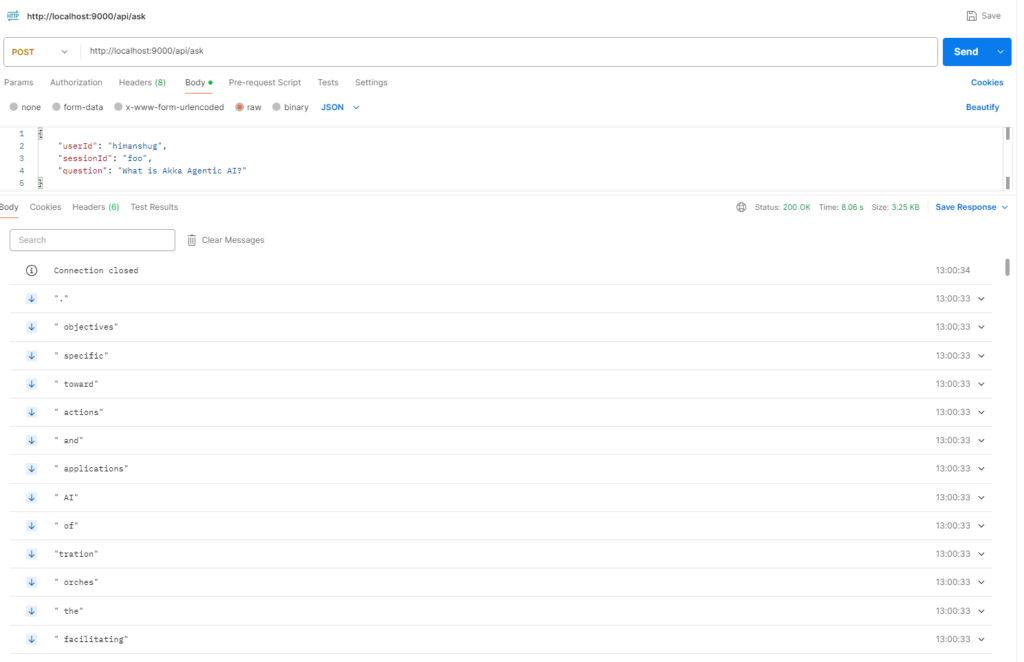
The difference between present response and earlier response is – the current response is retrieved from indexed documents in place of from a general LLM.
Next Steps
Now the knowledge index is wired in the AI Agent. However, we are still receiving response(s) in a stream fashion. Due to which the response(s) are visible incrementally. Also, any conversation with an AI Agent via a LLM model is stateless, which makes it difficult to retain the context of an ongoing conversation. To tackle this we will look into UI Endpoints and User Session History in upcoming blog(s), so stay tuned 🙂