


Introduction
In Part 1, we explored why n8n is powerful for developers—especially with the rise of AI Workflows and AI Agents. Now it’s time to get hands-on.
As a Frontend Developer, one of the most annoying blockers when building UI is:
👉 There is no API yet… but the deadline is still coming.
In this guide, I’ll show you how to build a real, working Fake API using n8n + Gemini AI — based directly on the JSON workflow you provided from your local n8n instance.
You’ll learn:
- How to run n8n (cloud or self-hosted)
- How the fake API workflow is structured
- How the webhook, AI request, and JSON parsing fit together
- How the /users API gets generated dynamically using AI
- And how you can extend it later for more endpoints or more data models
Let’s dive in.
Step 1 — Running n8n (Cloud vs Self-Hosted)
You have two ways to run n8n.
Option A — n8n Cloud (Easy, but Paid)
- No setup
- Web UI ready instantly
- Free trial available
- After trial, you must pay monthly
Go to https://n8n.io/ and select Get started for free
Great for teams who want convenience.
Option B — Self-Hosting n8n (Developer-Friendly, Free)
As a software engineer, this is often the better choice:
- Completely free
- Full control
- Install locally via Docker, npm, or desktop app
A simple Docker install:
docker run -it --rm \
  -p 5678:5678 \
  -v ~/.n8n:/home/node/.n8n \
  n8nio/n8n
or
npm install -g n8n
n8n
And now your n8n UI is available at:
You mentioned you already set up local n8n — perfect.
Let’s use that system for the Fake API example.
Step 2 — Understanding the Fake API Workflow
This tutorial is fully based on workflow JSON:
{
  "name": "Fake API - Users from AI Gemini",
  "nodes": [
    {
      "parameters": {
        "modelId": {
          "__rl": true,
          "value": "models/gemini-2.5-flash",
          "mode": "list",
          "cachedResultName": "models/gemini-2.5-flash"
        },
        "messages": { "values": [ { "content": "Generate an array of 5 user objects with fields: id, name, email, and role." } ] },
        "jsonOutput": true,
        "options": { "systemMessage": "You are an API generator. Always return ONLY valid JSON array. No extra text, no markdown." }
      },
      "type": "@n8n/n8n-nodes-langchain.googleGemini",
      "typeVersion": 1,
      "position": [ 928, -16 ],
      "id": "74575443-3be9-4210-aadf-42cb3ec37652",
      "name": "Message a model",
      "credentials": {
        "googlePalmApi": {
          "id": "IK8e2I2twTcJIGNK",
          "name": "Google Gemini(PaLM) Api account"
        }
      }
    },
    {
      "parameters": { "options": {} },
      "id": "a41c92c5-3fba-46ef-a5f4-93045049b3b9",
      "name": "Return API",
      "type": "n8n-nodes-base.respondToWebhook",
      "typeVersion": 1,
      "position": [ 1504, -16 ]
    },
    {
      "parameters": { "jsCode": "const data = JSON.parse($input.first().json.content.parts[0].text);\nreturn [{ json: { users: data } }];" },
      "id": "313fad76-b3cc-4a27-8d56-5c616cbe6055",
      "name": "Parse JSON",
      "type": "n8n-nodes-base.code",
      "typeVersion": 2,
      "position": [ 1280, -16 ]
    },
    {
      "parameters": {
        "path": "users",
        "responseMode": "lastNode",
        "options": {}
      },
      "id": "3a8b6c07-e2e2-4218-b1cd-ac95aee41b35",
      "name": "Webhook /users",
      "type": "n8n-nodes-base.webhook",
      "typeVersion": 1,
      "position": [ 704, -16 ],
      "webhookId": "946ab88c-3813-403c-8e16-21f8b91e03e3"
    }
  ],
  "pinData": {},
  "connections": {
    "Message a model": {
      "main": [
        [
          {
            "node": "Parse JSON",
            "type": "main",
            "index": 0
          }
        ]
      ]
    },
    "Parse JSON": {
      "main": [
        [
          {
            "node": "Return API",
            "type": "main",
            "index": 0
          }
        ]
      ]
    },
    "Webhook /users": {
      "main": [
        [
          {
            "node": "Message a model",
            "type": "main",
            "index": 0
          }
        ]
      ]
    }
  },
  "active": true,
  "settings": { "executionOrder": "v1" },
  "versionId": "70ca357b-7fab-444f-bd1e-0f48108fab56",
  "meta": {
    "templateId": "self-building-ai-agent",
    "templateCredsSetupCompleted": true,
    "instanceId": "931c320b04ac306373dc485ec41ef799729d215cf40e37906cd97aac9df5cb21"
  },
  "id": "AnoXIELaMeAKJFvf",
  "tags": []
}
Workflow name: Fake API – Users from AI Gemini
This API allows developers to hit:
GET http://localhost:5678/webhook/usersAnd receive a dynamically generated JSON list of fake users created by Gemini.
Here’s how the pipeline works internally.
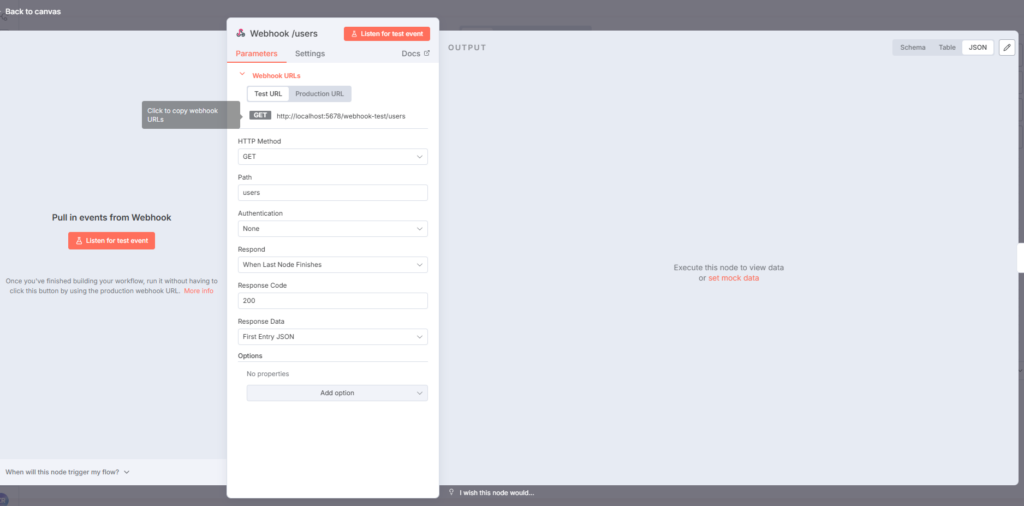
Node 1 — Webhook Trigger (/users)
{
  "name": "Webhook /users",
  "type": "n8n-nodes-base.webhook",
  "parameters": { "path": "users", "responseMode": "lastNode" }
}
This exposes a public-like endpoint:
/webhook/usersWhenever a request comes in, the workflow starts.
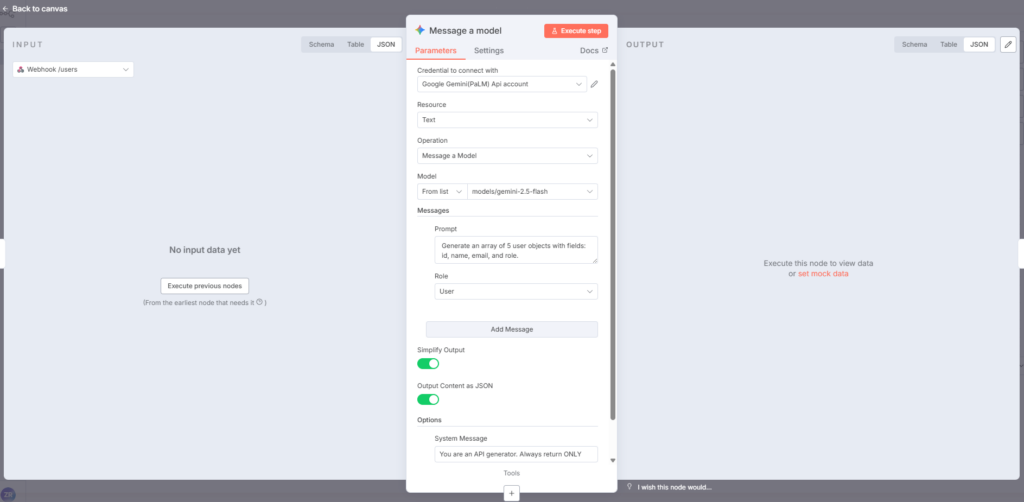
Node 2 — Gemini AI Model (Generate Fake Users)
"type": "@n8n/n8n-nodes-langchain.googleGemini"The node sends this prompt:
“Generate an array of 5 user objects with fields: id, name, email, and role.”
With a strict system instruction:
Always return ONLY valid JSON array.
No extra text, no markdown.
This ensures Gemini returns clean API-ready JSON, such as:
[
  { "id": 1, "name": "Alice", "email": "alice@example.com", "role": "admin" },
  ...
]
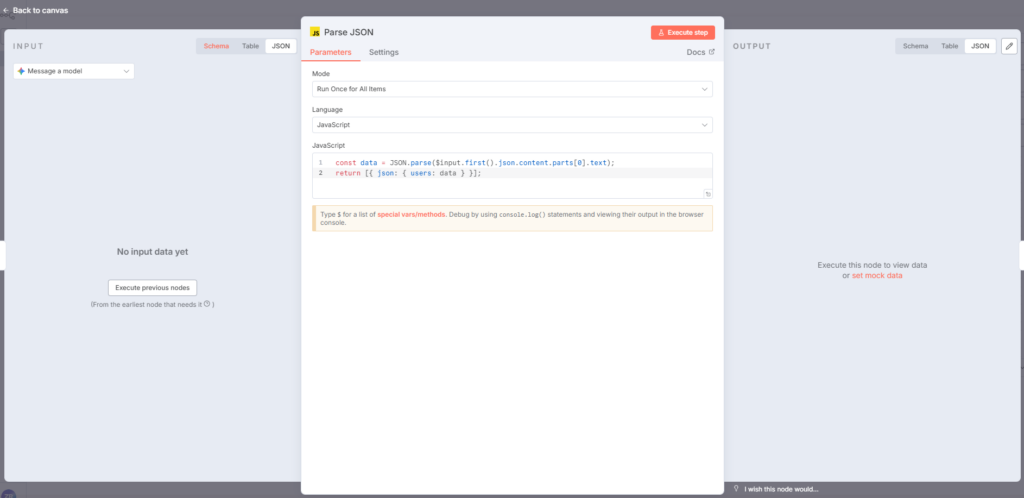
Node 3 — Parse JSON Node
Gemini returns a JSON string, not a JS object.
This custom code processes it:
const data = JSON.parse($input.first().json.content.parts[0].text);
return [{ json: { users: data } }];
Now the workflow produces:
{
  "users": [...]
}
Node 4 — Return API Response
This node sends the final data back to the requester.
When calling:
GET /webhook/usersYou will receive:
{
  "users": [
    { "id": "...", "name": "...", "email": "...", "role": "..." },
    ...
  ]
}
A fully functional Fake API.
No backend.
No database.
No actual data.
All generated dynamically by AI + n8n workflow logic.
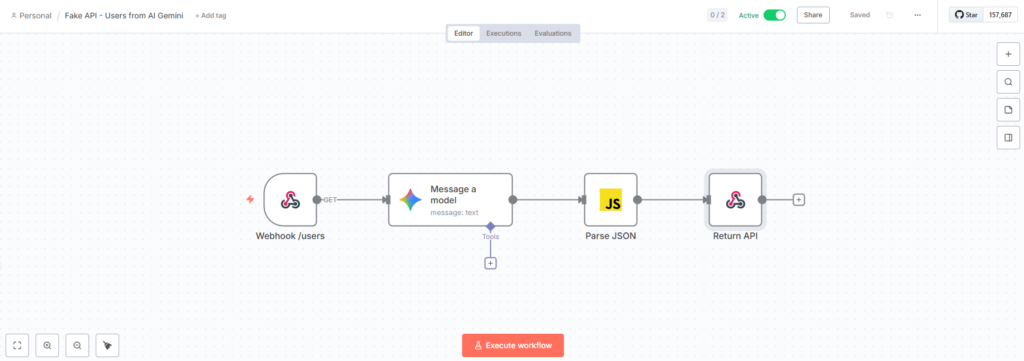
This is image of full workflow that create the fake API users
Step 3 — Testing the Fake API
Open terminal and run:
curl http://localhost:5678/webhook/users
Or test in browser / Postman.
Each request returns new data — perfect for Frontend developers building UI screens.
Why This Is Useful for Developers
With this workflow:
- You don’t have to wait for backend APIs
- You can simulate pagination, sorting, roles, and error cases
- You can generate dynamic mock data using AI
- You can rapidly prototype UI pages
- And later, just point your frontend to real APIs
This alone can save hours or days during development.
Conclusion
This workflow demonstrates the true power of n8n:
- You combine Webhooks → AI → Custom Code → API Output
- You create realistic Fake APIs instantly
- You improve your development workflow without backend dependencies