


Building a Face Recognition and Similarity System with AuraFace, Python, PostgreSQL, and C#
Face recognition is a core technology for security, personalized services, and analytics. In this post, we’ll walk through a full pipeline:
- Detect faces and generate embeddings using AuraFace in Python
- Cluster faces to discover patterns
- Store embeddings in PostgreSQL
- Perform similarity search in C# using EF Core for business logic
1. Extracting Face Embeddings and Clustering with AuraFace (Python)
AuraFace is a pretrained model that generates vector embeddings for faces. These embeddings represent faces in a high-dimensional space, enabling similarity comparisons and clustering.
Download the AuraFace Model First
Before using the model, you need to download it from Hugging Face Hub:
from huggingface_hub import snapshot_download

# Download the AuraFace-v1 model to a local folder
model_dir = snapshot_download(
    repo_id="fal/AuraFace-v1",
    local_dir="models/auraface"
)

print("Model downloaded to:", model_dir)
Note: This only needs to be run once. The model will be cached in the models/auraface directory for future use.
Face Detection and Embedding Extraction
from insightface.app import FaceAnalysis
import cv2

# Initialize AuraFace (InsightFace)
# Make sure the model is downloaded first (see above)
face_app = FaceAnalysis(
        name="buffalo_l",  # detection model
        root="models/auraface",  # your local folder with AuraFace files
        allowed_modules=["detection", "recognition"]  # enable detection + embedding
    )
face_app.prepare(ctx_id=-1, det_size=(640, 640))  # Prepare the model (GPU: ctx_id=0, CPU: ctx_id=-1)

img = cv2.imread("images/group_photo.jpg")
faces = face_app.get(img)

for face in faces:
    emb = face.normed_embedding  # 512-D normalized vector
    x1, y1, x2, y2 = face.bbox.astype(int)
    face_clip = img[y1:y2, x1:x2]  # optional face crop
Clustering Faces
from sklearn.cluster import DBSCAN
import numpy as np

embeddings = np.array([face.normed_embedding for face in faces])
clustering = DBSCAN(metric='cosine', eps=0.6, min_samples=2)
labels = clustering.fit_predict(embeddings)

for face, label in zip(faces, labels):
    print(f"Face at {face.bbox.tolist()} -> Cluster {label}")
- Cluster
-1→ faces considered outliers (not similar to any group) - Helps in analytics, deduplication, and dataset organization.
2. Storing Embeddings in PostgreSQL
PostgreSQL with pgvector allows efficient storage and similarity search for high-dimensional embeddings.
Database Table
CREATE EXTENSION IF NOT EXISTS vector;

CREATE TABLE face_embeddings (
    id SERIAL PRIMARY KEY,
    name TEXT,
    embedding vector(512)
);

-- Index for fast similarity search
CREATE INDEX embedding_idx
ON face_embeddings USING ivfflat (embedding vector_cosine_ops) WITH (lists = 100);
vector(512)stores the AuraFace embeddings.- Indexing speeds up top-K similarity searches.
3. Performing Similarity Search in EF Core (C#)
EF Core provides LINQ-based queries to search embeddings efficiently without raw SQL.
Entity Definition
public class FaceEmbedding
{
    public int Id { get; set; }
    public string Name { get; set; }
    public float[] Embedding { get; set; } = new float[512];
}
DbContext Setup
using Microsoft.EntityFrameworkCore;

public class FaceDbContext : DbContext
{
    public DbSet FaceEmbeddings { get; set; }

    protected override void OnConfiguring(DbContextOptionsBuilder optionsBuilder)
    {
        optionsBuilder.UseNpgsql(
            "Host=localhost;Database=yourdb;Username=user;Password=pass",
            o => o.UseVector()
        );
    }

    protected override void OnModelCreating(ModelBuilder modelBuilder)
    {
        modelBuilder.Entity()
            .Property(f => f.Embedding)
            .HasColumnType("vector(512)");
    }
}
Top-K Similarity Search
using (var db = new FaceDbContext())
{
    float[] queryEmbedding = LoadEmbedding();
    int topK = 50;

    var topMatches = db.FaceEmbeddings
        .OrderBy(f => f.Embedding.CosineDistance(queryEmbedding))
        .Take(topK)
        .Select(f => new
        {
            f.Id,
            f.Name,
            Similarity = 1 - f.Embedding.CosineDistance(queryEmbedding)
        })
        .ToList();

    foreach (var match in topMatches)
    {
        Console.WriteLine($"ID: {match.Id}, Name: {match.Name}, Similarity: {match.Similarity:F3}");
    }
}
Optional: Filter by Threshold
float similarityThreshold = 0.65f;

var filteredMatches = db.FaceEmbeddings
    .Where(f => 1 - f.Embedding.CosineDistance(queryEmbedding) >= similarityThreshold)
    .OrderBy(f => f.Embedding.CosineDistance(queryEmbedding))
    .Take(topK)
    .Select(f => new { f.Id, f.Name })
    .ToList();
- Use cosine similarity for normalized embeddings (
normed_embedding). - IVFFlat index ensures fast retrieval for large datasets.
Cosine Distance Can Give Wrong Results
Common Issues:
- Magnitude Ignored: Cosine similarity focuses on the angle between vectors, not their magnitude. Two vectors with very different norms but similar directions can appear highly similar.
- Embedding Noise: If embeddings are poorly trained or contain noise, vectors may cluster incorrectly, leading to false positives.
- Semantic Ambiguity: Similarity in vector space doesn’t always mean semantic similarity, especially in high-dimensional spaces.
Recommended Filters
To improve accuracy, you can apply these techniques:
1. Threshold Filtering
- Set a minimum similarity score (or maximum distance) to accept results.
- Example: Only consider matches with Cosine Similarity ≥ 0.8.
- This removes weak matches that might be irrelevant.
2. Ebow (Embedding Bag of Words) or Weighted Filtering
- Combine cosine similarity with token-level overlap or weighted scoring.
- Helps ensure semantic alignment beyond just vector direction.
3. Hybrid Search
- Use Cosine Similarity + Keyword/Metadata Filters.
- Example: Filter by category, language, or domain before ranking by similarity.
4. Normalization
- Normalize embeddings before computing cosine similarity to reduce magnitude bias.
5. Re-ranking with Contextual Models
- After initial cosine-based retrieval, re-rank using a more precise model (e.g., cross-encoder or semantic scoring).
4. Business Logic Integration
When a photographer captures moments (e.g., weddings, birthdays, corporate events) and uploads them to the gallery:
Core Features
Face Clustering & Identity Grouping
- Automatically cluster faces across all uploaded images to group photos by individual
- This enables easy navigation and personalized galleries
Generate Face Clips (FaceClip)
- Create cropped face thumbnails for each detected person
- These serve as filters for quick browsing and selection
Selfie-Based Search
- Allow end-users to upload a selfie and search for all photos containing them
- Uses vector similarity (Cosine Distance + threshold filtering)
Publish Personalized Galleries
- Generate dynamic galleries for each person
- Enable guests to view and download their photos securely
Additional Features
Tagging & Metadata Enrichment
- Add tags like event name, location, and timestamp to improve search and filtering
Integration with Social Sharing & Print Services
- Provide options for users to share their curated galleries on social media
- Order prints directly from the platform
Privacy & Access Control
- Implement secure authentication and permissions
- Ensure only authorized users can access their photos
Analytics & Insights
- Track engagement metrics (e.g., most-searched faces, download counts)
- Provide insights for photographers and event organizers
Optional Monetization
- Offer premium features like high-resolution downloads
- Custom albums or AI-enhanced photo edits
5. Putting It All Together
- Python/AuraFace: Detect faces → generate embeddings → cluster → crop faces (FaceClip).
- PostgreSQL + pgvector: Store embeddings efficiently and index for similarity search.
- C# + EF Core: Retrieve top-K similar embeddings → integrate business logic → trigger actions or analytics.
This pipeline is scalable and production-ready, with a clear separation of concerns:
- Python → CV & embeddings
- PostgreSQL → storage & similarity search
- C# → business logic & application layer
Demo Images
Note: Demo photos downloaded from Unsplash – Child Portrait Collection for source reference.
Face Detection and FaceClip Generation
Generated FaceClips

Automatically cropped face thumbnails from the group photo
Search by FaceClip
Filter by FaceClip
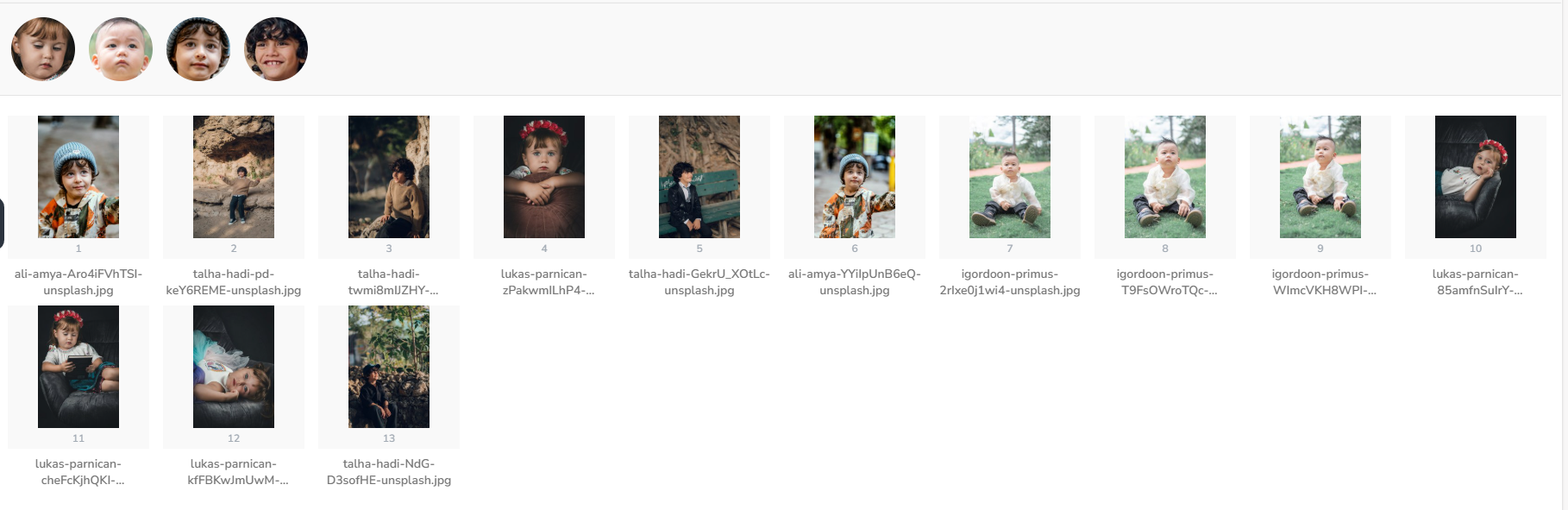
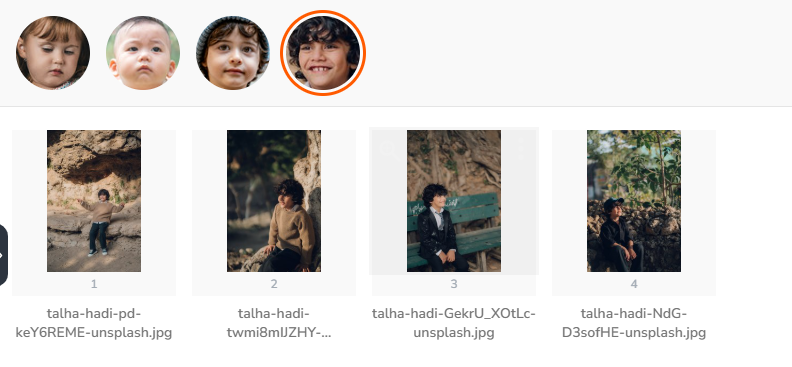
Gallery filtered to show only photos containing the selected person
Search Results
Similarity Search Results

Top matching faces with similarity scores displayed
Conclusion
By combining AuraFace in Python, PostgreSQL + pgvector, and EF Core in C#, you can build a robust face recognition system that supports:
- Real-time similarity searches
- Unknown face clustering
- Seamless business integration
This hybrid approach leverages the strengths of each technology and allows for a fully operational face recognition & analytics system.