


Many manual testers feel nervous when they hear the words API testing.
Some think it is “too technical” or “only for automation testers.”
But the truth is: API testing is not hard, especially when you use Postman.
Postman is a simple and powerful tool that helps testers send requests, check responses, and understand how an API works – all without writing code.
In this blog, we will explain API testing in easy words and show how manual testers can get started quickly.
What Is an API?
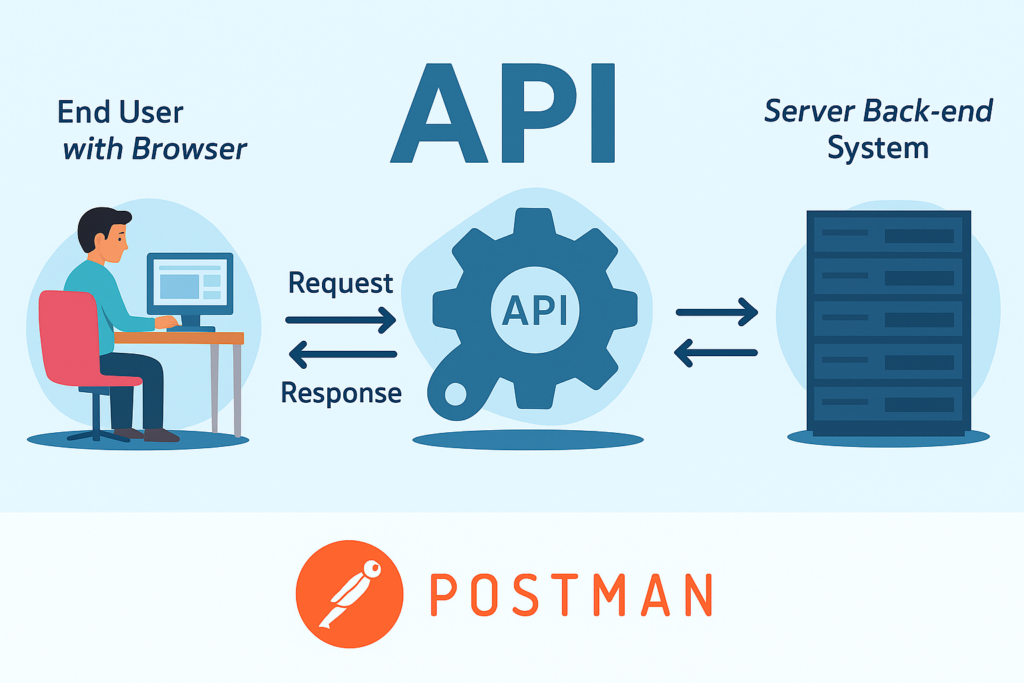
API stands for Application Programming Interface.
But you can think of it like this:
An API is a way for two systems to talk to each other.
For example:
- When you log into an app → the app talks to the server through an API.
- When you click “Forgot Password” → an API sends the request to reset your password.
- When you view your profile → an API brings your data from the server.
APIs work in the background.
Postman helps you see and test them.
What Is Postman?
Postman is a free tool for sending API requests.
It allows you to:
- Send requests (GET, POST, PUT, DELETE)
- Add parameters or body data
- Check the server’s response
- Validate status codes (200, 400, 401, etc.)
- Save your test cases as Collections
No programming knowledge is required for basic usage.
Why Manual Testers Should Learn Postman
Learning Postman gives many advantages:
- Understand how your application works – You can see what happens behind the UI.
- Test faster – You don’t need to click many screens to test one function.
- Catch bugs early – Many bugs come from APIs, not the UI.
- Improve your skills – Knowing API testing makes you a stronger and more valuable tester.
The Most Common API Request Types
You’ll see many HTTP methods, but you actually only need to understand four:
1. GET – Get data from server
Example: Get user profile
No body needed.
2. POST – Send new data to server
Example: Login
You add body data like email and password.
3. PUT – Update data
Example: Update profile information.
4. DELETE – Remove data
Example: Delete a user.
If you understand these four, you already understand most API testing.
How to Test an API in Postman (A Simple Example)
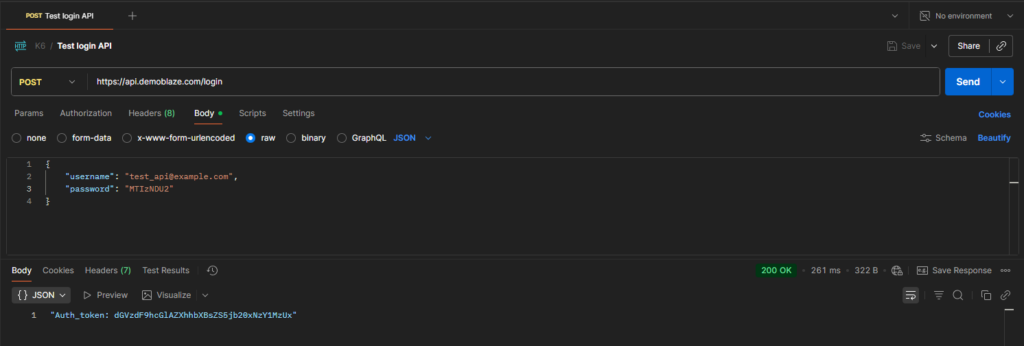
Let’s test a login API example.
Step 1: Open Postman
Click New → HTTP Request.
Step 2: Select method
Choose POST.
Step 3: Enter the URL
Example: https://api.example.com/login
Step 4: Go to Body → select raw → JSON
Add your login data:
{
“email”: “test@example.com“,
“password”: “123456”
}
Step 5: Click Send
Postman will show the server’s response.
What to Check in the API Response
1. Status Code
- 200 = success
- 400 = bad request
- 401 = wrong email or password
- 500 = server error (serious issue)
2. Response Time
Is the API slow?
3. Response Body
Example of a success response:
{
“message”: “Login successful”,
“token”: “abcd1234”
}
Check if:
- Messages are correct
- Data is correct
- Fields follow the right format
4. Error Messages
Try wrong inputs:
- Empty email
- Wrong password
- Invalid format
Make sure the system returns the right error.
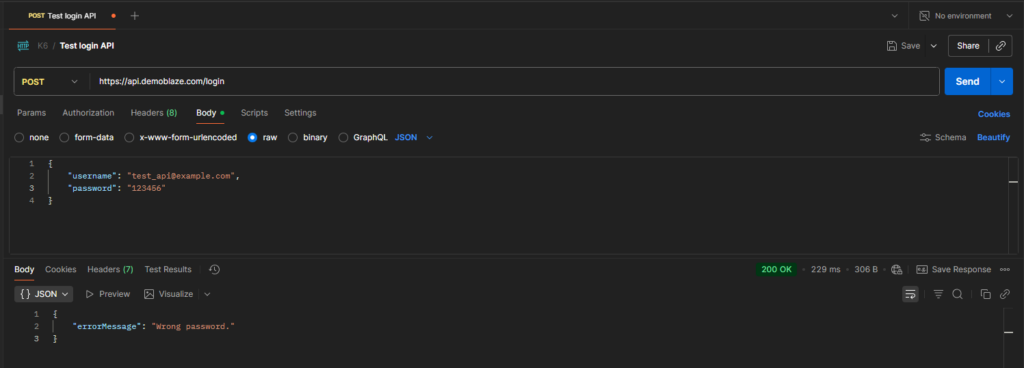
In the example above, a login request was sent using an incorrect password. The API correctly returned an error message.
However, the status code returned was 200 OK, which is inappropriate for a failed login. The proper status code for a failed login due to invalid credentials is 401 Unauthorized, because the request was received but the user is not authenticated.
This demonstrates how Postman helps testers spot issues that may not appear in the UI. Checking both the response message and status code makes it easy to detect when an API deviates from expected behavior or standards.
Real Testing Scenarios for Manual Testers
Here are common examples you can test with Postman:
- Login API – Check valid login, invalid login, missing fields.
- Forgot password – Check email sending, wrong email format, empty email.
- Get user profile – Check if user info matches database.
- Update profile – Check valid update and invalid update.
If your project has APIs, you can test all these easily.
Tips for Manual Testers Learning Postman
- Start with the simplest API in your project (usually login or get-user).
- Save your requests as Collections to reuse later.
- Compare API results with what you see in the UI.
- Always validate both success and failure cases.
- Don’t be afraid to try. You won’t break anything just by sending a request.
Final Thoughts
API testing is not difficult when using Postman.
Once you learn the basic request types and understand how to read responses, you will feel more confident in your testing.
Postman helps manual testers:
- Test faster
- Find bugs earlier
- Understand the system better
- Become more professional