


Coordinating Multiple Agents with Google ADK
Introduction
To be frank, instead of manually creating and wiring together tools, prompts, and control logic for each use case, Google ADK provides a structured way to define agents and their capabilities upfront. It abstracts common patterns like tool invocation, multi-step reasoning, and agent coordination, reducing boilerplate and fragile glue code while making agent behavior easier to scale, debug, and run in production.
What problem it’s trying to solve
As teams build LLM-based agents, they repeatedly hit the same issues:
- Ad-hoc agent logic: Prompts, tools, memory, and workflows are often glued together without clear structure.
- Hard-to-scale workflows: Multi-step, multi-agent interactions become fragile and difficult to maintain.
- Poor observability: Debugging agent decisions, tool calls, and failures is hard.
- Tight coupling to models: Switching models or providers requires rewriting logic.
- Production gap: Prototypes work locally but lack deployment, monitoring, and lifecycle management.
What ADK provides
- A standardized way to define agents (roles, goals, tools, policies).
- Composable workflows for single-agent and multi-agent systems.
- Tool and function integration as first-class concepts.
- Model-agnostic design, so agents aren’t locked to one LLM.
- Production-oriented features, such as tracing, evaluation hooks, and deployment compatibility with Google’s ecosystem.
What are we building in this
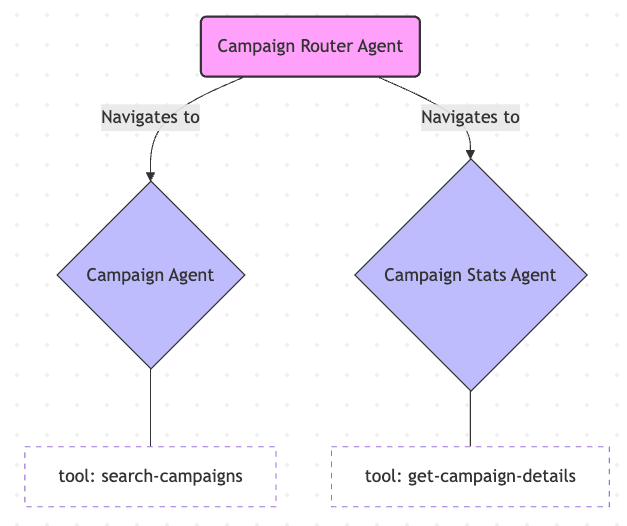
Let’s assume we have an advertising system that allows us to search for a campaign and its stats. Usually, one Agent is enough for this, but let’s say it has more functions and logic, so we will split it into three agents: one for campaign management, one for campaign details management, and another agent as navigator.
Implement our Agents
Implement Campaign Agent
- Create the Python Virtual Environment. It’s OK if you prefer using the global too.
- Install Google ADK Library
pip install google-adk - Install LLM so we can easily switch model
pip install litellm - Create our first agent
adk createcampaign_agent (You will need API key for any model, but prefered Google API for this tutorial) - The code below will
- Declare the tool called
search_campaignwhich will search and return the mock data - Declare the
campaign_agentusing modelMODEL_GEMINI_2_5_FLASHand toolsearch_campaigndeclare above - Export
root_agent = campaign_agentsince the default debug required theroot_agent
- Declare the tool called
import asyncio
from google.adk.agents import Agent
from google.adk.sessions import InMemorySessionService
from google.adk.runners import Runner
from google.genai import types
import dotenv
dotenv.load_dotenv()

MODEL_GEMINI_2_5_FLASH = "gemini-2.5-flash"

# --- Tool Definition ---
def search_campaign(name: str) -> dict:
    """Retrieves the performance details and status of an advertising campaign by name.

    Args:
        name (str): The name of the advertising campaign (e.g., "Summer Sale", "Brand Awareness").

    Returns:
        dict: A dictionary containing campaign details.
              Includes 'status' (Active/Paused/Completed), 'impressions', and 'clicks'.
    """
    print(f"--- Tool: search_campaign called for: {name} ---")
    name_normalized = name.lower().strip()

    # Mock Campaign Database
    mock_campaign_db = {
        "summer sale": {
            "status": "Active",
            "impressions": 150000,
            "clicks": 4200,
            "ctr": "2.8%",
            "budget_spent": "$1,200"
        },
        "brand awareness": {
            "status": "Completed",
            "impressions": 500000,
            "clicks": 12000,
            "ctr": "2.4%",
            "budget_spent": "$5,000"
        },
        "holiday blast": {
            "status": "Paused",
            "impressions": 25000,
            "clicks": 300,
            "ctr": "1.2%",
            "budget_spent": "$250"
        }
    }

    if name_normalized in mock_campaign_db:
        return {"status": "success", "data": mock_campaign_db[name_normalized]}
    else:
        return {"status": "error", "error_message": f"Campaign '{name}' not found."}

# --- Agent Configuration ---
campaign_agent = Agent(
    name="campaign_agent_v1",
        model=MODEL_GEMINI_2_5_FLASH,
    description="Provides performance metrics and status for advertising campaigns.",
    instruction="You are a helpful advertising operations assistant. "
                "When a user asks about a specific campaign, use 'search_campaign' to fetch the data. "
                "Present the campaign status, impressions, and clicks in a professional, concise summary. "
                "If the campaign is not found, offer to list the available campaigns: Summer Sale, Brand Awareness, Holiday Blast.",
    tools=[search_campaign],
    include_contents="default"
)

root_agent = campaign_agent- Run debug web application by using
adk web - You can debug your ADK application and also view the debug information on each tool call. But note that this isn’t Production ready and should only be used for debugging. Agent can also call multiple tools at the same time and executed in parallel
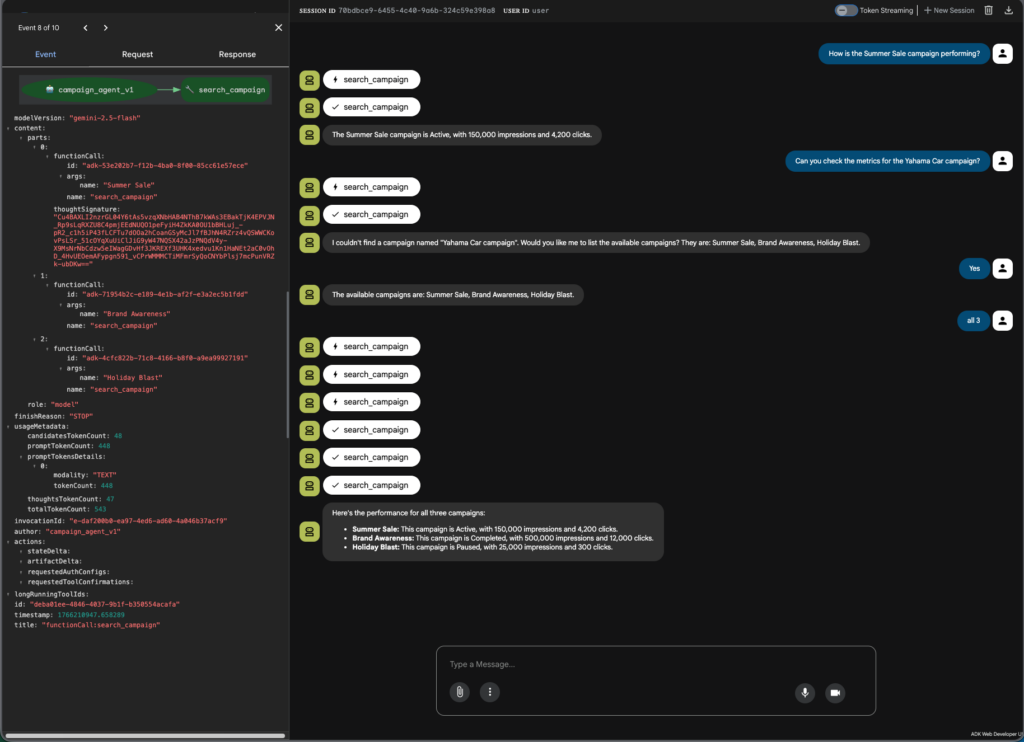
If you want to test via the Python’s __main__ instead, then we can use this session_service to make sure the Agent aware of our conversation history.
async def call_agent_async(query: str, runner: Runner, user_id: str, session_id: str):
    """Sends a query to the agent and prints the final response."""
    print(f"\n>>> User Query: {query}")
    content = types.Content(role='user', parts=[types.Part(text=query)])

    final_response_text = "Agent did not produce a final response."
    async for event in runner.run_async(user_id=user_id, session_id=session_id, new_message=content):
        if event.is_final_response():
            if event.content and event.content.parts:
                final_response_text = event.content.parts[0].text
            elif event.actions and event.actions.escalate:
                final_response_text = f"Agent escalated: {event.error_message or 'No specific message.'}"
            break

    print(f"<<< Agent Response: {final_response_text}")
    return final_response_text

# --- Main Execution ---
async def main():
    APP_NAME = "campaign_demo_app"
    USER_ID = "user_888"
    SESSION_ID = "session_999"

    session_service = InMemorySessionService()
    runner = Runner(app_name=APP_NAME, agent=campaign_agent, session_service=session_service)

    await session_service.create_session(app_name=APP_NAME, user_id=USER_ID, session_id=SESSION_ID)

    queries = [
        "How is the Summer Sale campaign performing?",
        "Can you check the metrics for the Yahama Car campaign?",
        "Yes"
    ]

    for query in queries:
        await call_agent_async(query=query, runner=runner, user_id=USER_ID, session_id=SESSION_ID)

if __name__ == "__main__":
    asyncio.run(main())
Implement Campaign Stats Agent
Use the similar approach, create the campaign_stats_agent and use the following code.
MODEL_GEMINI_2_5_FLASH = "gemini-2.5-flash"

# --- Tool Definition ---
def search_campaign_daily_stats(name: str, start_date: str = None, end_date: str = None) -> dict:
    """Retrieves daily performance statistics for an advertising campaign by name.

    Args:
        name (str): The name of the advertising campaign (e.g., "Summer Sale", "Brand Awareness").
        start_date (str, optional): Start date in YYYY-MM-DD format. If not provided, returns all available data.
        end_date (str, optional): End date in YYYY-MM-DD format. If not provided, returns all available data.

    Returns:
        dict: A dictionary containing daily stats.
              Includes a list of daily records with 'date', 'impressions', and 'clicks'.
    """
    print(f"--- Tool: search_campaign_daily_stats called for: {name} ---")
    name_normalized = name.lower().strip()

    # Mock Campaign Daily Stats Database
    mock_campaign_daily_stats_db = {
        "summer sale": [
            {"date": "2024-06-01", "impressions": 12000, "clicks": 340},
            {"date": "2024-06-02", "impressions": 13500, "clicks": 380},

            {"date": "2024-06-04", "impressions": 12800, "clicks": 360},
            {"date": "2024-06-05", "impressions": 15000, "clicks": 420},
        ],
        "brand awareness": [
            {"date": "2024-06-01", "impressions": 45000, "clicks": 1080},
            {"date": "2024-06-02", "impressions": 48000, "clicks": 1152},
            {"date": "2024-06-03", "impressions": 12, "clicks": 1248},
            {"date": "2024-06-04", "impressions": 47000, "clicks": 1128},
            {"date": "2024-06-05", "impressions": 50000, "clicks": 1200},
        ],
        "holiday blast": [
            {"date": "2024-06-01", "impressions": 5000, "clicks": 60},
            {"date": "2024-06-02", "impressions": 5200, "clicks": 62},
            {"date": "2024-06-03", "impressions": 4800, "clicks": 58},
            {"date": "2024-06-04", "impressions": 5100, "clicks": 61},
            {"date": "2024-06-05", "impressions": 4900, "clicks": 59},
        ]
    }

    if name_normalized in mock_campaign_daily_stats_db:
        daily_stats = mock_campaign_daily_stats_db[name_normalized]

        # Filter by date range if provided
        if start_date or end_date:
            filtered_stats = []
            for stat in daily_stats:
                stat_date = stat["date"]
                if start_date and stat_date < start_date:
                    continue
                if end_date and stat_date > end_date:
                    continue
                filtered_stats.append(stat)
            daily_stats = filtered_stats

        return {"status": "success", "data": daily_stats}
    else:
        return {"status": "error", "error_message": f"Campaign '{name}' not found."}

# --- Agent Configuration ---
campaign_stats_agent = Agent(
    name="campaign_stats_agent_v1",
    model=MODEL_GEMINI_2_5_FLASH,
    description="Provides and analyzes daily performance statistics for advertising campaigns.",
    instruction=(
        "You are an advertising operations assistant specializing in daily campaign statistics and basic performance analysis. "
        "When a user asks about daily stats for a specific campaign, use 'search_campaign_daily_stats' to fetch the data. "
        "Present daily statistics (date, impressions, clicks) in a clear, professional format. "
        "In addition, analyze the data to identify notable patterns or issues, including but not limited to: "
        "missing dates or gaps in reporting, sudden spikes or drops in impressions or clicks, "
        "unusual day-over-day changes, and inconsistent or zero values. "
        "Clearly separate raw statistics from analytical observations. "
        "If a date range is provided, filter the data using start_date and/or end_date parameters before analysis. "
        "If the campaign is not found, offer to list the available campaigns: Summer Sale, Brand Awareness, Holiday Blast."
    ),
    tools=[search_campaign_daily_stats],
    include_contents="default"
)
Sample Output
>>> User Query: Show me the daily stats for the Summer Sale campaign
--- Tool: search_campaign_daily_stats called for: Summer Sale ---
<<< Agent Response: Here are the daily statistics for the Summer Sale campaign:

**Daily Statistics:**
*   **Date: 2024-06-01**
    *   Impressions: 12,000
    *   Clicks: 340
*   **Date: 2024-06-02**
    *   Impressions: 13,500
    *   Clicks: 380
*   **Date: 2024-06-04**
    *   Impressions: 12,800
    *   Clicks: 360
*   **Date: 2024-06-05**
    *   Impressions: 15,000
    *   Clicks: 420

**Analytical Observations:**
*   **Missing Data:** There is a gap in reporting for **2024-06-03**.
*   **Performance Spike:** Both impressions and clicks saw a notable increase on **2024-06-05**. Impressions rose by 2,200 (approximately 17.2%) and clicks by 60 (approximately 16.7%) compared to the previous reported day, 2024-06-04. This marks the highest daily performance within this period.

>>> User Query: What are the daily impressions and clicks for Brand Awareness campaign from 2024-06-01 to 2024-06-03?
--- Tool: search_campaign_daily_stats called for: Brand Awareness ---
<<< Agent Response: Here are the daily statistics for the Brand Awareness campaign from 2024-06-01 to 2024-06-03:

**Daily Statistics:**
*   **Date: 2024-06-01**
    *   Impressions: 45,000
    *   Clicks: 1,080
*   **Date: 2024-06-02**
    *   Impressions: 48,000
    *   Clicks: 1,152
*   **Date: 2024-06-03**
    *   Impressions: 12
    *   Clicks: 1,248

**Analytical Observations:**
*   **Sudden Drop in Impressions:** There was a drastic drop in impressions on **2024-06-03** to just 12, which is highly unusual given the consistent high impression numbers on the previous days (45,000 and 48,000). This suggests a potential issue with ad delivery or tracking on this specific date.
*   **Inconsistent Clicks to Impressions Ratio:** Despite the massive drop in impressions on 2024-06-03, the clicks **increased** to 1,248. This results in an exceptionally high and unrealistic click-through rate (CTR) for that day, indicating a significant discrepancy in the data, likely due to the impressions issue.

>>> User Query: Can you check the daily stats for the Yamaha Car campaign?
<<< Agent Response: The campaign 'Yamaha Car campaign' was not found. Available campaigns are: Summer Sale, Brand Awareness, Holiday Blast.
Implement Root Agent
Create the root_agent, the code should be similar, except for the sub_agents=[campaign_agent, campaign_stats_agent]
from google.adk.agents import Agent
from campaign_agent.agent import campaign_agent, search_campaign
from campaign_stats_agent.agent import campaign_stats_agent, search_campaign_daily_stats

MODEL_GEMINI_2_5_FLASH = "gemini-2.5-flash"

if campaign_agent and campaign_stats_agent and 'search_campaign' in globals() and 'search_campaign_daily_stats' in globals():
    # Use a capable Gemini model for the root agent to handle orchestration
    root_agent_model = MODEL_GEMINI_2_5_FLASH

    root_agent = Agent(
        name="root_agent_v1",  # Give it a version name
        model=root_agent_model,
        description="The main coordinator agent. Handles campaign requests and delegates to specialized sub-agents.",
        instruction="You are the main Root Agent coordinating a team. Your primary responsibility is to provide campaign information and statistics. "
                    "Use the 'search_campaign' tool for general campaign performance requests (e.g., 'How is the Summer Sale campaign performing?'). "
                    "Use the 'search_campaign_daily_stats' tool for daily statistics requests (e.g., 'Show me daily stats for Brand Awareness campaign'). "
                    "You have specialized sub-agents: "
                    "1. 'campaign_agent': Handles general campaign performance metrics and status. Delegate to it for campaign overview requests. "
                    "2. 'campaign_stats_agent': Handles daily campaign statistics and analysis. Delegate to it for daily stats requests. "
                    "Analyze the user's query. If it's a general campaign performance question, you can handle it yourself using 'search_campaign' or delegate to 'campaign_agent'. "
                    "If it's a daily statistics request, you can handle it yourself using 'search_campaign_daily_stats' or delegate to 'campaign_stats_agent'. "
                    "For complex queries that require both types of information, coordinate between the sub-agents. "
                    "For anything else, respond appropriately or state you cannot handle it.",
        tools=[search_campaign, search_campaign_daily_stats],  # Root agent has access to both tools for its core tasks
        # Key change: Link the sub-agents here!
        sub_agents=[campaign_agent, campaign_stats_agent]
    )
    print(f"✅ Root Agent '{root_agent.name}' created using model '{root_agent_model}' with sub-agents: {[sa.name for sa in root_agent.sub_agents]}")

else:
    print("❌ Cannot create root agent because one or more sub-agents failed to initialize or tools are missing.")
    if not campaign_agent:
        print(" - Campaign Agent is missing.")
    if not campaign_stats_agent:
        print(" - Campaign Stats Agent is missing.")
    if 'search_campaign' not in globals():
        print(" - search_campaign function is missing.")
    if 'search_campaign_daily_stats' not in globals():
        print(" - search_campaign_daily_stats function is missing.")
    root_agent = None
Test using adk web
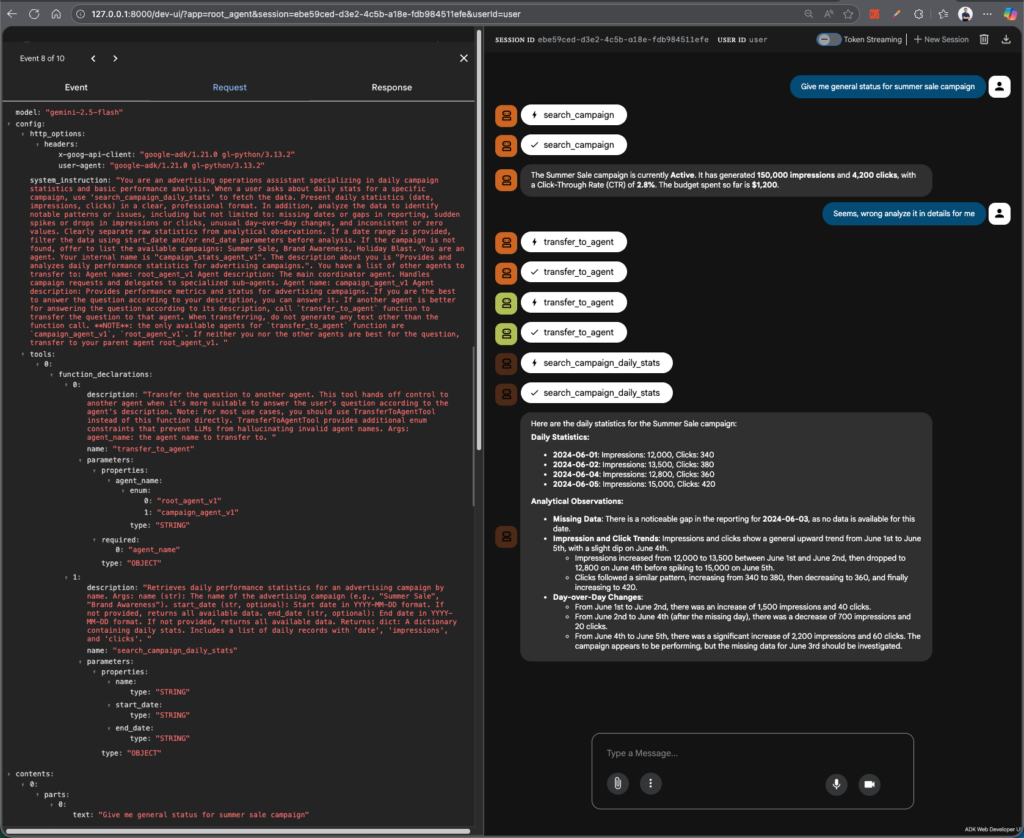
You can see that base on your conversation, LLM will able to transfer and select the correct tools.
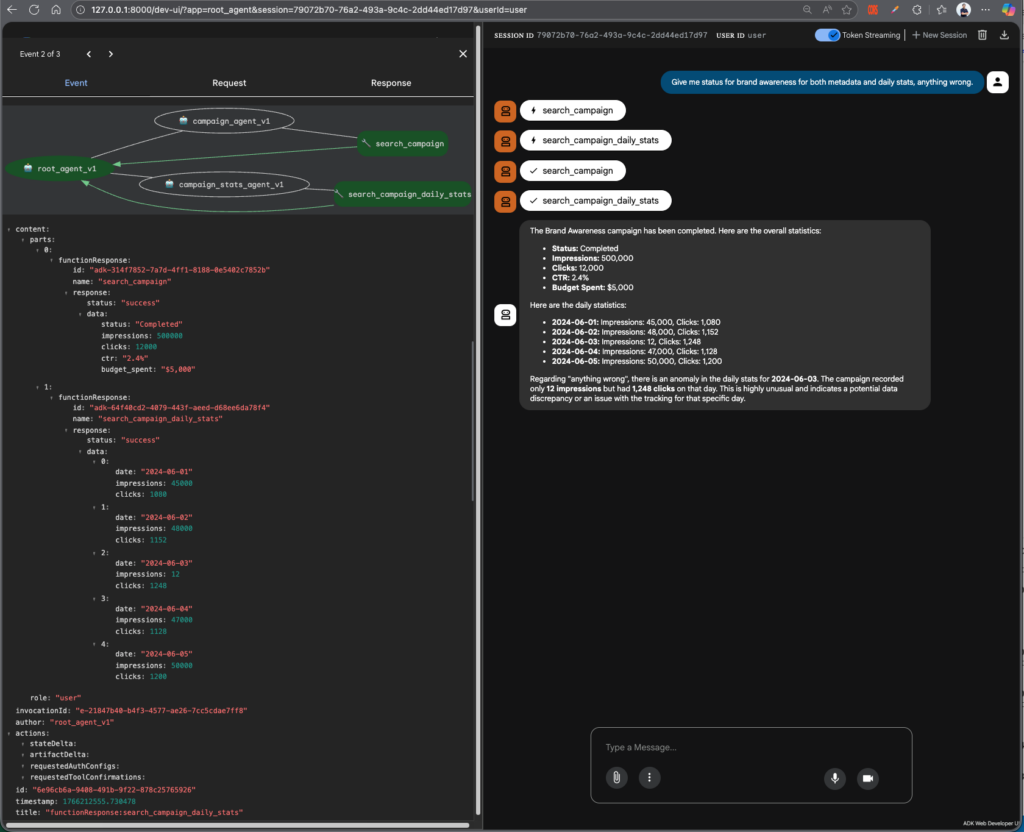
It’s able to execute two difference tool at the same time as well, just need to tweak your question a bit.
Using Other LLM Models?
You can just wrap your Agent’s model with LiteLLM
campaign_stats_agent = Agent(
    name="campaign_stats_agent_v1",
    model=LiteLlm(model="gpt-5-mini"),
    description="Provides and analyzes daily performance statistics for advertising campaigns.",
    instruction=(...),
    tools=[search_campaign_daily_stats],
    include_contents="default"
)
You can see that the response is slightly different as well
>>> User Query: Show me the daily stats for the Summer Sale campaign
--- Tool: search_campaign_daily_stats called for: Summer Sale ---
<<< Agent Response: Raw daily statistics — Summer Sale
- 2024-06-01: Impressions 12,000 | Clicks 340
- 2024-06-02: Impressions 13,500 | Clicks 380
- 2024-06-04: Impressions 12,800 | Clicks 360
- 2024-06-05: Impressions 15,000 | Clicks 420

Analytical observations
- Missing date / gap
  - 2024-06-03 is not present in the data. This could be a reporting gap (no data ingested for that date) or genuinely zero delivery on that day. Recommend checking the ad server / reporting pipeline or campaign schedule for 2024-06-03.

- Volume and trend
  - Overall increase from 2024-06-01 → 2024-06-05: impressions +3,000 (+25%), clicks +80 (+23.5%). Peak day is 2024-06-05 (15,000 impressions, 420 clicks).
  - Day-to-day changes (using available consecutive records):
    - 06-01 → 06-02: impressions +1,500 (+12.5%), clicks +40 (+11.8%).
    - 06-02 → 06-04: impressions −700 (−5.2%), clicks −20 (−5.3%) — note this spans a missing calendar day.
    - 06-04 → 06-05: impressions +2,200 (+17.2%), clicks +60 (+16.7%).

- CTR / efficiency
  - Click-through rate is very stable across days:
    - 06-01 CTR ≈ 2.83%
    - 06-02 CTR ≈ 2.82%
    - 06-04 CTR ≈ 2.81%
    - 06-05 CTR = 2.80%
  - The near-constant CTR suggests consistent creative/targeting performance; changes are driven primarily by impression volume rather than changes in user engagement.

- Unusual values or issues
  - No zero values in the returned records.
  - No extreme one-day spikes or crashes beyond moderate swings (~±17% at most). The most notable issue is the missing 2024-06-03 entry.

Recommended next steps
- Verify whether 2024-06-03 had zero delivery or if reporting failed for that date (check ad server logs or reporting ingestion).
- If you want to understand causes of the impression swings, check: budget changes, pacing rules, bid adjustments, frequency caps, or policy/creative approvals across the date range.
- If helpful, I can:
  - Pull stats filtered to a custom date range,
  - Compare this campaign’s performance to another campaign,
  - Return hourly breakdowns if available,
  - Or list available campaigns (Summer Sale, Brand Awareness, Holiday Blast).

Which next step would you like?

>>> User Query: What are the daily impressions and clicks for Brand Awareness campaign from 2024-06-01 to 2024-06-03?
--- Tool: search_campaign_daily_stats called for: Brand Awareness ---
<<< Agent Response: Raw daily statistics — Brand Awareness (2024-06-01 → 2024-06-03)
- 2024-06-01: Impressions 45,000 | Clicks 1,080
- 2024-06-02: Impressions 48,000 | Clicks 1,152
- 2024-06-03: Impressions 12 | Clicks 1,248

Analytical observations / issues
- Implausible values
  - 2024-06-03 shows 12 impressions but 1,248 clicks. That yields a CTR of 10,400.00% (1248 / 12), which is not possible in normal reporting — clicks cannot materially exceed impressions. Treat 2024-06-03 as a data anomaly.
- Day-over-day changes
  - 06-01 → 06-02: Impressions +3,000 (+6.67%), Clicks +72 (+6.67%) — consistent small growth with stable CTR (~2.40% both days).
  - 06-02 → 06-03: Impressions −47,988 (−99.98%), Clicks +96 (+8.33%) — huge, contradictory swing driven by the anomalous 06-03 impression value.
- CTR behavior
  - 06-01 CTR ≈ 2.40%
  - 06-02 CTR ≈ 2.40%
  - 06-03 CTR ≈ 10,400.00% (clearly erroneous)
  - The near-constant CTR for 06-01/02 suggests normal behavior; 06-03 deviates dramatically and should be excluded from any performance trend analysis until validated.
- Possible causes
  - Reporting ingestion error (impressions missing or truncated for 2024-06-03).
  - Field mapping/column swap or unit mismatch for that date (e.g., impressions and clicks swapped, or impressions lost trailing zeros).
  - Partial/corrupted export or aggregation bug (e.g., impressions aggregated elsewhere, clicks deduplicated differently).
  - Cumulative clicks incorrectly reported for that date while impressions are per-day.

Recommended next steps
- Verify the raw report source for 2024-06-03 (CSV/DB/UI) to confirm whether impressions were actually 12 or if fields were mis-mapped.
- Check whether impressions and clicks might be swapped for that date, or if a scale factor (thousands) was lost.
- Cross-check the ad server UI/logs for 2024-06-03 and any scheduled changes (budget, targeting, creative approvals) that day.
- For safe analysis, exclude 2024-06-03 until validated, then re-run trend calculations.

Would you like me to:
- Re-query the data (e.g., hourly for 2024-06-03) to try to pinpoint the issue?
- Check a wider date range for similar anomalies?
- Compare Brand Awareness to another campaign?
Other Orchestrators Types?
Besides the example above, Google ADK also provides additional orchestrator types. You can find the full list at https://google.github.io/adk-docs/agents/multi-agents/#workflow-agents-as-orchestrators, but in short, the following are the most notable ones.
SequentialAgent
Executes its sub-agents sequentially, in the order they are defined.
from google.adk.agents import SequentialAgent, LlmAgent

step1 = LlmAgent(name="Step1_Fetch", output_key="data")
step2 = LlmAgent(
    name="Step2_Process",
    instruction="Process data from {data}."
)

pipeline = SequentialAgent(
    name="MyPipeline",
    sub_agents=[step1, step2],
)
ParallelAgent
Executes its sub-agents in parallel; events from different sub-agents may be interleaved.
from google.adk.agents import ParallelAgent, LlmAgent

fetch_weather = LlmAgent(name="WeatherFetcher", output_key="weather")
fetch_news    = LlmAgent(name="NewsFetcher", output_key="news")

info_gatherer = ParallelAgent(
    name="InfoGatherer",
    sub_agents=[fetch_weather, fetch_news],
)
LoopAgent
Executes its sub_agents sequentially in a loop
from google.adk.agents import LoopAgent, LlmAgent, BaseAgent
from google.adk.events import Event, EventActions

class CheckDone(BaseAgent):
    async def _run_async_impl(self, ctx):
        done = ctx.session.state.get("done", False)
        yield Event(author=self.name, actions=EventActions(escalate=done))

step = LlmAgent(name="ProcessStep", output_key="progress")

poller = LoopAgent(
    name="StatusPoller",
    sub_agents=[step, CheckDone(name="Checker")],
    max_iterations=10,
)
What’s next?
This post only cover the which UI is only for debugging purpose. We can try to:
- Expose this Agent through endpoint, like FastAPI and manage user’s session, conversation history
- Have UI that support streaming through SSE
- Add more agent or guardrails before tool calling or invoking agent