


If you are a developer or a system administrator, you’ve almost certainly run into Docker and virtual machines (VMs). Both let you run applications in isolated environments, but they solve different problems and come with different trade‑offs.
This article compares Docker containers and virtual machines, looks at their architecture, pros and cons, use cases, and gives you practical guidance on when to use which.
Virtual Machine
A virtual machine (VM) is a software-defined computer that runs on top of a physical host. It emulates hardware (CPU, memory, storage, network interfaces, etc.) and runs a full guest operating system on top of a hypervisor (such as VMware ESXi, Hyper‑V, KVM, or VirtualBox).
High-level architecture:
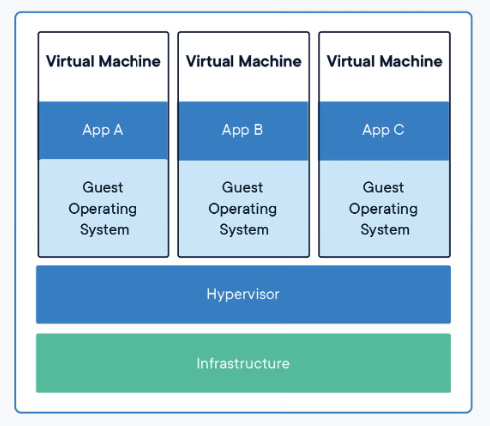
- Infrastructure (CPU, RAM, disks, NICs)
- Hypervisor (virtualization layer)
- Virtual machines: Each VM has its own kernel, OS, libraries, and applications
Some of the benefits of using VMs are:
- Strong isolation and security: Each VM has its own OS and kernel, providing strong isolation between workloads. A compromise inside one VM usually does not directly affect others, assuming the hypervisor and host are secure.
- Run different operating systems: You can run different OS families (Windows, Linux, BSD, etc.) side by side on the same hardware, and even multiple OS versions for testing and compatibility.
- Mature tooling and ecosystem: Platforms like vCenter, Hyper‑V Manager, and cloud IaaS (AWS EC2, Azure VMs, GCP Compute Engine) provide rich features: snapshots, cloning, live migration, HA, and backup integrations.
- Good fit for heavy, stateful, or legacy workloads: Databases, monoliths, and older enterprise apps that expect a “full server” environment often run best on VMs.
Some of the challenges of using VMs are:
- Higher resource overhead: Each VM includes a full OS image. Memory, CPU cycles, and disk are consumed even when the VM is mostly idle.
- Slower startup and scaling: Booting a VM means booting an OS, which typically takes tens of seconds to minutes, slowing down auto‑scaling and ephemeral workloads.
- Operational complexity: Every VM is a full server, it needs OS patching, configuration management, monitoring, and backups, which can lead to “VM sprawl”.
- Hypervisor coupling: VM images are less portable than container images. Moving between different hypervisors or clouds may require conversion or re‑building.
Docker Container
A Docker container is like a lightweight VM that shares the same operating system as your main computer. It has its own file system, environment variables, processes, network interface, etc., but it doesn’t have its own kernel or hardware drivers. You can run any application on a Docker container as long as it is compatible with the host operating system. For example, you can run Linux applications on a Docker container inside your Linux computer, but not Windows applications.
High-level architecture:
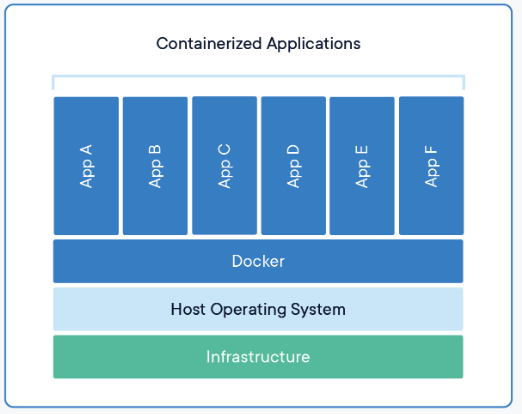
- Infrastructure (CPU, RAM, disks, NICs)
- Host OS kernel (e.g., Linux)
- Container runtime (Docker Engine, containerd, etc.)
- Containers: Each container includes app code, libraries, and runtime, but not its own kernel
Some of the benefits of using Docker containers are:
- Lightweight and resource‑efficient: Containers share the host kernel and only add what the application needs. This allows higher density, you can often run dozens or hundreds of containers on a host that would support only a handful of VMs.
- Fast startup and teardown: No OS boot inside each container. Containers typically start in milliseconds to a few seconds, which is ideal for auto‑scaling, short‑lived tasks, and CI jobs.
- Portability and consistency: container image bundles the application + dependencies + config, so it runs the same way on a laptop, on‑prem, or in the cloud, as long as the target supports Docker/OCI containers.
- Great fit for microservices and DevOps: Containers work naturally with microservices, CI/CD pipelines, and orchestrators like Kubernetes. They make it easier to standardize environments and automate deployment flows.
Some of the challenges of using Docker containers are:
- Weaker isolation than VMs: Containers share the host kernel. A kernel exploit or misconfiguration can potentially impact multiple containers. Hardening (Seccomp, AppArmor/SELinux, user namespaces, minimal base images) is important, especially in multi‑tenant setups.
- OS constraints: Containers are usually limited to the host OS kernel family
- Linux containers on Linux kernels
- Windows containers on Windows Server hosts
- Running Windows apps in Linux containers (or vice versa) is not supported directly; you’d use a VM in between.
- Legacy and GUI applications: Some legacy or GUI‑based apps, or software requiring kernel modules / low‑level drivers, are difficult or impractical to containerize.
- Operational learning curve: Adopting containers introduces new tooling and patterns (Dockerfiles, registries, image scanning, orchestration, service meshes, etc.) and often a cultural shift toward cloud‑native practices.
Comparison
Now that we understood Docker containers and Virtual machine with their benefits and challenges, let’s compare the two technologies in more detail.
Resource Usage: Virtual machines require a significant amount of resources, including CPU, RAM, and storage. Each VM includes its own operating system, which requires additional resources. Docker containers, on the other hand, share the host operating system, which reduces the amount of resources required.
Security: Virtual machines provide complete isolation between each VM, which makes them more secure. Each VM runs its own operating system, making it difficult for an attacker to gain access to other VMs. Docker containers share the host operating system, which creates potential security risks if the host is compromised.
Portability: Docker containers are highly portable and can be deployed on any system that supports Docker. Virtual machines, on the other hand, require a compatible hypervisor to run.
Scalability: Both virtual machines and Docker containers are scalable, but Docker containers are more lightweight and can be replicated more quickly than virtual machines.
Management: Virtual machines require a separate management interface, such as vCenter or Hyper-V Manager. Docker containers can be managed through the Docker CLI or through third-party tools such as Kubernetes.
Use Cases
Depending on your needs and preferences, you might choose to use Docker containers or virtual machines for your projects. Here are some examples of use cases for each option:
Use Docker containers if you want to:
- Develop and test applications in a consistent and reproducible environment
- Deploy applications across different platforms and cloud providers
- Run microservices or serverless architectures
- Optimize resource utilization and performance
Use virtual machines if you want to:
- Run applications that require different operating systems or hardware access
- Run legacy or proprietary software that cannot run on Docker
- Provide a high level of security and isolation
- Emulate a full computer system for testing or education purposes
Conclusion
Docker containers and virtual machines both provide isolation and flexibility for running applications, but at different layers of the stack:
- Virtual machines
- Virtualize hardware
- Stronger isolation, any OS, great for legacy and high‑security workloads
- Docker containers
- Virtualize the OS
- Lightweight, fast, highly portable, ideal for cloud‑native, microservices, and CI/CD
The right choice depends on:
- Workload type (legacy vs cloud‑native, stateful vs stateless)
- Security and compliance requirements
- Scalability and performance needs
- Operational maturity and tooling
For many teams, the most practical strategy is hybrid: use VMs as the foundation and containers for modern, fast‑moving application workloads.