


State Management, Render Boundaries, and Structural Performance
If memoization is where many teams over-optimize, then state management is where most teams underestimate performance impact.
In real-world React applications, performance problems rarely come from a single slow component.
They emerge from how state changes propagate through the component tree.
This article focuses on structural performance — the decisions that determine how much of your app re-renders when something changes.
1. State Updates Are Render Triggers — Whether You Like It or Not
Every state update in React is a signal to re-render.
What matters is how far that signal travels.
Real-world Case Study: “A small toggle broke the dashboard”
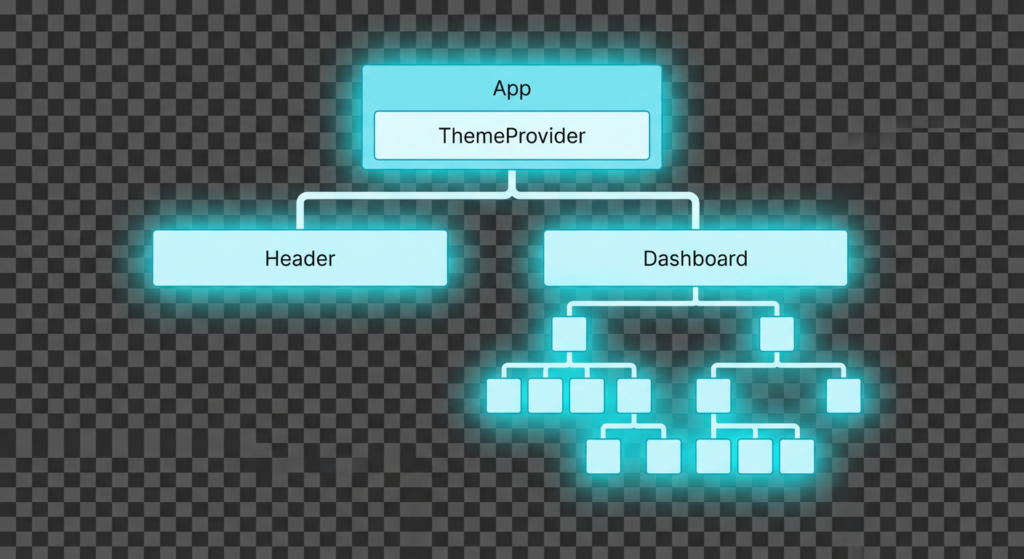
Theme state is placed too high, so toggling the theme causes the entire Header, Dashboard, and all their children to re-render.
Scenario
A global theme toggle was added to a fintech dashboard.
function App() {
  const [theme, setTheme] = useState('dark');

  return (
    <ThemeProvider value={theme}>
      <Header />
      <Dashboard />
    </ThemeProvider>
  );
}
Symptom
- Toggling theme causes noticeable lag
- Charts flicker
- CPU spikes briefly
Profiling Insight
Dashboardand all its children re-render- Render reason: “context changed”
Root Cause
- State placed too high
- Render boundary too wide
👉 A small state change affected the entire app.
2. Local State vs Lifted State vs Global State (Performance View)
State placement is an architectural decision.
Local State
function SearchInput() {
  const [value, setValue] = useState('');
}
- Small render scope
- Minimal impact
- Usually best for performance
Lifted State
function Page() {
  const [query, setQuery] = useState('');
  return <SearchInput value={query} />;
}
- Wider render scope
- Can be necessary
- Needs careful boundaries
Global State
useStore(state => state.query);
- Maximum visibility
- Maximum risk if misused
👉 The higher the state lives, the more expensive it becomes.
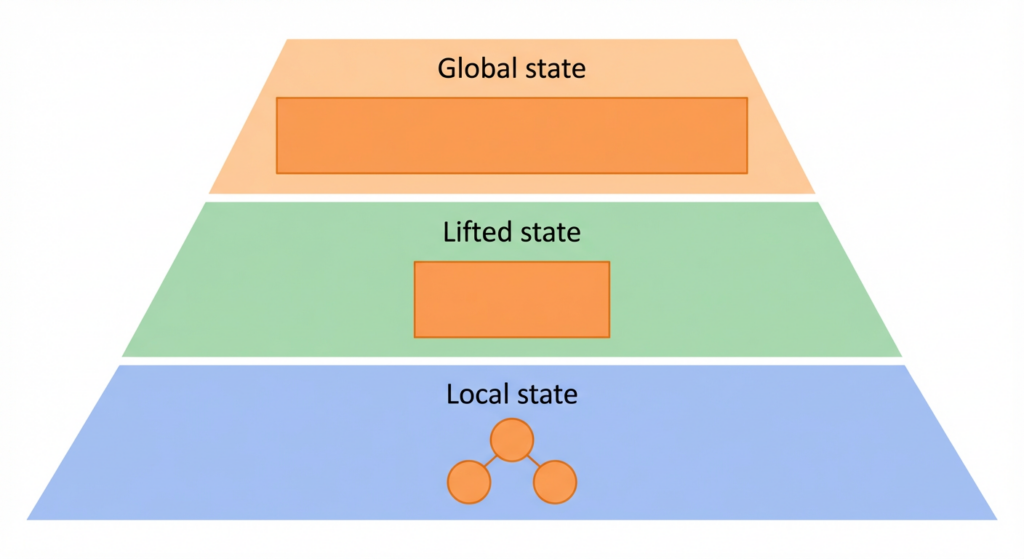
Local state only affects a small area, lifted state affects a wider area, and global state tends to impact almost the entire app.
3. Context API: Powerful, But Easy to Abuse
Context is often introduced to “avoid prop drilling”.
From a performance standpoint, this is dangerous thinking.
Real-world Case Study: “Context solved one problem and created three”
<UserContext.Provider value={user}>
  <Sidebar />
  <MainContent />
</UserContext.Provider>
Symptom
- Frequent re-renders
- Unrelated components re-render
- Hard-to-track performance issues
Why
- Any change to
userre-renders all consumers - No built-in render isolation
Profiling Insight
- Many components re-render with reason: “context changed”
- Components only use a small part of
user
👉 Context is broadcast-based, not selective.

On the left, a single UserContext broadcasts updates to many consumers, causing widespread re-renders. On the right, an external store like Zustand only updates the components that subscribe to a specific slice of state.
4. Breaking Context into Performance Boundaries
Improved approach
<AuthContext.Provider value={auth}>
  <ThemeContext.Provider value={theme}>
    <App />
  </ThemeContext.Provider>
</AuthContext.Provider>
Even better:
- Separate contexts by concern
- Memoize provider values
- Narrow provider scope
👉 Context should model logical ownership, not convenience.
5. External State Libraries and Render Isolation
Real-world Case Study: Migrating from Context to Zustand
Before
- One large context
- Frequent re-renders
- Hard to optimize
After
const useStore = create(set => ({
  user: null,
  theme: 'dark'
}));
const theme = useStore(state => state.theme);
Result
- Only components that select
themere-render - Natural render isolation
- Less memoization needed
👉 Libraries like Zustand or Jotai optimize for selective subscriptions, not global broadcasts.
6. Cascading Re-renders: The Silent Performance Killer
Real-world Case Study: “Why does everything re-render?”
function App() {
  const [filters, setFilters] = useState({});
  return <ProductList filters={filters} />;
}
setFilters({ category: 'books' });
- New object every update
- Parent re-render
- Child re-render
- Grandchild re-render
Profiling Pattern
- Many renders
- Render reason: “parent re-rendered”
👉 This is a render cascade, not a component problem.
7. Large Lists: When Structure Becomes Performance
Large lists are where structural decisions meet real pain.
Real-world Case Study: Data Table Lag
Scenario
- 5,000+ rows
- Sorting, filtering, scrolling
- Severe jank
Initial attempts
- React.memo everywhere
- useCallback everywhere
Result
- Minimal improvement
Why
- Too many DOM nodes
- Browser overwhelmed
👉 The problem was structural, not computational.
8. Virtualization: Rendering Only What Matters
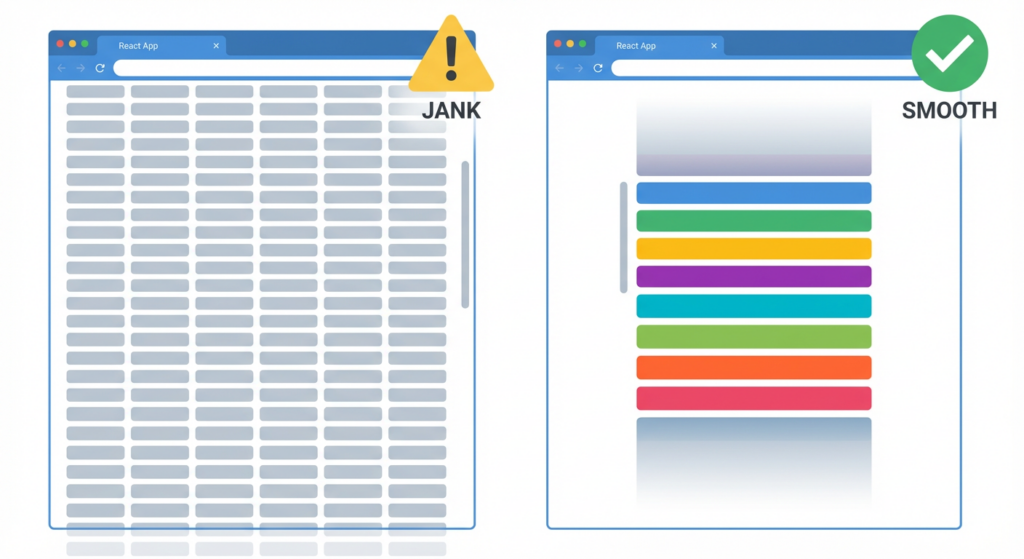
The non-virtualized table renders thousands of rows at once, overwhelming the browser, while the virtualized list only renders the visible window, keeping scrolling smooth.
Concept
Render only visible rows.
Example (react-window)
<List
  height={400}
  itemCount={rows.length}
  itemSize={40}
>
  {({ index, style }) => (
    <Row style={style} data={rows[index]} />
  )}
</List>
Real-world Outcome
- Render count drops dramatically
- Scroll becomes smooth
- CPU usage drops
👉 Virtualization changes the problem size.
9. Common Virtualization Mistakes
Mistake 1: Virtualizing small lists
- Adds complexity
- No measurable benefit
Mistake 2: Unstable row components
- Inline styles recreated
- Memoization broken
Mistake 3: Mixing virtualization with layout-heavy CSS
- Causes layout thrashing
👉 Virtualization works best with simple, predictable rows.
10. Profiling Structural Performance Issues
Real-world Debugging Flow
- App feels slow
- Profiler shows large subtree rendering
- Render reason: “state changed”
- Trace state ownership
- Narrow render boundary
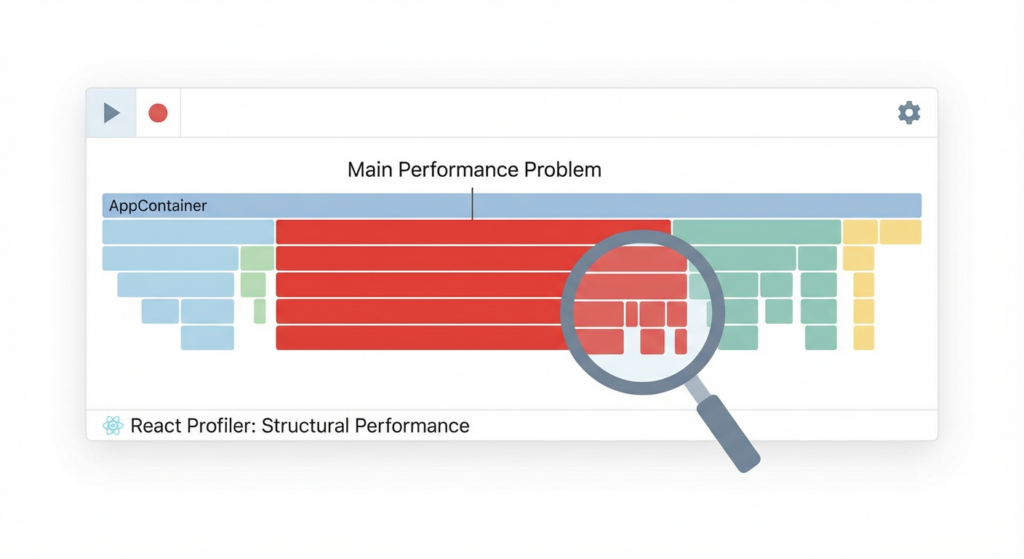
The React Profiler highlights a large subtree as the main rendering hotspot, providing a clear starting point for tracing state ownership and tightening render boundaries.
Key Insight
Most performance issues are visible within 5 minutes of profiling —
if you know what you’re looking for.
11. Structural Performance Principles (Learned the Hard Way)
- Place state as low as possible
- Avoid wide render scopes
- Context is not a free abstraction
- Prefer selective subscriptions
- Optimize structure before memoization
12. Key Takeaways from Part 3
- State management is the biggest performance lever
- Structural decisions define render cost
- Memoization cannot fix poor architecture
- Virtualization is often the real solution
- Profiling reveals structural flaws clearly
If Part 1 taught you how React renders,
and Part 2 taught you how memoization works,
Part 3 teaches you where performance problems actually live.