



If you are a software developer in 2026 and you are still writing every line of code manually from scratch, I have some bad news for you: you are working inefficiently.
Are you still using AI only to Google error messages or quickly generate a regex snippet?
If so, you are not just under-utilizing the technology — you are wasting your own potential.
The game has changed.
From “Coder” to “AI Commander”
In the era of Large Language Models (LLMs), an elite developer is no longer just a “coder.”
You must evolve into an AI Commander.
That means:
- Mastering AI-native IDEs
- Using AI agents for planning and execution
- Leveraging protocols like MCP (Model Context Protocol) to orchestrate complex workflows
Do not confuse typing fast with creating value.
Below is a practical roadmap to becoming an AI-Native Developer.
1. Upgrade Your Arsenal: Embrace AI-Native IDEs
Using VS Code with Copilot is like driving with lane assist.
If you want full self-driving, you need an IDE built from the ground up for the AI era.
Recommended tools
- Cursor
- Antigravity
- Claude-based IDEs
Why they matter
These are not just text editors. They are context-aware environments that:
- Understand your entire codebase
- Execute terminal commands
- Refactor multiple files at once
- Maintain architectural consistency across the project
Action items
- Download one immediately
- Pro tip: Pay for the subscription
$20/month is trivial compared to the hours of productivity you gain.
Treat it as a career investment, not a cost.
2. Connect the Data “Islands”: Install Popular MCPs
Ever wondered why AI sometimes generates code that looks right but completely misses your business logic?
Because the AI is blind.
It cannot see your design system, database, or internal tools.
MCP (Model Context Protocol) is the missing link
MCP gives AI both eyes and hands — allowing it to:
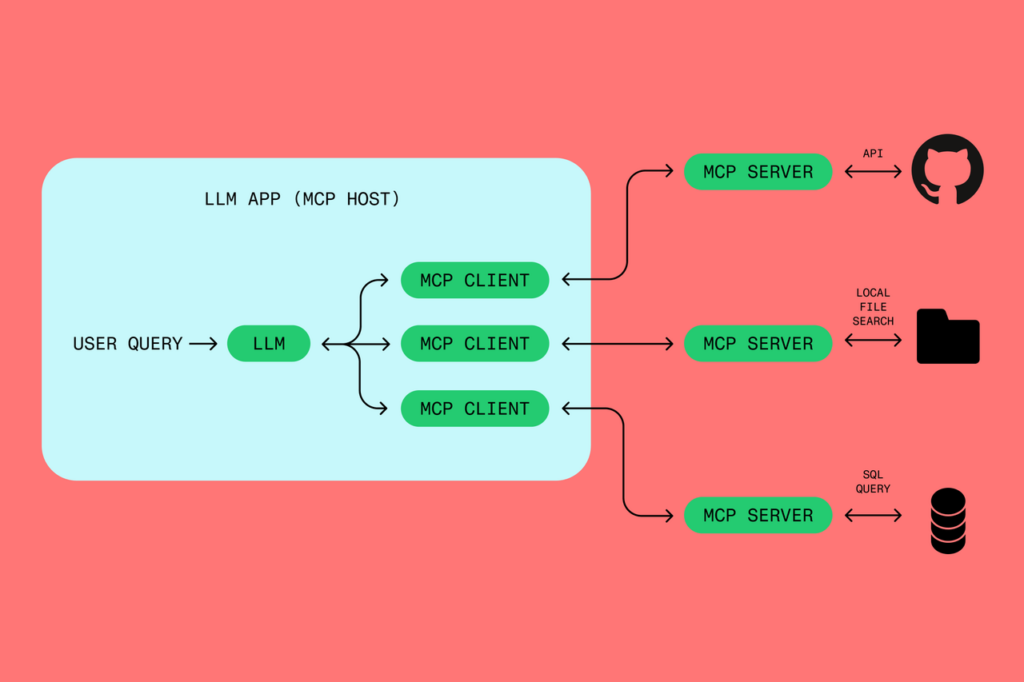
- Read designs
- Query data sources
- Interact with external systems
Example use case (Frontend)
UI implementation is often repetitive manual labor. Stop measuring pixels by hand.
Old workflow
- Look at Figma
- Guess padding
- Write CSS
- Reload
- Repeat endlessly
AI-native workflow
- Install Figma MCP in Cursor
- Grant developer access
- Prompt: “Read this Figma design URL and generate a React component for the hero section.”
Result:
Pixel-perfect code generated instantly.
Your role shifts from translator to reviewer and decision-maker.
3. The Soul in the Machine: Rules and Workflows
A powerful tool is useless if you don’t teach it how to behave.
If your AI writes messy or inconsistent code, that is not the AI’s fault — it’s yours.
You must move from Prompting to Context Engineering.
The strategy
Encode your knowledge once — and reuse it forever.
Stop repeating:
- Naming conventions
- Code style preferences
- Architectural decisions
- Tech stack choices
What to do
- Use Rules or Workflows (Antigravity, Cursor)
- Create:
.cursorrules- A system-prompt library
- Reference these rules in every task
This ensures the AI automatically respects your architecture and coding standards.
4. Documentation Is the New Code
In the AI era, the cost of writing code is approaching zero.
The value of design clarity is skyrocketing.
If you cannot clearly explain what you want, AI cannot build it.
Your core skill must shift from syntax to communication.
The mindset shift
- You are the architect
- AI is the contractor
- Vague instructions produce fragile systems
Best practices
- Markdown is the lingua franca
AI understands Markdown structure perfectly. - Use a two-step loop:
- Ask AI to generate a PRD or Technical Spec
- Review, refine, and correct the logic
- Feed the finalized document back to AI to generate code
Your architectural thinking is the soul of the application.
Code is merely the implementation detail.
5. Foundation First: Clean Up Your Local Environment
Nothing kills AI flow faster than dependency hell.
Most MCP servers and AI agents require specific runtimes — usually Node.js or Python.
If your local setup is messy, agents will crash before they even start.
The solution: a clean sandbox environment
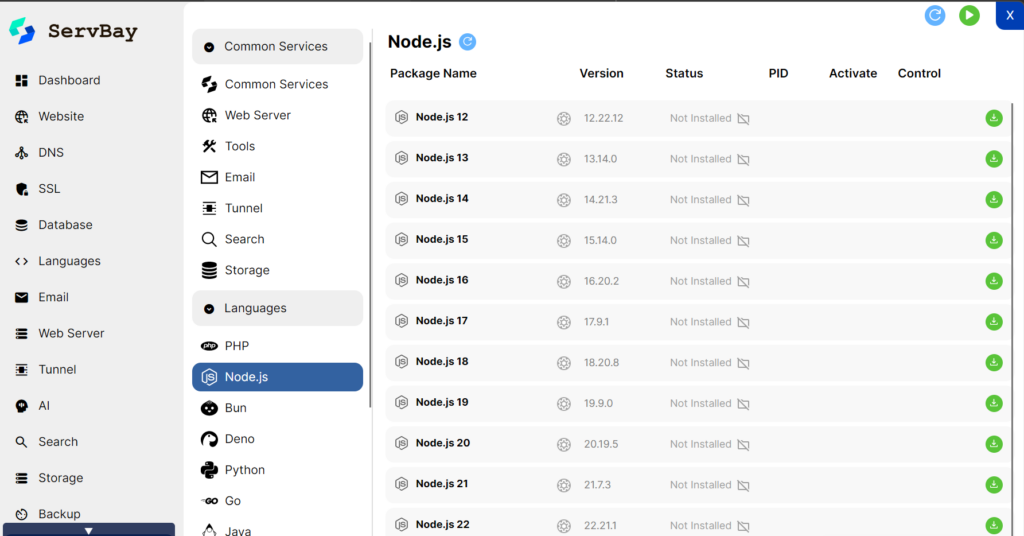
Tools like ServBay (or equivalents) help by providing:
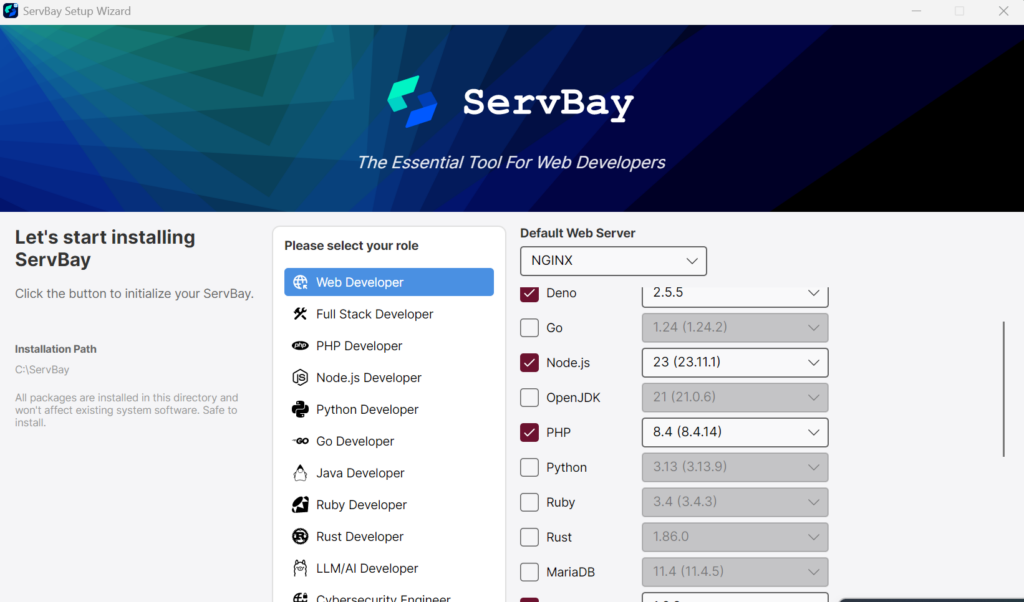
- One-click installation of Node.js, Python, and databases
- Version switching for different AI tools
- A stable, isolated environment where agents run reliably
Stability is not optional when you rely on automation.
Conclusion
AI is not here to steal your job.
It is here to automate the boring parts — so you can focus on what truly matters:
- Solving complex problems
- Making architectural decisions
- Delivering real business value
The future belongs to Super-Individuals — developers who can orchestrate AI tools to do the work of a ten-person team.
Stop coding manually.
Start engineering intelligence.