


1. Purpose of This Article
This article describes how Zephyr Scale is used across our projects to support effective test execution management and quality reporting. Specifically, it aims to:
- Manage test execution in a structured and scalable way
- Provide transparent, real-time visibility into testing progress
- Generate reliable quality metrics to support release and go/no-go decisions
2. Common Challenges in Test Execution
In complex projects, Quality Control teams often face several execution challenges, including:
- Rapidly growing test case repositories
- Multiple test cycles within a single sprint or release
- Limited real-time visibility into execution progress
- High manual effort required to prepare quality reports
Without a centralized execution and reporting tool, these challenges can increase delivery risk and reduce confidence in release decisions.
3. Managing Test Execution with Zephyr Scale
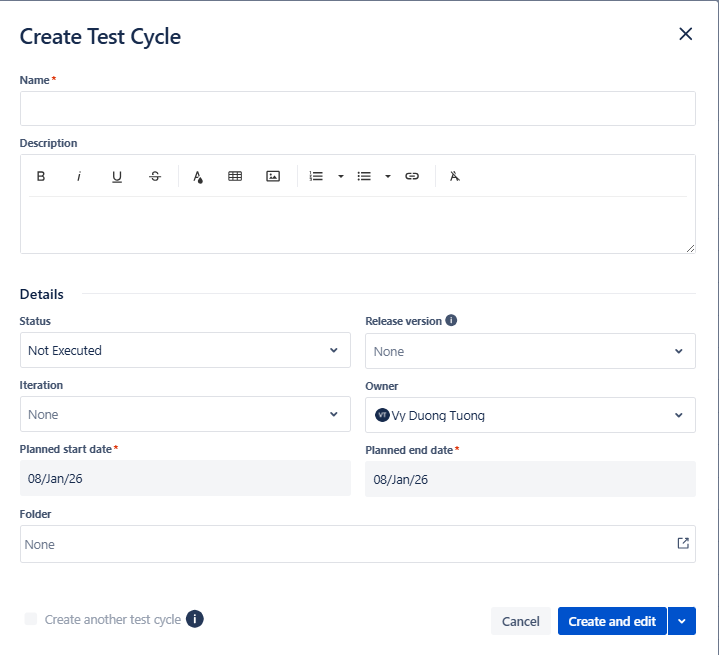
3.1 Test Cycles in Zephyr Scale
Zephyr Scale enables QC teams and clients performing UAT to structure and manage test execution via Test Cycles, with each cycle representing a defined testing scope, such as:
- Smoke Testing
- Regression Testing
- Sprint Validation
- User Acceptance Testing (UAT)
Each Test Cycle can be associated with Jira versions, sprints, or releases, ensuring that execution results are always aligned with the correct delivery context
3.2 Executing Tests in Jira
Test execution is performed directly within Jira using Zephyr Scale’s execution interface.
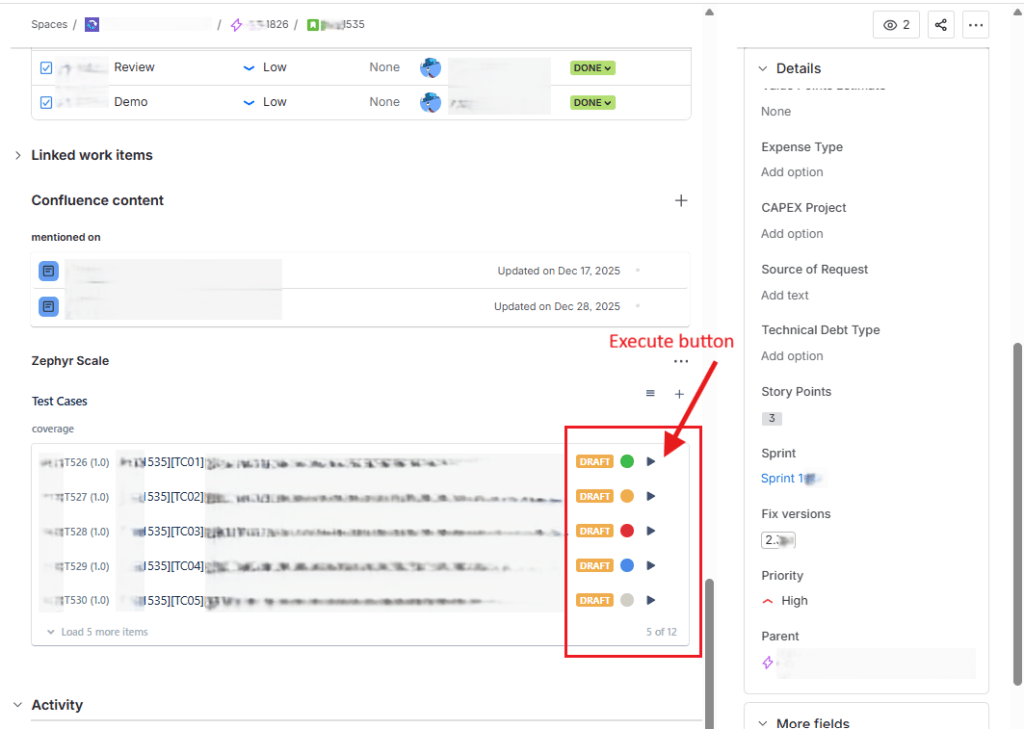
For each test execution, teams can record:
- Execution status: Pass, Fail, Blocked, In Progress
- Execution comments and timestamps
- Evidence attachments such as screenshots or logs
- Direct links to Jira defects created from failed tests
Zephyr Scale maintains full traceability across the testing lifecycle:
Test Case → Test Execution → Defect → Requirement
This level of traceability is essential for audits, root-cause analysis, and release validation.
3.3 Real-Time Execution Visibility
For QC Leads and Managers, Zephyr Scale provides real-time insights into:
- Execution progress by test cycle
- Pass/fail distribution
- Execution ownership by tester
- Identification of high-risk or unstable areas
This visibility allows teams to proactively manage quality rather than react to issues late in the release cycle.

4. Reporting and Quality Metrics
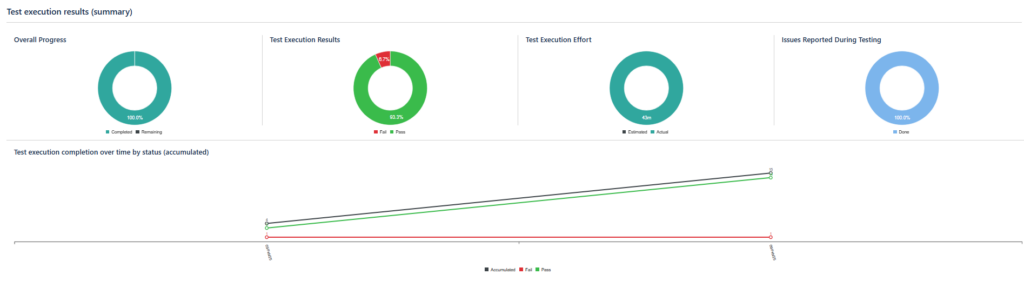
4.1 Built-in Reports
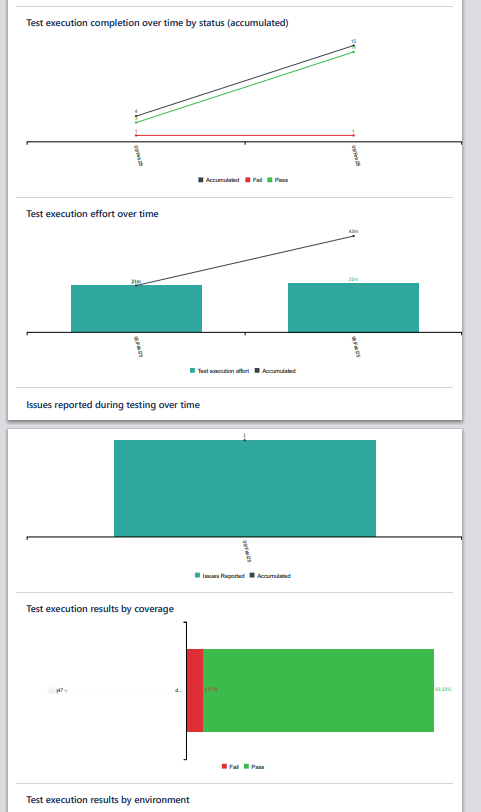
Zephyr Scale offers a set of built-in reports commonly used by QC teams, including:
- Test Execution Report
- Test Progress Report
- Requirement Coverage Report
- Defect Traceability Report
These reports transform raw execution data into meaningful quality metrics that support decision-making.
4.2 Exporting Reports for Internal Use
All reports can be exported in CSV or Excel format and reused for:
- Sprint reviews
- Release readiness assessments
- Quality compliance and audit activities
- Management-level reporting
This significantly reduces manual reporting effort while improving data consistency and accuracy.
5. Key Benefits for Quality Control Teams
By adopting Zephyr Scale, QC teams can:
- Centralize and standardize test execution management
- Maintain end-to-end traceability between tests, executions, defects, and requirements
- Gain real-time visibility into testing progress and risks
- Reduce manual reporting overhead
- Support data-driven and confident release decisions
6. Summary
Zephyr Scale plays a critical role in strengthening our test execution and reporting processes.
By applying a structured approach with Zephyr Scale, Quality Control teams can evolve from:
Manual tracking → Controlled execution → Measurable quality
This transformation directly contributes to higher product quality and increased confidence in every release.
7. Recommended Internal Best Practices
- Standardize Test Cycle and Test Case naming conventions across projects, applicable to both QC testing and UAT.
- Define and consistently apply execution status usage guidelines to ensure reliable and comparable execution results.
- Attach evidence for all failed test executions (e.g. screenshots, video) to support defect analysis and audits.
- Link failed test executions to Jira defects to maintain full traceability.
- Use Jira dashboards as the single source of truth for execution status and quality reporting.