


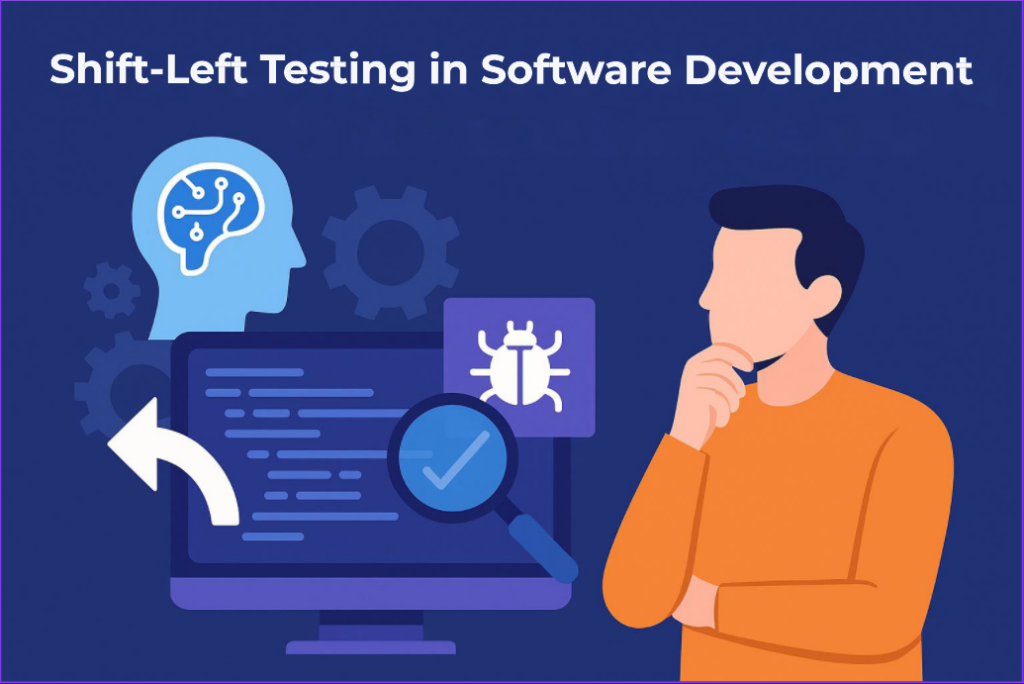
In real projects, most of defects come from misunderstand requirements and early design decision, not from coding mistakes. When testing only happens at the end, teams discover these problems too late to fix them cheaply. Shift-Left testing, supported by AI, allows team to validate requirements, designs, and code much earlier, make quality a daily activity instead of a last-minute rescue.
What Shift-Left Testing Is
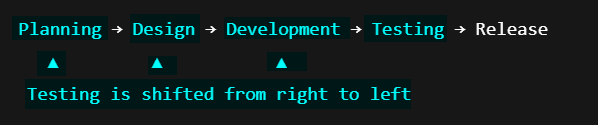
Shift-left testing is the simple idea with a big impact. It means moving testing earlier in the software development lifecycle (SDLC).
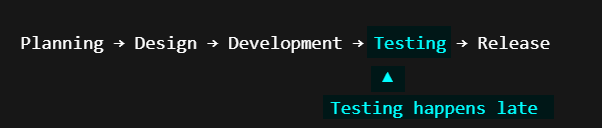
If you imagine the SDLC as a timeline running from left to right, testing in traditional project usually sit on the far right, just before release. With a shift-left approach, testing no longer waits until the end.
Why Shift-Left Really Matters
Shift-Left testing matters because most of defects are found out much earlier than the testing phase. They often come from unclear requirement, design gap, or code change made without fast feedback. When testing moves left, teams can fix problems sooner, with less cost and less rework.
However, shift-left testing earlier also increases the amount of work happening at the same time. This is why AI plays a critical role. It helps teams apply Shift-Left effectively across every phases of the SDLC without slowing development down.
As a result, the quality is no longer a final checkpoint. Instead, it is built continuously, from planning to coding and testing.
The CheckPoints of Shift-Left Success
From experience, Shift-Left works best when the right practices start early and AI is used to support daily testing, not add complexity. Below is the important checkpoints that help teams apply Shift-Left in real projects.
TDD & BDD – Requirements & Planning
Shift-Left starts even before coding begins. At this stage, the goal is to make sure everyone understands the requirements in the same way.
Common tools: JUnit (TDD) && Cucumber / SpecFlow (BDD)
How AI helps:
- Copilot, Rovo and similar AI assistants converts requirements or user stories into BDD scenarios(Given–When–Then).
- AI tools analyze BDD scenarios to detect missing edge cases.
- When a requirement is updated, AI can highlight which test cases or scenarios should be reviewed or updated.
As a result:
- Product owners have clearer requirements
- Developers understand expectations earlier
- Testers spend less time fixing misunderstandings
Test Automation – Development (Coding)
At this stage, the focus is on catching logic errors as soon as code is written. Utilizing tools like Selenium, JUnit, and TestNG to run repetitive tests continuously.
Common tools: JUnit / TestNG (unit testing) && Selenium, Playwright (UI automation)
How AI helps:
- Diffblue Cover automatically generates JUnit tests by analyzing Java code.
- GitHub Copilot suggests unit test cases while developers write code.
- Testim uses AI to stabilize Selenium-based UI tests and reduce flakiness.
As a result:
- This allows team to create and maintain tests with far less manual effort.
Shift-Left Security (DevSecOps) – Design & Coding
By thinking about security early on, through threat modeling, code scanning, and vulnerability assessments, we will avoid scrambling to “bolt it on” at the end.
Common tools: SonarQube && Snyk(DeepCode) && Checkmarx
How AI helps:
- Snyk AI prioritizes vulnerabilities based on real exploitability.
- Checkmarx One uses AI to reduce false positives in static analysis.
- AI models learn from past incidents to flag high-risk code patterns earlier.
As a result:
- This turns security into a continuous practice rather than a late-stage gate.
Shift-Left Performance – Pull Request / Pre-Merge
Performance issues become harder to fix as systems grow.
Common tools: K6/JMeter (load and performance testing) && GitHub Actions (automation)
How AI helps:
- AI-enhanced K6 setups generate realistic traffic patterns automatically.
- Dynatrace find the root cause of slow code automatically.
- Predictive analytics highlight potential bottlenecks before release.
As a result:
- This turns security into a continuous practice rather than a late-stage gate.
CI/CD Integration – Build & Integration
Every code commit should trigger automated tests (Continuous Testing) to ensure new changes don’t break existing functionality.
Common tools: Jenkins, GitLab CI, GitHub Actions
How AI helps:
- Launchable uses machine learning to select the most relevant tests for each build.
- Harness applies AI to determine if a build is “healthy” enough to proceed or if it should auto-rollback..
- AI-driven analytics highlight the most common failure patterns across builds.
As a result:
- Pipelines remain fast while still protecting quality.
Final Thoughts
Shift-Left simply helps team avoid fixing problems too late. AI makes it easier by supporting familiar tools like JUnit, Selenium, and K6 with faster and smarter feedback. But at the end, tools don’t change habits. Shift-Left only works when the whole team genuinely cares about quality from day one.
References:
NashTech sites
Other Internet resources