


Modern JavaScript engines are highly optimised, yet the language remains single‑threaded at heart. When your program performs asynchronous operations—waiting on timers, handling events, performing I/O or working with promises—it relies on an underlying mechanism called the event loop to coordinate when pieces of code run. Understanding the event loop is essential for writing responsive web applications, debugging callback‑related issues and avoiding performance pitfalls.
What is the Event Loop?
The JavaScript runtime environment combines a call stack, a queue of jobs (commonly referred to as the event loop) and various system‑provided APIs (DOM, timers, network I/O and more). The call stack is a last‑in–first‑out (LIFO) data structure: every time a function is called, a new execution context is pushed onto the stack; when the function returns, the context is popped. The queue of jobs, also called the event loop, stores callbacks (jobs) that are ready to run. Since JavaScript is single‑threaded, the runtime can only process one statement at a time. When asynchronous actions complete, their callbacks are added to the job queue. Each time the call stack becomes empty, the engine pulls the next job from the queue and executes it, ensuring that code never blocks the main thread. This design lets JavaScript handle tasks like network I/O without freezing the user interface.
On the server side, Node.js uses the same principles but builds on top of the libuv library to offload operations to the operating system. The Node.js documentation succinctly defines the event loop as the mechanism that allows Node.js to perform non‑blocking I/O operations by offloading work to the system kernel and executing the associated callback later. Thus, both browser‑based and server‑side JavaScript rely on an event‑loop‑driven model to interleave synchronous execution with asynchronous callbacks.
Run‑to‑Completion Guarantee
Each job in the queue runs to completion: once a callback begins executing, no other job will interrupt it until its call stack unwinds. This property simplifies reasoning about shared state but also means that long‑running callbacks can block the entire application. To keep applications responsive, callbacks should be broken into short tasks whenever possible.
Components of the Execution Model
The event loop coordinates several core data structures and queues. These components are worth understanding individually:
Call Stack
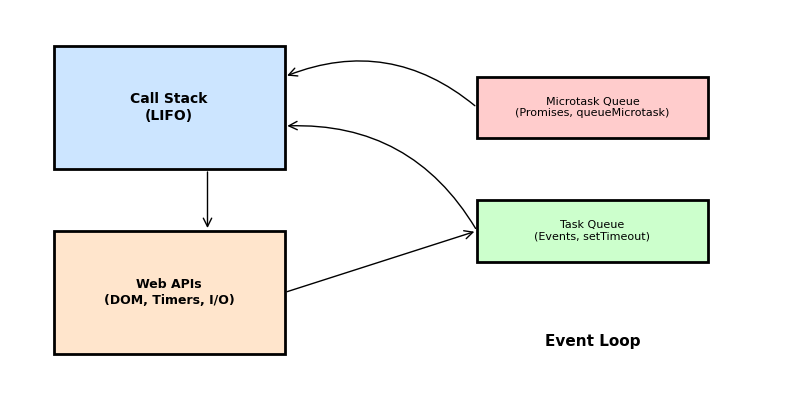
The call stack (a stack of execution contexts) records the flow of function calls. When a function is invoked, its context is pushed onto the stack; when it returns, it is popped. It is a LIFO structure. Synchronous code runs entirely on the call stack—if the stack is never emptied, the event loop never gets a chance to process queued callbacks.
Task (Macrotask) Queue
Tasks (also called macrotasks) represent high‑level callbacks: script entry points, event handlers, setTimeout() and setInterval() callbacks, I/O completion callbacks and so on. When a task is enqueued it waits in the task queue until the call stack is empty. The event loop executes one macrotask per iteration: when the current job completes and the stack is empty, the next task is pulled from the queue.
Microtask Queue
Promises and the queueMicrotask() API use a separate microtask queue. A microtask is a short function that runs after the function or program that created it exits, but before control returns to the event loop. When a task finishes, the event loop will run all microtasks before processing the next macrotask. If a microtask enqueues more microtasks, the engine continues draining the microtask queue until it is empty. This guarantees predictable ordering for promise callbacks but can starve the event loop if misused.
Web APIs / Host APIs
JavaScript engines do not implement timers or network I/O themselves; instead they rely on the host environment. In browsers, Web APIs (DOM, timers, fetch and so on) handle asynchronous operations. When such an operation completes, its callback is scheduled on the appropriate queue (task or microtask). Node.js uses libuv to interface with the kernel, providing timers, file system functions and other asynchronous primitives.
Node.js Event Loop Phases
While browsers expose the event loop conceptually, Node.js specifies the phases through which it cycles. Each phase has a FIFO queue of callbacks to execute. In order, the important phases are:
| Phase | Purpose |
|---|---|
| Timers | Executes callbacks scheduled by setTimeout() and setInterval(). |
| Pending callbacks | Executes I/O callbacks deferred to the next loop iteration. |
| Idle/prepare | Internal use (not typically visible to developers). |
| Poll | Retrieves new I/O events and executes related callbacks; Node may block here when appropriate. |
| Check | Executes setImmediate() callbacks immediately after the poll phase. |
| Close callbacks | Handles close events for sockets or handles (e.g., socket.on('close')). |
Starting with Node.js 20, timers are run only after the poll phase; earlier versions ran them before and after. This adjustment can affect how setImmediate() and timers interleave.
Visualising the Event Loop
The following diagram summarises how the call stack, Web APIs, microtask queue and task queue interact. When synchronous code runs, functions are pushed onto the call stack. Asynchronous operations are delegated to Web APIs; once complete, their callbacks are queued. When the call stack empties, the event loop drains the microtask queue (promises, queueMicrotask()) before pulling the next task (events, timers) from the task queue. Node.js phases like poll and check sit between these high‑level queues, but the principle remains the same.
Example Scenario: Tasks vs. Microtasks
Consider the following JavaScript code. What will it log?
console.log('script start');

setTimeout(() => {
  console.log('setTimeout');
}, 0);

Promise.resolve()
  .then(() => {
    console.log('promise 1');
  })
  .then(() => {
    console.log('promise 2');
  });

queueMicrotask(() => {
  console.log('microtask');
});

console.log('script end');
Output:
script start
script end
microtask
promise 1
promise 2
setTimeout
Explanation: The synchronous logs run immediately (script start and script end) because they are on the call stack. The microtask scheduled with queueMicrotask() and the promise callbacks are microtasks. When the synchronous code finishes and the call stack empties, the engine drains the microtask queue before touching the task queue. Therefore microtask, promise 1 and promise 2 log next (all microtasks are drained in order). Only after the microtask queue is empty does the event loop handle tasks; the setTimeout() callback is a macrotask, so it runs last.
Code Example (TypeScript)
The following example uses async/await (which internally uses promises) alongside timers to show how the event loop coordinates asynchronous operations. The code is written in TypeScript, but the behaviour is identical in JavaScript.
async function fetchData(): Promise<string> {
  // Simulate asynchronous work with a timer
  return new Promise((resolve) => {
    setTimeout(() => {
      resolve('data loaded');
    }, 50);
  });
}

async function run() {
  console.log('start');
  const dataPromise = fetchData();

  // Schedule a timer (macrotask)
  setTimeout(() => {
    console.log('timeout fired');
  }, 0);

  // Await resolves after the microtasks for the promise resolution have run
  const data = await dataPromise;
  console.log(data);

  // A microtask scheduled explicitly
  queueMicrotask(() => {
    console.log('microtask after await');
  });
  console.log('end');
}

run();
What happens:
startlogs synchronously.fetchData()kicks off asetTimeout(); its callback will be enqueued in the timers phase after ~50 ms.- A zero‑delay
setTimeout()is scheduled; its callback goes to the task queue. await dataPromiseyields control back to the event loop. When the timer resolves after 50 ms, the promise’sresolvetriggers a microtask; the event loop runs that microtask, fulfilling the promise.- The
awaitresumes;datalogsdata loaded. queueMicrotask()schedules another microtask (microtask after await), which runs immediately after the current stack frame unwinds.- Finally, the zero‑delay
setTimeout()callback runs in the task queue, loggingtimeout fired.
This example demonstrates how promises (via async/await) use the microtask queue while timers use the task queue.
Sample Interview Question
Question: What will be printed by the following Node.js program, and why?
setImmediate(() => console.log('immediate'));
Promise.resolve().then(() => console.log('promise'));
setTimeout(() => console.log('timeout'), 0);
process.nextTick(() => console.log('nextTick'));
Answer:
nextTick
promise
immediate
timeout
Explanation:
process.nextTick()callbacks are not part of the official event loop phases; Node.js executes them immediately after the current operation completes, before any other microtasks or macrotasks. ThusnextTicklogs first.Promise.resolve().then()schedules a microtask. After draining the nextTick queue, Node.js drains the microtask queue before continuing to other phases, sopromiselogs next.setImmediate()callbacks run in the check phase of the Node.js event loop, which occurs after the poll phase. Thereforeimmediateappears before the zero‑delaysetTimeout()callback (which runs in the timers phase).- Finally,
setTimeout()runs in the timers phase at the start of the next event loop iteration.
Understanding the relative priority of process.nextTick(), microtasks (promises), setImmediate() and setTimeout() is a common interview topic. The key takeaway is that Node.js drains the nextTick queue first, then the microtask queue, then proceeds through the event loop phases, executing setImmediate() before timers during an iteration.
Conclusion
The JavaScript/TypeScript event loop is the backbone of asynchronous programming. By keeping the call stack and various queues separate and processing them in a well‑defined order, JavaScript can remain single‑threaded yet responsive. Remember these key points:
- The call stack executes synchronous code and must be empty before the event loop handles queued callbacks.
- Microtasks (promises,
queueMicrotask()) are drained before the next macrotask. - Macrotasks (tasks) include script execution, timers, and event callbacks; one macrotask runs per event loop iteration.
- Node.js introduces distinct phases (timers, poll, check, etc.) to organise its event loop.
Mastering these concepts will help you reason about asynchronous behaviour, optimise performance and debug complex sequencing issues in both browser and server environments.
References
MDN Web Docs
JavaScript Execution Model
https://developer.mozilla.org/en-US/docs/Web/JavaScript/Reference/Execution_model
MDN Web Docs
Using microtasks in JavaScript with queueMicrotask()
https://developer.mozilla.org/en-US/docs/Web/API/HTML_DOM_API/Microtask_guide
MDN Web Docs
In depth: Microtasks and the JavaScript runtime environment
https://developer.mozilla.org/en-US/docs/Web/API/HTML_DOM_API/Microtask_guide/In_depth
Node.js
The Node.js Event Loop
https://nodejs.org/en/learn/asynchronous-work/event-loop-timers-and-nexttick
WHATWG
HTML Living Standard – Event Loops
https://html.spec.whatwg.org/multipage/webappapis.html#event-loops