


1. Introduction
In modern web development, performance matters. A key factor in page load time is how and when scripts are loaded. By default, when the browser encounters a http://â¦
/js/app.js
Use defer for scripts that depend on the DOM or on each other, such as loading a library (e.g., jQuery) followed by your own code.
2. Understanding defer
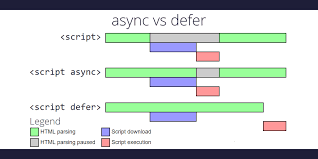
The defer attribute tells the browser to download the script in parallel while it continues parsing HTML, then execute the script after the document has been parsed and before the DOMContentLoaded event. This means deferred scripts never block page rendering and always run in the order they appear in the document. Key points:
- Non‑blocking: The page content remains visible during download and execution.
- Execution order preserved: Multiple deferred scripts run in the same order they appear in the HTML.
- Runs after parsing: Execution waits until the DOM is fully built but before the
DOMContentLoadedevent fires. - External scripts only:
deferworks only on scripts with asrcattribute and has no effect on inline scripts.
<!-- The following scripts load in parallel and execute in order after parsing -->
/js/vendor.js
/js/app.js
Use defer for scripts that depend on the DOM or on each other, such as loading a library (e.g., jQuery) followed by your own code.
3. Understanding async
The async attribute also downloads scripts in parallel but treats them as independent of the HTML and of each other. An asynchronous script is fetched in parallel with the page and executed as soon as it is available, without waiting for HTML parsing or other scripts. Important characteristics:
- Non‑blocking: Like
defer, the browser continues parsing HTML while downloading an async script. - Execution order based on load time: Scripts run in whichever order they finish downloading, regardless of their order in the HTML.
- No coordination with
DOMContentLoaded: The event may fire before or after an async script executes. - Best for independent third‑party code: Ideal for analytics, ads or any script that doesn’t rely on other scripts or DOM elements.
<!-- Each script runs as soon as it finishes downloading -->
https://example.com/analytics.js
https://example.com/ads.js
4. Key Differences and Best Practices
Although both attributes make script loading non‑blocking, their behaviour differs in significant ways. The following table summarises the distinctions:
| Aspect | defer | async |
|---|---|---|
| Download phase | In parallel with HTML parsing | In parallel with HTML parsing |
| Execution timing | After the document is parsed and before DOMContentLoaded | As soon as script is downloaded |
| Execution order | Maintains document order | Unpredictable; first to load runs first |
Interaction with DOMContentLoaded | Delays event until script executes | Doesn’t affect event; may run before or after |
| Suitable for | DOM‑dependent scripts and libraries that must run in order | Independent scripts such as analytics or ads |
Best practices:
- Use
deferfor your own scripts that manipulate the DOM or rely on other scripts. This ensures the DOM is ready and that dependent scripts execute in order. - Use
asyncfor third‑party scripts that are independent of your code (analytics, advertising, social widgets). This prevents blocking and allows them to execute as soon as possible. - Avoid mixing attributes on scripts that depend on each other; order dependencies may break with
async.
5. Example: Loading Scripts with defer and async
Consider this simplified HTML document:
<!DOCTYPE html>
<html lang="en">
<head>
  <meta charset="UTF-8">
  <title>Script Loading Demo</title>
  <!-- DOM-dependent code: library then application -->
  /lib.js
  /app.js
  <!-- Independent analytics script -->
  https://analytics.example.com/script.js
</head>
<body>
  <h1>Hello!</h1>
  <p>Content shows immediately, while scripts download in parallel.</p>
</body>
</html>
In this example, lib.js and app.js are loaded in parallel and execute in order after the document is parsed. The analytics script downloads in parallel and runs whenever it finishes downloading, independent of the other scripts.
6. Common Interview Question and Answer
Question: You have two external scripts, utils.js and main.js. main.js depends on functions defined in utils.js. You also want to load a third-party analytics script analytics.js without blocking page rendering. How should you load these scripts?
Answer: Use the defer attribute on utils.js and main.js so they load concurrently and execute in order once the DOM is parsed. Use the async attribute on analytics.js so it downloads in parallel and executes as soon as it’s ready without blocking other scripts or waiting for them. For example:
/utils.js
/main.js
https://analytics.example.com/analytics.js
This approach ensures your application code runs correctly while third‑party analytics does not interfere with your script dependencies.
7. Conclusion
Understanding how browsers load and execute scripts is essential for building performant web pages. Both defer and async allow scripts to download without blocking HTML parsing, but they differ in when and how they execute. defer is designed for DOM‑dependent scripts that need to run in order after the document is parsed, while async is suited to independent scripts that can execute whenever they finish loading. Choosing the right attribute helps minimise perceived latency and ensures that both your code and third‑party scripts behave predictably.
8. References
MDN Web Docs – HTMLScriptElement: defer property – Explains that setting defer causes scripts to execute after the document is parsed and before DOMContentLoaded.
MDN Web Docs – HTMLScriptElement: async property – Notes that async scripts are fetched in parallel and executed as soon as they are available.
JavaScript.info – Scripts: async, defer – Provides detailed explanations of script loading behaviour, including that deferred scripts never block the page and preserve order and that async scripts are independent and run when ready. It also summarises key differences and best practices for choosing between defer and async.