


A few months ago, I worked on a ticket that required integrating a PayPal Login button into a Web SDK component. It turned out to be a surprisingly interesting sprint. I had the opportunity to dig into PayPal’s integration patterns, investigate cross-domain communication, and ultimately find a solution that not only solved the problem but also deepened my understanding and sense of ownership.
In this post, I’d like to share that experience—specifically, how PayPal handles callbacks using browser message events and why this approach works well for embedded SDK scenarios.
The Typical Approach to Third-Party Integration
When we talk about third-party integrations on the web, the first thing that usually comes to mind is:
“Include a JavaScript file provided by the third party and embed it directly into our application.”
PayPal is no exception. They provide a JavaScript SDK that allows merchants to easily add features such as login, checkout, and payouts by simply including a script and configuring a few options.
A Simple Solution: PayPal Login Button
The most straightforward way to integrate the PayPal Login button is by using their existing JavaScript library:
<https://www.paypalobjects.com/js/external/api.js>PayPal also provides a button generator that helps you produce the required configuration code. You can access it here:
https://developer.paypal.com/docs/log-in-with-paypal/integrate/generate-button
The typical workflow looks like this:
- Fill in the required fields (client ID, scopes, environment, etc.)
- Click Generate
- Copy the generated code into an HTML file
- Run it locally or on a test server
At this point, everything works exactly as advertised. A PayPal Login button is rendered, and users can authenticate successfully.
The Core Problem: Redirect-Based Flow
However, this “simple” solution comes with an important limitation.
After a user logs in successfully, PayPal redirects the browser to a predefined return_url, passing the authorization code and other parameters via the query string.
While this is perfectly acceptable for traditional web applications, it becomes a deal-breaker when working with embedded Web SDK components.
Why?
Because in an SDK or embedded component scenario:
- The login flow typically happens in a popup or iframe
- Redirecting the entire page away from the merchant’s site breaks the user experience
- In many cases, redirecting at all is simply not allowed
In short, a full-page redirect is incompatible with SDK-based integrations.
PayPal Assisted Account Creation (AAC)
To address this limitation, PayPal provides an alternative approach known as Assisted Account Creation (AAC).
Under the hood, this solution uses Zoid, a cross-domain component framework developed by PayPal. Zoid enables secure communication between windows or frames across different domains—without forcing a page redirect in the merchant application.
The key idea is simple but powerful:
- PayPal still redirects to a
return_url - But that
return_urlpoints to a minimal HTML page - This page does nothing except extract data from the URL and send it back to the original window using a message event
First to create a index.html:
<html>
	<head>
	</head>
	<body>
		<script>
			document.addEventListener("DOMContentLoaded", function(evt) {
				var params = {}, pairs = document.URL.split('?').pop().split('&');

				for (var i = 0, p; i < pairs.length; i++) {
					p = pairs[i].split('=');
					params[ p[0] ] =  decodeURIComponent(p[1]);
				}

				var response = {};

				if (params.code) {
					response.body = {
					  code: params.code,
					  clientData: params.clientData,
					  scope: params.scope,
					};
				}
				else if (params.err) {
					response.err = params.err;
				}
				else {
					response.err = "AUTHORIZATION_CODE_UNAVAILABLE";
				}
				window.opener.postMessage(response.body, '*');
			});
		</script>
	</body>
</html>
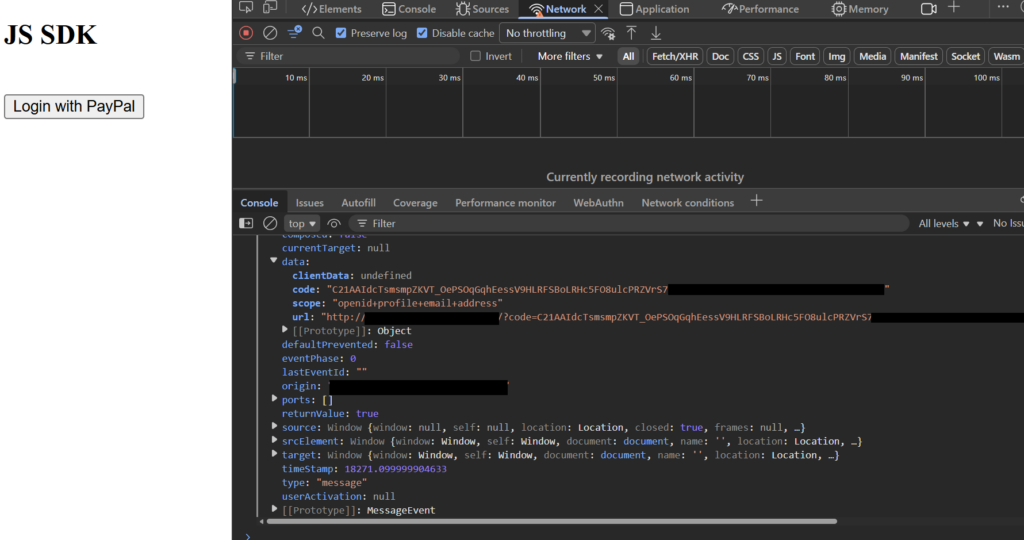
The soul of this approach is the js code behind it, it leverages something called “Window: message event”. The idea is to use this script to retrieve the information returned from PayPal – usually with the OAuth approach, the callback URL should contains the authorization code which looks like this:
"<http://redirect.com/?code=C21AALKjybpvHzoroO1u4brRtsnAoEGW1_MpsbtMJlQ_2VakbCs9P&scope=openid+profile+email+address>"Next, we have to host this return URL, for local environment, we can use IIS to easily host our basic webpage. When PayPal callbacks to this page, we can use Window message event to post the message.
By using window.opener.postMessage(...), the redirect page communicates directly with the window that initiated the login popup. This achieves several important goals:
- ✅ No full-page redirect for the merchant
- ✅ Secure cross-domain communication
- ✅ Clear separation of concerns
- ✅ Compatibility with embedded SDK components
Here’s what the final implementation looks like:
References
https://developer.mozilla.org/en-US/docs/Web/API/Window/message_event