


This is Part II of a series. If you haven’t read Part I — The Working Monolith, I’d recommend starting there. It sets the scene for why we’re here.
We left off with an agent, it worked well. It greeted users, it followed instructions, It did the job. The prompt was baked right into the agent definition — a string literal sitting inside LlmAgent(instruction="...") — and honestly, for a prototype, that’s fine. I’ve shipped worse.
But then I started thinking about what happens next.
What happens when the product team wants to tweak the greeting? What happens when you need a Receptionist persona and a Greeter persona and a SalesAssistant persona — all running off the same agent codebase? What happens when you want to test prompt version A against version B without touching agent code?
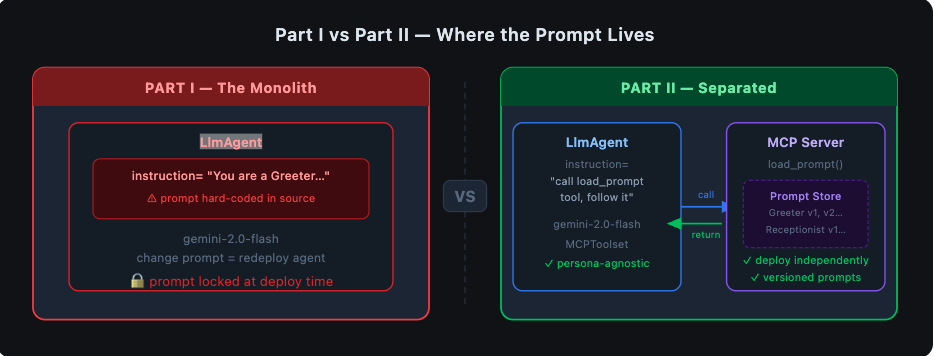
The answer in Part I was: you’d edit the Python file, commit it, redeploy the agent, and hope nothing broke. Every prompt change was a code change. Every code change was a deployment. The prompt and the agent had become one organism, and changing one meant disturbing the other.
That’s the monolith problem. And this is the experiment I ran to get out of it.
The Idea: Treat Prompts Like a Service
What if the agent didn’t own the prompt? What if, instead, it fetched the prompt at runtime — the same way it might call an API or look up a database record?
This is the core idea behind separating prompts onto an MCP (Model Context Protocol) server. The agent becomes a thin consumer. The MCP server becomes the single source of truth for prompt content. They talk to each other over a well-defined protocol, and neither needs to know — or care — about the other’s internals.
The architecture I landed on looks like this:
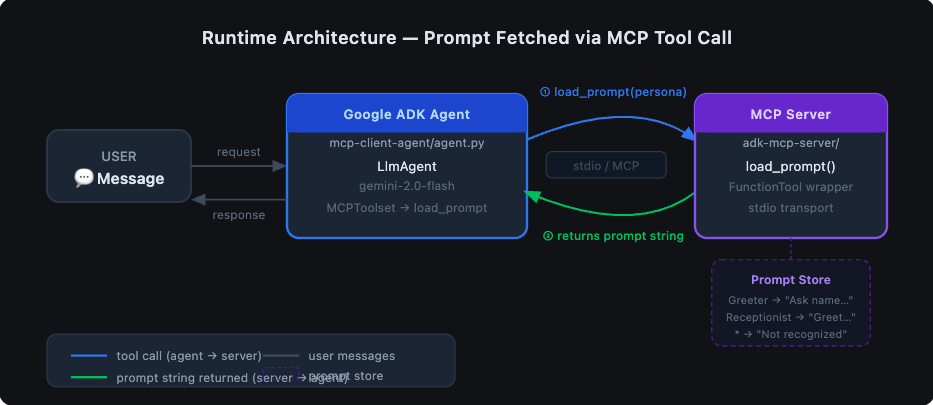
The agent has one job: receive a user request, ask the MCP server for the right prompt, and follow it. The MCP server has one job: know what prompts exist and return the right one.
Sounds simple. It mostly is. Let me walk you through what I actually built.
The MCP Server: A Prompt Store with a Tool Interface
The MCP server lives in adk-mcp-server/. It’s a Python process that speaks the Model Context Protocol — a standardised way for agents and tools to communicate over stdio.
The prompt logic itself is deliberately boring. Here’s load_prompt.py:
"""Tool for getting prompt."""

def load_prompt(persona: str = "Greeter") -> str:
    """
    Returns a prompt string based on the persona.

    Args:
        persona (str, optional): The persona type. Defaults to "Greeter".

    Returns:
        str: The generated prompt.
    """
    if persona == "Greeter":
        return "Ask user their name and return Hello $Name"
    elif persona == "Receptionist":
        return "You are a helpful assistant that greets the user. Ask for the user's name and greet them by name."
    else:
        return f"Persona '{persona}' is not recognized. Please provide instructions for this persona."
Right now it’s an if/elif block. In production this could be a database lookup, a call to a prompt registry, a versioned file store — anything. The function signature stays the same. The agent doesn’t care what’s behind it.
Now, to expose this as an MCP tool, I wrapped it using Google ADK’s FunctionTool and wired it into an MCP server in my_adk_mcp_server.py:
from google.adk.tools.function_tool import FunctionTool
from google.adk.tools.mcp_tool.conversion_utils import adk_to_mcp_tool_type
from load_prompt import load_prompt

# Wrap the plain Python function as an ADK tool
adk_tool_to_expose = FunctionTool(load_prompt)

# Create the MCP server
app = Server("adk-tool-exposing-mcp-server")

@app.list_tools()
async def list_mcp_tools() -> list[mcp_types.Tool]:
    mcp_tool_schema = adk_to_mcp_tool_type(adk_tool_to_expose)
    return [mcp_tool_schema]

@app.call_tool()
async def call_mcp_tool(name: str, arguments: dict) -> list[mcp_types.Content]:
    if name == adk_tool_to_expose.name:
        adk_tool_response = await adk_tool_to_expose.run_async(
            args=arguments,
            tool_context=None,
        )
        response_text = json.dumps(adk_tool_response, indent=2)
        return [mcp_types.TextContent(type="text", text=response_text)]
The adk_to_mcp_tool_type utility does the heavy lifting of converting ADK’s tool schema into MCP’s format. From the agent’s perspective, load_prompt is just another tool it can call — it doesn’t know or care that it’s hitting a separate process.
The server runs over stdio — meaning the agent spawns it as a subprocess and they communicate through standard in/out. No HTTP, no ports, no service discovery. For this use case, that simplicity is a feature.
The Agent: Now Just a Thin Consumer
On the other side of the wire, the agent in mcp-client-agent/agent.py is notably slimmer than its Part I counterpart:
import os
from google.adk.agents import LlmAgent
from google.adk.tools.mcp_tool.mcp_toolset import MCPToolset
from google.adk.tools.mcp_tool.mcp_session_manager import StdioConnectionParams
from mcp import StdioServerParameters

PATH_TO_MCP_SERVER_SCRIPT = os.path.join(
    os.path.dirname(os.path.abspath(__file__)),
    "..", "adk-mcp-server", "my_adk_mcp_server.py"
)

root_agent = LlmAgent(
    model='gemini-2.0-flash',
    name='mcp_prompt_agent',
    instruction=(
        "You are a helpful assistant. "
        "When a user asks you to behave as a specific persona, call the 'load_prompt' tool "
        "with that persona name to fetch the appropriate instructions, then follow them exactly."
    ),
    tools=[
        MCPToolset(
            connection_params=StdioConnectionParams(
                server_params=StdioServerParameters(
                    command='python3',
                    args=[PATH_TO_MCP_SERVER_SCRIPT],
                )
            ),
            tool_filter=['load_prompt'],
        )
    ],
)
Compare this to Part I. The instruction field no longer contains the actual persona behaviour — it just tells the agent how to get the instructions. The agent’s job description has shifted from “be a Greeter” to “know how to ask for instructions and follow them.”
That’s a meaningful change. The agent code is now persona-agnostic. I can add ten new personas to load_prompt.py and the agent file doesn’t change at all.
The tool_filter=['load_prompt'] line is worth calling out. The MCP toolset can expose multiple tools, but I’m explicitly telling the agent to only surface load_prompt. It’s a good habit — principle of least privilege applies to agents too.
What This Unlocks
Let me be concrete about the wins here, because “separation of concerns” is easy to say and hard to feel until you’ve lived through the alternative.
Prompt changes no longer require agent deployments. Want to update the Greeter persona to say “Hey there!” instead of “Hello”? Edit load_prompt.py on the MCP server. Redeploy the MCP server. Done. The agent process doesn’t need to know.
Multiple personas from a single agent. In Part I, if you wanted a Receptionist agent, you’d copy-paste the agent code and change the instruction string. Now you just pass persona="Receptionist" to load_prompt. One agent, many behaviours, all managed in one place.
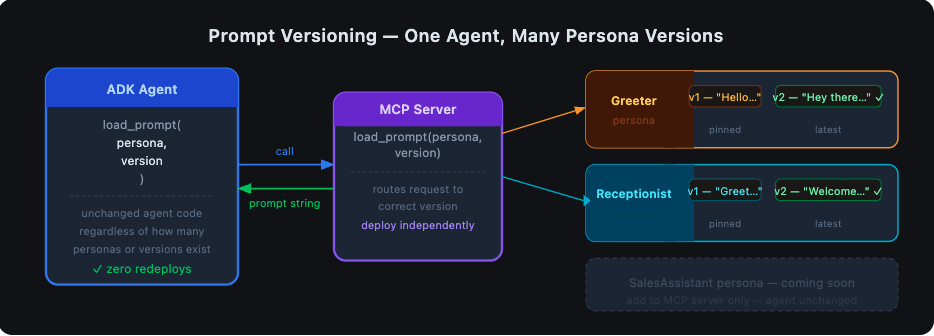
Versioning becomes possible. Right now load_prompt is an if/elif. But because it’s a function with a clear interface, you could extend it to accept a version parameter:
def load_prompt(persona: str = "Greeter", version: str = "latest") -> str:
    # look up persona + version from a store
    ...
The agent calls it the same way. The server manages the versioning logic. You can A/B test prompts, roll back a bad version, or pin a specific persona to a stable version — all without touching agent code.
The prompt becomes observable. Because the prompt travels over the MCP protocol as a tool call, you can log it, trace it, audit it. You know exactly what instruction the agent received at runtime, for every request. In Part I that was implicit — the instruction was always whatever was in the source file at deploy time. Now it’s an explicit, observable event.

The Tradeoff You Should Know About
I won’t pretend this architecture is free. Here’s the honest accounting:
- More moving parts. You now have two processes to run, two sets of dependencies, two things that can fail. For a prototype or a solo project, that overhead is real.
- Stdio coupling. The agent spawns the MCP server as a subprocess. If the server crashes, the agent loses its tool. You need to think about restarts and health checks in production.
- Local dev is slightly more involved. You need the MCP server running (or let the agent spawn it) before you can test. The README has the steps, but it’s not as simple as
python agent.pyanymore.
For a production system I’d accept all of these tradeoffs without hesitation. For a weekend prototype, it depends how much you value clean architecture vs. moving fast.
Running It Yourself
The full code is in the repository. Here’s the short version:
1. Build the MCP server image:
docker build -t adk-mcp-server ./adk-mcp-server
2. Set your API key in mcp-client-agent/.env:
GOOGLE_GENAI_USE_VERTEXAI=FALSE
GOOGLE_API_KEY=your_key_here
3. Install agent dependencies and run:
cd mcp-client-agent
pip install -r requirements.txt
adk web
4. Try these prompts in the ADK UI at http://localhost:8000:
# Greeter persona
Load the Greeter prompt and introduce yourself.

# Receptionist persona
Load the Receptionist prompt and help me check in.

# Unknown persona — see how the server handles it gracefully
Load the Barista prompt and take my order.
On that last one — the server returns "Persona 'Barista' is not recognized." The agent receives that, tells the user it doesn’t know that persona, and asks for clarification. No crashes, no hallucinations about what a Barista agent should do. The boundary holds.
Where This Goes Next
This experiment answered the question I set out to answer: yes, you can separate prompts from agent logic, and it’s worth doing.
But it also opened up a few obvious next questions:
- What if the MCP server itself needs to call an LLM to generate or adapt prompts dynamically? That’s a multi-agent pattern, and ADK handles it — but that’s a Part III.
- What about prompt versioning with a real store? Replacing the
if/elifwith a versioned database or a dedicated prompt registry (there are a few emerging ones) would make this genuinely production-ready. - What about authentication? Right now the MCP server trusts anyone who can spawn it. In a multi-tenant or cloud-deployed scenario, you’d want to think about this carefully.
For now, the thing I set out to build works. The agent fetches its prompt at runtime. The prompt can change without touching the agent. The two concerns are separated, and the boundary between them is explicit and observable.
That’s enough for one experiment. More soon.
Code for this post: https://github.com/NashTech-Labs/adk-mcp-example Part I: Where Does My Prompt Live? — The Working Monolith