


OpenSpec: Write the Plan Before You Write the Code
AI coding tools are everywhere now. But there is still a big problem. You describe what you want in a chat. The AI writes code. Then you realize the result is not what you meant. You start over. This happens again and again.
OpenSpec fixes this problem.
1. The Problem with AI Coding Today
Let’s say you are building a login feature. You open your AI coding tool and type:
“Add a remember me checkbox to the login form with 30-day sessions.”
The AI writes the code. It looks correct. You ship it.
Three days later, a bug report comes in. Sessions never expire. The AI forgot to handle the logout case. It also stored the session token in the wrong place. You did not specify those details. The AI made its own decisions.
Now you spend two hours fixing code you did not fully understand.
This is a context problem. AI tools work inside a single chat session. When the session ends, all the context disappears. The next time you open the tool, it knows nothing about what you built or why.
For solo developers, this is frustrating. For teams, this is a real risk.
2. What Is OpenSpec?
OpenSpec is an open source framework. It helps developers plan features before writing any code. It sits between your idea and your AI coding tool.
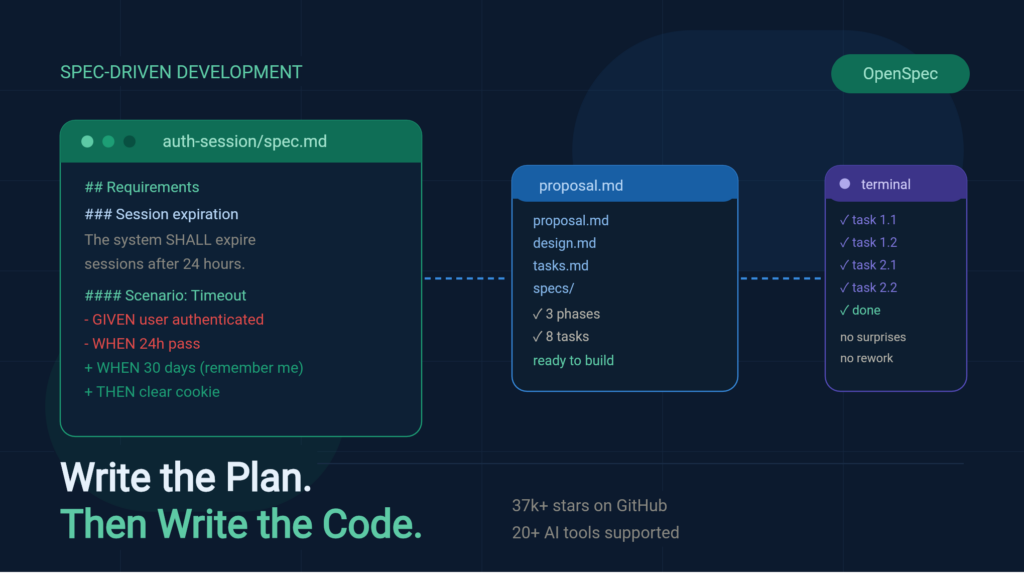
The idea is simple. You write a spec first. A spec is a short document. It describes what a feature should do. It uses plain language. It lists requirements and scenarios. Then your AI reads the spec and builds from it.
The spec lives inside your code repository. It stays there forever. It does not disappear when a chat ends.
OpenSpec has over 37,000 stars on GitHub and supports more than 20 AI coding tools.
3. How It Works: A Real Example
Say you want to add a “Remember Me” feature to your app. Here is what happens with OpenSpec.
Step 1: You propose the feature.
You type one command inside your AI tool:
/opsx:propose add-remember-me-checkbox
OpenSpec reads your existing codebase. It finds your current login code and your session handling files. Then it creates a folder:
openspec/changes/add-remember-me/
├── proposal.md
├── design.md
├── tasks.md
└── specs/
    └── auth-session/
        └── spec.md
Step 2: You review the proposal.
Open proposal.md. It looks like this:
## Change: Add Remember Me Checkbox

### Why
Users currently lose their session after 24 hours.
This creates friction for returning users.

### What We Are Building
- A "Remember Me" checkbox on the login form
- Extended session duration of 30 days when checked
- A persistent cookie to store the session token
- Logic to clear the cookie on manual logout
You read it. You catch something. The proposal did not mention what happens when a user logs out on one device but is still logged in on another. You add that requirement before any code is written.
Step 3: You review the spec.
Open specs/auth-session/spec.md. It shows the exact requirements:
### Requirement: Session expiration

The system SHALL expire sessions after a configured duration.

#### Scenario: Default session timeout
- GIVEN a user has authenticated
- WHEN 24 hours pass without activity
- THEN invalidate the session token
- AND require re-authentication

#### Scenario: Extended session with remember me
- GIVEN user checks "Remember me" at login
- WHEN 30 days have passed
- THEN invalidate the session token
- AND clear the persistent cookie

#### Scenario: Manual logout
- GIVEN a user is logged in with remember me
- WHEN the user clicks logout
- THEN clear the session token immediately
- AND delete the persistent cookie from all devices
You added that last scenario yourself. Now the AI knows about it.
Step 4: You review the tasks.
Open tasks.md. It lists concrete steps:
Phase 1: Frontend
1.1 Add "Remember me" checkbox to login form
1.2 Pass checkbox state to login API call

Phase 2: Backend
2.1 Update session creation to accept remember_me flag
2.2 Set cookie expiry to 30 days when flag is true
2.3 Add logout endpoint that clears cookie on all sessions

Phase 3: Testing
3.1 Test default 24-hour expiry
3.2 Test 30-day extended session
3.3 Test logout clears cookie
You see Phase 2.3. You realize you need a database change to track active sessions per user. You add that to the task list now, not later.
Step 5: The AI builds from the spec.
You run:
/opsx:apply
The AI reads the spec and the tasks. It implements each item. It does not guess. It follows the plan you already approved.
AI: Implementing tasks...
✓ 1.1 Add checkbox to login form
✓ 1.2 Pass state to API
✓ 2.1 Update session creation logic
✓ 2.2 Set cookie expiry
✓ 2.3 Add logout endpoint
✓ 3.1 Write test for 24h expiry
✓ 3.2 Write test for 30-day session
✓ 3.3 Write test for logout
All tasks complete.
No surprises. No missing edge cases. Everything was agreed on before the first line of code was written.
4. Context That Never Disappears
This is the most powerful thing about OpenSpec.
After the feature is done, you archive the change:
/opsx:archive
The spec stays in your repository. Six months later, a new developer joins your team. They look at the login code and wonder: “Why does the session expire after 30 days? Why not 7? Why not forever?”
They open openspec/specs/auth-session/spec.md. They read the scenarios. They understand the intent. They do not need to ask you. They do not need to read old chat logs that no longer exist.
This is what OpenSpec calls “context that persists.” It is not just documentation. It is living documentation. When the feature changes, the spec changes too.
5. Code Review Gets Easier
Code reviews are hard when you only see code changes. You see that a function changed. You do not know why.
With OpenSpec, every change includes a spec delta. A spec delta shows exactly which requirements changed. Here is an example:
openspec/specs/auth-session/spec.md

### Requirement: Session expiration

- The system SHALL expire sessions after a configured duration.
+ The system SHALL support configurable session expiration periods.

#### Scenario: Default session timeout

  - GIVEN a user has authenticated
- - WHEN 24 hours pass without activity
+ - WHEN 24 hours pass without "Remember me"
  - THEN invalidate the session token
Now the reviewer knows exactly what changed and why. They do not need to trace through ten files of code to understand the intent.
6. It Works on Existing Codebases
Most planning tools assume you start fresh. You write all your specs upfront. You plan every feature before building anything.
That is not how real projects work.
OpenSpec is built for mature codebases. You add specs as you go. You build a new feature? Write a spec for it. You fix a bug? Update the relevant spec. Over time, your spec library grows. The older parts of your codebase get documented naturally.
You do not need to stop everything and write 200 spec files before you can use it. Start with one feature. Add more over time.
7. Works With Tools You Already Use
OpenSpec supports over 20 AI coding tools. You do not switch to a new IDE. You do not change your workflow. You just add OpenSpec on top of what you already have.
Supported tools include Claude Code, Cursor, GitHub Copilot, Windsurf, Gemini CLI, Cline, Amazon Q, and more.
Install it once. Use it everywhere.
8. How to Get Started
Install OpenSpec:
npm install -g @fission-ai/openspec@latest
Go to your project and initialize:
cd your-project
openspec init
Start your first proposal:
/opsx:propose what you want to build
That is it. OpenSpec creates the spec structure. You review it. You refine it. Then you build.
9. OpenSpec vs. Other Tools
vs. just prompting your AI — A prompt lives in one chat. It disappears. A spec lives in your repository forever.
vs. writing documentation manually — Traditional docs go stale fast. OpenSpec specs update as you build. They stay in sync with your code.
vs. using a project management tool — Tools like Jira track tasks. They do not capture why a feature works a certain way. OpenSpec captures both the what and the why.
10. Final Thought
AI coding is not going away. It is only getting more powerful. But power without clarity creates problems. You need a way to agree on what to build before the AI starts building.
OpenSpec is that layer. It is lightweight. It is fast. It takes ten minutes to plan a feature properly. It saves hours of rework later.
Think of it this way. You would not ask a contractor to build a house without a blueprint. Why ask an AI to build a feature without a spec?
Write the plan. Review it. Then build.
Try OpenSpec → openspec.dev GitHub → github.com/Fission-AI/OpenSpec
Open source. MIT license. No API keys required. Works with 20+ AI coding tools.