



As Quality Control Engineers, we often fall into the trap of viewing test automation frameworks purely through the lens of execution speed, assertions, and test coverage. When it comes to the Cucumber framework, this perspective is a fundamental miscalculation.
To unlock its true value, we must step away from trivial UI scripting and view Cucumber through a lens of high-level architectural discipline.
1. Cucumber: What It Is and Why It Matters
At its core, Cucumber is an open-source test automation tool designed to support Behavior-Driven Development (BDD). It reads executable specifications written in plain text – using a structural language called Gherkin – and validates that the software behaves exactly as specified.
As illustrated above, Cucumber acts as a parser and a matching engine. It takes the human-readable Feature File (the business behavior) and maps each line to an underlying snippet of code known as a Step Definition. This structural flow ensures that your tests are never completely disconnected from the actual business logic they verify.
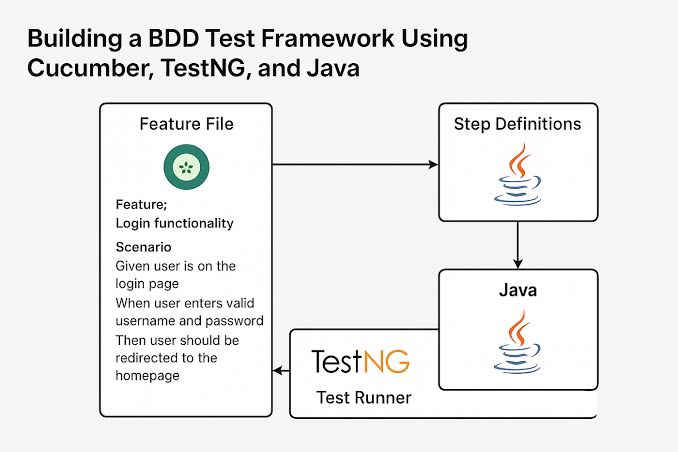
The Cucumber Architectural Pipeline. Source: Medium
2. The Genesis of Gherkin: Refining the “Prompt” Before the Code
The success of a Cucumber suite is decided long before the first line of code is written. In BDD, the “prompt” – the raw business requirement – must undergo a rigorous refinement process before it is translated into Gherkin syntax (Given-When-Then).
If your initial prompt is ambiguous, your automation will be inherently fragile. To build high-fidelity specifications, engineers and stakeholders must align on two foundational principles:
Shifting from Imperative to Declarative Writing
The most common failure mode in Cucumber implementation is writing imperative scenarios that mimic manual test steps.
The Imperative Trap (Anti-pattern):
- Given the user is on the login page
- When the user types “admin” into the username field
- And the user clicks the “Submit” button
- Then the URL should contain “/dashboard”
This approach couples your business documentation tightly to the current UI layout. If a designer changes a button to a link, your documentation breaks. Instead, elevate the language to a declarative level that focuses on business capabilities:
The Declarative Standard (Best Practice):
- Given an unauthenticated administrator
- When they authenticate with valid credentials
- Then they are granted access to the management dashboard
The “Three Amigos” Calibration
Before checking a feature file into source control, it must survive the “Three Amigos” review: the Product Owner (describing the why), the Developer (architecting the how), and the QA Engineer (interrogating the what-ifs). This collaborative calibration ensures that the Gherkin file serves as an explicit contract, removing assumptions before automation begins.
3. Engineering for Scale: Architectural Utilization
Utilizing Cucumber efficiently requires strict software engineering patterns. Because Cucumber introduces an extra layer of abstraction (the text-based feature file), your test architecture must be highly decoupled to prevent code bloat.
[Feature Files: Business Intent (Gherkin)]
│
▼
[Step Definitions: The Glue Layer (Regex/Annotations)]
│
▼
[Domain Model / Page Objects / API Clients: Execution Layer]
The Three-Tier Architecture
To maintain a scalable framework, segregate your automation into three distinct layers:
- The Intent Layer (Feature Files): Purely declarative domain language. Zero technical implementation details.
- The Glue Layer (Step Definitions): Thin wrappers that capture the Gherkin expressions and instantly delegate execution to the underlying codebase. This layer should contain no direct assertions or UI selectors.
- The Execution Layer (Domain Model/Page Objects): Where the actual heavy lifting happens – API requests, database queries, or UI interactions via Selenium/Playwright.
Context Injection Over Global State
When executing complex workflows, steps must frequently share state (e.g., storing an API token generated in a Given step to use in a When step).
Avoid using static variables for state sharing; they cause race conditions and completely break your ability to run tests in parallel. Utilize Dependency Injection (DI) containers – such as PicoContainer or Spring – to inject isolated scenario contexts cleanly across step definition classes.
4. The Analytical Trade-offs: Strengths vs. Weaknesses
No framework is an engineering silver bullet. To champion Cucumber effectively, a Quality Control Engineer must objectively weigh its strategic advantages against its technical costs.
| Dimension | Strategic Advantage | Tactical Challenge |
|---|---|---|
| Cross-Functional Alignment | Establishes a Ubiquitous Language that aligns product managers, engineers, and executives. | Requires cultural buy-in. Without active participation from business partners, Cucumber is just overhead. |
| Documentation Longevity | Automated tests double as exact, human-readable specifications that never go out of date. | The “Maintenance Tax”: Refactoring underlying system behavior requires a dual update to both features and code. |
| Testing Versatility | Can abstract complex workflows ranging from front-end user journeys to microservices APIs. | String and regex matching can become fragile as the step definition library grows into the thousands. |
Mitigating the “Maintenance Tax”
The primary criticism of Cucumber is the maintenance burden it imposes. Because it introduces a mapping layer between natural language and code, large test suites can slow down velocity if the step definitions are poorly designed.
To mitigate this, design your step definitions to be highly reusable and generic. Instead of writing separate steps for every specific entity, parameterize your steps using data tables and regular expressions to handle diverse inputs smoothly.
5. How Cucumber Transforms the Workplace
Cucumber shines brightest not when it is used merely as a tool to find bugs, but when it is leveraged to prevent them. By enforcing rigorous communication prior to coding and adhering to clean architectural patterns during implementation, Cucumber transforms automated testing from a downstream verification chore into an upstream design asset.
Treat your feature files as production-grade documentation, and your automation suite will gracefully scale alongside your business.
In a traditional software ecosystem, miscommunication between the business and engineering teams is the single largest source of project waste. Cucumber shifts the paradigm by addressing this friction directly:
- Eliminating the “Telephone Game”: Instead of product managers writing a requirement document, developers interpreting it into code, and QA engineers writing a completely separate test plan, everyone works off the same Feature File. It serves as a single source of truth.
- Creating Living Documentation: Traditional documentation goes stale the moment code changes. Because Cucumber tests are the documentation, your system specs are always 100% accurate. If the documentation doesn’t match the application, the build fails.
- Forcing Clear Design Upfront: You cannot automate an ambiguous requirement in Cucumber. The framework forces engineers and business stakeholders to resolve edge cases and logical gaps before a single line of production code is authored.