


1. What is SOAP request
SOAP stands for Simple Object Access Protocol is a messaging protocol specification for exchanging structured information in the implementation of web services in computer networks. It uses XML format, and relies on applications layer protocols, most often HTTP, although some legacy systems communicate over SMTP, for message negotiation and transmission.
2. XML Format
Here is an example of XML format
<?xml version="1.0" encoding="utf-8"?>
<soap:Envelope xmlns:soap="http://schemas.xmlsoap.org/soap/envelope/">
    <soap:Body>
        <Calculate xmlns="http://www.example.com/webservices/">
            <Username>ExampleTest</Username>
            <Password>Password12345</Password>
        </Calculate>
    </soap:Body>
</soap:Envelope>
In this example:
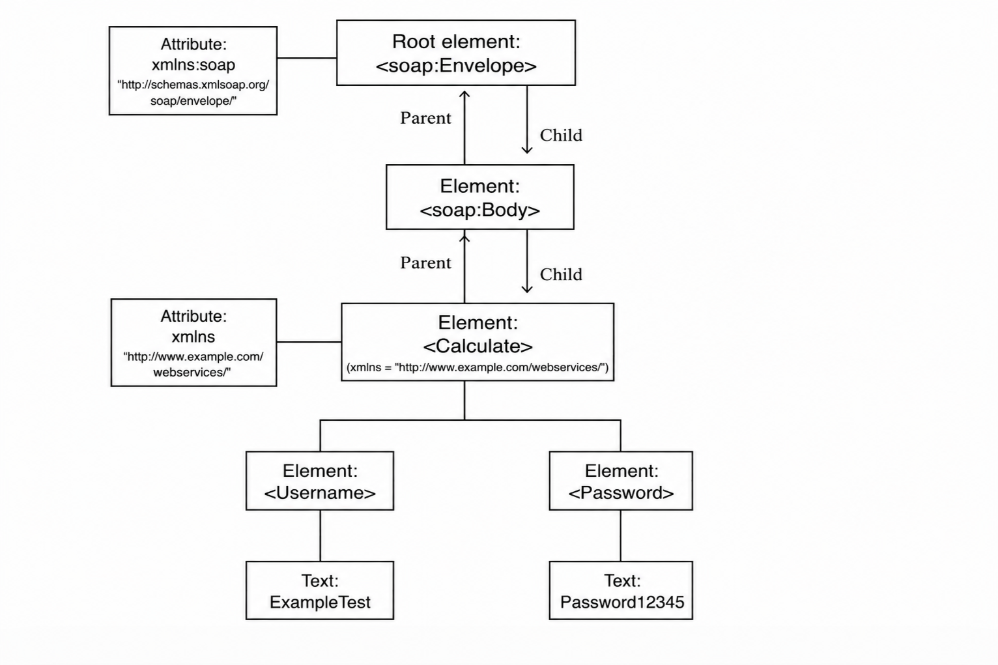
- Root element: Envelope, it has a namespace http://schemas.xmlsoap.org/soap/envelope/
- Body element has child Calculate element
- Calculate element has 2 children: Username and password, and it also has a namespace: http://www.example.com/webservices/
Namespace: In XML, element names are defined by the developer. This often results in a conflict when trying to mix XML documents from different XML applications. XML Namespaces provide a method to avoid element name conflicts.
The following image describes more detail about the structure of XML format
3. How to send SOAP in automation with C#
// Put your xml content into a file, then using File.ReadAllText() method to read file content
var filePath = @"..\..\..\Data\testdata.xml"; //path to xml file
var fileContent = File.ReadAllText(filePath);
// Create an object HttpClient() to send request
using var client = new HttpClient();
// Create body to send request, make sure passing mediaType is "application/xml"
var content = new StringContent(fileContent, Encoding.UTF8, "application/xml");
// Send PostRequest with your specific request URI
var response = await client.PostAsync("https://requestURI",content);
var responseContent = await response.Content.ReadAsStringAsync();
4. The way to handle response
Here is an example of response of API in XML format
<?xml version="1.0" encoding="utf-8"?>
<soap:Envelope xmlns:soap="http://schemas.xmlsoap.org/soap/envelope/">
  <soap:Body>
    <CalculateResponse xmlns="http://www.example.com/webservices/">
        <Calculation>
          <Student>
            <Studentid>1111</Studentid>
            <Name>abc</Name>
            <Regyear>2026</Regyear>
          </Student>
        </Calculation>
    </CalculateResponse>
  </soap:Body>
</soap:Envelope>
4.1. Deserialize to Model
Before deserializing to model, you need to create a model call CalculateResponseEnvelope.cs and put the below code into this file
using System.Xml.Serialization;
namespace DataModel
{
    [XmlRoot(ElementName = "Student")]
    public class Student
    {
        [XmlElement(ElementName = "Studentid")]
        public int StudentId { get; set; }

        [XmlElement(ElementName = "Name")]
        public string Name { get; set; }

        [XmlElement(ElementName = "Regyear")]
        public int RegYear { get; set; }
    }

    [XmlRoot(ElementName = "Calculation")]
    public class Calculation
    {
        [XmlElement(ElementName = "Student")]
        public Student Student { get; set; }
    }

    [XmlRoot(ElementName = "CalculateResponse", Namespace = "http://www.example.com/webservices/")]
    public class CalculateResponse
    {
        [XmlElement(ElementName = "Calculation", Namespace = "")]
        public Calculation Calculation { get; set; }
    }
    [XmlRoot(ElementName = "Body", Namespace = "http://schemas.xmlsoap.org/soap/envelope/")]
    public class ResponseBody
    {
        [XmlElement(ElementName = "CalculateResponse", Namespace = "http://www.example.com/webservices/")]
        public CalculateResponse CalculateResponse { get; set; }
    }
    [XmlRoot(ElementName = "Envelope", Namespace = "http://schemas.xmlsoap.org/soap/envelope/")]
    public class CalculateResponseEnvelope
    {
        [XmlElement(ElementName = "Body", Namespace = "http://schemas.xmlsoap.org/soap/envelope/")]
        public ResponseBody Body { get; set; }
    }
}
It is significant to provide all namespace into model. If you add missing any of them, you are not able to deserialize successfully.
// Deserialize response XML to model
var serializer = new XmlSerializer(typeof(CalculateResponseEnvelope));
using var reader = new StringReader(responseContent);
var res = (CalculateResponseEnvelope)serializer.Deserialize(reader);
// Get value
var studentID = res.Body.CalculateResponse.Calculation.Student.StudentId;
This approach quite complicated as you need to create a model, make sure add all namespace correctly. It will be a challenge if the size of response too large, so many namespaces and elements as well.
4.2. Using XMLDocument
var doc = new XmlDocument();
doc.LoadXml(responseContent);
// create object XmlNamespaceManager
var nsmgr = new XmlNamespaceManager(doc.NameTable);
// add all namespaces into XmlNamespaceManager
nsmgr.AddNamespace("soap", "http://schemas.xmlsoap.org/soap/envelope/");
nsmgr.AddNamespace("ns","http://www.example.com/webservices/");
// Select the first XmlNode that matches the XPath expression
var studentID = doc.SelectSingleNode(          "//ns:Calculation//Studentid",nsmgr)?.InnerText;
With this approach, you only need to add namespace one time into XmlNamespaceManager, and then using XPath expression to get value of element you want, so clear and straightforward.
5. Reference
https://www.w3schools.com/xml/xml_xpath.asp
https://learn.microsoft.com/vi-vn/dotnet/standard/data/xml/xml-document-object-model-dom