



I. Introduction
Writing manual test cases is one of the most time-consuming activities for QA engineers. For every new User Story (US) created in Azure DevOps, testers need to understand the requirements, identify test scenarios, and create detailed test cases.
With Microsoft Copilot for Microsoft 365, much of this work can be accelerated. By leveraging Copilot, QA engineers can automatically generate test scenarios and manual test cases directly from User Stories, allowing them to focus more on exploratory testing and quality improvements.
This article demonstrates how to use Copilot to create manual test cases from Azure DevOps User Stories.
II. Why Use Copilot for Test Case Creation?
Benefits include:
- Reduce time spent writing repetitive test cases.
- Improve test coverage by generating additional scenarios.
- Standardize test case formats across teams.
- Help new QA engineers quickly understand requirements.
- Generate edge cases that may be overlooked manually.
III. Prerequisites
Before starting, ensure you have:
- Microsoft Copilot for Microsoft 365 license.
- Access to Azure DevOps.
- User Stories with clear acceptance criteria.
- Microsoft Word, Teams, or Copilot Chat.
IV. Example User Story
Suppose we have the following User Story in Azure DevOps:
Title:
As a customer, I want to log in to the application so that I can access my account.
Acceptance Criteria
- User can log in with valid credentials.
- System displays an error for invalid credentials.
- User account is locked after five failed attempts.
- “Remember Me” functionality keeps the user signed in.
Step 1: Copy the User Story from Azure DevOps
Open the User Story in Azure DevOps and copy:
- Title
- Description
- Acceptance Criteria
- Business Rules
- Additional Notes
Example:
Title: As a customer, I want to log in to the application so that I can access my account.Acceptance Criteria: - Login succeeds with valid credentials. - Error message appears for invalid credentials. - Account is locked after 5 failed attempts. - Remember Me option persists the session.
Step 2: Open Microsoft Copilot
Open:
- Copilot Chat
- Microsoft Teams Copilot
- Word with Copilot
Paste the User Story into the prompt.
Step 3: Use an Effective Prompt
Use a detailed prompt to get better results.
Act as a Senior QA Engineer. Based on the following User Story, generate manual test cases in a table format with the following columns: - Test Case ID - Test Scenario - Preconditions - Test Steps - Test Data - Expected Result - Priority Also include: - Positive test cases - Negative test cases - Boundary test cases - Error handling scenarios - Security scenarios if applicable. User Story: <paste user story here>
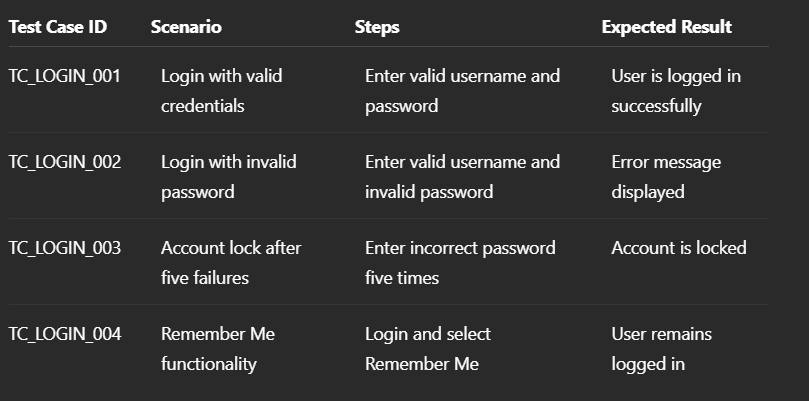
Step 4: Review Copilot’s Output
Copilot may generate something like this:
Step 5: Ask Copilot to Improve Coverage
A second prompt often produces better results
Generate additional edge cases and negative scenarios that may have been missed.Step 6: Format for Azure DevOps Test Cases
You can ask Copilot to generate a format suitable for importing into Azure DevOps.
Generate the test cases in a table with: Title, Steps, Expected Result, Priority, Area Path, Iteration Path.
Advanced Prompt for Better Results
Act as a Senior QA Lead with 10 years of experience. Analyze the following User Story and Acceptance Criteria. Generate:
1. Test Scenarios
2. Manual Test Cases
3. Negative Scenarios
4. Boundary Test Cases
5. API Validation Scenarios
6. Security Test Cases
7. Regression Test Cases Return the result in a markdown table suitable for importing into Azure DevOps Test Plans.
V. Best Practices
1. Write Better User Stories
Copilot’s output quality depends heavily on the quality of requirements.
2. Include Acceptance Criteria
The more details provided, the more accurate the generated test cases.
3. Always Review Generated Test Cases
Copilot assists the tester but does not replace QA expertise.
4. Ask Follow-Up Questions
Use iterative prompts to improve coverage and identify missing scenarios.
5. Keep a Reusable Prompt Library
Maintain standardized prompts for different types of applications:
- Web applications
- Mobile applications
- APIs
- Insurance systems
- E-commerce systems