


PART 2: Spotlights on Kiro and Practical Implementation
Deep Dive: Model Context Protocol (MCP) & The Kiro Framework
To see this architecture in action, we must look at how modern frameworks implement these theoretical layers.
Demystifying the Model Context Protocol (MCP)
Developed as an open-source standard, MCP functions much like a development driver (similar to how USB-C standardizes hardware connections). It utilizes a simple Client-Server model:
- The Client: The AI application or agent framework.
- The Server: A lightweight application that exposes specific capabilities (e.g., a Filesystem MCP Server, a GitHub MCP Server, or a Postgres Database MCP Server).
Because the protocol is standardized, an agent can swap from using a local text file to querying an enterprise database seamlessly, using the exact same communication syntax.
The Kiro Architecture
Kiro represents a practical implementation of an advanced Agentic Workflow. Rather than operating as a passive text translator, Kiro behaves like an active digital project manager. It continuously runs a cognitive loop: Plan -> Act -> Reflect.
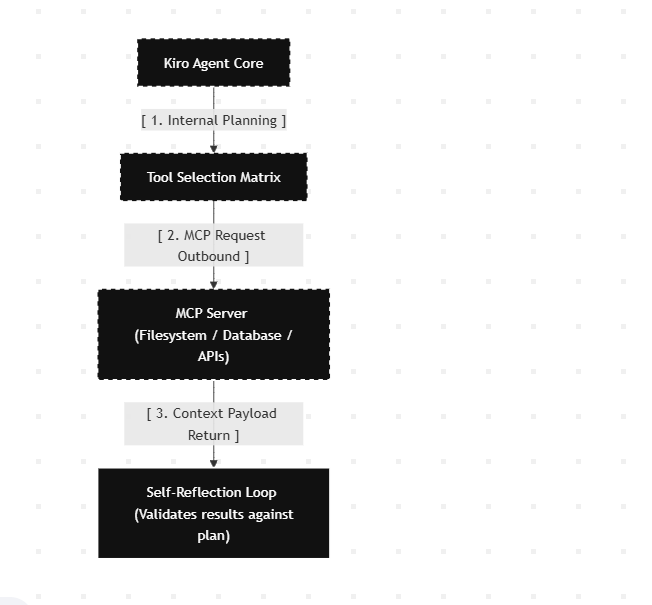
When Kiro receives a complex command, it consults its internal Tool Selection Matrix. If it needs to edit a file, it talks to an MCP server, receives the file state, checks its own work for bugs (Reflection), and adapts its next steps autonomously until the objective is reached.
Practical Case Study: Automating Chat Log Summarization
Let us look at a highly practical enterprise use case: Summarizing a massive, 50-page customer support chat log to extract recurring technical bugs.
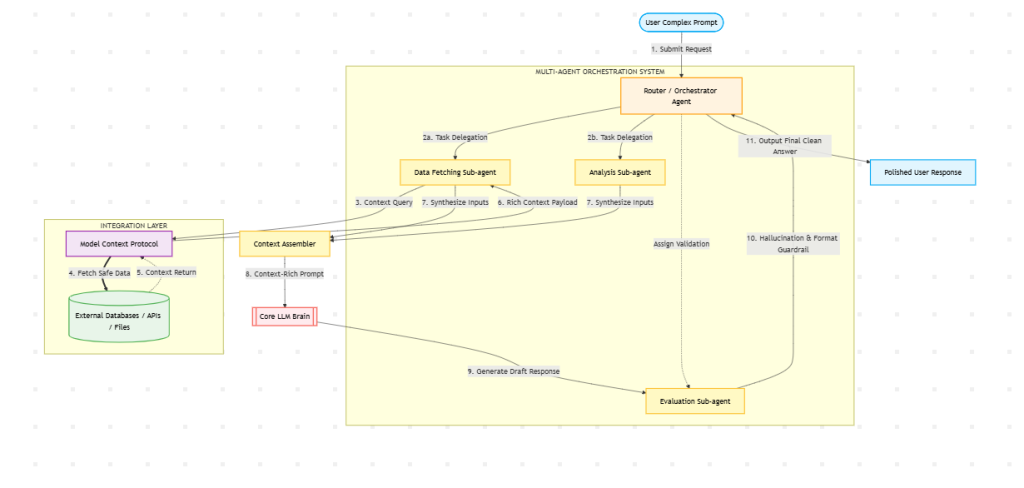
Here is exactly how our orchestrated system solves this, step-by-step:
- Step 1: The Input
The user inputs the prompt into the Kiro platform:
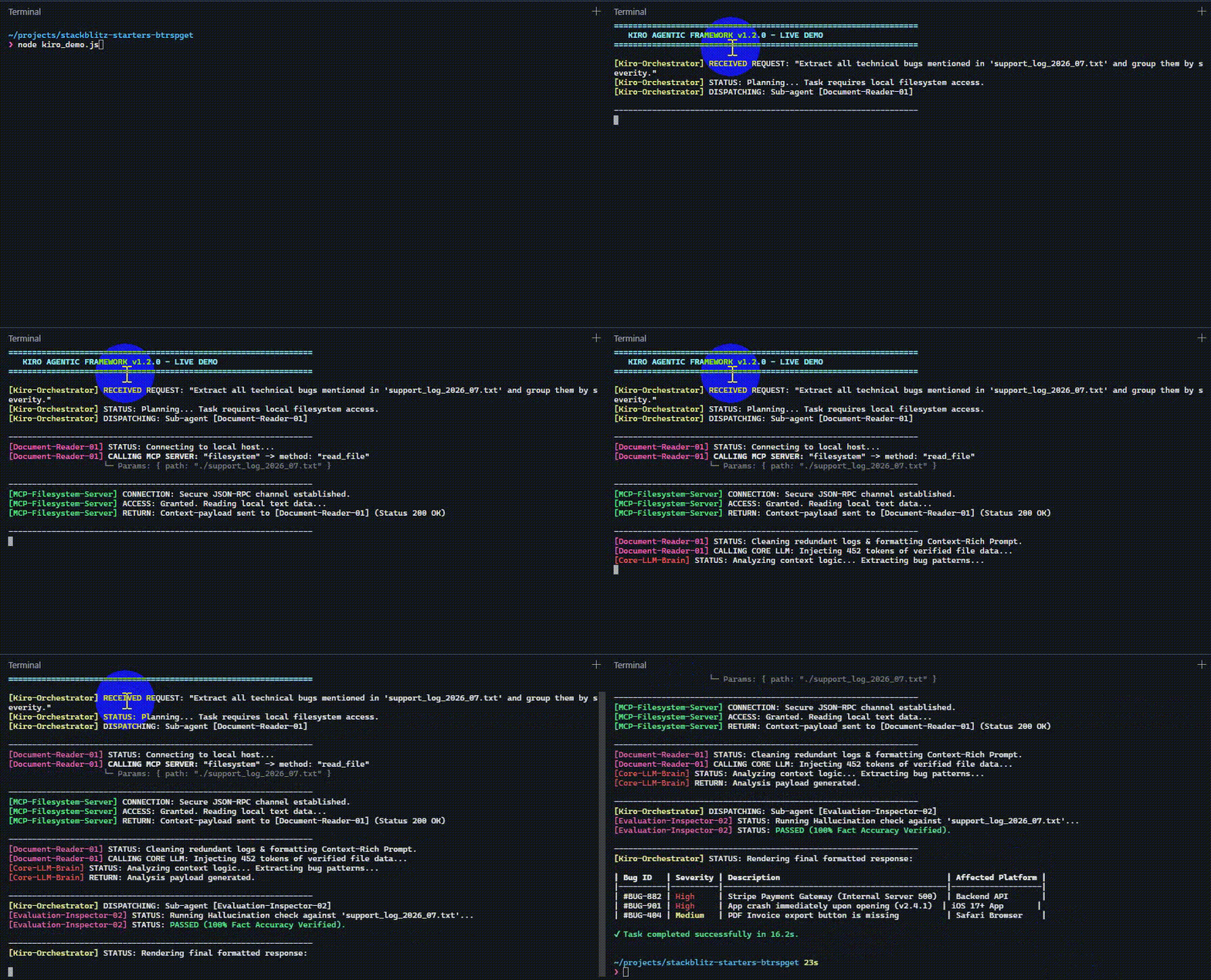
“Extract all technical bugs mentioned in
support_log_2026_07.txtand group them by severity.”
- Step 2: Agent Parsing and Delegation
The Kiro Orchestrator identifies two distinct needs: reading a local file structure, and classifying data. It spins up a Document Parsing Sub-agent.
- Step 3: MCP File Retrieval
The Sub-agent cannot natively read the computer’s hard drive due to security sandboxing. It sends an standardized JSON-RPC request to the Local Filesystem MCP Server:
JSON

{
  "method": "resources/read",
  "params": {
    "uri": "file:///logs/support_log_2026_07.txt"
  }
}
The MCP Server verifies file permissions, reads the log, and returns the raw text data safely to the Sub-agent.
- Step 4: Context Optimization & LLM Reasoning
Because the file is 50 pages long, passing the raw data blindly could degrade performance. The Sub-agent cleans the text, removes irrelevant metadata (like timestamps and greetings), and packages the core chat transcripts into a optimized context window.
This structured packet is passed to the Core LLM with explicit reasoning instructions:
Plaintext

[System Context provided by MCP File Server]
[Cleaned Transcripts of Conversations]

Task: Analyze the text above. Isolate explicit software errors, categorize them into High/Medium/Low priority based on user disruption, and format as a Markdown table.- Step 5: Verification and Output
The Core LLM processes the data and outputs the table. Kiro’s Evaluation Sub-agent performs a rapid cross-reference pass to ensure that every bug listed in the final draft corresponds directly to a line item in the source file (preventing hallucinated bugs).
The finalized, high-accuracy summary table is cleanly rendered on the user’s monitor.
Short demo
Conclusion: The Modular Future of AI
The transition from monolithic prompts to structured, agent-driven architectures powered by MCP represents a major paradigm shift in AI engineering. By separating reasoning (LLM) from context retrieval (MCP) and task execution (Agents), we build systems that are significantly more reliable, secure, and deterministic.
As open protocols like MCP continue to gain industry adoption, AI will shift entirely away from closed, passive chat boxes and transform into proactive software colleagues capable of navigating real-world infrastructure safely and efficiently.
Reference:
https://modelcontextprotocol.io/docs/getting-started/intro